
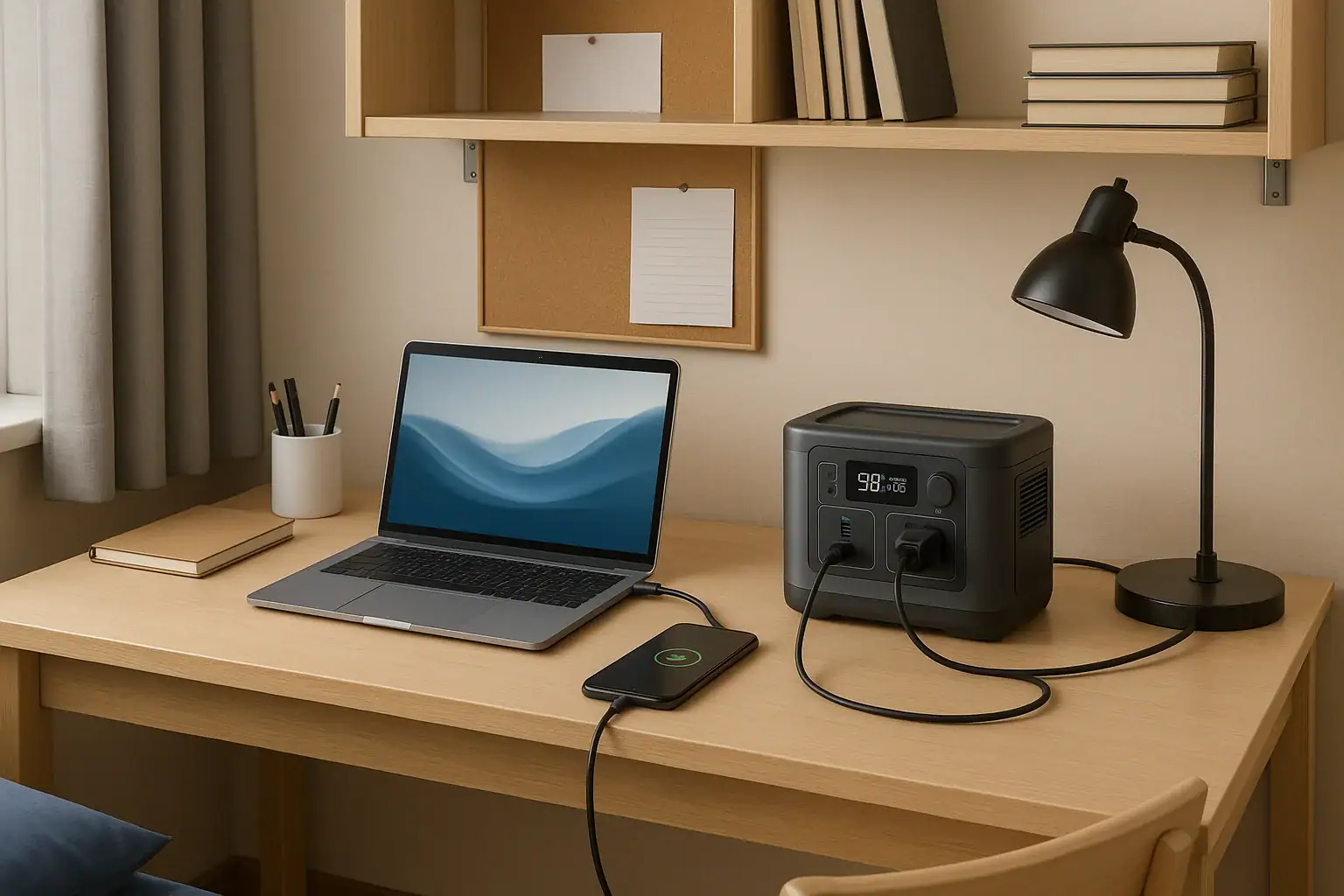
Yes, you can usually use a portable power station in a dorm room if your housing rules allow it and you use it within its rated limits. The main things to check are the residence hall policy, the unit’s watt-hours, AC output, surge watts, input limit, USB-C PD profile, and expected runtime for your devices.
A portable power station is not the same as a gas generator, and it should never be used with fuel, extension-cord chains, or improvised wiring. In a dorm, it is best treated as a rechargeable battery for laptops, phones, lights, small fans, and study gear during outages or when outlets are inconvenient. The right answer depends less on maximum power and more on safe charging, cable management, noise-free operation, and whether your school allows lithium battery equipment in student housing.
What using one in a dorm room means and why it matters
Using a portable power station in a dorm room means storing and operating a self-contained rechargeable battery pack with outlets or ports for personal electronics. Most models include a lithium battery, a battery management system, USB ports, DC output, and sometimes a built-in inverter that creates household-style AC power.
It matters because dorm rooms are shared, compact spaces with rules that are often stricter than a private home. A device that is reasonable for a camping trip may still be limited by campus housing policies, fire safety expectations, and roommate comfort. The question is not only whether the power station can run your device. It is also whether it can be charged safely, stored with airflow, kept away from bedding, and used without overloading cords or blocking exits.
For many students, the practical use case is simple: keep a laptop, phone, tablet, desk lamp, router, small fan, or medical accessory powered for a period of time. If the power station is compact, has appropriate safety certifications, charges from a normal wall outlet without getting unusually hot, and is not used for banned appliances, it is more likely to fit dorm life.
How a portable power station works in a dorm setting
A portable power station stores energy in watt-hours. A 300 watt-hour unit can theoretically supply 300 watts for one hour, 100 watts for three hours, or 30 watts for ten hours before conversion losses. Real runtime is lower because inverters, USB electronics, heat, and battery protection systems consume some energy.
The output rating tells you what it can power at one time. A small unit may provide 200 to 600 watts of AC output, while larger units can provide more. Dorm use rarely requires high wattage unless you are trying to run heat-producing appliances, which are often prohibited. Laptops, phones, tablets, LED lights, and small fans are usually low to moderate loads.
Charging input also matters. A power station with a high input limit may recharge faster, but it can still draw significant power from the wall. In a dorm, a moderate wall-charging rate is often more practical than the fastest possible rate because it reduces heat and avoids tying up an outlet for a high-demand charge cycle. USB-C PD output is especially useful for modern laptops and tablets because it can avoid the extra conversion loss of running an AC charger through the inverter.
| Device type | Typical power draw | What it means for dorm use |
|---|---|---|
| Phone | 5 to 20 watts while charging | Easy load; many recharges from even a compact unit |
| Tablet | 10 to 35 watts | Usually better on USB-C than AC |
| Laptop | 30 to 100 watts | Check USB-C PD or charger wattage for compatibility |
| LED desk lamp | 5 to 15 watts | Good low-power use during outages |
| Small fan | 15 to 60 watts | Runtime depends heavily on speed setting |
| Mini fridge | 60 to 150 watts running, higher surge | Policy-sensitive and surge-dependent; not always appropriate |
Real-world dorm examples
A common dorm scenario is a short power outage during a storm. A student may want to keep a phone charged, finish work on a laptop, and run a low-watt LED lamp. In this case, a modest power station can be useful because those devices have predictable, relatively low power needs. If the laptop can charge directly from USB-C PD, runtime improves because the power station does not need to turn battery power into AC and then back into DC through the laptop charger.
Another realistic example is a room with limited outlet access. Some older dorms have awkward outlet placement, and students may be tempted to use long chains of power strips. A power station can reduce outlet crowding for occasional charging, but it should not become a permanent workaround for unsafe cord management. It should sit on a hard, stable surface with clear airflow, not under blankets, pillows, laundry, or a pile of textbooks.
A third example is supporting permitted health or accessibility equipment. In that case, the decision should be made with housing staff and, when appropriate, campus accessibility services. Runtime, recharge time, alarms, and backup planning matter more than general convenience. Students should not rely on an untested battery as the only source of power for essential equipment.
Less suitable examples include space heaters, hot plates, kettles, irons, air fryers, and other heat-making appliances. These often draw high wattage, may exceed dorm policies, and can drain a power station quickly. Even if a power station can technically start one, that does not make it a safe or allowed dorm use.
Common mistakes and troubleshooting cues
The first mistake is assuming that capacity and output are the same thing. Watt-hours describe stored energy. Watts describe delivery rate. A power station with plenty of capacity can still shut off if a device asks for more watts than the inverter can supply, especially during startup surge. If a mini fridge, printer, or motorized device clicks on and the unit powers down, surge watts vs running watts may be the issue.
The second mistake is ignoring the input limit while charging. If the power station gets very warm, charges unusually slowly, trips a room outlet, or causes a power strip to feel hot, stop using that setup and simplify it. Plug the unit directly into a wall outlet when possible, avoid daisy-chained strips, and follow the manufacturer’s charging instructions. If a building outlet frequently trips, report it through the appropriate campus maintenance process instead of working around it.
The third mistake is using only AC outlets when USB-C or DC would be more efficient. If your laptop supports a matching USB-C PD profile, direct USB-C charging can extend runtime and reduce heat. If the laptop starts and stops charging, the port may not support the required voltage or wattage. For example, a laptop that expects 20 volts at 3 amps may not charge properly from a lower-power port.
Other troubleshooting cues include beeping, overload messages, sudden shutoff, an unusual smell, swelling, damaged ports, loose plugs, or excessive heat. Those are not normal dorm-room inconveniences. Stop use, disconnect loads when safe, and follow the product safety guidance. Do not open the unit, bypass protections, modify battery packs, or attempt internal repairs.
Safety basics for dorm rooms
Start with the housing policy. Some colleges treat portable power stations as personal electronics, while others restrict large lithium batteries, high-capacity battery packs, or unapproved backup power devices. If the policy is unclear, ask residence life or facilities staff before moving one in. Written clarification is better than assuming it is allowed.
Keep the power station on a hard, flat, ventilated surface. Avoid beds, rugs, closets, windowsills with direct sun, and areas where liquids are common. Dorm rooms often combine sleeping, eating, studying, and storage in one small area, so placement matters. The unit should not block a walking path, doorway, heater, air vent, smoke alarm, or sprinkler head.
Use the ports as intended. Do not plug the power station into building wiring, do not backfeed any outlet, and do not use adapters to defeat grounding or protections. If there is ever a building-level backup power issue, that is a job for qualified facilities personnel or a licensed electrician, not a dorm-room workaround.
Charging should be supervised in a practical sense. You do not need to stare at the unit, but avoid burying it under belongings and avoid charging it in a hidden spot overnight if the manual discourages unattended charging. Stop using any charger or cable that is frayed, loose, crushed, or unusually hot. For shared rooms, discuss placement and noise from cooling fans with your roommate so the setup does not create a conflict.
Maintenance and storage during the semester
A portable power station lasts longer when it is stored with moderate charge, moderate temperature, and occasional attention. For everyday dorm use, avoid leaving it at zero percent for long periods. Also avoid keeping it in a hot car, on a radiator, in direct sunlight, or pressed against bedding where heat cannot escape.
If you use it only for emergencies, check the charge level every month or two and top it up as recommended by the manual. Lithium batteries slowly self-discharge, and display percentages are estimates. A unit that looked half full at move-in may not be ready during finals week if it has been ignored all semester.
Keep ports clean and dry, but do not insert tools into them or open the housing. Wipe the exterior with a dry cloth if needed. Store the charging cable with the unit so it is not lost, bent sharply, or swapped with an incompatible adapter. Before school breaks, review residence hall instructions because some campuses require electronics to be unplugged or removed during extended closures.
| Habit | Better dorm practice | Why it helps |
|---|---|---|
| Storage charge | Keep roughly mid to high charge for standby use | Reduces the chance of finding it empty during an outage |
| Placement | Use a desk, shelf, or hard floor area with airflow | Helps manage heat and cable visibility |
| Charging routine | Recharge when you can monitor normal operation | Makes heat, odors, or cable problems easier to notice |
| Cable care | Avoid crushed cords and loose plugs | Reduces resistance, heat, and intermittent charging |
| Break storage | Follow campus rules for unplugging or removal | Prevents policy issues during room inspections or closures |
Practical takeaways for choosing and using one
Related guides: Portable Power Station vs Power Bank: Where the Line Really Is • Portable Power Station vs UPS: What Changes for Computers and Networking? • Portable Power Stations for Apartments
A portable power station can be a practical dorm accessory when it is allowed, appropriately sized, and used for low-to-moderate power electronics. The best dorm choice is usually not the largest unit possible. It is the unit that fits the room, charges safely from a normal outlet, has the right ports for your devices, and provides enough runtime without encouraging prohibited appliance use.
Before buying or bringing one, check the residence hall policy, your actual device wattages, and where the unit would sit. If the main goal is laptop and phone backup, prioritize efficient USB-C output, clear runtime estimates, manageable size, and safety features. If the goal is powering large appliances, review the policy carefully and reconsider whether that use belongs in a dorm room at all.
Specs to look for
- Battery capacity: Look for roughly 200 to 700 watt-hours for typical dorm electronics; this balances useful runtime with size and storage practicality.
- Continuous AC output: Match the inverter rating to the devices you actually use, such as 300 to 600 watts for laptop, lamp, and small fan combinations; this helps prevent overload shutoffs.
- Surge watts: Look for a surge rating above the startup demand of any motorized device you plan to use; motors and compressors can briefly draw several times their running watts.
- USB-C PD output: Look for 60 to 100 watts, or higher if your laptop requires it; direct USB-C charging is often more efficient than using the AC inverter.
- Recharge input: A wall input around 100 to 500 watts is common for compact units; faster charging is convenient, but moderate input can be easier to manage in a shared dorm outlet.
- Battery chemistry and cycle rating: Look for a clear cycle-life estimate and chemistry information; longer cycle ratings matter if you expect weekly or daily use.
- Safety protections: Look for overcharge, overcurrent, overload, short-circuit, and temperature protection; these features are important in a small shared room.
- Noise and fan behavior: Look for quiet operation at low loads; fan noise can matter when roommates are sleeping or studying.
- Size and weight: Look for a unit you can lift, store, and place on a stable surface; oversized units are harder to manage safely in tight rooms.
- Display information: Look for remaining percentage, input watts, output watts, and estimated runtime; clear feedback makes troubleshooting much easier.
The simplest rule is to use a dorm power station as a battery, not as a substitute electrical system. Keep the loads modest, keep the setup visible and ventilated, follow campus rules, and stop using it if anything seems hot, damaged, unstable, or outside the product’s normal behavior.
Frequently asked questions
What features should I look for in a portable power station for a dorm room?
Look for enough watt-hours to cover your actual devices, a continuous AC output that matches your load, and USB-C PD if you plan to charge a laptop or tablet directly. Safety protections, clear display information, and a manageable size also matter in a shared room. For most students, efficiency and portability are more useful than maximum output.
Can I charge a portable power station overnight in a dorm room?
Often yes, but only if your housing policy allows it and the manufacturer says unattended charging is acceptable. Charge it on a hard, ventilated surface and avoid covering it with bedding or storing it in a hidden spot. If the unit or charger becomes unusually hot, stop charging and check the setup.
What is the most common mistake students make with a portable power station in a dorm room?
A common mistake is confusing battery capacity with power output. A unit may have plenty of stored energy but still shut off if a device needs more watts than the inverter can supply, especially at startup. Another frequent issue is using inefficient AC charging when USB-C or DC would work better.
Is a portable power station safe to use in a dorm room?
It can be safe when it is allowed by the school, used within its ratings, and kept away from heat, liquids, bedding, and blocked exits. Use only approved charging methods and do not modify the unit or its cables. If you are unsure about campus rules, ask residence life before bringing it in.
Can a portable power station run a mini fridge in a dorm room?
Sometimes, but it depends on the fridge’s running watts, startup surge, and the power station’s inverter rating. Many mini fridges are not a good fit for dorm use because they can trip the unit or drain it quickly. Also check housing rules, since some dorms restrict certain appliances or backup power setups.
How long will a portable power station last for laptop and phone charging in a dorm room?
That depends on the battery capacity, conversion losses, and how much power your devices draw. A laptop and phone can often run for several charge cycles from a modest unit, especially if the laptop charges by USB-C instead of AC. The best estimate comes from comparing the station’s watt-hours with your devices’ actual wattage.
Related guides
Browse this topic →
- Beginner-friendly sizing, runtime & specs
- Solar & charging (MPPT, fast charging, cables)
- Batteries (LiFePO4, cycles, care & storage)
- Safety, cold-weather performance, real-world tips
More in FAQ
See all →- Why Does My Portable Power Station Show 0W Even When Something Is Plugged In?
- What Happens When a Portable Power Station Is Overloaded?
- Can a Portable Power Station Run Multiple Appliances at Once?
- Portable Power Station Error Codes: What Common Warnings Mean
- Do Portable Power Stations Lose Charge Over Time?
Keep reading
About this site
Portable Energy Lab publishes practical, independent guides about portable power—clear sizing, safe use, and real-world expectations.
Affiliate disclosure
Some links on this site may be affiliate links. If you buy through these links, we may earn a small commission at no extra cost to you. This helps support our content. Read our affiliate disclosure.