
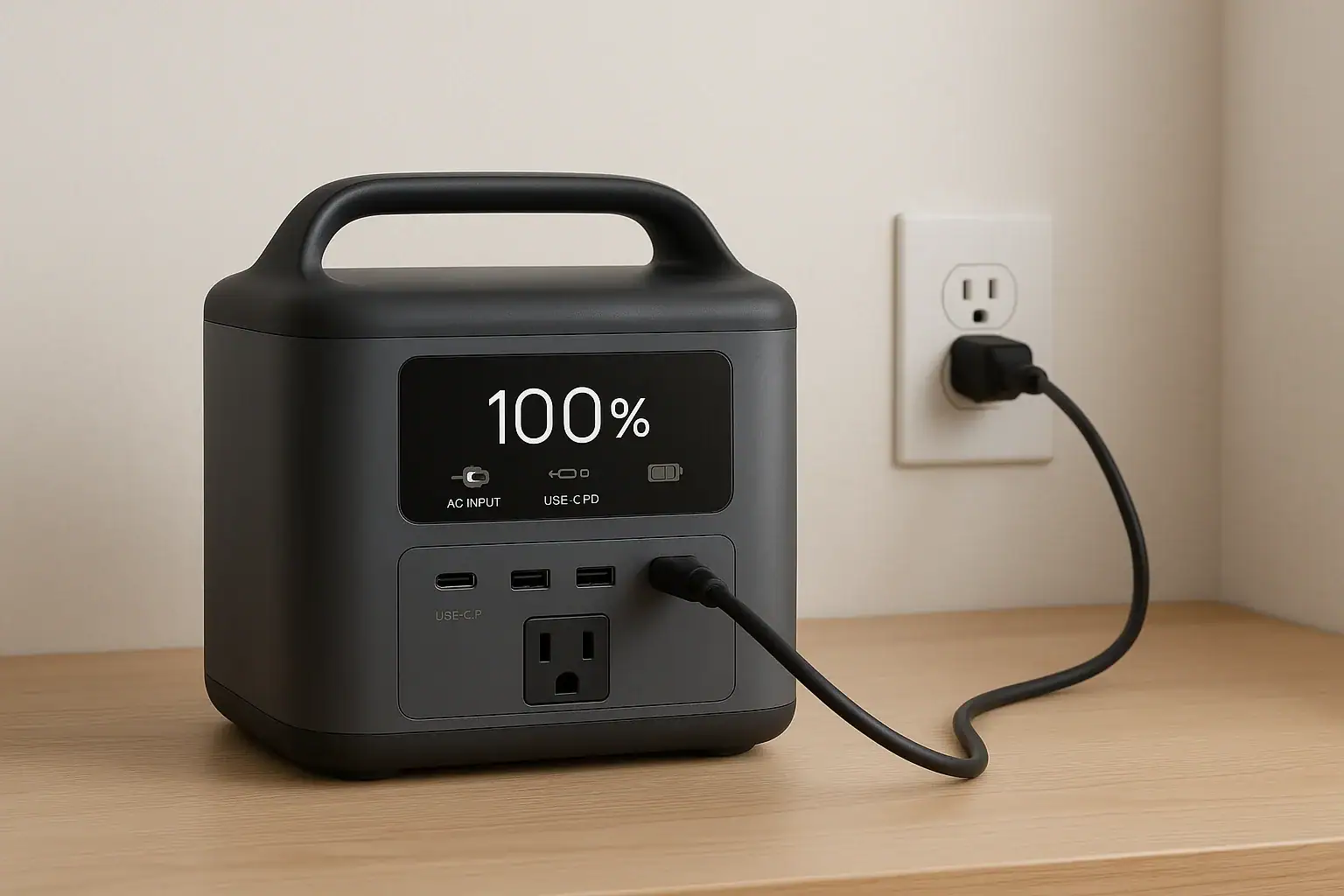
You can usually leave a portable power station plugged in, but how you do it and for how long affects both safety and battery lifespan. Modern units have built-in charge controllers, BMS protection, and idle power draw that determine what “always plugged in” really means for cycle life, runtime, and long-term capacity.
People search this because of concerns about trickle charging, standby power, float voltage, fire risk, and whether keeping a power station at 100% will shorten battery life. The right answer depends on battery chemistry, charging profile, and how you actually use the device during outages, camping, or as a UPS-style backup.
This guide explains when it is safe to leave a portable power station on the charger, how the internal electronics manage input and output, what habits wear the battery faster, and the best maintenance practices to get the longest usable life from your portable power station.
What “Leaving a Portable Power Station Plugged In” Really Means
“Leaving a portable power station plugged in” can describe several different situations, and the risks and battery impact are not the same for each one. Understanding the context is the first step toward deciding what is safe and what is good for long-term performance.
In practice, people usually mean one or more of the following:
- Plugged into the wall but turned off – AC input connected, internal charger available, but DC/AC outputs switched off.
- Plugged into the wall and turned on – AC input connected, screen and inverter may be active, ready to power devices.
- Plugged into the wall and powering loads – Power station is acting like a small UPS, charging its battery while simultaneously running laptops, routers, or appliances.
- Plugged in at 100% for storage – Used only occasionally, but left connected to maintain a full charge “just in case.”
Each scenario hits the battery and electronics differently. The key questions are:
- Does the charger keep the battery at 100% state of charge (SoC) constantly?
- Is the inverter or DC-DC circuitry idling and generating heat?
- Is the unit in a well-ventilated, temperature-controlled location?
These factors matter because lithium batteries age faster at high SoC and high temperature. So while many manuals say continuous connection is acceptable, “safe” is not the same as “best for maximum battery lifespan.”
How Portable Power Stations Manage Charging and Standby
battery management system (BMS) and a charge controller that decide how current flows in and out. Knowing the basics of how these systems work helps explain why some units handle continuous plugging better than others.
Battery chemistry and charge profile
Most modern power stations use one of two chemistries:
- Lithium-ion (NMC or similar) – Higher energy density, lighter, but more sensitive to high voltage and heat. They typically prefer not to sit at 100% SoC for long storage.
- Lithium iron phosphate (LiFePO4) – Heavier for the same watt-hours, but more cycle-stable and generally more tolerant of frequent full charges and deeper discharges.
The charge controller typically follows a constant-current/constant-voltage (CC/CV) profile. Once the battery approaches full, current tapers down and the BMS decides whether to:
- Stop charging entirely and let the battery rest at near-full, or
- Maintain a “top-off” state, re-adding small amounts of energy as self-discharge or standby draw occurs.
Idle draw, inverter behavior, and pass-through
When left plugged in, a power station may still consume some power even with no external devices attached. This can come from:
- Idle inverter draw – The AC inverter uses power just to stay ready, especially if AC output is left on.
- DC standby draw – USB ports, 12 V sockets, and the display electronics can draw a small amount even when “off” or in eco mode.
- Cooling fans – Fans may cycle on occasionally if internal temperatures rise.
Some models offer pass-through functionality, where AC input both charges the battery and powers connected devices. In this mode, the unit may:
- Prioritize powering loads from the wall and only top up the battery as needed, or
- Route power through the battery more often, adding extra mini-cycles that count against cycle life.
Charge limits and user settings
More advanced units let you set:
- Maximum charge percentage (for example, stop at 80–90%) to reduce stress on the battery.
- Charge current or input limit to manage heat and circuit load.
- Eco or sleep modes that shut off outputs after a period of low load to cut idle draw.
These controls significantly affect whether always-on charging is merely acceptable or truly optimized for long-term use.
| Operating State | Typical Behavior | Impact When Left Plugged In |
|---|---|---|
| Plugged in, outputs off | Battery charges to target SoC, then charger idles | Low wear if room temperature and not stored at 100% for months |
| Plugged in, outputs on (no load) | Inverter and electronics idle, small standby draw | Minor extra cycling and heat, slightly faster aging |
| Plugged in, powering light loads | Acts like small UPS, occasional top-up cycles | Moderate cycling; fine for daily use with quality BMS |
| Plugged in, powering heavy loads | High internal temps, frequent fan use | More heat and cycles; long-term impact depends on cooling and design |
Real-World Ways People Leave Power Stations Plugged In
How you actually use a portable power station day to day matters more than any single rule. Here are common real-world scenarios and what they imply for leaving the unit on the charger.
Using a power station as an emergency backup
Many owners keep a power station charged and ready for grid outages. Typical patterns include:
- Always plugged in at 100% in a closet or garage, rarely discharged.
- Checked and topped off monthly, stored mostly unplugged at partial charge.
For pure emergency use, it is usually better for battery health to store the unit around 40–80% charge and top it up every few months rather than leave it at 100% indefinitely. However, if you live in an area with frequent outages, you may accept some battery wear in exchange for always-on readiness.
Using a power station as a mini UPS
Some people leave their router, modem, or small electronics connected 24/7 so the internet stays up during brief outages. In this case, the power station:
- Stays plugged into AC input continuously.
- Feeds a small but steady load (often 10–50 watts).
- Experiences many shallow charge/discharge cycles.
With a well-designed BMS and adequate cooling, this is generally safe. Over several years, the battery will gradually lose capacity, but many users consider that an acceptable tradeoff for uninterrupted power.
Continuous use for RVs, vans, and cabins
In mobile or off-grid setups, power stations are often:
- Left plugged into shore power when available.
- Charged via solar during the day and used at night.
- Occasionally charged from vehicle DC while driving.
Here, the unit may be connected to some form of input most of the time. The main considerations are:
- Temperature in confined spaces (RVs, vans) on hot days.
- Combined load from AC, DC, and USB outputs while charging.
- Whether the system regularly cycles or just sits at full.
Good airflow and avoiding chronic overloading are more important than whether the AC cord stays plugged in.
Desk or workshop power hub
Some users keep a power station on a desk or bench, plugged into the wall, serving as a hub for laptops, tools, or test gear. It may:
- Spend hours per day at moderate loads.
- Stay near full charge most of the time.
- See frequent plug-and-unplug of devices.
In this scenario, leaving it plugged in is common and usually fine, but it is wise to:
- Turn off unused outputs to reduce idle draw.
- Avoid stacking items on top that trap heat.
- Occasionally let the battery cycle through a partial discharge to keep the gauge calibrated.
Common Mistakes When Leaving a Power Station Plugged In
Most damage to portable power stations does not come from a single event, but from repeated habits that slowly stress the battery and electronics. Recognizing these mistakes early helps with troubleshooting and longevity.
Keeping the battery at 100% forever
Leaving a lithium battery at full voltage for months accelerates chemical aging, especially in warm environments. Common signs include:
- Noticeably shorter runtime at the same load.
- Battery percentage dropping quickly from 100% to 90% under light use.
- Needing to recharge more often for the same tasks.
While occasional full charges are normal and sometimes necessary, storing at slightly lower SoC and only topping up when needed is gentler on the cells.
Ignoring heat and poor ventilation
Placing a plugged-in power station in a tight cabinet, next to a heater, or in direct sunlight can raise internal temperatures. Over time, this can lead to:
- Fans running more often or louder.
- Thermal throttling (reduced charge or output power).
- Premature capacity loss or, in extreme cases, shutdowns and error codes.
If the casing feels consistently hot to the touch while just sitting plugged in, ventilation or ambient temperature should be improved.
Overloading circuits and daisy-chaining
Some users plug a loaded power strip into the power station, then plug the power station into another power strip or extension cord. This can cause:
- High current on household circuits not designed for continuous heavy loads.
- Warm or discolored plugs and outlets.
- Tripped breakers or nuisance shutoffs.
Even if the power station can technically handle the wattage, the household wiring and extension cords might not. If you see flickering lights, warm outlets, or frequent tripping, reduce the load and simplify the connections.
Ignoring warning messages and odd behavior
When left plugged in, watch for troubleshooting cues such as:
- Battery percentage stuck and not increasing.
- Unexpected shutdowns even with AC input connected.
- Repeated error codes related to temperature, overvoltage, or charger faults.
- Fans running at high speed with no obvious load.
These signs suggest something is wrong with the charger, BMS, or internal sensors. In that case, disconnect from power, let the unit cool, and consult the manual or a qualified technician before continued use.
Safety Basics for Leaving a Portable Power Station Plugged In
Modern portable power stations are designed with multiple safety layers, but they still store significant energy. Treat them with the same respect you would give other high-capacity electrical devices.
Built-in protections and what they do
Typical safety features include:
- Overcharge protection – Stops charging when the battery reaches its upper voltage limit.
- Overcurrent and short-circuit protection – Limits or cuts off output if a device draws too much or a fault occurs.
- Overtemperature and undertemperature protection – Reduces power or shuts down charging in extreme heat or cold.
- Cell balancing – Keeps individual battery cells at similar voltages to avoid stress and imbalance.
These systems make it generally safe to leave a power station connected to a proper outlet, but they are not a substitute for basic electrical safety.
Placement and environment
When leaving a unit plugged in for extended periods:
- Place it on a stable, non-flammable surface.
- Keep it away from flammable materials like curtains, bedding, or paper stacks.
- Allow several inches of clearance around vents and fans.
- Avoid damp locations, standing water, or unprotected outdoor exposure.
For garages, sheds, or RVs, consider both temperature extremes and the risk of dust buildup in vents.
Electrical safety and household circuits
To minimize risk:
- Use properly grounded outlets and avoid damaged extension cords.
- Do not exceed the circuit’s typical continuous rating, especially if other appliances share the same breaker.
- Do not attempt to backfeed a home’s electrical system through a wall outlet or improvised connection.
If you want to integrate a power station into a home backup setup beyond simple plug-in loads, consult a qualified electrician to design a safe solution.
When to unplug or power down
Unplugging is a good idea if you notice:
- Unusual smells, smoke, or visible damage.
- Rapid heating when idle and plugged in.
- Repeated tripping of breakers or GFCI outlets.
- Cracked housings, loose ports, or evidence of liquid ingress.
In such cases, disconnect from power, move the unit to a safe area, and seek professional assessment before further use.
Best Practices for Maintenance and Storage While Plugged In
Good maintenance habits extend the useful life of a portable power station, whether you leave it plugged in regularly or only occasionally.
Balancing readiness and battery health
If you need the unit ready for emergencies:
- Consider keeping it between roughly 60–90% charge instead of locked at 100% for months.
- Top up to full when severe weather or expected outages are forecast.
- After the event passes, allow it to rest back at a more moderate SoC.
This compromise maintains reasonable readiness while easing long-term stress on the cells.
Periodic cycling and calibration
Battery gauges can drift over time if the unit mostly sits at one charge level. Every few months:
- Use the power station down to a moderate level (for example, 20–40%).
- Then recharge it fully under normal conditions.
This helps the internal electronics keep a more accurate estimate of remaining runtime, especially after many partial cycles.
Temperature management
For long-term storage or continuous plug-in use:
- Aim for a cool, dry environment, roughly room temperature when possible.
- Avoid leaving the unit in a closed car, attic, or sunlit window where temperatures can spike.
- If the unit feels warm even when idle, improve airflow or move it to a cooler spot.
Temperature has a strong influence on calendar aging, independent of how often you cycle the battery.
Inspecting cables and ports
Since a plugged-in unit relies on its AC cord and connectors, periodically:
- Check for frayed insulation, bent prongs, or loose plug fit.
- Inspect input and output ports for dust, corrosion, or wobble.
- Replace damaged cords and avoid forcing tight or misaligned plugs.
Clean, undamaged connections reduce resistance, heat, and the chance of intermittent faults while charging.
| Usage Pattern | Suggested Charge Level for Storage | Maintenance Habit |
|---|---|---|
| Emergency-only | 40–80% most of the year | Top to 100% before storms; cycle every 3–6 months |
| UPS-style for small electronics | 70–100% with regular cycling | Check vents and cords monthly; keep in cool room |
| Frequent outdoor/camping use | 30–80% between trips | Inspect ports after each trip; avoid full discharge |
| Workshop/desk hub | 60–100% with daily use | Turn off unused outputs; ensure clear airflow |
Related guides: Can a Portable Power Station Replace a UPS? • How to Maintain a Portable Power Station • Indoor Use Safety: Ventilation, Heat, and Fire-Prevention Basics
Key Takeaways and Specs to Look For
Leaving a portable power station plugged in is generally safe when you follow the manufacturer’s instructions, provide good ventilation, and avoid overloading circuits. The main tradeoff is between maximum readiness and long-term battery health. Continuous full charge and high temperatures accelerate aging, while moderate charge levels, occasional cycling, and cool storage extend lifespan.
For most users, a practical approach is:
- Keep the unit plugged in when you need constant backup power or frequent use.
- Aim for moderate storage SoC when it will sit unused for weeks or months.
- Monitor for heat, odd noises, or error codes and address them early.
Specs to look for
- Battery chemistry (Li-ion vs LiFePO4) – Look for clear labeling of chemistry; LiFePO4 often offers more cycles and tolerates frequent charging better, which helps if you plan to leave it plugged in often.
- Cycle life rating – Values around 500–3,000+ cycles to 80% capacity indicate how well the battery handles repeated charge/discharge while plugged in and in use.
- Charge management features – Settings like adjustable max charge (for example, 80–90%), eco modes, and input limit controls help reduce stress and heat during long-term plug-in use.
- Continuous AC output vs idle draw – Check rated continuous watts and any published standby or no-load consumption; lower idle draw means less unnecessary cycling and heat when left on.
- Thermal management and ventilation – Multiple vents, intelligent fan control, and clear temperature operating ranges support safer, cooler operation while connected to power for long periods.
- Pass-through or UPS-like capability – If you plan to power devices while charging, look for explicit support for simultaneous input/output and any transfer time specs that affect sensitive electronics.
- AC input range and charge power – Input wattage in the 100–800 W range (depending on capacity) balances reasonable charge times with manageable heat and household circuit load.
- Protection and safety certifications – Overcharge, overcurrent, short-circuit, and temperature protections, along with recognized safety markings, add confidence for continuous plug-in scenarios.
- Display and monitoring – A clear screen or indicators for input watts, output watts, battery percentage, and error codes make it easier to spot problems when the unit stays plugged in.
- Recommended storage guidelines – Well-documented storage SoC and temperature recommendations indicate the manufacturer has considered long-term maintenance and plug-in behavior.
By matching these specs to how you intend to use and store your portable power station, you can safely decide when to leave it plugged in and how to maximize its useful life.
Frequently asked questions
Which specs and features should I prioritize if I plan to leave a portable power station plugged in?
Prioritize battery chemistry (LiFePO4 typically tolerates prolonged full charging better than common Li-ion), a high cycle-life rating, adjustable max-charge or eco modes, good thermal management, low idle draw, and support for simultaneous input/output if you will run devices while charging. Verified safety certifications and a clear display for monitoring input/output and battery percent are also important to spot issues quickly.
Will keeping a power station at 100% constantly damage the battery?
Storing a lithium battery at 100% for long periods accelerates chemical aging, especially for common Li-ion cells and in warm environments. Reducing long-term storage to a moderate state of charge (for example 40–80%) and using max-charge limits when available helps preserve capacity while still maintaining readiness.
Is it safe to leave a portable power station plugged in overnight or for days?
Generally yes with modern units that include overcharge, overtemperature, and overcurrent protections, provided the unit is placed on a stable, well-ventilated surface and plugged into a proper grounded outlet. Regularly check for excessive heat, unusual smells, or error codes and unplug if any warning signs appear.
Can I use a portable power station as a UPS for a router or modem 24/7?
Many users run small networking gear continuously from a power station; this typically causes shallow, frequent cycles and gradual capacity loss over years but is generally safe if the unit supports pass-through or simultaneous input/output. Confirm the model’s specs for continuous output, cooling, and charge management to avoid excess wear or overheating.
How often should I cycle or top up a power station that’s mostly plugged in?
For balance between readiness and longevity, top up before expected outages and perform a moderate discharge/recharge cycle every 3–6 months to help calibrate the battery gauge and exercise the cells. If storage temperatures are high or the battery is standard Li-ion, consider slightly more frequent checks and avoid leaving it at full charge constantly.
Recommended next:
- How to Clean and Inspect Ports, Cables, and Fans (Without Causing Damage)
- Long-Term Storage Best Practices: Charge Level, Temperature, and Schedule
- Should You Leave a Power Station Plugged In All the Time?
- How to Test Real Capacity at Home: A Simple Step-by-Step Method
- Firmware Updates and App Control: What to Expect (and What to Avoid)
- When to Replace Cables and Adapters: Signs of Wear and Overheating
- More in Maintenance →
Related guides
Browse this topic →
- Beginner-friendly sizing, runtime & specs
- Solar & charging (MPPT, fast charging, cables)
- Batteries (LiFePO4, cycles, care & storage)
- Safety, cold-weather performance, real-world tips
More in Maintenance
See all →Keep reading

About this site
Portable Energy Lab publishes practical, independent guides about portable power—clear sizing, safe use, and real-world expectations.
Affiliate disclosure
Some links on this site may be affiliate links. If you buy through these links, we may earn a small commission at no extra cost to you. This helps support our content. Learn more.