
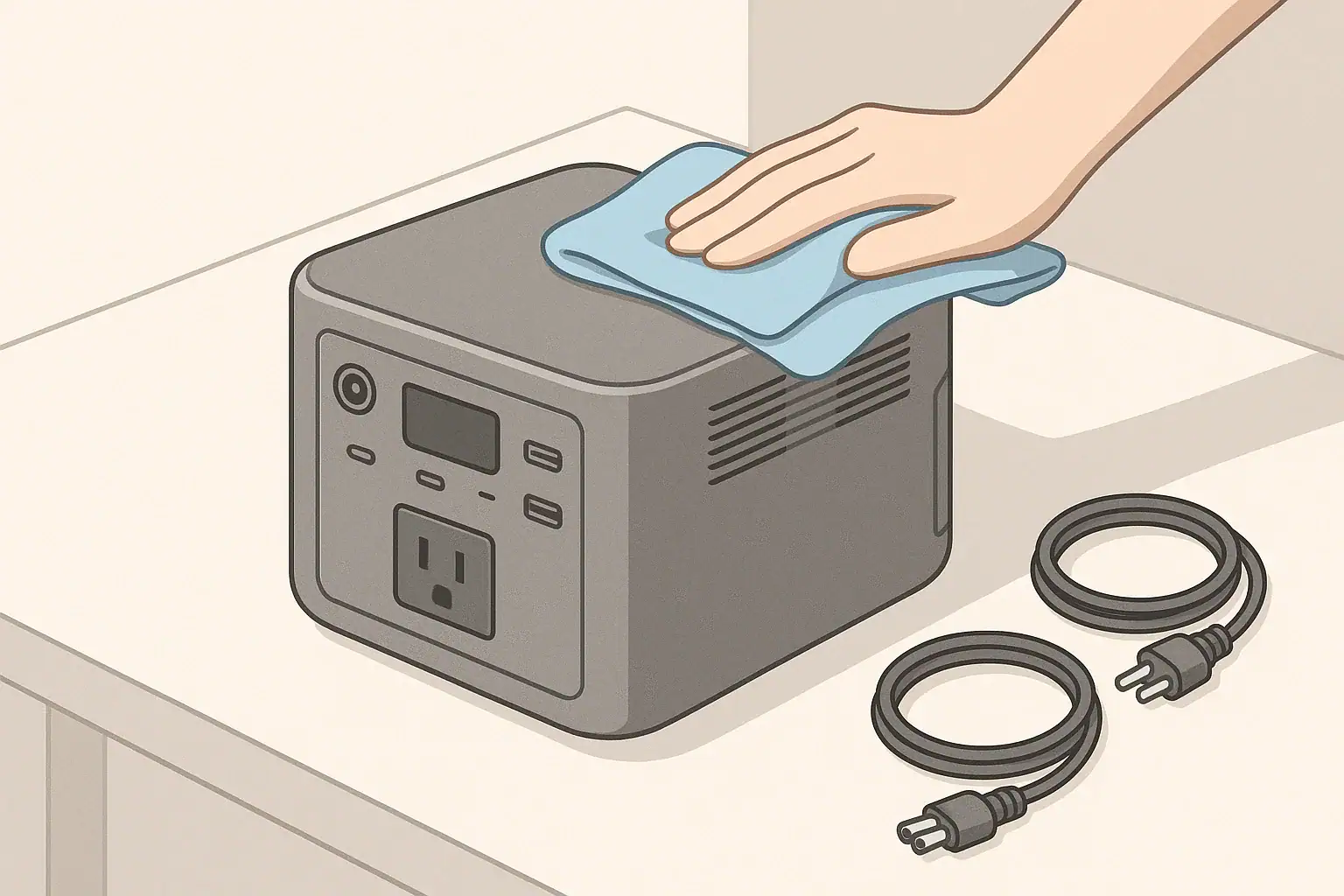
Cleaning and inspecting ports, cables, and fans on a portable power station means checking the connection points, cords, and cooling vents for dust, damage, or loose parts, and gently removing debris without opening the unit or altering its design. It is routine care that keeps electricity flowing efficiently and safely from your power station to your devices.
Ports include AC outlets, DC barrel jacks, car-style sockets, and USB outputs. Cables include the cords you use to charge the power station, as well as the cords that power your appliances. Fans and ventilation grills help move heat away from the internal battery and inverter, reducing stress on electronic components during use and charging.
Taking care of these parts reduces the risk of overheating, intermittent power, or unexpected shutdowns. Dust buildup and bent or worn connectors can increase electrical resistance, which wastes energy and can create hot spots. Regular inspection helps you catch problems early, before you plug in a critical device during a blackout or remote trip and discover something no longer works properly.
What the topic means (plain-English definition + why it matters)
Thoughtful cleaning and inspection is also about avoiding harm. Using the wrong tools, liquids, or pressure can crack plastic housings, deform metal contacts, or push debris deeper into the device. Learning gentle, low-risk techniques helps extend the life of your power station while preserving its built-in safety protections.
Key concepts & sizing logic (watts vs Wh, surge vs running, efficiency losses)
Cleaning and inspection may seem separate from power sizing, but they are closely linked. A dusty fan, clogged vents, or scorched cable ends all affect how efficiently your portable power station can deliver its rated watts and watt-hours. Understanding the basics of watts, watt-hours, surge ratings, and efficiency helps explain why ports, cables, and fans need attention.
Watts describe power at a given moment, such as a 100-watt laptop or a 1000-watt microwave. Watt-hours describe stored energy, such as a 500 watt-hour battery that could theoretically supply 100 watts for about five hours. When ports and cables are in poor condition, more of that stored energy is lost as heat, meaning you see shorter runtimes than the math suggests.
Most portable power stations also list surge and running watt ratings for their AC output. The running rating is what the inverter can support continuously, while the surge rating is a short-term allowance for starting loads like compressors or motors. Dirty fans and vents make it harder for the inverter to dissipate heat during those higher demand moments, so internal protections may shut down the output earlier than expected to prevent damage.
Every conversion step has efficiency losses, from DC battery power to AC output and through each cable. Loose plugs, corroded contacts, and kinked cords increase resistance and waste energy. Keeping ports, fans, and cables in good condition supports real-world performance that stays closer to the nameplate values when you plan runtimes and appliance usage.
| What to check | Why it matters | Typical cue to look for |
|---|---|---|
| AC outlets | Ensures solid contact for higher watt loads and reduces heat at the plug. | Loose fit, discoloration around slots, or melted plastic. |
| DC and USB ports | Maintains stable power for electronics and prevents intermittent charging. | Wobble, bent center pins, lint or dust in the opening. |
| Charging cord ends | Reduces voltage drop and keeps charging time close to expected. | Fraying insulation, exposed wire, or cracked strain relief. |
| Extension cords | Helps prevent overheating when running higher wattage appliances. | Warm to the touch under load, cuts or flattened sections. |
| Cooling fans | Supports heat dissipation during peak output and charging. | Louder than usual, grinding sound, or no fan when under load. |
| Ventilation grills | Maintains airflow and keeps internal components from running hot. | Visible dust matting, pet hair, or blocked openings. |
| Power station case | Reveals impact damage that might affect internal connections. | Cracks, warping, or evidence of liquid exposure. |
Real-world examples (general illustrative numbers; no brand specs)
Consider a small portable power station with a battery of about 300 watt-hours and an AC inverter rated for around 300 watts continuous, 600 watts surge. If its fan vents are clogged with dust, the internal temperature can rise more quickly when you run it near the upper end of its rating, such as powering a 250-watt appliance. Internal protections may cycle the inverter off earlier, forcing shorter use even though the battery is not fully depleted.
Now picture a medium unit around 700 to 1000 watt-hours that you use for home backup. You may run a refrigerator, some lights, and a modem through a single power strip connected to one AC outlet on the power station. If the outlet or plug is worn or partially melted from previous overloads, resistance at that single connection goes up. The plug can feel hot to the touch after an hour, and voltage at the far end of the power strip may sag, causing sensitive electronics to behave unpredictably.
For remote work, you might rely on USB-C and DC ports to run a laptop and monitor for a full day. Even if your loads are modest, lint and dust packed into a USB port can block the connector from fully seating. The plug may make only partial contact, leading to slow or sporadic charging. Gently clearing debris with nonmetallic tools and a dry cloth often restores consistent performance without altering your power plan.
On camping or RV trips, long extension cords are common between the power station and appliances. A thin, undersized cord used outdoors may heat up noticeably when you run a 500-watt appliance from a larger portable unit. Inspecting that cord for soft spots, discoloration, or cut insulation before each trip, and choosing a thicker, shorter cord where possible, helps keep voltage drop and heating within reasonable limits for typical short-term use.
Common mistakes & troubleshooting cues (why things shut off, why charging slows, etc.)
Several common cleaning and inspection mistakes can cause the very problems you are trying to avoid. One is using liquid cleaners that drip into ports or vents. Even small amounts of moisture inside the case can lead to corrosion or short circuits. Another mistake is using metal picks or paper clips to scrape inside USB or DC ports, which can bend or break contact pins that are not repairable from the outside.
Over-aggressive vacuuming is another issue. Some users press a vacuum nozzle directly over a fan opening, which can spin the fan at speeds beyond its design or deform the blades. Instead, gentle suction from a short distance or using a soft brush attachment is generally safer. Blowing compressed air directly into a port at close range can also drive debris further inside, so it is best used cautiously and only if the manufacturer’s guidance allows it.
Operational cues often point to cleaning or inspection needs. If the power station shuts off under loads it previously handled, inspect for clogged vents, a fan that no longer spins up, or hot spots on plugs and cables. If charging is slower than usual from the same wall outlet, trace the charging cord for kinks, fraying, or damage at the plug. Also check for dust or foreign objects in the charging port that might be interrupting good contact.
Intermittent power at specific ports, such as a USB that stops and starts charging with minor movement, usually indicates wear or debris at that connector. A port that feels loose or allows the plug to wobble is a sign to stop using that outlet for higher current devices and to consider alternate ports or a replacement accessory. When repeated shutdowns or overheating occur without an obvious cause, discontinue use and contact the manufacturer or a qualified electronics service professional rather than attempting internal repairs.
Safety basics (placement, ventilation, cords, heat, GFCI basics at a high level)
Keeping ports, cables, and fans safe starts with where and how you place your portable power station. Set it on a stable, dry surface with clearance around all vents, typically several inches on each side, so air can move freely. Avoid placing the unit in tightly enclosed spaces, under blankets, or near heat sources that can raise internal temperature and trigger protective shutdowns.
Cord safety is equally important. Use extension cords of suitable gauge and length for your expected loads, and avoid running cords under rugs, through doorways that close on them, or in locations where they can be tripped over. Damaged insulation or crushed cords can expose conductors and create shock or fire hazards. Regularly check cord ends for signs of arcing, such as darkening or pitting on metal blades.
Never clean ports or vents while the unit is wet, and keep liquids away from open outlets. When you need to wipe dust from the case or around ports, power the unit off and disconnect cords first. For any situation involving outdoor moisture, consider using a ground-fault circuit interrupter (GFCI) device on the AC side where appropriate. A GFCI is designed to trip if it senses current leaking to ground, adding a layer of protection in damp settings.
Portable power stations should not be modified to tie directly into a building’s electrical system by anyone other than a qualified electrician, and only with equipment designed for that purpose. Backfeeding through outlets or improvised cords is unsafe and may bypass household protection devices. Keep cleaning and inspection activities focused on external surfaces, ports, cables, and vents, leaving internal wiring and any panel connections to licensed professionals.
Maintenance & storage (SOC, self-discharge, temperature ranges, routine checks)
Good cleaning and inspection habits fit into a broader maintenance plan that includes charge level, storage, and temperature control. Portable power stations gradually self-discharge over time, even when switched off. Many manufacturers recommend maintaining a moderate state of charge, often around 40 to 60 percent, for longer-term storage and topping up the battery every few months. Check your manual for specific guidance.
Temperature strongly affects battery health and fan operation. Store and use the power station within generally recommended ranges, avoiding extended time in very hot vehicles or unheated sheds in extreme cold. Excessive heat can accelerate aging, while deep cold can reduce available capacity temporarily and make charging less effective. When the unit returns to room temperature, its performance usually improves.
Plan routine visual checks of ports, cables, and vents at the same time you cycle the battery. Wipe dust from the case with a dry or slightly damp microfiber cloth, being careful to keep moisture away from openings. Use a soft, dry brush to loosen debris around grills, and lightly remove it with a low-powered handheld vacuum or gentle airflow at a distance, if recommended by the manufacturer.
Inspect all commonly used cords, including charging adapters, car charging leads, and any dedicated DC cables. Replace any that show cuts, exposed wire, or loose connectors rather than trying to tape or patch them for continued use. This routine attention helps ensure that when you need the power station during an outage, trip, or workday, it is clean, cool, and ready to deliver its stored energy efficiently.
| Timeframe | Maintenance task | Example notes |
|---|---|---|
| Every month | Visual check of ports and cables | Look for loose outlets, bent pins, or damaged cord jackets. |
| Every 2–3 months | Battery top-up charge | Bring battery to a moderate state of charge if stored. |
| Every 3–6 months | Dust removal from vents and fans | Use a soft brush or gentle vacuum outside the grill area. |
| Before trips | Function test under light load | Run a few typical devices to confirm normal behavior. |
| Seasonally | Check storage location | Confirm area is dry and within typical indoor temperature range. |
| Annually | Inspect rarely used cables and adapters | Retire any cords with cracking or stiff insulation. |
| After heavy use | Extra inspection of hot spots | Feel plugs and cord sections that previously ran warm. |
Practical takeaways (non-salesy checklist bullets, no pitch)
Cleaning and inspecting your portable power station does not require special skills, just a careful and patient approach. Focus on external surfaces and visible components, avoid liquids inside openings, and resist the temptation to pry or scrape contacts. Treat any sign of overheating or damage as a reason to pause usage and, when in doubt, seek professional guidance.
Building a simple checklist helps keep your unit reliable for everyday tasks, backup power, and travel. Combine inspection with periodic charging and storage checks so you do not forget about the power station until the next outage. A little attention to ports, cables, and fans goes a long way toward preserving performance and reducing avoidable risks.
- Keep the power station dry and powered off while cleaning.
- Use soft, nonmetallic tools like microfiber cloths and small brushes.
- Clear vents and grills gently; do not force air or vacuum nozzles directly into openings.
- Inspect plugs and cords for discoloration, fraying, and loose parts; replace rather than repair damaged cords.
- Watch for new noises or heat during use, which can signal clogged fans or poor connections.
- Store the unit in a cool, dry place with moderate charge and revisit it every few months.
- Avoid internal repairs, modifications, or panel connections without a qualified electrician.
These habits help your portable power station deliver dependable power when you need it, while minimizing wear, unexpected shutdowns, and safety concerns over the long term.
Frequently asked questions
How often should I clean and inspect the ports, cables, and fans on my portable power station?
Perform a quick visual inspection monthly and remove dust from vents and fans every 3–6 months or more often in dusty environments. Combine inspections with routine battery maintenance and before trips to catch wear or damage early.
What tools and cleaners are safe to use when cleaning ports and vents?
Use soft, nonmetallic tools like microfiber cloths and small brushes, and gentle vacuuming from a short distance; avoid metal picks, liquid cleaners, and forcing air or vacuum nozzles into openings. Compressed air can be used cautiously in short bursts only if the manufacturer permits it.
How can I tell if an AC outlet or DC/USB port is damaged and needs replacement?
Look for loose or wobbling plugs, discoloration or melting, intermittent connections, or ports that feel hot during use; these are signs of increased resistance or damage. Stop using affected ports for high-current devices and replace the accessory or seek professional service.
Is it safe to use compressed air or a vacuum to remove dust from fans and vents?
Gentle vacuuming with a soft brush attachment at a short distance is generally safe; avoid direct high-pressure airflow that can spin fans beyond design limits or push debris deeper inside. Follow the manufacturer’s guidance and use brief, controlled bursts if compressed air is permitted.
What should I do if my power station shuts down or overheats during use?
Power down and disconnect loads, let the unit cool, and inspect vents, fans, and cords for dust or damage before attempting to restart. If shutdowns, overheating, or unusual smells continue, discontinue use and contact the manufacturer or a qualified electronics service professional.
Recommended next:
Related guides
Browse this topic →

- Beginner-friendly sizing, runtime & specs
- Solar & charging (MPPT, fast charging, cables)
- Batteries (LiFePO4, cycles, care & storage)
- Safety, cold-weather performance, real-world tips
More in Maintenance
See all →Keep reading
About this site
Portable Energy Lab publishes practical, independent guides about portable power—clear sizing, safe use, and real-world expectations.
Affiliate disclosure
Some links on this site may be affiliate links. If you buy through these links, we may earn a small commission at no extra cost to you. This helps support our content. Learn more.