
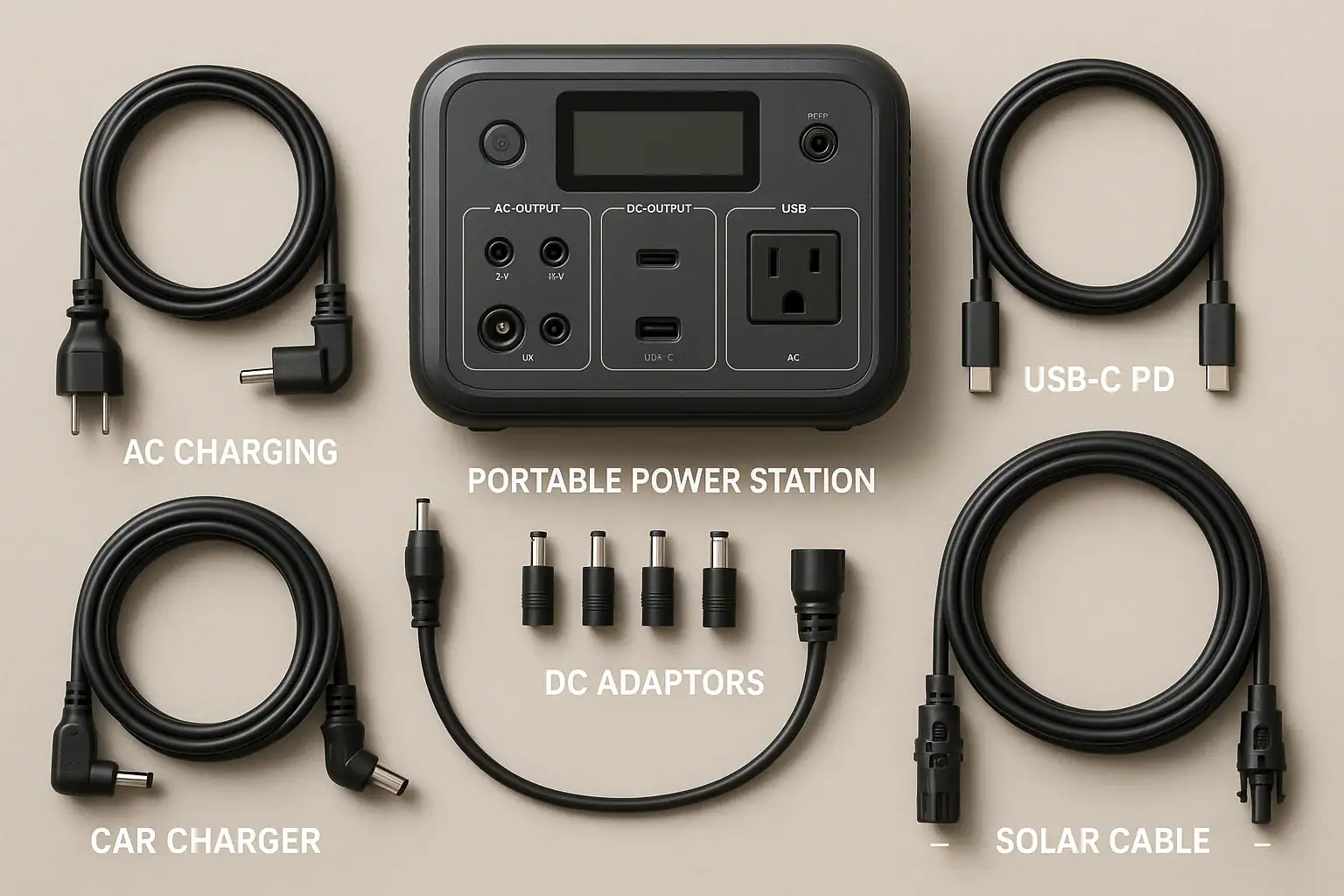
Most portable power stations include only a few basic cables in the box, so you may still need extra adapters or leads to match your devices and charging sources. Understanding what each cable does, which connector types you have, and how much power each port can safely handle helps you avoid slow charging, tripped protection circuits, or damaged gear. People often search for terms like input limit, PD profile, surge watts, runtime, and DC output when trying to figure out which cable or adapter they’re missing.
This guide walks beginners through the typical cables, plugs, and adapters used with portable power stations, the differences between them, and how to match specs to real-world needs. By the end, you’ll know what usually comes in the box, what you may need to buy separately, and which technical details matter most for safe, efficient charging at home, on the road, or at a campsite.
1. What “What’s in the Box” Really Means for Portable Power Stations
When you unbox a portable power station, the included cables and adapters determine what you can actually power or recharge on day one. The battery capacity and inverter rating might look impressive, but without the right AC cord, DC barrel plug, USB-C PD cable, or solar adapter, you may not be able to use that capacity effectively.
Manufacturers usually include only the essentials needed to charge the unit from a wall outlet and sometimes a vehicle socket. Everything else is considered optional, because users have different devices, plug types, and power needs. That is why beginners are often surprised to find that their fridge, CPAP, or solar panel will not connect directly, even though the power station has enough watt-hours and surge watts on paper.
Understanding the role of each cable and adapter matters because:
- Compatibility: Connectors must physically fit and match voltage and current ratings.
- Performance: Cable gauge, length, and PD profile can limit charging speed and runtime.
- Safety: Underrated or improvised adapters can overheat, trip protections, or damage equipment.
- Planning: Knowing what is included helps you budget for missing pieces before a trip or outage.
Thinking of the power station as a central hub and the cables as the “roads” in and out makes it clear: without the right roads, the power cannot reliably reach where you want it to go.
2. Core Cable Types and How They Work With Your Power Station
Most portable power station setups revolve around a small set of cable and adapter types. Each one serves a specific function: charging the station (inputs), powering your gear (outputs), or adapting between shapes and standards so everything fits together.
AC charging cables
AC charging cables connect your portable power station to a household wall outlet. On one end is a standard plug for your region, and on the other is usually a figure-eight, cloverleaf, or IEC-style connector that plugs into the power station’s AC input or power brick. Key specs include the maximum input watts the station can accept and the cable’s current rating. A wall cord that matches or exceeds the station’s input limit helps avoid overheating and ensures you can recharge as fast as the unit allows.
DC car charging cables
DC car charging cables plug into a 12 V vehicle socket (often called a cigarette lighter socket) and feed DC power into the power station’s car/DC input. These are useful for road trips and vehicle-based camping. They typically provide much lower watts than AC charging, so knowing the station’s DC input limit and your vehicle’s socket rating helps set realistic expectations for charge times.
Solar charging adapters and leads
Solar charging cables connect portable solar panels to the power station’s solar input. Common connectors include MC4 on the panel side and a barrel plug, Anderson-style connector, or proprietary plug on the power station side. Because solar voltage and current vary with sunlight, using correctly rated cables and matching the input voltage range of the station is critical to avoid protection shutdowns or inefficient charging.
DC output cables and barrel adapters
Many portable power stations provide DC outputs via barrel jacks or a regulated 12 V car socket. DC output cables may have barrel plugs on one end and a different barrel size or connector on the other, allowing you to power routers, LED lights, or small appliances. The key is matching voltage (for example, 12 V vs 24 V), polarity (center positive vs center negative), and current rating to the device’s label.
USB-A and USB-C PD cables
USB-A cables handle lower-power devices like phones and small accessories, while USB-C PD (Power Delivery) cables support higher power levels and different PD profiles. A high-quality USB-C cable rated for 60 W or 100 W can unlock the full output of a PD port, while a low-rated cable may limit charging speed or fail to negotiate the correct PD profile, leading to slower charging or no charge at all.
AC extension cords and plug adapters
Extension cords and plug adapters are often not included, but many users rely on them to reach distant devices or convert between outlet shapes. It is important to use cords with adequate gauge and current rating for the inverter’s continuous watts. Thin or very long extension cords can cause voltage drop, heat buildup, and nuisance shutdowns under higher loads.
| Cable or Adapter Type | Typical Use | Key Specs to Match |
|---|---|---|
| AC charging cable | Charge from wall outlet | Input watts, plug type, current rating |
| DC car charging cable | Charge from 12 V vehicle socket | Vehicle socket rating, DC input limit |
| Solar adapter/lead | Connect solar panel | Voltage range, connector type, max amps |
| DC barrel cable | Power DC devices | Voltage, polarity, barrel size |
| USB-C PD cable | Fast-charge phones/laptops | PD watt rating, cable quality |
| AC extension cord | Extend AC outlets | Wire gauge, length, amp rating |
Related guides: Extension Cords and Power Strips: Safe Practices With Portable Power Stations • Charging From a Car: What’s Safe, What’s Slow, and What Can Break • AC vs DC Power: How to Maximize Efficiency and Runtime
3. Real-World Setups: What You’ll Actually Need Beyond the Box
Once you understand the basic cable types, it becomes easier to plan what you need for specific scenarios. Here are common beginner use cases and the cables or adapters that often turn out to be essential.
Weekend camping with phones, lights, and a small fan
For a short camping trip, many people expect to plug everything straight into the portable power station. In practice, you may need:
- Several USB-A or USB-C cables for multiple phones and power banks.
- A USB-C PD cable rated for at least 60 W if you plan to charge a modern laptop.
- A short, properly rated AC extension cord to position a small fan or light farther from the power station.
- Optional 12 V DC cable if you are using a DC-powered camping fan or LED strip directly from the 12 V port.
The station likely includes an AC charging cable, but not the extra USB or DC leads for every device, so bringing your own matching cables is essential.
Road trip with car charging and fridge or cooler
On a road trip, you may want to keep the power station charged from the vehicle while it runs a 12 V fridge or cooler. In this scenario, you often need:
- The DC car charging cable that fits the power station’s DC input.
- A 12 V car-style cable for the fridge, plugged into the station’s 12 V socket.
- Possibly a spare fuse or fused adapter if the fridge draws close to the socket’s limit.
Because vehicle sockets are usually limited to around 10–15 A, using cables and adapters rated for that current helps prevent blown fuses and intermittent shutdowns when the compressor starts (surge watts).
Home backup for router, CPAP, and small electronics
During power outages, many users want to run a Wi-Fi router, modem, CPAP machine, and phone chargers. To do this efficiently, you may need:
- DC barrel cables or adapters that match your router or modem voltage and plug size, allowing you to run them from DC instead of the inverter, which can extend runtime.
- A properly rated AC extension cord to place the CPAP near your bed while the power station stays in a safe location.
- USB-C PD cables for tablets and phones to use the high-efficiency USB outputs.
Some CPAP machines also support direct DC input with a manufacturer-specific cable, which is usually not included with the power station. Using that instead of AC can reduce conversion losses and improve runtime.
Solar-powered off-grid weekend
If you plan to keep your portable power station topped up with solar panels, you will almost always need extra cables beyond what comes in the box. Typical needs include:
- MC4 extension leads from the panels to a shaded area where the power station sits.
- An MC4-to-barrel or MC4-to-Anderson adapter that matches the station’s solar input.
- Possibly a Y-branch or parallel adapter if your station supports parallel panel connections within its voltage and current limits.
Without the correct solar adapters, your panels may sit unused, even though the power station supports solar charging on paper.
Worksite or DIY projects with power tools
Using a portable power station with power tools introduces higher surge watts and continuous load. You may need:
- Heavy-duty AC extension cords with adequate gauge (lower AWG number) for the expected amps.
- Shorter cords where possible to reduce voltage drop under load.
- Plug adapters if your tools have different plug shapes than the station’s outlets.
While these accessories are simple, choosing the correct rating is vital to avoid nuisance tripping of the inverter or overheating cords when tools start up.
4. Common Cable Mistakes and How to Spot Problems Early
Many issues that users attribute to a “bad power station” actually come from mismatched or low-quality cables and adapters. Recognizing the warning signs early can save time and protect your equipment.
Underrated or overly long extension cords
Running high-wattage devices like kettles, heaters, or power tools through thin, very long extension cords can cause:
- Warm or hot cable insulation.
- Voltage drop, leading to devices stalling or shutting off.
- Inverter overload or low-voltage protection trips, even when the device’s rated watts are within limits.
If you notice dimming lights, slow tool startup, or warm plugs, check the cord’s amp rating and consider a shorter, heavier-gauge cord.
Wrong barrel connector size or polarity
DC barrel connectors come in many sizes and polarity arrangements. Common mistakes include:
- Using a plug that “almost fits” but is loose, causing intermittent power.
- Reversing polarity when using generic adapters, potentially damaging the device.
- Feeding 12 V into a device that expects 19 V or 24 V, which may cause failure to start.
Troubleshooting cues include devices that briefly power on then shut off, no response at all, or unusual heat near the connector. Always verify barrel size, voltage, and polarity markings before connecting.
Low-quality or mismatched USB-C PD cables
USB-C PD relies on communication between the power station, cable, and device to negotiate a PD profile. Problems arise when:
- The cable is only rated for 3 A or 15–30 W, but you expect 60–100 W charging.
- The cable is charge-only and does not support full PD communication.
- The device requests a PD profile the port cannot provide, leading to fallback to lower power.
Symptoms include laptops charging very slowly, not charging while in use, or showing “plugged in, not charging.” Using a higher-rated PD cable that clearly lists its watt rating often resolves these issues.
Overloading car sockets and DC cables
Vehicle and 12 V sockets have limited current ratings. Drawing too much through an undersized DC cable or adapter can cause:
- Blown fuses in the vehicle or power station.
- Hot connectors or melted plastic around the plug.
- Frequent shutdowns when a compressor or pump starts.
If a device repeatedly trips the socket or feels hot at the plug, reduce the load, shorten the cable, or use a higher-rated DC connector and fuse.
Using adapters that change shape but not voltage
Some plug adapters only change the physical shape of a plug without converting voltage or frequency. When combined with a portable power station’s AC output, this can lead to confusion about what is safe to connect. Always confirm that the device’s voltage and frequency requirements match the power station’s AC output before relying on a simple shape adapter.
5. Safety Basics for Using Cables and Adapters With Portable Power Stations
Portable power stations are designed with multiple layers of protection, but cable and adapter choices still play a major role in overall safety. Following a few high-level practices can reduce risks of overheating, shock, or damage to connected devices.
Match ratings, not just shapes
Two cables may look identical but have very different current or watt ratings. Always check:
- The amp or watt rating printed on the cable or its packaging.
- The maximum output of the port you are using (AC, DC, or USB).
- The device’s voltage and current requirements on its label.
Use the lowest of these values as your safe operating limit. This prevents overloading a cable or adapter that could otherwise overheat.
Avoid daisy-chaining adapters and splitters
Stacking multiple plug adapters, splitters, or extension cords increases resistance and the chance of poor connections. This can lead to localized heating, arcing, and unreliable power delivery. Whenever possible, use a single, high-quality cable of the correct length instead of chaining several together.
Keep connections dry and off the ground
Moisture and conductive dust are major risks around power connections. For portable power stations used outdoors or in vehicles:
- Keep cables and plugs off wet ground and away from puddles.
- Avoid placing the power station directly on damp surfaces.
- Use cable management to prevent tripping or pulling on connections.
If a cable or connector gets wet, disconnect it from all power sources and allow it to dry completely before reuse.
Do not modify or open cables or the power station
Cutting, splicing, or otherwise modifying power cables and adapters can defeat built-in protections and create shock or fire hazards. Similarly, opening the portable power station’s case or bypassing its internal protections is unsafe. If you need a different connector or length, purchase a properly rated cable or consult a qualified electrician for custom solutions.
Respect input and output limits
Every input (AC, DC, solar) and output (AC, DC, USB) on a portable power station has its own limit. Exceeding these can trip protections or, in extreme cases, damage the unit. Pay attention to:
- AC inverter continuous watts and surge watts for short peaks.
- DC port amp limits, especially for 12 V sockets.
- Solar input voltage and current ranges.
- USB and USB-C PD watt ratings per port.
If you are unsure whether a specific setup is safe, reduce the number of devices, shorten cables, and avoid running everything at maximum load simultaneously.
6. Caring for Your Cables and Adapters: Storage and Longevity
Good cable management and storage practices help maintain reliable connections and reduce the chance of failures at critical moments, such as during a power outage or while traveling off-grid.
Coiling and storing without stress
Repeatedly bending cables sharply or wrapping them too tightly around the power station can weaken internal conductors and strain reliefs. To extend cable life:
- Use loose coils with gentle bends, avoiding tight loops.
- Secure coils with soft ties or hook-and-loop straps instead of hard knots.
- Avoid hanging heavy adapters by their cable, which can pull on connectors.
For USB-C and DC barrel cables, pay special attention to the connector ends, which are prone to damage from repeated flexing.
Labeling and organizing by function
As you add more cables and adapters for AC, DC, USB, and solar, it becomes easy to mix them up. Simple labeling and organization can prevent incorrect connections:
- Use colored tags or labels to mark solar, car, and wall charging cables.
- Group DC barrel adapters by voltage and plug size.
- Keep high-wattage USB-C PD cables separate from low-power ones.
Storing everything in a dedicated pouch or case alongside the power station reduces the chance of leaving a critical cable behind.
Inspecting regularly for wear and damage
Before trips or storm seasons, visually inspect cables and adapters for:
- Cracked or frayed insulation.
- Loose, bent, or corroded pins.
- Discoloration or melted areas near connectors.
If you notice any of these signs, retire the cable and replace it. It is better to discard a questionable cable than risk overheating or intermittent power during an emergency.
Protecting from heat, cold, and UV
Extreme temperatures and direct sunlight can degrade cable jackets over time. When storing your portable power station and accessories:
- Keep them in a cool, dry location away from direct sun.
- Avoid leaving cables in hot vehicles for long periods.
- Use protective sleeves or conduit for cables that remain outdoors.
These steps help maintain flexibility and prevent cracking, especially for solar and outdoor extension cords.
Travel and vehicle storage tips
For users who keep their portable power station in a vehicle or RV, cable storage is especially important:
- Use a small organizer or bag to keep AC, DC, USB, and solar cables separate.
- Secure heavy adapters so they do not swing and stress connectors while driving.
- Keep a spare basic charging cable (AC or DC) in case the primary one is misplaced.
Having a predictable place for every cable makes setup faster and reduces the chance of relying on improvised or unsafe substitutes.
| Care Practice | Applies To | Benefit |
|---|---|---|
| Loose coiling | AC, DC, USB, solar | Reduces internal conductor stress |
| Labeling by function | All cables/adapters | Prevents misconnection and confusion |
| Regular inspection | High-use cables | Early detection of wear and damage |
| Temperature control | Outdoor and vehicle-stored cables | Prevents jacket cracking and brittleness |
| Dedicated storage pouch | Travel setups | Keeps critical cables with the power station |
7. Putting It All Together: Planning Your Cable and Adapter Kit
For beginners using portable power stations, the most effective approach is to treat cables and adapters as part of your core system, not afterthoughts. Start by listing the devices you want to power, how you plan to recharge the station (wall, car, solar), and where you will use it (home, vehicle, campsite, worksite). Then map each connection path from source to station to device, identifying which cables you already own and which you need to add.
In practice, a reliable kit usually includes: the original AC charging cable, a DC car charging cable, one or more solar adapters if you use panels, a few high-quality USB-C PD cables, several USB-A leads, at least one heavy-duty AC extension cord, and a small set of DC barrel adapters for routers, lights, or other DC devices. Keeping these organized and checked for wear ensures your portable power station is ready when you need it, with minimal surprises about what was or was not included in the box.
Specs to look for
- AC charging input watts: Look for a wall charging cable and input that support roughly 150–800 W, depending on battery size, so the station can recharge in a reasonable time without overloading the cord.
- DC car charging current rating: Choose car/DC cables rated for at least 10–15 A at 12 V to safely handle typical vehicle socket limits and avoid blown fuses during long drives.
- Solar input voltage and connector type: Match solar cables and MC4 adapters to an input range around 12–50 V and ensure the connector type (barrel, Anderson-style, etc.) fits the station’s solar port.
- USB-C PD cable watt rating: Use USB-C cables clearly rated for 60–100 W if you plan to fast-charge laptops or tablets, so the PD profile can deliver full power without throttling.
- USB-A and USB-C port outputs: Check for 2–3 A at 5 V for basic USB-A and 18–65 W for USB-C PD ports, then match your cables so phones and laptops charge at their intended speeds.
- AC extension cord gauge and length: For loads up to about 10–13 A, look for shorter cords with heavier gauge (for example, 14 AWG or thicker) to minimize voltage drop and heating when running appliances.
- DC output voltage and barrel size: Confirm whether DC ports are regulated 12 V or higher (such as 24 V) and match barrel diameter and polarity to your devices to avoid no-start or damage.
- Connector durability and strain relief: Prefer cables with reinforced ends and flexible jackets, especially for travel or outdoor use, to reduce failure at the connector over time.
- Temperature and outdoor rating: For solar and extension cords used outside, look for insulation suitable for outdoor or higher-temperature environments so cables remain flexible and safe in the sun.
By focusing on these specs and planning your cable and adapter kit around how you actually use your portable power station, you can unlock its full potential while keeping your setup safe, efficient, and ready for future upgrades.
Frequently asked questions
What specs and features should I prioritize when choosing cables and adapters for a portable power station?
Prioritize matching amp/watt ratings, connector type and polarity, and the supported input/output voltage ranges. For USB-C, check the PD watt rating; for AC, confirm continuous and surge watt capability; for solar, verify compatible voltage range and connector type. Also consider cable gauge and length since thin or long cables increase voltage drop and limit performance.
How can I avoid common cable mistakes that lead to slow charging or tripped protections?
Always use cables and adapters rated for the port’s maximum watts and the device’s requirements, avoid undersized or overly long extension cords, and verify barrel size and polarity before connecting. Don’t daisy-chain adapters or rely on cheap, unmarked cables, since poor connections increase resistance and can cause thermal issues or protection trips.
What basic safety practices should I follow when using cables and adapters with a portable power station?
Check that every cable’s current or watt rating matches or exceeds the device and port limits, keep connections dry and off the ground, and avoid modifying cables or the power station. Regularly inspect cables for damage and replace any with frayed insulation, melted areas, or corroded pins to reduce fire and shock risks.
Are the cables included with a power station usually sufficient for connecting solar panels or specialty devices?
Often they are not; manufacturers typically include only basic wall and sometimes car charging cables, while solar panels and specialty devices frequently require MC4 adapters, Anderson connectors, or proprietary leads. Check the station’s input connector and voltage range and plan to buy matching adapters or extension leads if needed.
How do I choose the right USB-C PD cable for fast laptop charging?
Choose a USB-C cable explicitly rated for the wattage your laptop requires (commonly 60–100 W for laptops) and ensure it supports PD communication and the correct current (for example, an e‑marked 5 A cable for 100 W). Higher-quality, certified cables reduce negotiation failures and minimize the chance of the port falling back to lower power.
What maintenance steps extend the life of power cables and adapters?
Store cables in loose coils with gentle bends, keep them in a cool, dry place away from direct sunlight, and use soft ties or an organizer to prevent strain on connectors. Regularly inspect for cracks, fraying, or discoloration and replace any damaged items rather than attempting repairs.
Recommended next:
- Portable Power Station Buying Guide
- Common Mistakes When Buying a Portable Power Station
- Portable Power Station Terminology Explained
- Portable Power Station Basics: Outputs, Inputs, and What the Numbers Mean
- A Simple Buying Checklist: Features That Matter (and Those That Don’t)
- Choosing the Right Size for Apartment Backup: Practical Examples
- More in Beginners →
Related guides
Browse this topic →
- Beginner-friendly sizing, runtime & specs
- Solar & charging (MPPT, fast charging, cables)
- Batteries (LiFePO4, cycles, care & storage)
- Safety, cold-weather performance, real-world tips
More in Beginners
See all →- RV Basics: Using a Power Station for 12V Loads and House Power
- Camping Power Planning: A Simple Energy Budget for a Weekend
- Remote Work Power Kit: Keeping Laptop, Monitor, and Internet Running
- Portable Power Stations for Photography and Drone Charging: A Field Guide
- Portable Power Stations for CPAP and Medical Devices: What to Look For
Keep reading

About this site
Portable Energy Lab publishes practical, independent guides about portable power—clear sizing, safe use, and real-world expectations.
Affiliate disclosure
Some links on this site may be affiliate links. If you buy through these links, we may earn a small commission at no extra cost to you. This helps support our content. Learn more.