
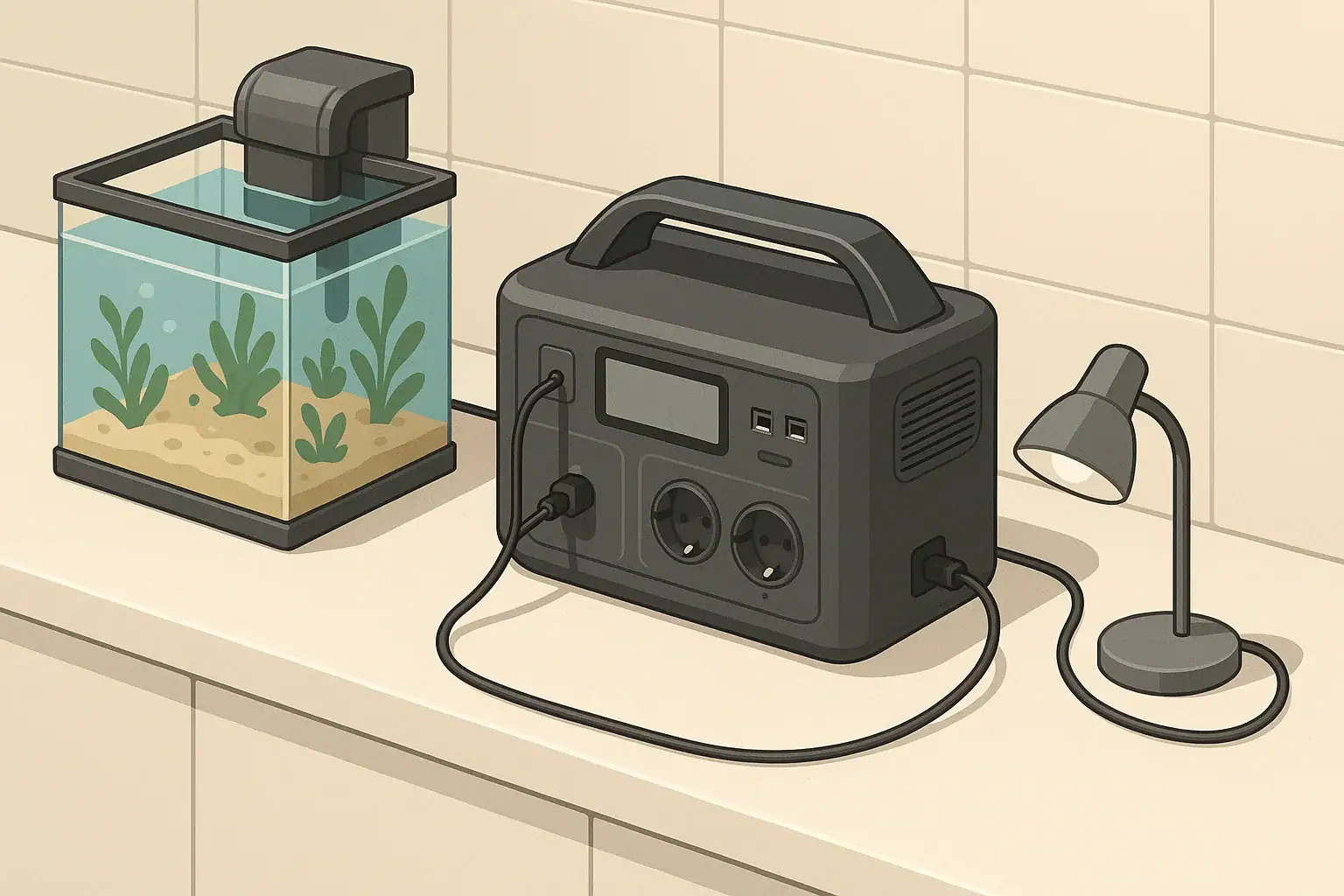
Powering an aquarium during an outage means using backup power first for water movement and oxygen, then for heat when temperature risk requires it. In most tanks, pumps, filters, and air pumps are the priority because stagnant water can lose oxygen faster than it loses heat.
A portable power station can keep essential aquarium life-support equipment running through a short blackout, overnight outage, or storm-related interruption. The key is not simply buying the largest battery. It is knowing which devices matter most, how many watts they use, and how heater cycling changes real runtime.
This guide explains how to estimate aquarium backup power needs, what to run first, when to conserve battery, and how to avoid common mistakes around heaters, cords, and wet locations.
What Powering an Aquarium During an Outage Really Means
An aquarium is a small controlled ecosystem. When household power stops, the tank immediately loses active filtration, circulation, aeration, heating, and lighting unless you have backup power. Some of those losses matter much more than others.
For most freshwater and saltwater aquariums, the first concern is oxygen exchange. Fish, invertebrates, beneficial bacteria, and other organisms consume oxygen. Surface agitation from a filter return, air stone, powerhead, or return pump helps oxygen enter the water and carbon dioxide leave it. When water sits still, oxygen can decline, especially in warm, heavily stocked, or densely planted tanks at night.
The second concern is temperature. A tropical community tank may tolerate a slow temperature drop for several hours if the room is mild, while a sensitive reef tank, breeding setup, or warm-water species tank may need closer temperature control. Cold-water tanks may face the opposite issue during a summer outage if the room becomes hot.
Lights are usually not essential during an outage. In fact, leaving aquarium lights off often helps conserve battery and may reduce heat buildup. Protein skimmers, UV sterilizers, automatic feeders, dosing equipment, and decorative devices may be important in normal operation, but they are usually secondary to circulation, oxygen, and safe temperature.
How to Size Backup Power for Pumps, Filters, and Heaters
Portable power sizing starts with two numbers: watts and watt-hours. Watts show how much power equipment uses while running. Watt-hours show how much stored energy a battery can deliver over time. A 10-watt air pump running for 10 hours uses about 100 watt-hours before conversion losses.
The basic formula is simple: battery capacity in watt-hours divided by total running watts equals theoretical runtime. Real runtime is lower because an inverter uses some energy converting battery power to AC power. A practical estimate is to subtract about 10 to 25 percent, depending on load size, inverter efficiency, and whether the power station is running AC or DC outputs.
Heaters need special attention. A heater rated at 150 watts does not usually draw 150 watts all the time. It cycles on and off based on tank temperature, room temperature, setpoint, water volume, lid coverage, and airflow. If that 150-watt heater runs half the time, its average draw is roughly 75 watts. If the room gets cold and it runs almost continuously, it can drain a battery very quickly.
Use a plug-in watt meter before an emergency if possible. Label each device with its measured running watts, then write down two outage plans: one for life support only and one for life support plus controlled heater use.
| Device or decision | Typical power range | Outage priority | Runtime impact |
|---|---|---|---|
| Air pump with air stone | 2 to 8 watts | Very high | Excellent oxygen support for low energy use |
| Hang-on-back or internal filter | 5 to 25 watts | High | Useful for circulation and biological filtration |
| Powerhead or circulation pump | 5 to 40 watts | High | Important for reef tanks and high-flow systems |
| Return pump | 20 to 100 watts or more | High, depending on system | Can be essential but may use more energy than an air pump |
| Aquarium heater | 50 to 300 watts | Conditional | Often the largest battery drain when active |
| Aquarium light | 10 to 150 watts or more | Low | Usually kept off to conserve backup power |
| Optional accessories | Varies widely | Low | Disconnect unless needed for animal health |
Real-World Aquarium Runtime Examples
Runtime examples are only planning estimates, but they show why load selection matters. The same power station may run a small air pump for days, a filter for much of a day, or a heater for only a few hours if the heater runs often.
For a small freshwater tank, imagine a 10-watt filter and a 50-watt heater. If you run only the filter from a 300 watt-hour power station, the simple estimate is 30 hours. After losses, a more realistic expectation may be about 22 to 27 hours. If the heater averages 25 watts because it cycles about half the time, the combined average load becomes 35 watts and practical runtime may fall to roughly 6 to 8 hours.
For a medium community tank, a 20-watt canister filter plus a 5-watt air pump gives a 25-watt life-support load. On a 500 watt-hour station, practical runtime may land around 15 to 18 hours. Add a 150-watt heater that averages 75 watts overnight, and the total average load becomes about 100 watts. Runtime may fall to about 4 to 5 hours.
For a reef or sump-based system, the return pump and circulation pumps may be more important than the display lights. If the full system normally uses 250 watts, moving only the most important flow devices to backup power may cut the emergency load to 40 to 90 watts. That difference can turn a short backup window into an overnight plan.
| Scenario | Essential load used for estimate | Battery capacity | Practical runtime expectation |
|---|---|---|---|
| Small tank, oxygen only | 5-watt air pump | 300 Wh | About 45 to 50 hours |
| Small tank, filter only | 10-watt filter | 300 Wh | About 22 to 27 hours |
| Small tank, filter plus cycling heater | 35-watt average load | 300 Wh | About 6 to 8 hours |
| Medium tank, filter plus air | 25-watt load | 500 Wh | About 15 to 18 hours |
| Medium tank, filter, air, and cycling heater | 100-watt average load | 500 Wh | About 4 to 5 hours |
| Reef tank, reduced flow plan | 60-watt circulation load | 1000 Wh | About 12 to 15 hours |
Common Mistakes and Troubleshooting Cues
The most common mistake is treating the heater rating like a minor detail. A pump that uses 10 watts is a small load. A heater that pulls 200 watts while on is not. If your power station drains much faster than expected, check whether the heater is running continuously because the room is cold, the tank is uncovered, or the setpoint is too aggressive for backup operation.
Another mistake is trying to power the aquarium exactly as if utility power were still available. During an outage, lights, decorative features, extra pumps, UV sterilizers, and noncritical electronics may shorten runtime without improving immediate survival. Build an emergency power strip with only the devices you intend to run, and avoid plugging in unrelated household loads.
Overload shutdowns are another clue that the inverter limit is being exceeded. If the power station clicks off, flashes an overload warning, or refuses to start when several devices are connected, unplug everything and restart with the smallest essential load first. Add equipment one device at a time. Pumps can have startup surges, and multiple devices starting together may briefly exceed the unit’s rating.
If a filter does not restart after power is restored, check for lost siphon, trapped air, clogged intake, or an impeller that needs cleaning. Some filters are easier to restart if they are filled with water before the pump is powered. During a long outage, confirm that water is actually moving rather than assuming a plugged-in filter is functioning.
Watch the animals and the water surface. Fish gasping near the top, reduced surface movement, unusual coral behavior, or a strong stagnant smell are warning signs that oxygen and circulation need attention. In many cases, adding a low-watt air pump provides more emergency value than running a high-watt device that drains the battery quickly.
Safety Basics for Backup Power Around Aquariums
Water and electricity require conservative habits. Keep the power station on a dry, stable surface away from splashes, water changes, sump overflow risk, salt spray, and wet floors. Do not place it under a tank stand where a leak or siphon accident could drip directly onto the unit.
Use drip loops on every cord leaving the aquarium. A drip loop lets water run down the cord and fall off before it reaches a plug, outlet, or power station socket. Keep plug connections elevated when possible, and avoid loose adapters that can be bumped or pulled by pets, children, or maintenance activity.
Use cords and power strips rated for the total load. Short, appropriately rated cords are safer than long, thin extension cords. If a cord, plug, or power strip feels warm under load, disconnect it and reduce the load or replace the component. Warmth can indicate resistance, poor contact, or undersized wiring.
Ventilation matters. Portable power stations generate heat when discharging, especially through AC outlets. Do not cover the unit with blankets, towels, foam, or tank insulation. Do not operate it in standing water, outdoors in rain, or in a closed cabinet with poor airflow.
Ground-fault protection is commonly used around aquariums because wet environments increase shock risk. If your normal aquarium setup uses a ground-fault protected power strip, you may be able to keep that layer of protection by plugging the strip into the power station, provided the equipment operates correctly. Do not modify wiring or defeat safety devices to make a backup setup work.
Maintenance, Storage, and Long-Term Readiness
A backup power plan only helps if it is ready before the outage. Store the power station indoors in a cool, dry location, away from direct sun, freezing temperatures, and high heat. Extreme storage conditions can reduce battery life and may limit available capacity when you need it.
Follow the manufacturer’s storage guidance for state of charge. Many lithium-based units are commonly stored partially charged for long periods and topped up before expected storms or planned utility work. If severe weather is forecast, fully charge the unit early rather than waiting until lights flicker.
Test the setup periodically with the actual aquarium equipment you plan to run. A 15-minute test can reveal noisy pumps, overloaded outputs, bad cords, or a heater strategy that drains too quickly. If you change filters, add a sump, upgrade lights, or increase heater size, update your written load list.
Keep emergency items together. A labeled bag or small bin near the tank can hold the air pump, airline tubing, air stone, extension cord, spare check valve, and your written runtime estimates. In a nighttime outage, having everything in one place is more useful than a perfect plan stored only in your memory.
Also think beyond electricity. A fitted lid, reduced room drafts, and temporary insulation around the sides of the aquarium can slow heat loss without consuming battery power. Leave vents and electrical devices uncovered, and never wrap a running power station or power strip for warmth.
Practical Takeaways and Specs to Look For
The best outage plan is simple: keep oxygen and circulation going, control temperature only as much as needed, and avoid wasting battery on nonessential equipment. A small, efficient air pump can be one of the most valuable emergency tools because it provides surface agitation with very low power draw.
For short outages, running a filter, air pump, or circulation pump may be enough. For longer outages, decide when to cycle the heater instead of leaving it on continuously. Monitor tank temperature with a separate thermometer, and let temperature change slowly rather than chasing a perfect number with limited battery capacity.
Specs to Look For
- Watt-hour capacity: Choose enough usable capacity for your target outage length after allowing for 10 to 25 percent losses.
- Continuous AC output: Make sure the power station can handle the combined running watts of pumps, filters, and any heater use.
- Surge output: Leave margin for pumps starting up, especially if several devices may restart at the same time.
- Pure sine wave AC output: This is generally preferred for aquarium pumps and other motor-driven equipment.
- Clear display: A useful screen should show remaining charge, input, output, and overload warnings.
- Quiet cooling and ventilation: Fan noise is less important than safe airflow, but the unit should have unobstructed vents.
- Recharge options: Consider how you will recharge after a long outage, including wall charging before storms and compatible off-grid charging if relevant.
- Port layout: Confirm there are enough AC outlets for your emergency setup without stacking multiple adapters.
Write your plan in plain numbers: essential watts, heater strategy, estimated runtime, and which plugs go into backup power. Review it annually and after every equipment change. With that preparation, powering an aquarium during an outage becomes a controlled process instead of a rushed guess when livestock are already under stress.
Frequently asked questions
How long can a power station run an aquarium during an outage?
It depends on the battery capacity, the equipment you run, and whether a heater cycles on. A small air pump may run for many hours or even days, while a heater can cut runtime sharply. The most accurate estimate comes from your measured watt load and the power station’s usable watt-hours.
What should I power first in an aquarium blackout?
Start with water movement and oxygenation, such as an air pump, filter, or circulation pump. These devices help maintain gas exchange and keep water from becoming stagnant. Add heat only if the tank temperature is dropping enough to threaten the livestock.
What specs matter most when choosing backup power for an aquarium?
Focus on usable watt-hour capacity, continuous output, surge capacity, and a pure sine wave AC output if you are powering motor-driven equipment. A clear display and enough outlets also help you manage the setup during an emergency. The best unit is the one that can safely handle your essential load for your target outage length.
What is the most common mistake people make with aquarium backup power?
The biggest mistake is underestimating the heater. A heater may not draw full power all the time, but when it does, it can drain a battery much faster than pumps or air stones. Another common error is running nonessential equipment that shortens runtime without improving survival.
Is it safe to run aquarium equipment from a portable power station?
Yes, if the equipment, cords, and power station are set up correctly and kept dry. Use drip loops, keep the unit away from splashes, and avoid overloading the inverter. Never place backup power where a leak or spill could reach it.
Should I leave the aquarium light on during an outage?
Usually no. Lights are typically low priority compared with circulation and oxygen, and turning them off helps conserve battery. In some tanks, leaving the light off can also reduce heat and stress during the outage.
Related guides
Browse this topic →
- Beginner-friendly sizing, runtime & specs
- Solar & charging (MPPT, fast charging, cables)
- Batteries (LiFePO4, cycles, care & storage)
- Safety, cold-weather performance, real-world tips
More in Home / Appliances
See all →Keep reading
About this site
Portable Energy Lab publishes practical, independent guides about portable power—clear sizing, safe use, and real-world expectations.
Affiliate disclosure
Some links on this site may be affiliate links. If you buy through these links, we may earn a small commission at no extra cost to you. This helps support our content. Read our affiliate disclosure.