
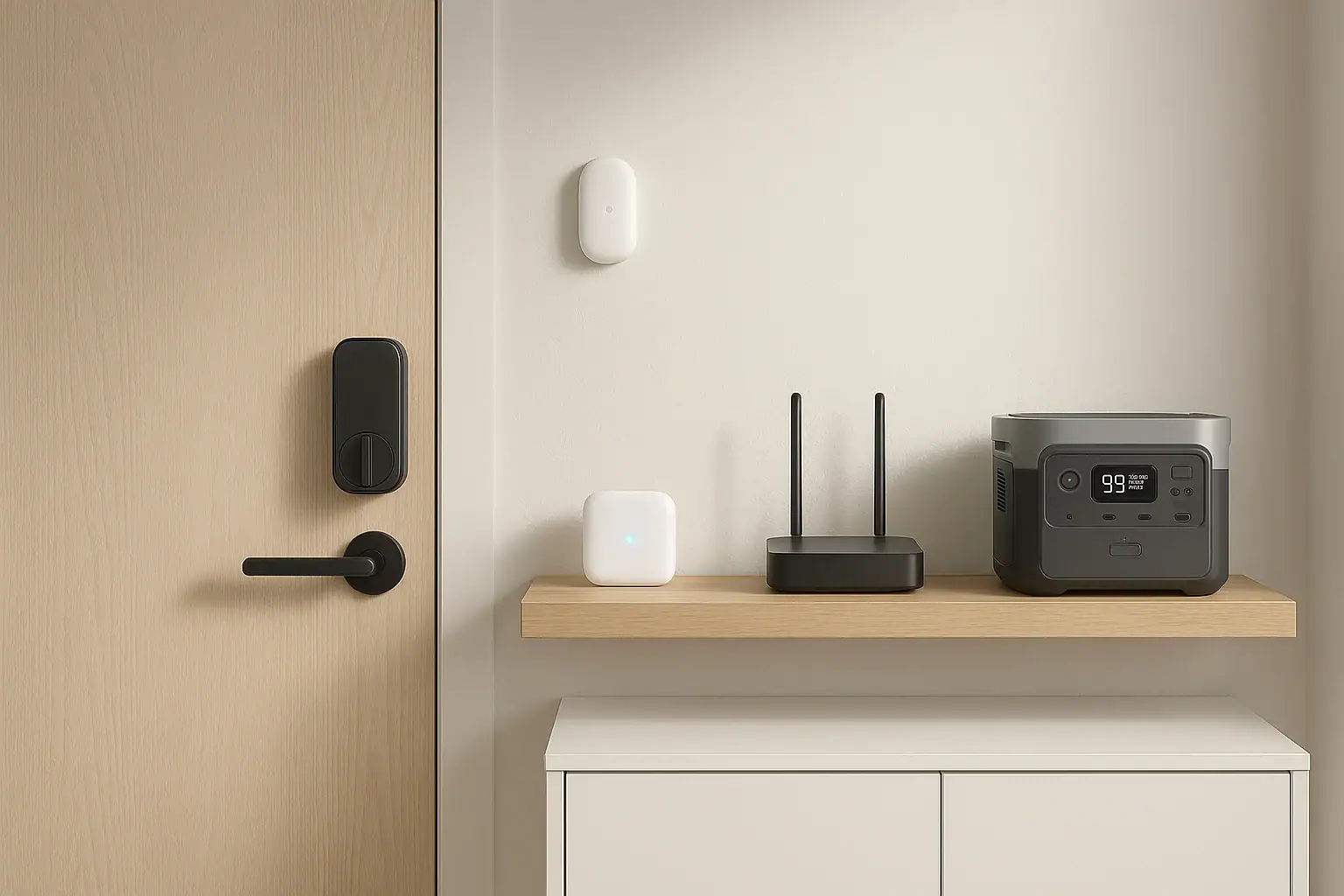
Backup power for a smart home hub, door locks, and security sensors usually means keeping the hub, internet equipment, and low-voltage accessories running while the locks and sensors continue on their own batteries.
The key is not raw size alone. You need enough watt-hours for the desired runtime, stable AC or DC output for small electronics, the right UPS mode or pass-through behavior if you want automatic switchover, and enough ports for the hub, router, modem, and any bridge devices. Because these loads are usually small, inverter efficiency, output waveform, and how the unit behaves at very low power draw matter more than surge watts.
A portable power station can work well for smart home backup when it is sized around the actual devices that must stay online. For security-focused homes, that often includes the smart home hub, Wi-Fi router, modem or fiber terminal, camera base station, alarm bridge, and maybe a keypad charger rather than every sensor in the home.
What smart home backup power means and why it matters
Smart home backup power is the plan that keeps the control layer of your home security system available during an outage. The control layer usually includes the hub that coordinates automations, the network equipment that provides local or cloud access, and any bridge that connects locks, contact sensors, motion sensors, sirens, or cameras.
This matters because many smart devices can still perform basic local functions without utility power, but they may lose remote control, alerts, automations, or status reporting if the hub or internet connection goes down. A smart lock may still unlock with a keypad or physical key. A door sensor may still have battery power. But if the hub is off, the system may not send notifications, trigger routines, or show real-time status in an app.
Backup planning should start with the question, what must remain available during a power outage? For a security-focused setup, the answer is often narrower than people expect. You may not need to run lights, speakers, displays, or all smart plugs. You may only need the hub, router, modem, and a few support devices that allow alerts and remote access.
For most homes, the objective is continuity, not heavy power delivery. A reliable small-load backup can be more useful than an oversized unit that wastes energy at low output or shuts itself off because the devices draw too little power.
How backup power works for hubs, locks, sensors, and network gear
A portable power station stores energy in a battery and provides it through AC outlets, DC ports, USB ports, or USB-C ports. For a smart home system, the most common setup is to plug the hub, router, modem, and bridges into the power station during an outage. Some power stations can remain plugged into the wall and pass power through to connected devices, switching to battery when utility power fails. This is often described as UPS mode, EPS mode, pass-through, or backup mode, though performance varies by design.
Door locks and sensors are different from hubs. Most smart locks use internal batteries, so the backup plan is usually fresh lock batteries, a physical key option where available, and continued hub/network power for remote commands. Contact sensors, motion sensors, glass-break sensors, leak sensors, and keypads are also commonly battery powered. Their main backup need is not a big power station; it is battery maintenance and a powered hub so their signals can still be processed.
Runtime is estimated by dividing usable battery capacity by total power draw. For example, if your active load is 25 watts and the power station has about 250 usable watt-hours, the rough runtime is around 10 hours before accounting for conversion losses, low-load behavior, and battery reserve. AC output is convenient but may be less efficient than direct DC or USB-C if your devices can safely use those outputs with the correct voltage and connector.
The most important concept is system dependence. A hub may be online, but remote access may still fail if the modem is off. A lock may have battery power, but scheduled automations may fail if the hub is off. Sensors may detect motion, but alerts may not reach you if the network path is unavailable.
| Device or load | Typical power range | Backup priority | Why it matters |
|---|---|---|---|
| Smart home hub or bridge | 2 to 10 watts | High | Coordinates locks, sensors, routines, and status updates. |
| Wi-Fi router | 6 to 20 watts | High | Keeps local wireless devices connected and supports app access. |
| Modem or fiber terminal | 5 to 20 watts | High if remote alerts matter | Allows cloud notifications and remote control when service is available. |
| Smart lock | Usually internal batteries | Maintain batteries | Physical entry may still work, but remote commands depend on hub and network. |
| Door or motion sensor | Usually internal batteries | Maintain batteries | Detection may continue, but reporting depends on hub operation. |
| Camera base station or alarm bridge | 5 to 15 watts | Medium to high | May be required for recording, alarm events, or device communication. |
Real-world backup examples for common smart home setups
A small apartment setup might include one hub, one router, one modem, a smart lock, and several contact sensors. If the hub draws 5 watts, the router 10 watts, and the modem 10 watts, the total continuous load is about 25 watts. A compact power station with a few hundred watt-hours could support this core system for many hours, depending on inverter efficiency and whether the devices are powered through AC or lower-voltage ports.
A larger house may have a hub, mesh router node, modem, fiber terminal, camera bridge, and alarm keypad charger. The total could be closer to 40 to 70 watts. In that case, the same small power station may still work, but runtime drops quickly. If the outage goal is overnight operation, you would size the battery for the combined load and add margin for conversion losses.
A local-only smart home can be more resilient than a cloud-dependent one if the hub and router stay powered. In this example, the modem may be less critical for basic automations inside the home, but the router and hub still matter. If the router provides the local network and the hub can process sensor events locally, door sensors and motion triggers may continue even without internet service.
A remote-monitoring setup has different priorities. If you want phone alerts while away from home, the modem or internet terminal becomes part of the essential load. This assumes the local internet service remains available during the outage. Some neighborhoods lose broadband equipment when utility power fails, so backup power inside the home cannot guarantee outside connectivity.
A security-first setup should also consider entry behavior. If a smart lock battery is low before an outage, running the hub will not solve a weak lock battery. Good backup planning includes replacing lock batteries before they are critically low, keeping a physical key or approved emergency entry method available, and understanding which features work locally versus through the hub.
Common mistakes and troubleshooting cues
One common mistake is backing up only the hub and forgetting the router or modem. The hub may appear powered, but the app may show devices offline because the network path is down. If remote control and notifications matter, include every required network device in the backup load.
Another mistake is assuming all portable power stations act like an uninterruptible power supply. Some switch quickly enough for routers and hubs, while others may briefly interrupt power. A short interruption can reboot a router, delay alerts, or cause the hub to reconnect. If automatic continuity matters, look for the stated transfer behavior and test it with noncritical equipment before relying on it.
Low-load shutoff is a frequent issue with small electronics. Some power stations are designed to turn off outputs when the connected load is very low. A hub that draws only a few watts may not be enough to keep an AC inverter awake. If devices unexpectedly turn off after a period of time, check whether eco mode, auto-off, or low-current shutoff is enabled.
Runtime estimates can also be misleading. A unit rated at a certain watt-hour capacity may deliver less usable energy through AC output because the inverter consumes power. Small loads may also be affected by standby drain. If a hub and router draw 20 watts, the real runtime may be shorter than a simple battery-size calculation suggests.
Port mismatch is another practical problem. Many hubs and routers use barrel connectors with specific voltages. USB ports are not automatically compatible with them. Using the wrong voltage or cable can damage equipment. If you are not using the original AC adapters, verify that any DC or USB-C power method matches the device requirements.
Troubleshooting should be simple and noninvasive. Confirm that the power station output is on, the device adapters are firmly connected, eco mode is not shutting the output down, the hub has rejoined the network, and the router or modem has fully rebooted. Avoid opening devices, modifying batteries, bypassing protections, or improvising wiring.
Safety basics for smart home backup power
For smart home hubs and sensors, backup power is usually low risk compared with large appliance backup, but basic safety still matters. Use the original power adapters when possible, keep the power station in a dry indoor location, and do not cover vents or place the unit in an enclosed cabinet that traps heat.
Do not wire a portable power station into a home electrical panel unless the system is specifically designed for that purpose and installed by a qualified electrician using appropriate equipment. This article focuses on plug-in backup for small electronics, not whole-home wiring, transfer switches, or interlock installation.
Keep cables organized so they are not pinched by doors, stretched across walkways, or overloaded on one power strip. Smart home gear draws little power, but messy cabling can still create trip hazards or loose connections. If you use a power strip, choose one intended for the load and avoid daisy-chaining multiple strips together.
Pay attention to heat and battery condition. If a power station, adapter, or cable becomes unusually hot, smells abnormal, swells, sparks, or behaves unpredictably, stop using it and follow the manufacturer’s safety guidance. Do not open battery packs or attempt repairs on lithium batteries.
For smart locks, safety includes access planning. Maintain backup entry options according to the lock design, such as a physical key, alternate authorized entry, or approved emergency power contact if the lock provides one. Do not depend only on an app during an outage.
Maintenance and storage for reliable outage readiness
Backup power is only useful if it is charged, accessible, and tested before an outage. Store the power station indoors in a cool, dry area and keep it within the charging range recommended for the battery type. Periodically check the state of charge so it is not empty when needed.
A simple maintenance routine should include testing the core smart home load. Plug in the hub, router, modem, and bridges you intend to support, then confirm that the hub stays online, sensors report correctly, and the app shows the expected status. If you plan to use automatic backup mode, test whether devices reboot when utility power is interrupted.
Lock and sensor batteries should be treated as part of the backup system. Replace them based on low-battery alerts, seasonal checks, or a schedule that fits your device history. Cold weather can reduce battery performance in exterior locks, so entry devices may need more attention than indoor sensors.
Firmware and app updates can also affect reliability. Keep hubs and network gear updated during normal conditions rather than waiting until outage season. After major updates, verify that automations, sensor alerts, and lock status reporting still work as expected.
If the power station will sit unused for long periods, avoid storing it completely full or completely depleted for months unless its guidance says otherwise. Recharge it periodically, inspect cables and adapters, and keep a small checklist with your essential devices so you can reconnect quickly during an outage.
| Maintenance item | Suggested interval | What to check | Why it matters |
|---|---|---|---|
| Power station charge level | Monthly or before storms | State of charge and output readiness | Prevents discovering an empty battery during an outage. |
| Core load test | Every 3 to 6 months | Hub, router, modem, and bridges stay online | Confirms real runtime and switchover behavior. |
| Lock batteries | When alerts appear or seasonally | Battery level, keypad response, backup entry method | Keeps entry available even if remote control is interrupted. |
| Sensor batteries | Seasonally | Contact, motion, and leak sensor status | Maintains detection and avoids silent offline devices. |
| Cables and adapters | During each test | Loose plugs, heat, wear, and correct voltage | Reduces failures caused by damaged or mismatched power supplies. |
Practical takeaways and specs to look for
Related guides: Portable Power Station vs UPS: What Changes for Computers and Networking? • Running a Router and Modem During a Power Outage: How Many Hours Can You Get? • Backup Power for Security Cameras and Wi-Fi: Sizing a 24/7 Setup
The best backup plan for a smart home security setup is usually modest, focused, and tested. Keep the hub and network path powered, maintain batteries in locks and sensors, and understand which functions depend on the cloud, the local hub, or the device itself. For most homes, a compact portable power station can cover the critical electronics, but only if it works well with low continuous loads.
Before buying or sizing any backup device, add up the wattage of the hub, router, modem, bridge devices, and any security base station that must remain on. Then choose a runtime target, such as 4 hours for short interruptions, 8 to 12 hours for overnight coverage, or longer if outages are common. Add margin for inverter losses, standby drain, cold conditions, and battery aging.
Specs to look for
- Usable capacity: Look for enough watt-hours to cover your total load for the desired runtime, such as 250 to 500 watt-hours for many small hub and router setups; this determines how long the system can stay online.
- Low-load efficiency: Look for good performance with loads under about 50 watts; smart home gear draws little power, so inefficient standby operation can noticeably shorten runtime.
- UPS or pass-through behavior: Look for backup mode with a transfer time suitable for routers and hubs; this reduces the chance of reboots when utility power fails.
- Auto-off control: Look for the ability to disable eco mode or low-current shutoff; hubs and sensors bridges may draw too little power to keep some outputs awake.
- AC output quality: Look for stable pure sine wave AC when using original wall adapters; sensitive electronics and networking gear are generally happier with clean output.
- Port selection: Look for enough AC, USB-A, USB-C, or DC outputs for the hub, router, modem, and bridges; this avoids unsafe adapters and overloaded power strips.
- USB-C PD or DC output options: Look for output profiles that match supported devices, such as 5, 9, 12, 15, or 20 volts where appropriate; direct DC can be more efficient than running every device through AC.
- Recharge speed: Look for a recharge rate that fits local outage patterns, such as returning to a useful charge within a few hours; faster recovery helps when outages happen close together.
- Operating noise and heat: Look for quiet cooling and reasonable ventilation needs at low loads; smart home hubs are often near living areas, bedrooms, or entry spaces.
In practical terms, start with the communication chain: hub, router, modem or internet terminal, and any required bridge. Then maintain independent device batteries for locks and sensors. A smart home backup system does not need to be complicated, but it does need to match the way your security devices actually communicate during an outage.
Frequently asked questions
What size backup power do I need for a smart home hub and router?
Start by adding the wattage of the hub, router, modem, and any required bridge devices. Then choose a battery capacity that matches your runtime goal, such as a few hours for short outages or overnight coverage for longer ones. Because these loads are small, low-load efficiency and automatic switchover behavior matter as much as raw capacity.
What features matter most when choosing backup power for smart home hub equipment?
Look for usable watt-hours, low-load efficiency, and a transfer mode that can keep the hub and network gear running without frequent reboots. Port options also matter, especially if you can power devices through DC or USB-C instead of AC. If your devices draw very little power, make sure the unit does not shut outputs off in eco mode.
Do smart locks and sensors need to be connected to backup power too?
Most smart locks and sensors use their own batteries, so they usually do not need to be plugged into backup power. What they do need is a powered hub or bridge so their signals can still be processed and reported. Keeping their batteries fresh is part of the backup plan.
What is a common mistake people make with backup power for smart home hub systems?
A common mistake is backing up only the hub and forgetting the router or modem. The hub may stay on, but remote access and notifications can still fail if the network path is down. Another issue is assuming every power station behaves like a true UPS without testing it first.
Is it safe to run smart home devices from a portable power station during an outage?
Yes, if you use the equipment as intended and keep it indoors, dry, and well ventilated. Use the correct adapters and avoid overloading power strips or modifying wiring. Do not connect a portable power station to home panel wiring unless the system is specifically designed and installed for that purpose.
How long can backup power keep a smart home hub online?
Runtime depends on the total wattage of the devices and the usable battery capacity. A small hub-and-router setup may run for many hours on a modest power station, while a larger security setup with more network gear will reduce runtime. Real-world performance is usually lower than the simple watt-hour rating because of inverter losses and standby drain.
Related guides
Browse this topic →
- Beginner-friendly sizing, runtime & specs
- Solar & charging (MPPT, fast charging, cables)
- Batteries (LiFePO4, cycles, care & storage)
- Safety, cold-weather performance, real-world tips
More in Home / Appliances
See all →Keep reading
About this site
Portable Energy Lab publishes practical, independent guides about portable power—clear sizing, safe use, and real-world expectations.
Affiliate disclosure
Some links on this site may be affiliate links. If you buy through these links, we may earn a small commission at no extra cost to you. This helps support our content. Read our affiliate disclosure.