
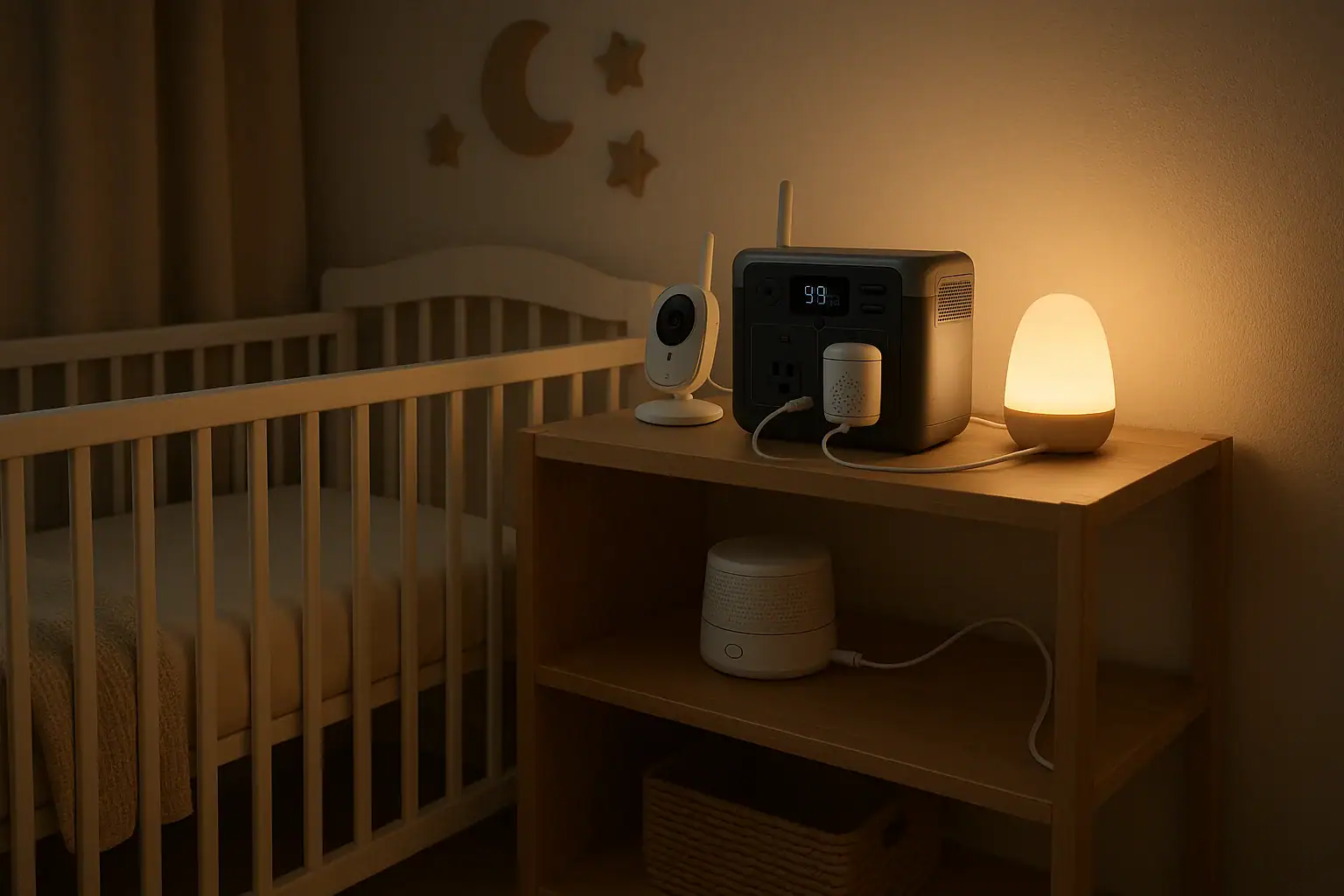
A portable power station can run a baby monitor, sound machine, night light, and other low-watt nursery essentials during an outage if its capacity, outputs, and runtime match the devices you need to keep on.
For most nurseries, the important questions are not just battery size. You also need to check watt-hours, AC outlet needs, USB-C PD profile, input limit, surge watts, standby draw, and whether the unit can recharge while powering small electronics. Baby gear usually uses modest power, but a few items, such as a humidifier or bottle warmer, can change the sizing quickly.
This guide explains how a portable power station fits into a nursery backup plan, how to estimate runtime, which specs matter, and what safety habits help keep the sleep space calm and practical during short blackouts or longer weather-related outages.
What a Nursery Portable Power Station Is and Why It Matters
A portable power station is a rechargeable battery system with built-in outlets and charging ports. Instead of burning fuel, it stores electricity and delivers it through AC outlets, USB ports, USB-C ports, and sometimes 12-volt DC outputs. For a nursery, the goal is simple: keep communication, soothing, and basic comfort devices working when the wall outlet is unavailable.
The most common nursery loads are small electronics. A baby monitor camera, parent unit, sound machine, small fan, night light, air purifier on low, or a low-power humidifier may draw far less than kitchen or heating equipment. That makes a portable power station a practical option for quiet indoor backup power.
It matters because nursery routines can be sensitive to interruption. A monitor helps caregivers stay aware, a sound machine may help maintain sleep, and a night light can make nighttime feeding or diaper changes safer. During an outage, even a few hours of backup power can reduce stress.
However, not every nursery device should be treated the same way. A sound machine that uses a USB cable may draw only a few watts, while a steam humidifier, bottle warmer, or space heater can demand much more power and may be inappropriate for small battery units. The right approach is to identify essential devices first, then size the power station around the total load and expected outage length.
How Portable Power Stations Run Baby Monitors and Sound Machines
A power station works by converting stored battery energy into the type of power your devices use. Battery capacity is usually listed in watt-hours. A 300 watt-hour unit can theoretically supply 300 watts for one hour, 30 watts for ten hours, or 10 watts for thirty hours, before losses. In real use, conversion losses and the power station’s own standby consumption reduce usable runtime.
Many nursery items can run from USB power. If your baby monitor or sound machine accepts USB-A or USB-C, using a DC port may be more efficient than using an AC adapter. AC outlets are convenient, but the inverter uses energy just to stay on. For very small loads, that overhead can be noticeable.
The basic runtime formula is simple: usable watt-hours divided by total watts equals estimated hours. If a power station has 500 watt-hours and you expect about 400 usable watt-hours after losses, a 20-watt nursery load may run for roughly 20 hours. This is an estimate, not a guarantee, because device settings, room temperature, battery age, and inverter efficiency all affect results.
Output type also matters. A baby monitor base may need its original wall adapter, a sound machine may need USB power, and a humidifier may need an AC outlet. Check the label on each adapter for volts, amps, and watts. If the device lists volts and amps but not watts, multiply volts by amps to estimate watts.
| Nursery device | Common power range | Backup implication |
|---|---|---|
| Audio or video baby monitor | 3 to 12 watts | Usually easy to run for many hours |
| Sound machine | 2 to 10 watts | Best on USB when available |
| LED night light | 1 to 5 watts | Very low battery impact |
| Small fan | 10 to 35 watts | Runtime depends heavily on speed setting |
| Cool mist humidifier | 15 to 45 watts | Often manageable, but verify label |
| Bottle warmer or steam device | 200 to 800 watts | Short runtime and higher output requirement |
Real-World Nursery Backup Examples
Consider a simple overnight setup: a video baby monitor using 8 watts, a sound machine using 5 watts, and a night light using 2 watts. The combined load is 15 watts. If a power station provides about 250 usable watt-hours, the estimated runtime is about 16 hours. That is enough for many overnight outages if the unit starts fully charged.
A second example is a nursery comfort setup with a monitor at 8 watts, sound machine at 5 watts, small fan at 20 watts, and cool mist humidifier at 25 watts. The total is 58 watts. A 500 watt-hour power station with roughly 425 usable watt-hours might run that group for about 7 hours. Turning down the fan or cycling the humidifier could extend runtime.
A third example shows why heating devices are different. Add a bottle warmer that draws 400 watts, even for short periods, and the power station must support that output. A small battery unit may handle the monitor and sound machine easily but trip off when the warmer starts. High-watt appliances also drain capacity quickly, so they usually belong in a separate emergency plan rather than the always-on nursery load.
For longer outages, prioritize the devices that are most important to safety and caregiving. The monitor, sound machine, and a small light will usually give the best value per watt. Humidity, air movement, and feeding accessories can be added if the power station has enough capacity and output headroom.
Charging phones or a parent-unit monitor from the same station is also common. Add those watts to the total, especially if multiple devices charge at once. Phone charging may be brief, but it still reduces available energy for overnight nursery equipment.
Common Mistakes and Troubleshooting Cues
One common mistake is buying based only on peak watt rating. A large output number does not tell you how long a power station will run a baby monitor. For nursery use, watt-hours and low-load efficiency are often more important than maximum wattage.
Another mistake is assuming every outlet behaves the same. Some power stations shut off automatically when the load is very small. This can affect a single low-watt sound machine or night light. If a device turns off unexpectedly even though the battery is not empty, the power station may be entering an auto-sleep mode because the load is below its detection threshold.
A third issue is using AC when USB would work better. If the sound machine has a USB input, using the USB port can reduce inverter losses. If the baby monitor requires its AC adapter, then the AC outlet may be necessary. Mixed use is normal: one device on AC and another on USB.
If the power station beeps, shuts down, or shows an overload warning, the connected devices may exceed the output rating or surge capability. This is more likely with motors, warming devices, or humidifiers than with monitors. Remove nonessential loads and restart according to the normal user controls. Do not bypass protections or alter cords to force operation.
If runtime is much shorter than expected, recheck the actual watts of each device, the power station’s state of charge, whether the inverter stayed on all night, and whether additional devices were plugged in. Also remember that battery capacity can be lower in cold environments or as the battery ages.
Safety Basics for Using Backup Power in a Nursery
For a nursery, placement matters as much as capacity. Keep the power station outside the crib, bassinet, play yard, or any sleep area. Place it on a stable, dry surface where air can circulate around the vents. Avoid covering it with blankets, clothing, curtains, or bedding.
Manage cords carefully. Cables should be routed away from the crib and out of reach of babies and toddlers. Avoid creating loops, dangling cords, or trip hazards near nighttime walking paths. Use only intact charging cables and adapters that fit securely.
Portable power stations are generally intended for indoor battery use, but they still produce heat during charging and discharging. Keep them away from water, humidifier mist, diaper pails with liquids, and open windows during storms. Do not place a power station where a humidifier can blow mist directly into vents or ports.
Do not use fuel-powered generators indoors, in garages, or near windows to power nursery equipment. A battery power station is different from a combustion generator, but it still should be used according to its manual and kept in a ventilated location.
Avoid powering high-heat devices in the nursery unless the power station and the device are clearly suitable for the load and the setup is supervised. Space heaters, heated blankets, steam humidifiers, and bottle warmers can draw high wattage and add burn or overheating concerns. For any permanent wiring, transfer equipment, or whole-room electrical modification, use a qualified electrician rather than improvised connections.
Maintenance, Charging, and Storage for Reliable Nursery Use
A nursery backup power plan works best when the battery is ready before an outage. Store the power station with an adequate charge level, check it periodically, and recharge it after use. Many owners keep a reminder to inspect charge status monthly or before storm seasons.
Temperature affects battery performance and long-term health. Store the unit in a dry indoor location, away from direct sun, extreme heat, freezing conditions, and high humidity. A closet shelf outside the nursery or an accessible household emergency area is often better than storing it on the floor.
Test the actual nursery setup before relying on it. Plug in the baby monitor, sound machine, and other essentials you plan to use, then observe whether the power station stays on and whether the estimated runtime looks realistic. This is especially helpful for low-watt devices that may trigger auto-shutoff on some units.
Keep the cables you need with the unit. During a nighttime outage, searching for the correct USB-C cable or monitor adapter can waste time. A small labeled pouch for nursery backup cords can make the system easier to use.
If the power station supports pass-through charging, it may be able to charge from the wall while powering devices. That can be convenient, but it is not the same as a dedicated uninterruptible power supply unless the unit specifically supports fast transfer behavior. For a baby monitor that must not blink off, confirm behavior with a simple home test rather than assuming seamless operation.
| Usable capacity | 15-watt load | 35-watt load | 60-watt load |
|---|---|---|---|
| 250 watt-hours | About 16 hours | About 7 hours | About 4 hours |
| 425 watt-hours | About 28 hours | About 12 hours | About 7 hours |
| 850 watt-hours | About 56 hours | About 24 hours | About 14 hours |
Related guides: Portable Power Station Watt-Hours Explained • AC vs DC Power: How to Maximize Efficiency and Runtime • USB-C Power Delivery (PD) Explained for Portable Power Stations
Practical Takeaways and Specs to Look For
For most nursery backup needs, start with the essentials: baby monitor, sound machine, and a small light. Add comfort devices only after you know their wattage. The best fit is usually a quiet battery unit with enough watt-hours for the expected outage, efficient low-load operation, and the right mix of USB and AC outputs.
Do not size the system around rare, high-watt nursery tasks unless you truly need them during an outage. A portable power station that easily runs small electronics overnight may not be the right tool for heating, steaming, or large appliances. Separating essential sleep and monitoring loads from occasional high-power loads makes the backup plan more reliable.
Specs to look for
- Battery capacity: Look for roughly 300 to 700 watt-hours for typical monitor, sound machine, light, and small fan setups; this range often supports overnight operation without excessive size.
- Continuous AC output: Look for at least 200 to 500 watts if you may use a humidifier or small appliance; it provides headroom beyond low-watt electronics.
- Surge watts: Look for a surge rating above the highest starting load you plan to connect; motors and some humidifiers may briefly draw more than their running watts.
- USB-C PD output: Look for 30 to 100 watts with common power delivery profiles; this helps run or charge modern monitors, phones, tablets, and parent units efficiently.
- Low-load behavior: Look for a unit that can stay on with small 2 to 10 watt devices or has adjustable auto-shutoff; this matters for sound machines and night lights.
- Pure sine wave inverter: Look for pure sine wave AC output when using sensitive adapters or electronics; it reduces compatibility issues compared with rougher AC output.
- Recharge time and input limit: Look for a wall recharge time of a few hours to overnight depending on capacity; faster input helps restore readiness between outages.
- Port mix: Look for at least one AC outlet, multiple USB-A or USB-C ports, and enough simultaneous outputs for your nursery list; adapters should not crowd or block each other.
- Noise and display controls: Look for quiet operation, dimmable screens, or no loud fan at low loads; nursery use benefits from minimal light and sound disruption.
The practical goal is not to power every device in the room. It is to keep essential monitoring and comfort available for the hours when household power is unavailable. With a clear load list, realistic runtime estimate, safe placement, and regular charging habit, a portable power station can be a useful part of a nursery emergency plan.
Frequently asked questions
How long can a portable power station run a baby monitor overnight?
It depends on the monitor’s wattage and the power station’s usable capacity. A low-watt baby monitor may run for many hours, and a larger battery can often cover a full night or more. To estimate runtime, divide usable watt-hours by the monitor’s total watts, then reduce the result a bit for conversion losses.
What specs matter most when choosing a portable power station for nursery use?
The most important specs are watt-hours, low-load efficiency, and the right output types for your devices. USB-C PD, AC outlet count, surge rating, and recharge time also matter if you plan to power a monitor, sound machine, light, or small fan. For nursery use, a unit that stays on reliably with small loads is often more useful than one with a very high peak watt rating.
Can I use the power station while it is charging?
Many units support pass-through charging, which means they can charge and power devices at the same time. That said, behavior varies by model, and some units may pause output or switch modes during charging. If a baby monitor must stay on continuously, test the setup at home before an outage.
What is a common mistake people make with nursery backup power?
A common mistake is sizing the system by output watts alone instead of watt-hours and actual device draw. Another frequent issue is using AC power for a very small USB device, which can waste battery energy. It is also easy to overlook auto-shutoff behavior on low-watt loads like sound machines or night lights.
Is it safe to keep a portable power station in the nursery?
It can be safe when it is placed outside the crib and sleep area, kept on a stable surface, and used with clear cords and proper ventilation. Keep it away from water, mist, bedding, and anything that could block airflow. For any setup that involves high-heat devices or permanent wiring changes, use a qualified professional.
Should I power a humidifier or bottle warmer from the same unit as the baby monitor?
Only if the power station has enough capacity and output headroom for the added load. Humidifiers may be manageable, but bottle warmers and other heating devices can drain battery quickly and may exceed the inverter rating. For most backup plans, the monitor and sound machine should stay on the priority list, while high-watt devices are treated as optional.
Related guides
Browse this topic →
- Beginner-friendly sizing, runtime & specs
- Solar & charging (MPPT, fast charging, cables)
- Batteries (LiFePO4, cycles, care & storage)
- Safety, cold-weather performance, real-world tips
More in Home / Appliances
See all →Keep reading
About this site
Portable Energy Lab publishes practical, independent guides about portable power—clear sizing, safe use, and real-world expectations.
Affiliate disclosure
Some links on this site may be affiliate links. If you buy through these links, we may earn a small commission at no extra cost to you. This helps support our content. Read our affiliate disclosure.