
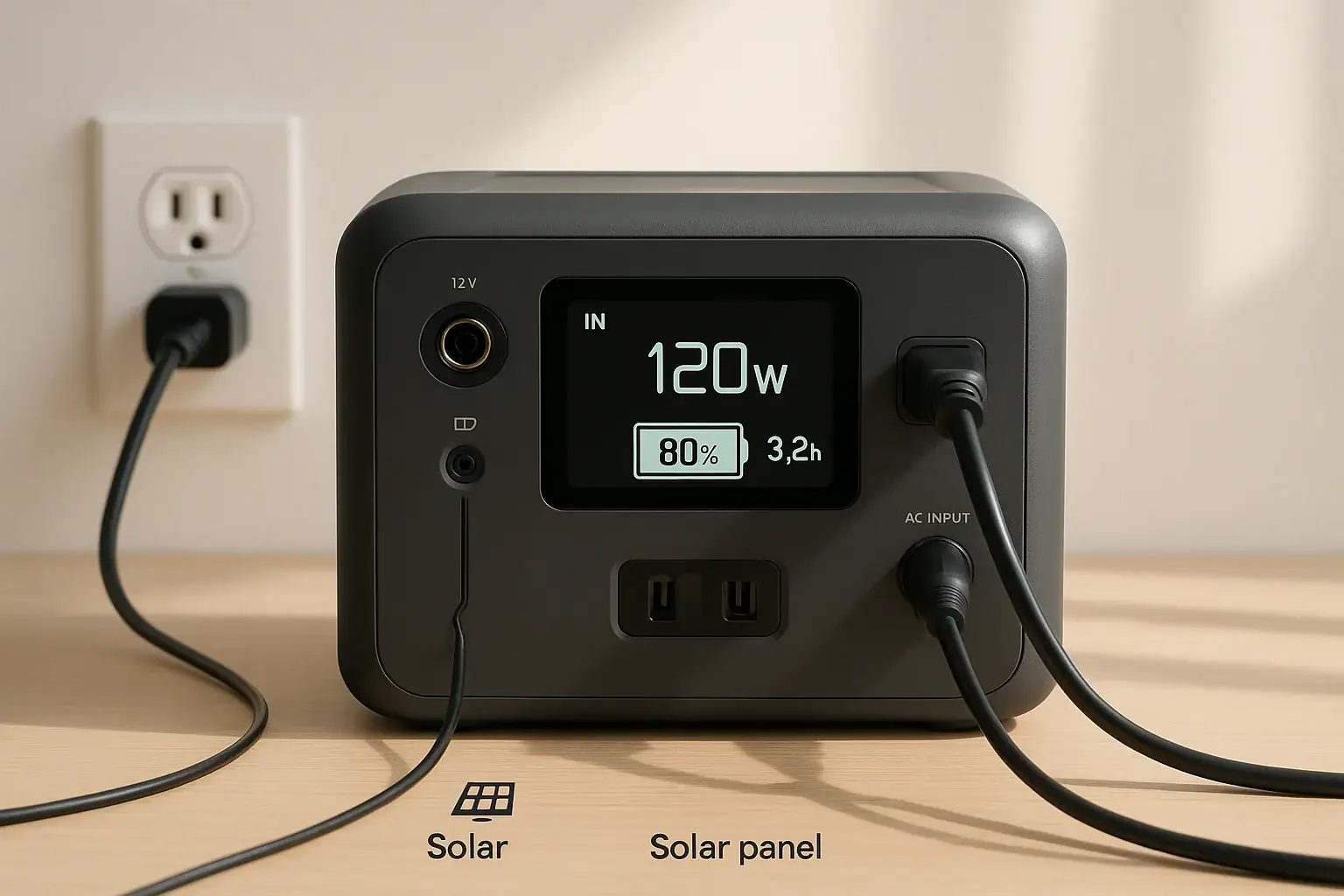
Most portable power stations take about 1.5 to 8 hours to charge, depending on battery size, input watts, and the charging method you use. Fast AC charging, solar input limits, and USB-C PD profiles all affect how long you wait before the battery is full.
People searching for how long it takes to recharge a portable power station often want to compare charge times, understand why their unit seems slow, or plan runtime between charges. The answer comes down to a few core specs: battery capacity in watt-hours, maximum input wattage, the type of charger (AC adapter, car charger, solar), and real-world efficiency losses.
This guide explains what those numbers mean, how to estimate charge time for any model, why your actual results may differ from the label, and which charging features matter most if you rely on a power station for camping, RVs, or backup power.
Understanding Charge Time for Portable Power Stations
When you ask “how long does it take to charge a portable power station,” you are really asking how quickly energy can be moved from a power source into the battery. Charge time is the result of three main factors working together: battery capacity, input power, and charging efficiency.
Battery capacity is usually measured in watt-hours (Wh). It describes how much energy the battery can store. A 300 Wh power station holds less energy than a 1000 Wh unit, so it can charge faster with the same input power simply because there is less capacity to fill.
Input power is measured in watts (W). This is the maximum rate at which the power station can accept energy from a specific source such as an AC wall charger, a USB-C PD charger, a 12 V car socket, or solar panels. The higher the input watts, the shorter the potential charge time, assuming the power source can actually supply that level.
Efficiency and charge curve also matter. Not all of the power going into the station ends up stored in the battery. Some is lost as heat or used to run internal electronics. Charging also usually slows down as the battery approaches full, so the last 10–20% can take longer than the first 50%.
Charge time matters because it determines how quickly you can recover from a full discharge, how many cycles you can realistically run in a day (important for solar setups), and how practical a unit is for travel or emergencies. If you rely on a power station for work equipment or critical devices, understanding realistic charge times helps you size both the battery and the charging system correctly.
How Portable Power Station Charging Actually Works
Portable power stations are essentially battery systems with built-in charge controllers and inverters. Different charging methods feed power into the battery through different circuits, each with its own limits and behaviors.
AC wall charging is usually the fastest method. The power station uses an internal or external AC adapter to convert grid power (typically 120 V AC in North America) into DC power for the battery. The adapter and the station’s firmware limit the maximum input watts to protect the battery and internal components. For example, a unit might accept up to 500 W from the wall, even if the outlet can technically supply more.
DC car charging uses a 12 V or 24 V vehicle socket. Because voltage is lower and many car sockets are limited to 8–10 A, car charging is usually slower, often in the 60–150 W range. This makes it convenient for topping up while driving but less ideal for quickly refilling a large battery.
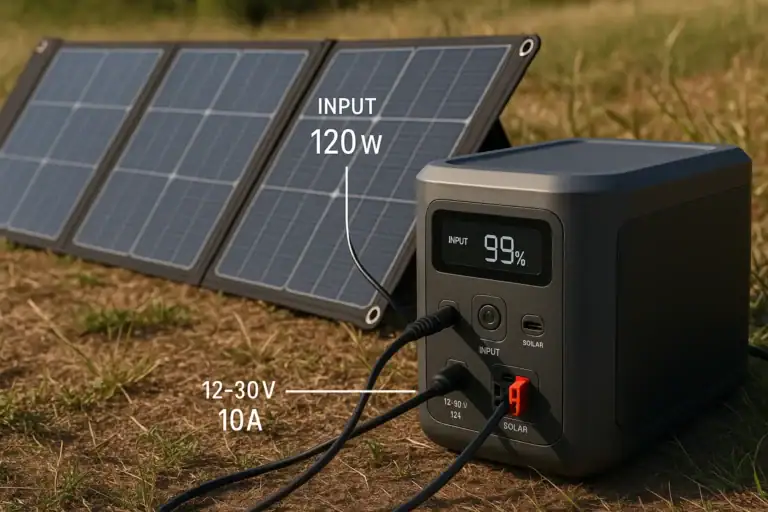
Solar charging relies on a built-in MPPT or PWM charge controller that takes power from solar panels and optimizes it for the battery. The solar input has a maximum wattage and a voltage range. Real-world solar input is affected by panel size, orientation, shading, temperature, and weather, so the effective watts are often much lower than the panel’s rated output.
USB-C PD charging uses Power Delivery profiles to negotiate voltage and current between the charger and the power station. A USB-C PD input might accept up to 60–100 W from a compatible charger. Some power stations can combine USB-C PD with AC or DC input for faster total charge rates, but only within their overall input limit.
All of these methods feed into the battery management system (BMS), which controls charge rate, monitors temperature, and prevents overcharging. The BMS typically follows a constant-current, then constant-voltage profile, meaning the power station charges quickly up to a certain percentage, then gradually tapers off as it approaches full to protect the cells.
This is why manufacturers often quote a time to reach 80% and a slightly longer time to reach 100%. In daily use, many people focus on how quickly they can reach 70–80% rather than waiting for a complete top-off, especially with larger batteries.
| Charging method | Typical input range (W) | Relative speed | Best use case |
|---|---|---|---|
| AC wall outlet | 200–800 W | Fastest for most units | Daily recharging, quick turnaround |
| DC car socket | 60–150 W | Slow to moderate | Charging while driving |
| Solar panels | 100–600 W (weather-dependent) | Moderate, highly variable | Off-grid, camping, RV |
| USB-C PD | 45–100 W | Slow to moderate | Small stations, travel backup |
Real-World Charge Time Examples and Estimates
To estimate how long it will take to charge a portable power station, a simple starting point is:
Charge time (hours) ≈ Battery capacity (Wh) ÷ Input power (W) ÷ 0.85
The 0.85 factor roughly accounts for efficiency losses and tapering near full. Real results vary, but this gives a practical ballpark.
Small portable power stations (150–300 Wh)
Smaller units designed for phones, laptops, and small electronics often have modest input limits:
- AC charging: With a 150–200 W input, a 240 Wh station might go from 0–80% in about 1–1.5 hours and reach full in around 2 hours.
- Car charging: At 60–100 W, the same unit could take 3–4 hours or more from low to full.
- USB-C PD: With 60–100 W PD, expect similar times to car charging, sometimes a bit faster if the station can fully use the PD profile.
Mid-size power stations (400–800 Wh)
These are common for camping, CPAP machines, and small appliances:
- AC charging: With 300–500 W input, a 500 Wh station might charge in about 1.5–2.5 hours, while an 800 Wh unit could take 2–3.5 hours.
- Car charging: At 100 W, a 500 Wh station may need 5–6 hours or more; an 800 Wh station could require most of a driving day.
- Solar charging: With 200–300 W of panels in good sun, 500–800 Wh units often need 3–6 hours of strong sunlight, spread over a longer real-world day.
Large power stations (1000 Wh and above)
Larger units for RVs or home backup can have much bigger batteries and higher input limits:
- AC charging: With 600–1200 W input, a 1000 Wh station might charge in 1–2 hours, while a 2000 Wh unit could take 2–3.5 hours.
- Car charging: At 100–150 W, a 1000 Wh station may need 8–10 hours or more; a 2000 Wh unit can take well over a full day of driving time.
- Solar charging: With 400–800 W of panels and good conditions, 1000–2000 Wh units often need 4–8 hours of strong sun, which usually means a full clear day or more.
These examples highlight that the same battery can have very different charge times depending on the input method. A large battery with a low input limit may charge more slowly than a smaller battery with a higher input limit, even from the same wall outlet.
In practice, you rarely charge from 0% to 100%. More often, you are topping up from 30–50% to 80–90%. That partial recharge can significantly shorten the effective wait time, especially with AC fast charging.
Common Charging Mistakes and Troubleshooting Slow Charge Times
Many users are surprised when their portable power station charges more slowly than the advertised “fast charge” time. Several common issues and misunderstandings can cause this gap between expectations and reality.
Using underpowered chargers or cables
If the station supports 500 W AC input but you are using a smaller adapter or a limited extension cord, the actual input may be much lower. Similarly, with USB-C PD, not all chargers and cables support high-wattage profiles. A 100 W-capable power station will still charge slowly if connected to a 30 W charger or a cable that cannot handle higher current.
Incorrect or weak power sources
Vehicle sockets can be limited by the car’s fuse rating, and some older vehicles provide lower, unstable voltage. Solar panels rarely deliver their full rated watts except under ideal conditions. Partial shade, low sun angles, dirt on the panels, or high temperatures can all reduce real input power, stretching charge times.
Charging while powering devices
If you are running appliances while charging (pass-through charging), some of the incoming power is used immediately rather than stored. For example, if the station accepts 300 W but is powering a 150 W load, only about half of the input goes into charging the battery. The display might show 300 W input, but the net charge rate is closer to 150 W.
High temperatures or poor ventilation
When a power station gets too warm, the BMS may reduce the charge rate to protect the battery. Placing the unit in direct sun, in a hot car, or in a confined space without airflow can lead to slower charging or intermittent pauses.
Firmware and battery protection behavior
Some units automatically slow charging at high or low states of charge, or when they detect voltage anomalies from solar or DC sources. This is normal behavior but can make it seem like the power station is not using the full rated input all the time.
If your unit charges much more slowly than expected, basic troubleshooting steps include:
- Check the display for actual input watts and compare with the rated maximum.
- Try a different wall outlet, charger, or cable to rule out weak sources.
- Move the station to a cooler, shaded, well-ventilated location.
- Disconnect or reduce loads while charging to maximize net input.
- Verify solar panel connections, orientation, and shading.
If problems persist, consult the user manual or contact the manufacturer rather than attempting any internal repairs or modifications.
Charging Safety Basics for Portable Power Stations
Safe charging is as important as fast charging. Portable power stations contain high-energy lithium batteries, and their charging systems include built-in protections. Users still play a key role in keeping operation safe and reliable.
Use only compatible charging methods. Always follow the manufacturer’s guidance on acceptable input voltages, connectors, and adapters. Avoid improvised connections or using chargers not designed for the unit, especially with DC and solar inputs.
Provide adequate ventilation. Charging generates heat, especially at high input rates. Place the power station on a stable, hard surface with space around the vents. Do not cover the unit with blankets or place it in tightly enclosed cabinets while charging.
Avoid extreme temperatures. Charging in very hot or very cold environments can stress the battery and may trigger safety limits that reduce the charge rate or stop charging entirely. Whenever possible, charge between roughly room temperature and typical indoor conditions rather than in direct sun, near heaters, or in freezing conditions.
Protect from moisture and dust. Most portable power stations are not fully waterproof. Keep them away from rain, standing water, and very dusty environments while plugged in. Moisture and conductive dust can increase the risk of short circuits or corrosion over time.
Do not modify or open the unit. Internal components are not user-serviceable. Avoid attempts to bypass charge limits, connect directly to battery terminals, or integrate the unit into home electrical panels without proper equipment and professional help. For any permanent installation or integration with household circuits, consult a qualified electrician.
Monitor during high-rate charging. When using the fastest available AC or solar input, it is wise to remain nearby, periodically checking for unusual noises, smells, or excessive heat. Modern power stations are designed to shut down under fault conditions, but user awareness adds an extra layer of safety.
Maintaining Good Charging Performance Over Time
How long it takes to charge a portable power station can gradually change over the life of the battery. Good maintenance and storage habits help keep charge times predictable and extend overall battery lifespan.
Avoid frequent full discharges. Regularly running the battery to 0% and then charging to 100% puts more stress on lithium cells than shallower cycles. When possible, operate between roughly 20–80% for everyday use and reserve full cycles for occasional needs.
Store at partial charge. If you will not use the power station for several weeks or months, store it around 40–60% charge in a cool, dry place. Long-term storage at 0% or 100% can accelerate capacity loss, which indirectly affects how long charging feels because you are filling a smaller effective battery.
Top up periodically during storage. Many manufacturers recommend recharging every 3–6 months to compensate for self-discharge and keep the battery management system active. Letting a unit sit completely drained for long periods can make it difficult or impossible to recharge.
Keep ports and vents clean. Dust and debris around charging ports and cooling vents can lead to poor connections or increased operating temperatures. Gently clean with a dry cloth and avoid blowing moisture into ports.
Use appropriate charging rates. If the station offers adjustable or “eco” charging modes, consider using moderate rates for routine charging when time is not critical. Lower stress on the battery can help maintain capacity and consistent charge times over many cycles.
Watch for signs of aging. Over years of use, you may notice that the displayed capacity decreases or that charge time changes slightly. Mild changes are normal. Rapid capacity loss, swelling, or unusual heat during charging are warning signs; discontinue use and contact the manufacturer for guidance.
| Practice | Recommended approach | Effect on charge time and lifespan |
|---|---|---|
| Daily cycling | Keep between ~20–80% when practical | Helps preserve capacity and consistent charge times |
| Long-term storage | Store at ~40–60% in a cool, dry place | Reduces aging, keeps future charge times predictable |
| Charging rate | Use maximum rate only when needed | Lower stress can slow degradation over time |
| Periodic checks | Recharge every 3–6 months in storage | Prevents deep discharge that can affect performance |
Related guides: Why Charging Slows Down Near 80–100%: A Simple Explanation • MPPT vs PWM in Portable Power Stations: What It Changes in Real Life • Dual Input Explained: Can You Combine Wall + Solar Charging Safely? • Fast Charging Explained: What “AC Input” and “DC Input” Speeds Mean
Key Takeaways and Specs to Look For When Comparing Charge Times
The time it takes to charge a portable power station depends mainly on battery capacity, maximum input watts, and the charging method you use. Small units often recharge in 1–3 hours from a wall outlet, mid-size models in 2–4 hours, and large stations in 2–8 hours or more, especially if limited to car or solar input.
When planning for camping, work, or backup power, match your expected daily energy use with both the battery size and how quickly you can realistically refill it from available sources. Fast AC charging is convenient at home, while higher solar input limits matter more for off-grid setups.
Specs to look for
- Battery capacity (Wh): Look for a capacity that fits your daily usage (for example, 300–600 Wh for light use, 1000–2000 Wh for heavier loads). Larger capacity means longer runtime but generally longer charge times.
- AC input wattage: Check the maximum AC charge rate (commonly 200–1200 W). Higher input shortens charge time; for example, 500 W can refill a 500 Wh unit in around 1–2 hours under ideal conditions.
- Solar input rating (W and V range): Look for a solar input that supports at least 200–400 W for mid-size units and a voltage range compatible with common portable panels. Higher solar input allows faster off-grid recharging on sunny days.
- Car charging power (12 V/24 V): Check the rated input from a vehicle socket (often 60–150 W). Higher values reduce the hours needed to recharge while driving, especially for larger batteries.
- USB-C PD input (W): For travel and laptop use, a USB-C PD input of 60–100 W can provide flexible charging from modern chargers and reduce reliance on bulky adapters.
- Combined input capability: Some units allow AC plus solar or AC plus USB-C at the same time, within a total input limit. This can significantly cut charge times when multiple power sources are available.
- Display accuracy and data: A clear screen showing real-time input watts, output watts, and percentage or remaining time helps you understand actual charge speed and plan usage.
- Battery chemistry and cycle life: Check for the expected cycle life at a given depth of discharge. Chemistries with higher cycle ratings can maintain capacity—and thus predictable charge times—over more years of use.
- Thermal management and ventilation: Good cooling design helps the unit sustain higher charge rates without throttling, especially in warm environments.
- Adjustable or eco charging modes: Optional lower-rate modes provide flexibility, allowing you to choose between fastest possible charging and gentler charging that may support longer battery life.
By focusing on these specifications and understanding how they interact, you can better estimate how long any portable power station will take to charge in real-world conditions and choose a model that fits your charging routine and power needs.
Frequently asked questions
What specifications and features most affect how long it takes to charge a portable power station?
The main specs are battery capacity (Wh) and the maximum input power (W) the unit accepts from AC, solar, car, or USB-C. Also consider combined-input capability, the charge controller type (MPPT vs PWM), and thermal/BMS limits because efficiency losses and charging tapering affect real-world times.
Why is my portable power station charging more slowly than the advertised time?
Common reasons include using an underpowered charger or cable, charging while running loads that consume incoming power, reduced solar output from shade or angle, and thermal/BMS throttling at high or low temperatures. The manufacturer’s quote often assumes ideal input power and conditions, so real-world times are typically longer.
Is it safe to charge a portable power station indoors or in hot conditions?
Charging indoors is generally safe if you follow the manufacturer’s instructions, allow ventilation, and keep the unit away from moisture and flammable materials. Avoid charging in very hot or confined spaces because elevated temperatures can trigger protection circuits or accelerate battery wear.
Can I charge a power station and power devices at the same time without affecting charge time?
Yes, many units support pass-through charging, but powering devices during charging reduces the net energy going into the battery, so overall recharge time will be longer. If you need the fastest refill, reduce or disconnect loads while charging.
How much does weather and panel placement affect solar charging speed?
Solar input is highly variable: cloud cover, panel angle, shading, temperature, and dirt can significantly lower output from rated watts. Using MPPT controllers and adding more panel capacity than the battery’s nominal input requirement helps compensate for real-world losses and speeds up charging on partly cloudy days.
How should I store my power station to keep charging performance steady over time?
Store the unit at a partial state of charge (around 40–60%) in a cool, dry place and recharge it every 3–6 months to prevent deep discharge. Avoid long-term storage at 0% or 100% and keep it away from extreme temperatures to preserve capacity and predictable charge times.
Related guides
Browse this topic →
- Beginner-friendly sizing, runtime & specs
- Solar & charging (MPPT, fast charging, cables)
- Batteries (LiFePO4, cycles, care & storage)
- Safety, cold-weather performance, real-world tips
More in Charging
See all →- Can You Daisy-Chain Portable Power Stations? Why It Usually Isn’t a Good Idea
- USB-C Input vs AC Input on Portable Power Stations: Which Charging Method Makes Sense?
- Car Alternator Charging vs Cigarette Lighter Charging: What Changes for Power Stations?
- Charging a Portable Power Station From an RV Outlet: 12V, 24V, and Safety Limits
- Fast AC Charging vs Battery Longevity: Should You Use Turbo Mode Every Time?
Keep reading

About this site
Portable Energy Lab publishes practical, independent guides about portable power—clear sizing, safe use, and real-world expectations.
Affiliate disclosure
Some links on this site may be affiliate links. If you buy through these links, we may earn a small commission at no extra cost to you. This helps support our content. Read our affiliate disclosure.