
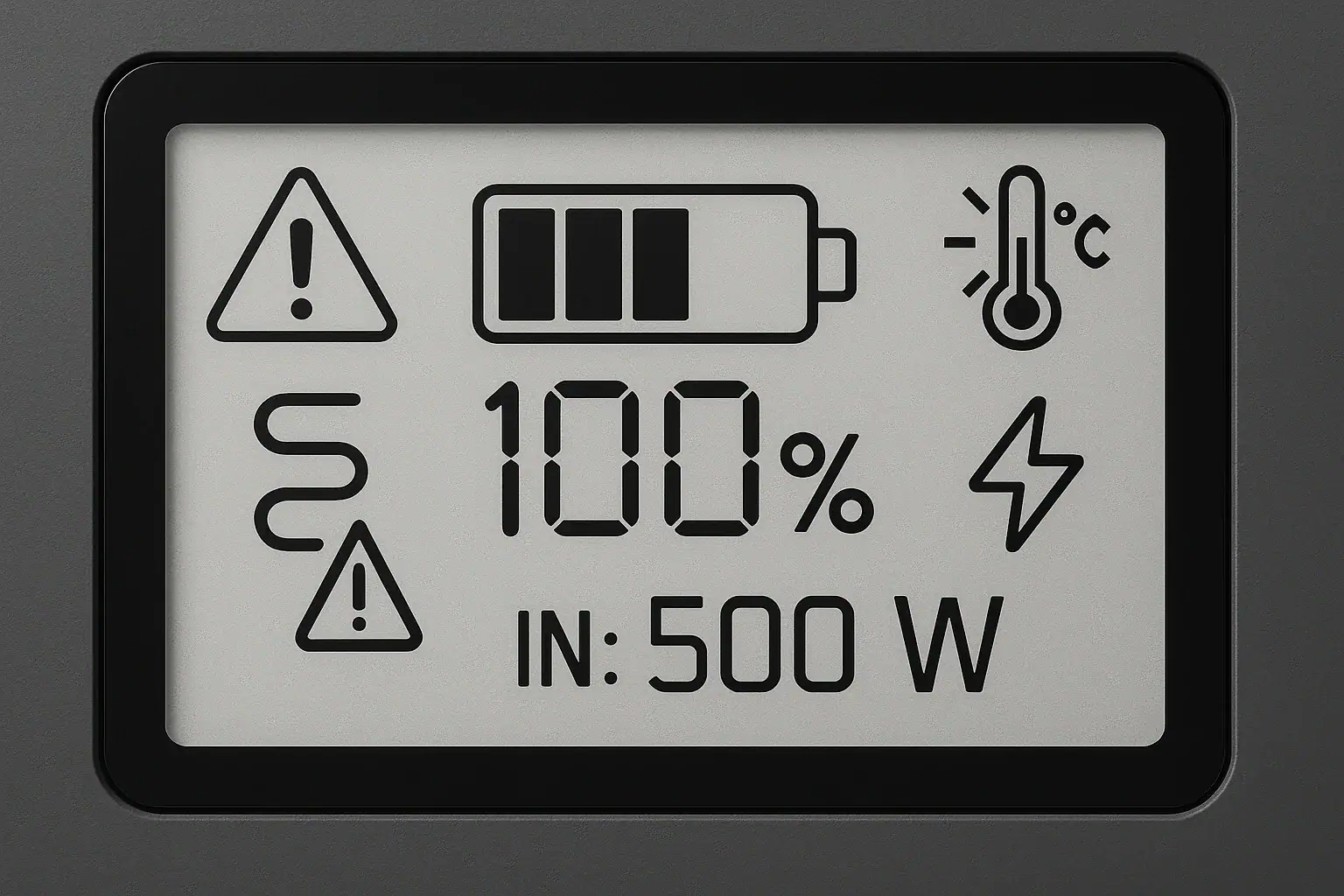
Portable power station error codes usually mean the unit has detected overload, temperature, charging, battery, or communication conditions that need attention.
Most warnings are protective, not proof that the power station is permanently damaged. A code may appear when connected devices exceed the output rating, a charger goes beyond the input limit, a USB-C device requests an unsupported PD profile, or a motor appliance briefly pulls more surge watts than the inverter can provide. Some alerts also relate to low battery, fan blockage, runtime estimates, or internal temperature sensors.
The exact wording varies by model, but the troubleshooting logic is similar: identify what changed, reduce electrical stress, let the unit return to a normal temperature, and stop using it if the warning repeats under light loads. Understanding the main code families helps you react calmly and choose safer, better-matched equipment later.
What Portable Power Station Error Codes Mean and Why They Matter
Error codes are short messages, icons, beeps, or flashing indicators that tell you the power station has reached a limit or detected an abnormal condition. They may appear as letters and numbers, such as E01 or P2, or as symbols for overload, temperature, battery, fan, AC output, DC output, or charging input.
These warnings matter because portable power stations combine several systems in one enclosure: a battery pack, battery management system, inverter, charge controller, display, ports, cooling fans, and internal sensors. A warning can come from any of those systems. The code is the unit’s way of preventing unsafe heat, excessive current draw, unstable charging, or battery stress.
Many alerts are temporary. For example, an overload warning may clear after you remove a high-wattage device. A low-temperature charging warning may clear after the unit warms within a normal operating range. A high-temperature warning may clear after the fan runs and the station rests in shade. Other alerts, especially repeated battery, sensor, or communication faults, may mean the unit needs professional service or replacement rather than continued use.
Error codes also help you match loads more accurately. If a power station repeatedly faults while running an appliance, the issue may not be battery capacity alone. It may be inverter wattage, surge capacity, waveform compatibility, port limits, input voltage range, USB-C negotiation, or environmental temperature.
How Error Detection Works Inside a Portable Power Station
A portable power station monitors voltage, current, power, temperature, state of charge, charging behavior, and output behavior. When a monitored value moves outside the design range, the control system may reduce output, stop charging, shut down a port, run fans faster, or display a warning.
The inverter is responsible for converting stored DC battery energy into AC power. It watches continuous watts and short bursts of surge watts. If a refrigerator compressor, pump, microwave, or power tool demands more starting power than the inverter can handle, the AC output may shut off even if the battery still has plenty of charge.
The battery management system monitors cell voltage, pack temperature, charge and discharge current, and overall battery condition. It helps prevent over-discharge, overcharge, excessive heat, and charging when the pack is too cold or too hot. The charge controller separately manages solar, wall, vehicle, or USB-C input, depending on the model. If input voltage, amperage, or power exceeds the accepted range, the station may reject the charge source or show an input error.
USB-C ports add another layer. They often use Power Delivery negotiation, where the device and station agree on a PD profile such as 5V, 9V, 15V, or 20V at a certain current. If the cable, device, or port cannot agree on a compatible profile, charging may be slow, intermittent, or unavailable.
| Warning type | What it usually means | Common trigger |
|---|---|---|
| Overload | Connected devices exceed output capability | AC load above 600W on a 500W inverter |
| Surge fault | Startup power is too high | Motor load briefly pulling 2 to 3 times running watts |
| High temperature | Internal components are too warm | Heavy load in direct sun or blocked airflow |
| Low temperature charging | Battery is too cold to accept charge safely | Charging after overnight storage in freezing conditions |
| Input error | Charging source is outside accepted range | Solar array voltage above the station input limit |
| USB-C negotiation error | Device, cable, and port did not agree on a profile | Using a low-rated cable for a high-wattage laptop |
Real-World Examples of Common Error Codes and Warnings
A typical overload warning appears when the total connected load is higher than the inverter can continuously supply. For instance, a small power station may run lights, a phone charger, and a fan easily, but fault when a coffee maker is added. The display may show an overload symbol, AC output may turn off, or the station may beep. The battery percentage may still look high because the problem is output power, not stored energy.
A surge-related warning can be more confusing. A refrigerator may list 150 running watts but require much more for a fraction of a second when the compressor starts. If the surge watts exceed the station’s capability, the inverter may trip immediately or after several cycles. This is why running watts alone can be misleading for motorized or compressor-based appliances.
A temperature warning often occurs during high-output use, fast charging, or hot weather. The station may keep running with fans at high speed, reduce charging power, or shut down output. Temperature warnings are more likely when the unit sits on a hot surface, inside a closed vehicle, in direct sunlight, or near blankets, gear, or walls that block airflow.
Input errors commonly happen with solar charging. A station may accept a broad range of solar wattage but a narrower range of input voltage. Connecting panels in a configuration that produces too much open-circuit voltage can trigger an input fault or prevent charging. With vehicle charging, weak sockets, undersized adapters, or voltage drops can cause intermittent input behavior.
USB and DC warnings are usually port-specific. A 12V socket may shut off if a cooler draws too much current. A USB-C port may fail to charge a laptop at full speed if the cable supports only lower wattage or if the laptop requests a PD profile the station does not provide.
Common Mistakes and Troubleshooting Cues
The first mistake is treating all error codes as battery failures. Many warnings are caused by the connected load, the charger, the cable, the temperature, or port selection. If the code appears only with one device connected, that device’s startup watts, power factor, charger behavior, or cable may be the clue.
Another common mistake is comparing battery capacity to appliance wattage without checking inverter output. A 1,000Wh battery does not automatically mean the station can run a 1,500W heater. Capacity affects runtime. Output rating affects whether the appliance can run at all. A low runtime estimate is not the same as an overload code, although both may appear during heavy use.
For overload cues, look for warnings that appear immediately after turning on a high-wattage appliance or when several devices run together. Remove the largest load and see whether normal operation returns. For surge cues, watch for faults when a motor, compressor, or pump starts, even if the running wattage seems modest. For temperature cues, note whether the warning appears after long operation, fast charging, sun exposure, or restricted airflow.
For input cues, compare the charging source to the station’s stated input range. Pay attention to voltage range, maximum input watts, connector type, and whether the source is regulated. Solar panel labels can be confusing because open-circuit voltage can be higher than the working voltage shown during charging. For USB-C issues, try a cable rated for the intended wattage and verify that the port supports the voltage profile your device needs.
If an error returns with no load connected, occurs during normal indoor temperatures, appears after a full reset according to the user manual, or is accompanied by swelling, odor, smoke, unusual heat, or liquid, stop using the unit and seek qualified service guidance.
Safety Basics When a Warning Appears
Warnings should be treated as protective signals. Do not bypass, tape down, disable, or repeatedly override a protection feature. If the power station shuts off a port, it is responding to a condition it is designed to limit. Repeatedly forcing the same condition can increase heat, wear, and risk.
Keep the unit on a stable, dry, hard surface with open airflow around vents and fans. Avoid operating it under bedding, in tightly packed storage bins, in rain, or near flammable materials. Do not charge or discharge it if the case is cracked, swollen, wet inside, or giving off an unusual smell.
Use cables and adapters that match the expected current and wattage. Underrated cords can heat up before the power station detects a problem. For AC loads, avoid daisy-chaining multiple extension cords or power strips. For DC and USB-C loads, use cables appropriate for the port rating and device demand.
Never open the power station, modify the battery pack, bridge terminals, or bypass fuses and electronics. Lithium battery systems store significant energy even when the display looks off. Internal repair is not a normal user task.
If the power station is intended to support household circuits, permanently installed wiring, or emergency backup for a building, consult a qualified electrician. Safe connection methods and code requirements are not the same as plugging a device into a portable outlet.
Maintenance and Storage Habits That Reduce Error Codes
Good storage and maintenance reduce nuisance warnings and help the battery management system work accurately. Store the unit in a cool, dry place away from direct sun, heaters, freezing temperatures, and moisture. Moderate storage charge is generally better than leaving a lithium battery completely full or completely empty for long periods.
Inspect the unit before trips or outages. Check for damaged ports, loose connectors, blocked vents, cracked cables, or debris in sockets. A small obstruction around a fan or intake can make temperature warnings more likely during heavy output.
Recharge and test the station periodically. A short functional check with a modest AC load, a USB-C load, and the charger you plan to use can reveal cable problems or port issues before an emergency. If the display’s runtime estimate seems inaccurate, remember that estimates adjust based on recent power draw and may stabilize after the load runs for a few minutes.
For solar charging, keep panel connectors clean and avoid configurations that may exceed voltage limits in cold bright conditions. For vehicle charging, avoid leaving the station connected to a vehicle outlet when the engine is off unless the setup is specifically designed to prevent draining the vehicle battery.
Software or firmware updates, if supported by the unit, may improve display behavior, charging logic, or error reporting. Follow the manufacturer’s normal update process only; do not use unofficial files or modified firmware.
| Habit | Suggested check | Why it helps |
|---|---|---|
| Storage charge | Store around 40% to 70% when unused for weeks | Reduces stress from extreme state of charge |
| Vent inspection | Check vents and fans before high-watt use | Lowers chance of heat-related shutdowns |
| Cable review | Use cords rated above expected load | Prevents voltage drop and overheating |
| Periodic test | Run a modest load every 1 to 3 months | Confirms ports and display behavior |
| Solar input check | Compare panel voltage to input range | Helps avoid input errors and rejected charging |
| Dry storage | Keep away from condensation and wet gear | Reduces corrosion and electrical faults |
Practical Takeaways and Specs to Look For
Related guides: Battery Management System (BMS) Explained: Protections Inside a Power Station • Input Limits (Volts/Amps/Watts) Explained: How Not to Damage Your Unit • USB-C Power Delivery (PD) Explained for Portable Power Stations
Most portable power station error codes point to a limit being reached: too much output, too much surge demand, poor charging input, unsuitable temperature, weak cable performance, or a battery protection condition. The fastest way to understand a warning is to connect it to what just changed, such as adding an appliance, changing chargers, moving into sun, or using a different cable.
When comparing power stations later, focus on operating limits, not just battery size. A higher-capacity unit may still be the wrong fit if its inverter, input range, port ratings, or cooling design do not match your use case.
Specs to look for
- Continuous AC output: Look for a watt rating above your expected running load, such as 800W for a 500W appliance group, because overload errors happen when output demand exceeds inverter capacity.
- Surge watt rating: Look for short-term surge capacity of about 2 times the running watts for motor loads, because compressors, pumps, and tools can spike at startup.
- Battery capacity: Look for watt-hours that match your runtime needs, such as 1,000Wh for roughly 10 hours at a 100W average load before losses, because capacity affects how long devices run.
- AC waveform: Look for pure sine wave output for sensitive electronics and motorized appliances, because some devices run poorly or fault on rougher inverter output.
- Solar input voltage range: Look for a range that safely fits your panel setup, such as 12V to 60V or wider depending on design, because excess voltage can trigger input errors.
- Maximum charging input: Look for input watts that match how quickly you need to recharge, such as 300W, 600W, or more, because low input limits extend recovery time.
- USB-C Power Delivery rating: Look for ports rated 60W to 100W or higher with common PD profiles, because laptops and tablets may not charge properly without the right voltage and cable support.
- Operating temperature range: Look for clear charging and discharging temperature ranges, because cold or hot conditions can stop charging, reduce output, or display temperature warnings.
- Display detail and diagnostics: Look for separate input watts, output watts, battery percentage, runtime estimate, and warning icons, because clearer information makes troubleshooting faster.
A warning that clears after reducing load or improving airflow is usually a normal protection response. A warning that repeats under light use, appears with no devices connected, or comes with heat, odor, swelling, moisture, or visible damage should be treated as a stop-use condition until the unit is inspected by qualified support.
Frequently asked questions
What should I check first when a portable power station error code appears?
Start by checking what changed right before the warning, including the connected load, charging source, cable, and ambient temperature. Remove the heaviest device, let the unit cool if needed, and compare the setup to the station’s rated input and output limits. If the warning clears after reducing stress, it was likely a protection response rather than a permanent fault.
Which specs matter most if I want to avoid portable power station error codes?
The most useful specs are continuous AC output, surge watt rating, solar or charging input range, USB-C Power Delivery rating, and operating temperature limits. These determine whether the station can handle your devices without overload, input, or temperature warnings. Clear display diagnostics also help you identify the cause faster.
What is a common mistake people make when troubleshooting these warnings?
A common mistake is assuming the battery is the problem when the actual issue is output power, surge demand, or an incompatible charger or cable. Another frequent error is comparing watt-hours to appliance watts without checking inverter capacity. Capacity affects runtime, while output rating determines whether the appliance can run safely.
Are portable power station error codes usually dangerous?
Most error codes are protective and are meant to prevent damage or unsafe operation. They become more concerning if they repeat under light loads, appear with no devices connected, or come with heat, odor, swelling, smoke, or moisture. In those cases, stop using the unit and seek qualified service guidance.
Why does my power station show an error with a device that seems to use low watts?
Some devices draw a short startup surge that is much higher than their normal running wattage. Motors, compressors, pumps, and some chargers can trigger a warning even when the average load looks small. Cable quality, waveform compatibility, and port limits can also cause faults.
Can temperature or storage conditions cause false warnings?
Yes. Very hot, very cold, or poorly ventilated conditions can trigger temperature-related warnings or charging restrictions. Storing the unit in extreme conditions can also affect battery behavior and make warnings more likely until the station returns to a normal operating range.
Related guides
Browse this topic →

- Beginner-friendly sizing, runtime & specs
- Solar & charging (MPPT, fast charging, cables)
- Batteries (LiFePO4, cycles, care & storage)
- Safety, cold-weather performance, real-world tips
More in FAQ
See all →Keep reading
About this site
Portable Energy Lab publishes practical, independent guides about portable power—clear sizing, safe use, and real-world expectations.
Affiliate disclosure
Some links on this site may be affiliate links. If you buy through these links, we may earn a small commission at no extra cost to you. This helps support our content. Read our affiliate disclosure.