
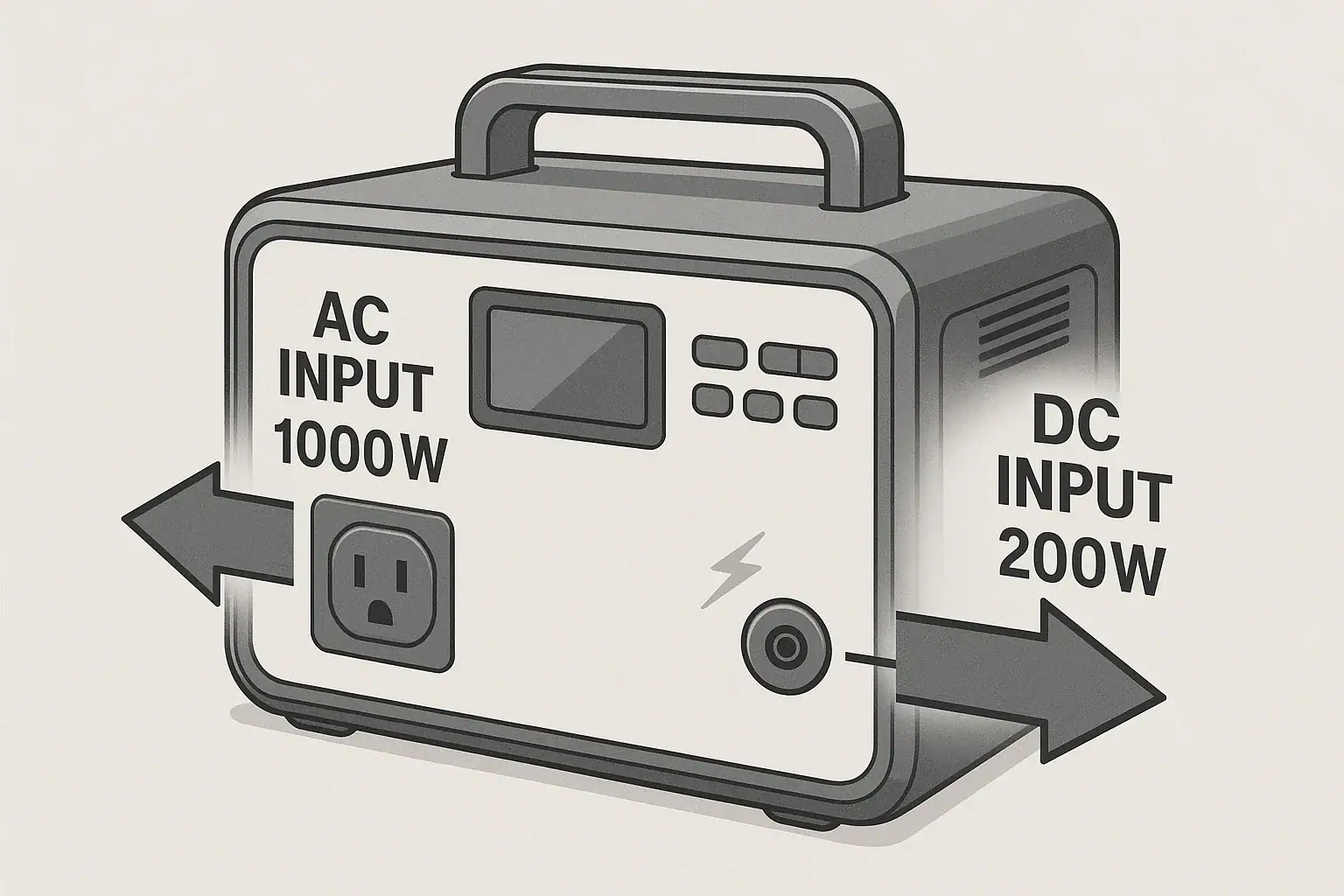
AC input and DC input speeds describe how quickly a portable power station can take in power from different charging sources, and they directly control how fast the battery fills up. When you see confusing specs like “AC charging input,” “DC input limit,” “solar input watts,” or “PD input,” they are all talking about how much power (in watts) the station can accept.
Understanding these input limits is the key to predicting charge time, choosing the right charger, and avoiding slow or incomplete charging. Whether you plug into the wall, a car outlet, or solar panels, the power station will only charge as fast as its AC and DC input ratings allow. Once you know how to read those numbers, you can compare fast charging claims, estimate runtime between charges, and match the station to your real-world needs.
This guide explains what AC and DC input speeds really mean, how they work inside a portable power station, and which specs matter most when you want reliable, fast, and safe charging.
AC vs DC Input Speeds: What They Mean and Why They Matter
On a portable power station, AC input and DC input are labels for the different ways it can receive charging power.
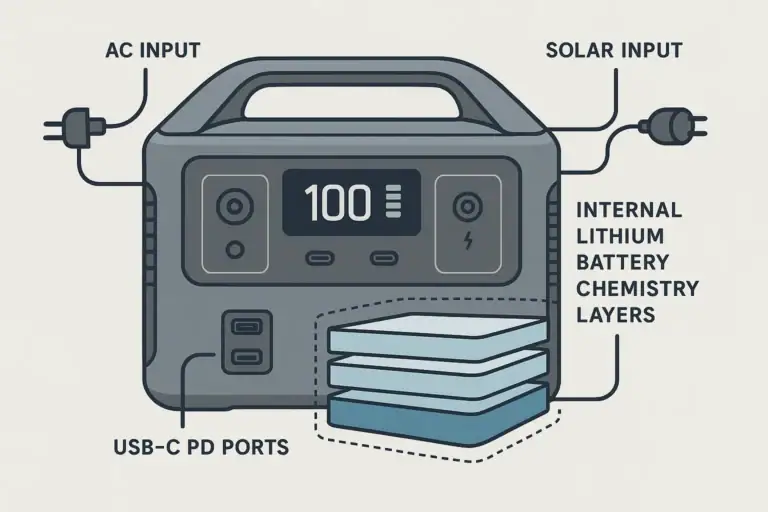
AC input usually refers to charging from a wall outlet or generator. The power station takes alternating current (AC), converts it to direct current (DC), and stores it in the battery. The AC input speed is typically shown as watts (for example, 300 W, 600 W, 1,000 W), and it largely determines how quickly you can recharge from household power.
DC input covers charging from sources that already provide direct current, such as solar panels, a car socket, or a dedicated DC adapter. DC input speed is also rated in watts, often split across different ports or voltage ranges (for example, 12–28 V up to 200 W, or USB-C PD up to 100 W per port).
Both AC and DC input speeds matter because:
- They set the maximum charging rate from each source.
- They define your minimum recharge time from empty to full.
- They limit how much you can benefit from a high-wattage charger or solar array.
- They affect heat, battery wear, and overall system stress.
Even if you connect a powerful charger or a large solar array, the power station will not exceed its rated AC or DC input limits. Those limits are built in to protect the battery and internal electronics.
How AC and DC Charging Work Inside a Portable Power Station
Although AC and DC inputs look like simple ports on the outside, they feed into different parts of the charging system inside the portable power station. Understanding the basics helps explain why some units charge faster than others, even with similar battery capacities.
AC Input Path: From Wall Outlet to Battery
When you plug a portable power station into a wall outlet, the charging path typically looks like this:
- AC inlet: Receives 100–120 V AC (in North America) from the wall or generator.
- AC-to-DC converter (charger): Converts AC to a controlled DC voltage and current.
- Battery management system (BMS): Regulates charging current and voltage to protect the battery cells.
- Battery pack: Stores the energy as DC at the pack’s nominal voltage.
The AC input wattage rating (for example, 600 W) is mainly determined by the size and efficiency of the AC-to-DC converter and the thermal design. Higher AC input wattage usually means faster charging but also more heat, so the unit may use fans or limit power under high temperatures.
DC Input Path: Direct Charging With Less Conversion
DC charging paths are somewhat simpler because the power is already DC, but they still pass through regulation stages:
- DC input port(s): This may include a barrel jack, XT-style connector, car socket input, or USB-C PD ports.
- DC-DC converter: Steps voltage up or down to match what the battery and BMS require.
- Battery management system: Controls charging current, monitors cell temperatures, and balances cells.
- Battery pack: Receives controlled DC power and stores it.
For DC inputs, the power station’s spec sheet may list separate limits for:
- Car/adapter input (for example, 12–24 V up to 120 W).
- Solar input (for example, 11–30 V up to 200 W, with a maximum current limit).
- USB-C PD input (for example, up to 60 W or 100 W per port).
These are often managed by separate DC-DC converters or shared converters with combined limits. The total DC input speed you can achieve depends on how the manufacturer allocates these limits across the ports.
Why Input Watts, Not Just Battery Size, Control Charge Time
Charge time is primarily a function of battery capacity (in watt-hours, Wh) and input power (in watts, W). A simple rough formula is:
Estimated charge time (hours) ≈ Battery capacity (Wh) ÷ Effective input power (W)
Because there are conversion losses and tapering near full charge, the real time is usually a bit longer than the simple math suggests. Still, two key points stand out:
- A large battery with a high input wattage can recharge nearly as fast as a smaller battery with a low input wattage.
- Fast charging claims only matter if the AC or DC input ratings support them.
For example, a 1,000 Wh power station with 500 W AC input will typically charge roughly twice as fast from the wall as the same 1,000 Wh capacity with only 250 W AC input, assuming similar efficiency.
| Battery capacity (Wh) | AC input rating (W) | DC input rating (W) | Approx. AC charge time from 0–80% |
|---|---|---|---|
| 500 Wh | 250 W | 150 W | About 1.5–2 hours |
| 1,000 Wh | 300 W | 200 W | About 3–3.5 hours |
| 1,000 Wh | 600 W | 400 W | About 1.5–2 hours |
| 2,000 Wh | 600 W | 500 W | About 3–3.5 hours |
Real-World Charging Scenarios: AC and DC Input in Action
Seeing how AC and DC input speeds play out in everyday use makes the numbers easier to understand. The examples below use rounded figures to show how input limits shape charge times.
Scenario 1: Fast Wall Charging Before a Trip
Imagine a 1,000 Wh portable power station with a 600 W AC input rating. You return home with the battery nearly empty and want it ready for a camping weekend.
- At 600 W AC input, in ideal conditions, you could theoretically go from 0–100% in around 1.7 hours (1,000 ÷ 600 ≈ 1.7).
- Accounting for efficiency and tapering near full, a more realistic estimate is about 2 hours.
If the same 1,000 Wh station only had 300 W AC input, you would be looking at roughly double the time, closer to 3.5–4 hours. The higher AC input rating gives you more flexibility when you are in a hurry.
Scenario 2: Solar Charging With DC Input Limits
Consider a 1,000 Wh power station with a solar DC input spec of 11–30 V, up to 200 W. You connect a solar array rated for 400 W under ideal sunlight.
- Even though the panels could theoretically deliver 400 W, the station will clamp input to its 200 W limit.
- In strong sun, you might see around 180–200 W actual input after losses.
- At 200 W effective input, 0–100% would take about 5 hours of strong sun (1,000 ÷ 200 = 5), plus extra time for tapering and real-world conditions.
In this case, adding more panels beyond 200 W of realistic output will not speed up charging because the DC input limit is the bottleneck.
Scenario 3: Car Charging While Driving
Now take the same 1,000 Wh power station with a 12 V car DC input rating of 120 W. You plug it into your vehicle’s 12 V outlet during a 4-hour drive.
- At 120 W, ideal 0–100% charging would take around 8–9 hours (1,000 ÷ 120 ≈ 8.3), not counting losses.
- In practice, voltage drop and inefficiencies might reduce effective power to 80–100 W.
- After 4 hours of driving, you might add roughly 320–400 Wh, or about one-third to two-fifths of the battery capacity.
This shows why car charging is usually much slower than wall or high-power solar charging: the DC input limit via the car socket is relatively low.
Scenario 4: Combining AC and DC Inputs
Some portable power stations allow combined charging, such as AC + solar, or AC + USB-C PD. The total input limit is often still capped by an overall maximum.
For example, a unit might specify:
- AC input: up to 500 W
- Solar DC input: up to 300 W
- Combined maximum: 800 W
If you connect both a 500 W AC source and a 300 W solar array, the station may draw close to 800 W total, if supported. This can significantly reduce charge time for large-capacity models, but only if the manufacturer explicitly allows and manages combined inputs.
Common Misunderstandings, Slow Charging, and Troubleshooting Cues
Many charging frustrations come from misreading AC and DC input specs or expecting more power than the station can accept. Recognizing typical mistakes can help you diagnose slow or inconsistent charging.
Mistake 1: Confusing Output Watts With Input Watts
One of the most common errors is assuming that a power station with a high AC output rating (for example, 1,000 W continuous) will also charge at 1,000 W. Output and input ratings are often very different:
- AC output tells you how much power you can draw to run devices.
- AC input tells you how fast the unit can recharge from the wall.
Always look specifically for the “AC input” or “charging input” value when estimating charge time.
Mistake 2: Oversizing Solar Panels Without Checking DC Limits
Another common issue is buying more solar wattage than the DC input can use. For instance, pairing 600 W of panels with a power station that only accepts 200 W solar input will not triple your charging speed. The station will simply cap the input to its internal limit.
Oversizing panels can still help in weak sun by reaching the input limit more often, but it will not exceed the stated maximum DC input watts.
Mistake 3: Expecting Full Rated Power From Vehicle Outlets
Vehicle 12 V outlets are often limited by the car’s fuse rating and wiring. Even if your power station can accept 120 W from a car input, the outlet itself might only safely supply 100 W or less before fuses blow or voltage sags.
If you see the input wattage fluctuating or dropping while driving, it may be due to:
- Voltage drop on long or thin cables.
- Car outlet current limits.
- High temperatures causing the station to reduce charging power.
Mistake 4: Ignoring Temperature and Ventilation
Fast charging generates heat in both the AC/DC converters and the battery. If the internal temperature rises too high, the station may automatically reduce input power or pause charging to protect itself.
Symptoms of thermal throttling include:
- Input wattage starting high, then dropping after a few minutes.
- Fans running continuously or at high speed.
- Charge times longer than the math would suggest.
Placing the unit in a hot car, in direct sun, or against a wall that blocks vents can all contribute to this behavior.
Quick Troubleshooting Cues
- Check the display: Many power stations show real-time input watts. Compare this to the rated AC or DC input to see if you are hitting the limit.
- Try a different cable or outlet: Damaged or undersized cables and weak outlets can reduce input power.
- Move to a cooler spot: Better airflow can restore normal input levels if the unit was heat-limited.
- Verify source voltage: For solar and DC charging, make sure the input voltage is within the specified range.
Safety Basics When Fast Charging With AC and DC Inputs
Fast charging a portable power station means moving a lot of energy in a short time. While modern units include multiple protections, good charging habits reduce risk and extend equipment life.
Respect Input Ratings and Labels
Never try to exceed the published AC or DC input limits. The station is designed to manage these limits internally, but using inappropriate chargers or wiring can still create unsafe conditions. Follow the labeled voltage and current ranges for each port, especially for DC inputs that might be fed from custom solar or DC setups.
Use Appropriate Cables and Connectors
High-wattage charging requires cables and connectors rated for the current they will carry. Undersized or damaged cables can overheat, melt insulation, or cause intermittent connections. For example:
- High-power DC inputs from solar or dedicated adapters should use the connector type and wire gauge recommended for the current involved.
- USB-C PD cables should be rated for the desired wattage (for example, 60 W or 100 W).
Inspect connectors for corrosion, looseness, or discoloration, and replace any suspect cables.
Avoid Enclosed or Overheated Environments
Fast charging produces heat in the AC/DC converters and the battery pack. Charging inside an enclosed space with poor airflow (such as a packed cabinet or a tightly sealed compartment) can trap heat and stress components.
Whenever possible:
- Provide space around cooling vents.
- Keep the station away from direct sun while charging.
- Avoid placing it on soft surfaces that block airflow.
Be Cautious With DIY DC and Solar Setups
When connecting solar panels or other DC sources, match the voltage and polarity exactly as specified. Incorrect wiring, reversed polarity, or using panels that exceed the voltage limit can damage the power station or create fire risk.
If you are unsure about series/parallel solar wiring, mixed panel types, or higher-voltage arrays, consult a qualified professional rather than experimenting. Do not open the power station or attempt to bypass its internal protections.
Do Not Integrate Directly Into Home Wiring
Portable power stations are designed for plug-in devices, not for permanent connection into household electrical panels. Backfeeding a home circuit without proper transfer equipment can be dangerous and is often against electrical codes.
If you want to power home circuits from a portable power source, work with a licensed electrician to design a compliant solution that keeps utility lines isolated and uses appropriate transfer mechanisms.
Charging Habits, Storage, and Preserving Input Performance
AC and DC input hardware can degrade over time if consistently pushed to extremes. Smart charging and storage habits help maintain reliable fast charging.
Avoid Constantly Maxing Out Input Power
Occasional full-speed charging is expected, but running at maximum AC or DC input every single cycle in hot conditions can accelerate wear on converters and battery cells. When you are not in a rush:
- Use moderate input power if the station allows adjustable charging modes.
- Charge in cooler ambient temperatures whenever possible.
This can reduce internal temperatures and may improve long-term battery health.
Keep Ports and Vents Clean
Dust and debris can accumulate in AC and DC ports and around cooling vents, potentially causing poor connections or restricted airflow. Periodically:
- Visually inspect ports for dirt, corrosion, or bent pins.
- Use gentle, dry cleaning methods (like a soft brush or compressed air at a safe distance) to clear vents.
Avoid liquids or aggressive tools that could damage contacts or internal components.
Store at Moderate Charge and Temperature
Long-term storage practices influence both battery health and the reliability of the charging system:
- For multi-month storage, keep the battery at a moderate state of charge (often around 30–60%, depending on manufacturer guidance).
- Store the unit in a cool, dry place away from direct sunlight and extreme temperatures.
- Avoid leaving it fully discharged for extended periods, as this may stress the battery and complicate future charging.
Exercise the Battery and Inputs Periodically
If a portable power station sits unused for months, both the battery and some protection circuits may benefit from occasional use:
- Every few months, perform a partial discharge and recharge cycle.
- Verify that AC and DC inputs still achieve expected wattage levels.
Regular light use can help you catch developing issues early, such as a failing adapter, degraded cable, or reduced input performance.
| Practice | Effect on AC/DC input performance | Recommended frequency |
|---|---|---|
| Charge in cool, ventilated area | Reduces thermal stress and throttling | Every charge when possible |
| Inspect and clean ports/vents | Maintains solid connections and airflow | Every few months or before big trips |
| Partial discharge/recharge cycles | Helps keep battery and BMS active | Every 2–3 months during storage |
| Avoid long-term full or empty storage | Preserves battery capacity and reliability | For any storage over 1–2 months |
Related guides: Input Limits (Volts/Amps/Watts) Explained: How Not to Damage Your Unit • AC Charging Heat & Fan Noise: Why It Happens and How to Reduce It Safely • Battery Management System (BMS) Explained: Protections Inside a Power Station
Practical Takeaways and Key Charging Specs to Watch
When you see “AC input” and “DC input” on a portable power station, think of them as the speed limits for how quickly the battery can be refilled from different sources. Wall charging, solar charging, and car charging all compete with your schedule and energy needs, and those input wattage numbers tell you what is realistically possible.
To match a power station to your use case, relate input power to battery capacity. Higher AC input speeds help with quick turnarounds at home or in RV parks. Robust DC input specs make solar and vehicle charging more practical, especially for off-grid or extended trips. Balanced design—where battery size and input speeds complement each other—usually delivers the best real-world experience.
Specs to look for
- Battery capacity (Wh): Look for a capacity that matches your daily usage (for example, 500–1,000 Wh for light use, 1,000–2,000+ Wh for heavier loads); it determines how much energy you can store between charges.
- AC input wattage: Values in the 300–800 W range offer noticeably faster wall charging for medium to large batteries; higher numbers reduce downtime between uses.
- DC/solar input rating: Check voltage range (for example, 11–30 V) and wattage (150–400 W typical); this controls how effectively you can use solar or DC sources for off-grid charging.
- Car charging input (12/24 V): Look for clear wattage limits (often 60–150 W) and 12 V/24 V support; this affects how much energy you can realistically add during drives.
- USB-C PD input support: Specs like 60–100 W per port are useful for topping up via modern USB-C chargers; helps when you travel light with laptop-style adapters.
- Combined input capability: Some units list a maximum combined AC + DC input (for example, up to 800 W); this can significantly shorten charge times for large-capacity models.
- Thermal management and fan behavior: While not always in a single number, look for mention of active cooling and temperature protections; good thermal design helps maintain full input power safely.
- Display of real-time input watts: A clear screen showing AC/DC input in watts makes it easier to troubleshoot and optimize charging setups.
- Recommended operating temperature range: Typical ranges might be around 32–104°F (0–40°C); staying within these limits supports stable fast charging and battery health.
By focusing on these input-related specs alongside capacity and output ratings, you can choose and use a portable power station that charges at the speed your situation demands, without relying on vague “fast charge” marketing claims.
Frequently asked questions
Which AC and DC input specs should I prioritize when choosing a portable power station?
Prioritize battery capacity (Wh) alongside AC input wattage and DC/solar input wattage and voltage range, since those determine how quickly and from which sources the unit will recharge. Also check combined input limits, USB-C PD support, and thermal management to ensure the station can safely sustain the advertised charging rates.
How do I estimate how long it will take to charge a power station from AC or DC inputs?
A practical estimate is battery capacity (Wh) divided by effective input power (W); for example, 1,000 Wh ÷ 500 W ≈ 2 hours, but expect longer due to conversion losses and charging taper near full. Use real-time input wattage readouts when available for a better approximation.
What is a common mistake people make with solar panels and DC input?
A frequent mistake is pairing a solar array that can produce more watts than the power station’s DC input limit, which won’t increase charging speed because the station caps the input. Oversizing panels can help in low-light conditions but always match voltage and polarity to the station’s specifications.
Can I fully charge a large portable power station using a car 12V outlet while driving?
Usually not within a short drive: vehicle 12V outlets are commonly limited to low wattages and are subject to fuse and wiring constraints, so charging is slow and often only adds a partial charge during typical trips. Expect reduced effective power from voltage drop and outlet limits.
Is fast charging a portable power station safe, and what precautions should I take?
Fast charging is generally safe when you stay within the manufacturer’s AC and DC input ratings and use appropriately rated cables and connectors. Avoid enclosed hot environments, monitor for thermal throttling, and never bypass the unit’s built-in protections or attempt risky DIY wiring.
Why might my power station start at high input watts and then drop during charging?
Input power may fall because of thermal throttling, battery management tapering as the battery reaches higher states of charge, or source voltage sag (for example, from a weak car outlet or long cable). Check ventilation, cables, and source voltage to help diagnose the cause.
Related guides
Browse this topic →
- Beginner-friendly sizing, runtime & specs
- Solar & charging (MPPT, fast charging, cables)
- Batteries (LiFePO4, cycles, care & storage)
- Safety, cold-weather performance, real-world tips
More in Charging
See all →- Can You Daisy-Chain Portable Power Stations? Why It Usually Isn’t a Good Idea
- USB-C Input vs AC Input on Portable Power Stations: Which Charging Method Makes Sense?
- Car Alternator Charging vs Cigarette Lighter Charging: What Changes for Power Stations?
- Charging a Portable Power Station From an RV Outlet: 12V, 24V, and Safety Limits
- Fast AC Charging vs Battery Longevity: Should You Use Turbo Mode Every Time?
Keep reading
About this site
Portable Energy Lab publishes practical, independent guides about portable power—clear sizing, safe use, and real-world expectations.
Affiliate disclosure
Some links on this site may be affiliate links. If you buy through these links, we may earn a small commission at no extra cost to you. This helps support our content. Read our affiliate disclosure.