
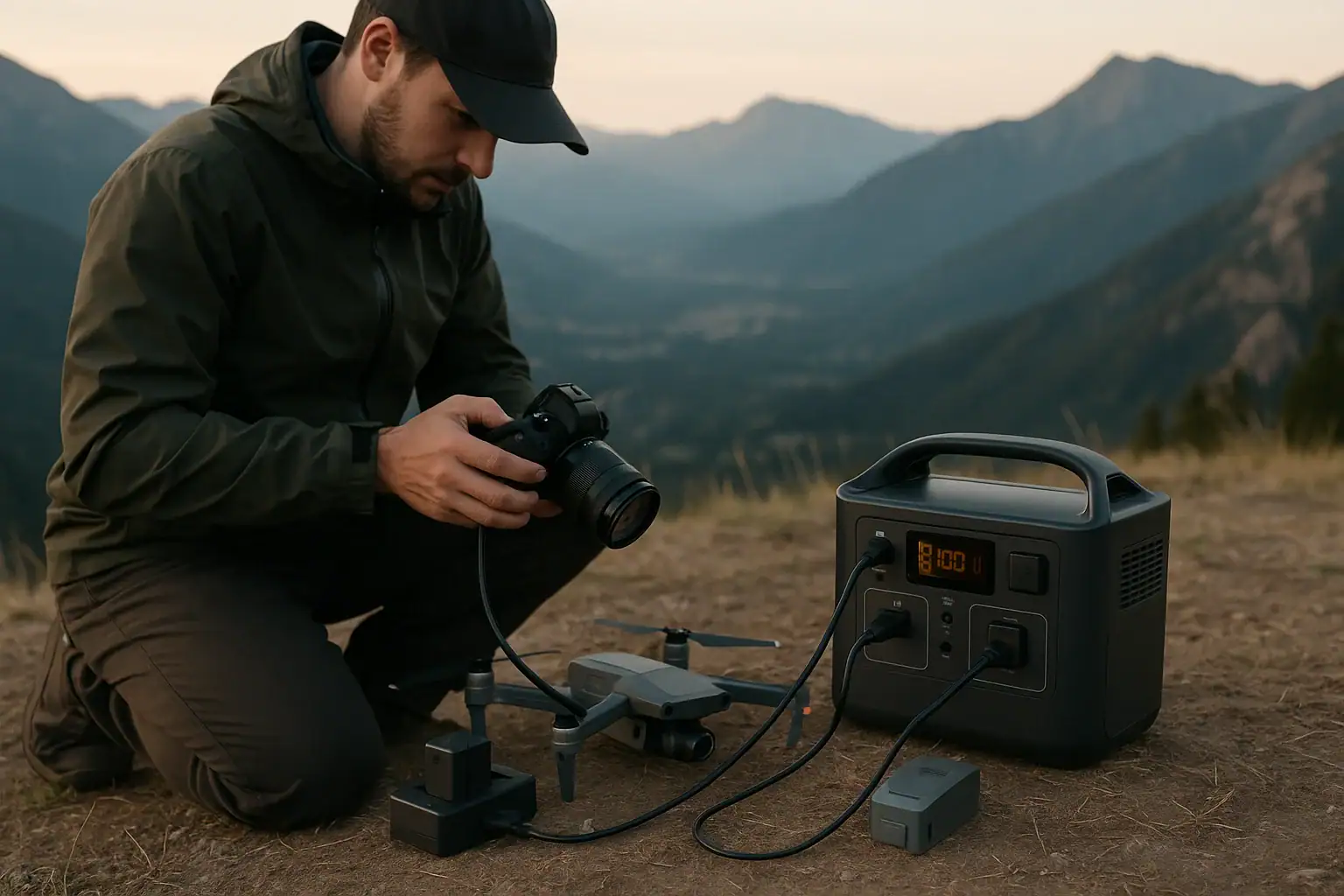
Portable power stations for photography and drone charging work by storing energy in a rechargeable battery and delivering it through AC outlets and DC or USB ports sized to your gear’s wattage and runtime needs. In practice, you match battery capacity, inverter watts, USB-C PD profiles, and input limits to the camera bodies, gimbals, lights, and drone batteries you need to keep running in the field.
Whether you call it a portable generator, battery power pack, or field power hub, the core idea is the same: convert stored watt-hours into usable power for chargers and accessories. For photographers and drone pilots, that means enough capacity for full shooting days, stable power for sensitive electronics, and fast recharging between sessions. Understanding surge watts, continuous output, and realistic runtime helps you avoid dead batteries, failed flights, and missed shots when you are far from the grid.
Understanding Portable Power Stations for Photo and Drone Work
In the context of photography and drone charging, a portable power station is a self-contained battery system with multiple outputs designed to safely power and recharge your field equipment away from wall outlets. It combines a high-capacity battery, an inverter for AC power, and regulated DC ports such as USB-A, USB-C PD, and 12 V outputs.
For photo and aerial workflows, these devices replace or supplement wall power on location. Instead of relying on a vehicle or limited camera batteries, you carry a single power hub that can handle camera battery chargers, drone charging hubs, laptops, tablets, wireless transmitters, field monitors, and small LED or panel lights.
This matters because modern cameras and drones draw more power than ever. High-resolution stills, 4K and 6K video, high frame rate recording, and long drone missions all consume significant energy. A well-matched power station lets you plan runtimes, schedule battery rotations, and maintain consistent uptime for client shoots, time-lapses, mapping flights, and inspections.
Key concepts for photographers and drone pilots include:
- Capacity (Wh): How much energy is stored, which directly affects how many camera and drone batteries you can recharge.
- Output power (W): How many watts the station can supply at once, which determines how many devices can charge simultaneously.
- Port types: AC outlets for standard chargers, USB-C PD for laptops and cameras, and DC outputs for some field gear.
- Recharge speed: How quickly the station itself can be refilled between shooting days.
How Portable Power Stations Deliver Power to Cameras and Drones
A portable power station works by storing energy in an internal battery, then converting and regulating that energy to match your devices. For photography and drones, three parts are especially important: the battery chemistry and capacity, the inverter for AC power, and the DC outputs for direct charging.
Battery and capacity: Capacity is usually expressed in watt-hours (Wh). To estimate how many charges you will get, divide the station’s usable watt-hours by the watt-hours of your camera or drone battery, then adjust down for conversion losses. For example, a 500 Wh station might realistically deliver around 350–420 Wh to your gear after efficiency losses.
Inverter and AC output: Many camera and drone chargers are designed for household AC power. The station’s inverter converts the battery’s DC power to AC. Two ratings matter:
- Continuous watts: The power level it can supply steadily, such as 300 W or 600 W.
- Surge watts: A higher short-term rating for startup spikes, often relevant for devices like some lights or small monitors.
As long as the total draw from your chargers and accessories stays below the continuous rating, you can power them reliably.
DC and USB outputs: Many modern cameras, gimbals, and accessories support USB-C PD or standard USB charging. USB-C PD ports negotiate a voltage and current “profile” with the device (for example, 5 V, 9 V, 15 V, or 20 V at a certain number of amps), allowing faster and more efficient charging. For drone work, AC outlets are still common because most flight battery chargers expect wall power, but some smaller drones and controllers can charge via USB-C.
Recharging the power station: Input power determines how quickly the station refills between sessions. Typical options include AC wall charging, vehicle 12 V charging, and solar panels. The input limit (in watts) caps how fast the battery can safely recharge. For field use, higher input limits shorten downtime between days.
All of this is managed by an internal battery management system that monitors voltage, temperature, and current to protect both the station and your devices.
| Component | Typical Range | Relevance for Photo/Drone Use |
|---|---|---|
| Battery capacity | 300–1500 Wh | Determines how many camera and drone batteries you can recharge. |
| AC continuous output | 300–1000 W | Limits how many chargers and accessories can run at once. |
| USB-C PD output | 45–100 W per port | Enables fast charging for cameras, laptops, and controllers. |
| AC input for recharging | 150–800 W | Controls how quickly the station refills between shooting days. |
Field Scenarios: Power Planning for Shoots and Flights
Real-world photo and drone work highlights how important it is to match a portable power station to your workflow. Thinking in terms of watt-hours and runtime helps you avoid underestimating your needs.
Example 1: Landscape photographer with mirrorless kit
Suppose you shoot sunrise to sunset with a mirrorless camera, two extra batteries, and a lightweight LED panel for occasional fill. Each camera battery is around 15 Wh, and the LED light draws 20 W when used. You might burn through four batteries (60 Wh) and run the light for 2 hours (40 Wh), plus some overhead for charging losses. A station with 200–300 Wh of usable capacity would comfortably cover this, with margin for a phone, GPS, and tablet.
Example 2: Wedding or event photographer
An all-day event with dual camera bodies, multiple flashes, wireless triggers, and a laptop for quick backups can easily double or triple consumption. If you are recharging eight camera batteries (120 Wh), keeping a laptop running for 3–4 hours (120–200 Wh), and topping up flash packs, a 500–700 Wh station gives more realistic headroom. Multiple AC outlets let you run several chargers simultaneously during short breaks.
Example 3: Drone pilot with multiple flight batteries
Drone flight batteries often range from about 40–70 Wh each. If you carry six batteries and plan to recharge half of them in the field, you might need 120–210 Wh just for flight packs, plus controllers, phones, and tablets. Add conversion losses and you quickly reach 250–350 Wh. For mapping or inspection work with heavier drones and more batteries, 700–1000 Wh or more is often practical.
Example 4: Hybrid photo, video, and drone production
On mixed shoots, you may be powering camera chargers, drone hubs, a laptop, a field monitor, and a small key light at the same time. Here, AC output becomes as important as capacity. A station with around 600 W continuous output can usually handle a couple of camera chargers, a drone charger, and a modest LED light, while still leaving a USB-C PD port free for the laptop.
Estimating runtime and charge counts
To estimate whether a station will last a full day:
- Add the watt-hours of all batteries you plan to recharge (camera, drone, and accessory packs).
- Add watt-hours for any devices you will power directly (watts × hours of use).
- Multiply the total by roughly 1.2 to 1.4 to account for conversion losses.
- Compare this to the station’s rated capacity; aim for at least 20–30% extra margin.
This approach keeps expectations realistic and helps you decide whether to bring one larger station or two smaller ones.
Common Power Pitfalls and Troubleshooting in the Field
Even experienced photographers and drone pilots run into avoidable power issues. Recognizing the most common mistakes and their symptoms makes troubleshooting much easier.
Underestimating total load
One frequent problem is plugging in too many chargers and lights at once, exceeding the station’s continuous watt rating. Symptoms include the inverter shutting off, warning indicators, or chargers cycling on and off. The fix is to unplug nonessential devices and stagger charging. Check the wattage labels on chargers and accessories to avoid overloading.
Ignoring surge watts
Some lights, monitors, or other gear draw a short surge when they start up. If this exceeds the station’s surge limit, it may trip protection even if the steady draw seems fine. In practice, turn on high-draw devices one at a time, and avoid running them at maximum power if you are near the station’s limits.
Using the wrong ports or cables
Another common issue is slow or unreliable charging because a device is plugged into a low-power USB port instead of a higher-wattage USB-C PD port, or because of a poor-quality cable. If your laptop or camera charges slowly or not at all, try a known-good cable and a higher-rated port. For drones, ensure you are using the manufacturer’s recommended AC charger with the station’s AC outlet.
Misreading battery indicators
Portable power stations often show remaining capacity as a percentage or estimated runtime. These readings can fluctuate with changing loads. If you see sudden drops, it may be due to a high, temporary draw. Treat the display as an estimate, not an exact fuel gauge, and keep a mental tally of how many batteries you have charged.
Charging in extreme conditions
Charging the station or your camera and drone batteries in very cold or very hot environments can trigger thermal protection. If charging slows or stops and you see a temperature warning, move the station and batteries to a shaded, moderate-temperature area and allow them to stabilize before resuming.
Not testing the setup before critical shoots
Finally, many issues arise simply because the full kit is never tested together before a paid job or remote expedition. It is wise to simulate a typical shooting day at home or in a controlled location, running all your chargers and accessories from the station to confirm compatibility, load, and runtime.
Safety Basics for Powering Cameras and Drones
Portable power stations are designed with built-in protections, but safe habits are still essential, especially when powering sensitive electronics like cameras, drones, and laptops.
Respect power ratings
Always stay within the station’s rated continuous and surge watt limits. Overloading can trigger shutdowns and, in extreme cases, stress internal components. Similarly, ensure that any power strips or extension cords used are rated for the load you intend to place on them.
Use appropriate chargers
Use manufacturer-approved or reputable third-party chargers for camera and drone batteries. Avoid improvising with unverified adapters or cables that might bypass built-in protections. For USB-C PD charging, use cables rated for the wattage you need, particularly for laptops and higher-draw devices.
Avoid moisture and physical damage
Keep the power station off wet ground and away from direct rain or splashes. Moisture and electronics do not mix, and while some enclosures are more robust than others, most portable stations are not fully waterproof. Protect the unit from impacts, drops, and crushing loads in transport.
Ventilation and heat
Do not cover the station’s vents or place it in confined, unventilated spaces while charging or under heavy load. Heat buildup can shorten battery life and may trigger thermal shutdown. In hot environments, keep the unit shaded and allow airflow around it.
Charging in vehicles
When charging a power station from a vehicle’s 12 V outlet, follow the manufacturer’s guidance. Avoid running a large station at high input draw from a small vehicle outlet for extended periods without the engine running, as this can drain the starter battery. If you plan complex vehicle-based setups, consult a qualified automotive electrician.
Do not open or modify
Internal batteries and electronics are not user-serviceable. Do not open the enclosure, attempt to modify the battery pack, or bypass built-in protections. For any repair or performance concerns, follow the manufacturer’s support process or consult a qualified technician.
| Safety Area | Key Practice | Why It Matters |
|---|---|---|
| Load management | Stay under continuous watt rating | Prevents shutdowns and stress on internal components. |
| Environment | Keep dry and well-ventilated | Reduces risk of damage and thermal issues. |
| Cabling | Use rated cables and chargers | Protects sensitive cameras and drones from power issues. |
| Handling | Avoid drops and impacts | Preserves battery integrity and long-term reliability. |
Related guides: Portable Power Station Buying Guide • Surge Watts vs Running Watts: How to Size a Portable Power Station • How to Estimate Runtime for Any Device: A Simple Wh Formula + 5 Worked Examples
Care, Maintenance, and Storage for Reliable Field Power
Proper care and storage extend the life of a portable power station and help ensure it performs consistently on important shoots and flights.
Regular cycling
Most modern lithium-based power stations benefit from occasional cycling. If you only use the unit a few times a year, it is still wise to discharge and recharge it every few months. This keeps the battery active and gives you a chance to confirm that everything is working before you rely on it in the field.
Optimal storage charge
For longer storage periods, many manufacturers recommend storing the battery at a partial charge rather than completely full or completely empty. Around 40–60% state of charge is commonly suggested. Check the unit every few months and top up if it has drifted significantly lower.
Temperature considerations
Store and transport the station in moderate temperatures whenever possible. Avoid leaving it in a hot vehicle in direct sun or exposed to freezing conditions for extended periods. Extreme temperatures accelerate battery aging and can temporarily reduce available capacity.
Keep ports and vents clean
Dust, sand, and moisture are common around outdoor shoots. Periodically inspect ports and vents and gently remove debris. Use dust caps or cases where practical, especially if you shoot in coastal, desert, or muddy environments.
Labeling and organization
For multi-person crews, clearly label which chargers and cables are intended for the power station. This reduces confusion on set and helps prevent under-rated extension cords or adapters from being used with higher loads.
Monitor performance over time
As with any battery, capacity will slowly decline with age and cycle count. If you notice that the station no longer delivers the expected number of camera or drone battery charges, adjust your planning. For critical work, consider adding a second unit or reducing your dependence on a single station as it ages.
Practical Takeaways and Power Station Buying Criteria
For photographers and drone pilots, a portable power station is essentially a field “fuel tank” for your batteries and electronics. The right choice depends on how much gear you run, how long you are away from grid power, and how quickly you can recharge between sessions.
Start by listing your actual devices: camera bodies, number and size of batteries, drones and flight packs, lights, laptop, monitors, and accessories. Estimate total daily energy use in watt-hours and add a healthy margin. Then match that to a station with enough capacity, the right mix of ports, and a recharge speed that fits your schedule.
Weight and size also matter. A smaller unit may be ideal for solo landscape work or lightweight drone scouting, while larger capacity is better suited to team productions, long events, or repeated mapping flights.
Specs to look for
- Battery capacity (Wh): Look for roughly 300–600 Wh for light solo work, 600–1200 Wh for heavier hybrid photo/drone shoots. This determines how many batteries you can recharge per day.
- AC continuous output (W): Aim for at least 300–500 W for a few chargers and small lights, 600–1000 W if you plan to run multiple chargers plus a laptop and modest lighting. This ensures stable power without overloading.
- Number and type of AC outlets: Two or more grounded outlets make it easier to run multiple camera and drone chargers simultaneously, reducing downtime between flights or shooting blocks.
- USB-C PD output (W per port): Seek 45–100 W per PD port if you plan to charge laptops, cameras, and controllers directly. Higher PD wattage shortens charge times and may allow you to skip some AC chargers.
- Recharge input power (W): Look for 200–800 W AC input if you need fast turnarounds between days. Higher input lets you refill a depleted station in a few hours instead of overnight.
- Battery chemistry and cycle life: Compare stated cycle life (for example, several hundred to a few thousand cycles to a certain percentage of original capacity). Longer cycle life is valuable for frequent use.
- Weight and form factor: Consider units under 20 lb for backpack or carry use, heavier units if they will mostly stay in a vehicle or on a cart. Manageable weight makes it practical to bring enough capacity.
- Display and monitoring: A clear display showing input/output watts and remaining capacity helps you plan charging order and avoid surprises on long days.
- Environmental operating range: Check the recommended operating temperature range if you often shoot in very hot, cold, or high-altitude locations. Staying within that range supports reliable performance.
By aligning these specifications with your actual shooting patterns, you can select a portable power station that keeps cameras, drones, and accessories running smoothly, minimizing downtime and missed opportunities when working off the grid.
Frequently asked questions
Which specs and features matter most when choosing a portable power station for photography and drone charging?
Prioritize battery capacity (Wh) to meet your planned charge counts, AC continuous output (W) to run multiple chargers at once, and USB-C PD port wattage for direct device charging. Also consider recharge input power for turnaround speed, port count and types, weight/form factor, and the stated cycle life for long-term use.
How do I estimate the right capacity and runtime for a full shooting day?
Add up the watt-hours of all batteries you will recharge and the watt-hours for devices you will run directly (watts × hours), then multiply the total by about 1.2–1.4 to account for conversion losses. Compare that adjusted total to the station’s usable Wh and include a 20–30% safety margin to avoid running flat during the day.
What common mistakes do photographers and drone pilots make with portable power stations?
Frequent errors include underestimating total load and exceeding the continuous watt rating, using low-power ports or poor cables for high-draw devices, and failing to test the full kit together before a job. These oversights lead to unexpected shutdowns, slow charging, or compatibility problems in the field.
Are portable power stations safe to use with cameras and drone batteries?
Yes, when used correctly: stay within the unit’s continuous and surge limits, use appropriate chargers and rated cables, and keep the station dry and well ventilated. Built-in battery management systems provide protections, but safe handling and adherence to ratings are still essential.
Can I recharge a power station with solar panels in the field, and what should I plan for?
Solar recharging is possible and common for field use, but plan for the station’s maximum input wattage, available sun hours, and the combined wattage of panels and charge controller. Expect variable recharge times depending on weather and be prepared with a backup charging option if you need guaranteed turnaround speed.
How should I maintain and store a power station between shoots to preserve battery life?
Store the unit at a partial charge (commonly around 40–60%), avoid extreme temperatures, and cycle the battery every few months if it sits unused. Periodically inspect and clean ports and vents, and monitor capacity over time to adjust planning as the battery ages.
Recommended next:
- Portable Power Stations for Apartments
- Portable Power Stations for RV and Motorhomes
- Can a Portable Power Station Run a Microwave? What to Check Before You Try
- Can a Portable Power Station Run a Space Heater? Realistic Limits
- Can a Portable Power Station Run an Air Conditioner? Sizing and Expectations
- Powering a Coffee Maker, Kettle, or Induction Cooktop: What Works and Why
- More in Home / Appliances →
Related guides
Browse this topic →
- Beginner-friendly sizing, runtime & specs
- Solar & charging (MPPT, fast charging, cables)
- Batteries (LiFePO4, cycles, care & storage)
- Safety, cold-weather performance, real-world tips
More in Beginners
See all →- RV Basics: Using a Power Station for 12V Loads and House Power
- Camping Power Planning: A Simple Energy Budget for a Weekend
- Remote Work Power Kit: Keeping Laptop, Monitor, and Internet Running
- Portable Power Stations for CPAP and Medical Devices: What to Look For
- What’s in the Box? Essential Cables and Adapters You May Need
Keep reading

About this site
Portable Energy Lab publishes practical, independent guides about portable power—clear sizing, safe use, and real-world expectations.
Affiliate disclosure
Some links on this site may be affiliate links. If you buy through these links, we may earn a small commission at no extra cost to you. This helps support our content. Learn more.