
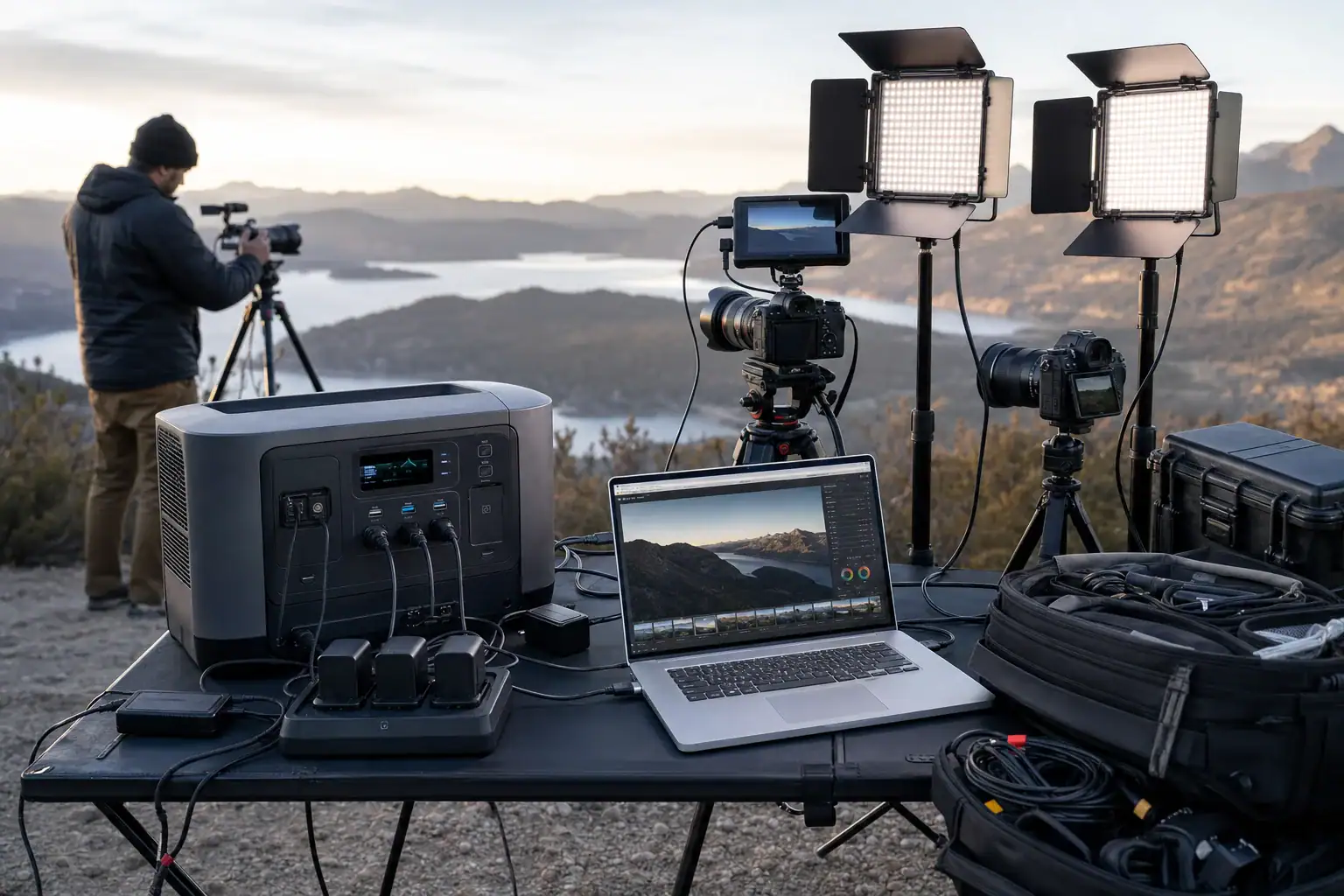
A portable power station can run cameras, LED lights, battery chargers, laptops, monitors, and audio equipment on location when its output and battery capacity are matched to the shoot. The main specifications to compare are watt-hours, continuous watts, surge watts, USB-C PD output, AC outlet capacity, and estimated runtime.
For photography, a smaller unit may be enough to recharge camera batteries and power a laptop throughout the day. Video production often requires more capacity because continuous lighting, field monitors, wireless systems, and computers can remain active for hours. The best size depends on which devices must run at the same time, not simply the number of devices in the equipment case.
Before a shoot, list each load, determine whether it uses AC, USB-C, or DC power, and estimate how long it will operate. This simple power budget helps prevent overloaded outlets, unexpectedly short runtimes, and incompatible charging connections.
1. What a Portable Power Station Does on a Photo or Video Shoot
A portable power station combines a rechargeable battery, charging electronics, output ports, and usually an inverter in one transportable unit. It stores electrical energy and delivers it through AC outlets, USB ports, or regulated DC outputs. Unlike a basic camera power bank, it can support several types of production equipment at once.
On a photography assignment, common uses include charging camera batteries, powering tethered-shooting laptops, operating small printers, and keeping phones or tablets available. On a video set, the station may also run LED fixtures, monitors, audio recorders, wireless receivers, teleprompters, networking equipment, and charging hubs.
Power availability affects more than convenience. A camera battery that cannot be recharged can stop production, while a laptop that shuts down may interrupt tethering, media backup, or editing. A properly sized station creates a centralized power source and can reduce dependence on vehicle outlets or a gasoline generator.
However, portable does not always mean lightweight. Higher battery capacity generally adds size and weight. The practical goal is therefore to carry enough energy and output capability for the planned load, plus a reasonable reserve, without bringing substantially more equipment than the crew can transport.
2. How Capacity, Output, and Runtime Work
Battery capacity is usually stated in watt-hours, abbreviated Wh. A 1,000Wh battery theoretically stores enough energy to supply 100 watts for 10 hours. Actual runtime is shorter because the inverter, cables, charging circuits, and connected devices consume or lose some energy. For initial planning, using roughly 75% to 85% of the stated capacity is a practical estimate when powering AC equipment.
Continuous output is the amount of power the station can provide steadily. Add the wattage of all devices expected to run simultaneously, then choose an output rating with headroom. A combined 430-watt load is better matched to an output comfortably above 430 watts than to one rated at exactly that level.
Surge output refers to brief startup demand. Most camera chargers and modern LED lights have limited startup surges, but equipment containing motors, compressors, or certain large power supplies may draw more power when switched on. Surge capacity does not increase normal runtime and should not be treated as continuous output.
Runtime can be estimated with the formula usable watt-hours divided by total load watts. If a station has 800 usable Wh and the active load is 200 watts, the rough runtime is four hours. Intermittent equipment should be calculated according to actual operating time. Port choice also matters: direct USB-C PD or DC output may avoid inverter losses associated with AC adapters.
| Equipment | Illustrative draw | Planning consideration |
|---|---|---|
| Camera battery charger | 15–60W | Draw varies by battery count and charging stage |
| Laptop | 40–140W | Editing and rendering can use more power than file transfer |
| LED panel light | 50–300W | Brightness level directly affects consumption |
| Field monitor | 15–50W | Continuous operation can create a meaningful daily load |
| Battery charging hub | 60–250W | Multiple batteries may charge simultaneously |
| Audio and wireless equipment | 5–40W | Small individual loads can add up over a long shoot |
3. Real-World Power Planning Examples
Photography and tethering setup
Consider a location portrait session using a 70-watt laptop, a 45-watt camera charging hub, and 20 watts of phone, tablet, and accessory charging. The simultaneous load is about 135 watts. If these devices operate for six hours, they require approximately 810Wh before conversion losses. The laptop may not draw its rated power continuously, but cold weather, screen brightness, and heavy processing can increase demand. A plan near 1,000Wh provides more flexibility than a calculation with no reserve.
Small interview setup
A two-light interview might use one 120-watt key light, one 60-watt fill light, a 25-watt monitor, a 20-watt audio system, and 45 watts of charging. The combined load is about 270 watts. For a three-hour recording window, the basic energy requirement is 810Wh. Allowing for conversion losses, setup time, retakes, and battery aging could move the practical target above 1,000Wh.
Higher-output video production
A larger shoot might combine 600 watts of lighting, a 120-watt laptop, an 80-watt monitor and video system, and a 150-watt charging area. That is a simultaneous load of approximately 950 watts. In this case, both capacity and inverter rating matter. A station with ample watt-hours but only 700 watts of continuous AC output would still be unsuitable for the full load.
These examples are planning models rather than guaranteed results. Equipment power labels may show maximum input rather than normal consumption. For a more accurate estimate, measure the complete setup with an external power meter during a realistic rehearsal, including high laptop workload and maximum intended light output.
4. Common Sizing Mistakes and Troubleshooting Cues
Confusing watts with watt-hours is one of the most frequent mistakes. Watts describe how much power equipment needs at a moment in time. Watt-hours describe stored energy and help determine how long that equipment can run. A high-output inverter does not guarantee long runtime if battery capacity is low.
Adding device ratings without considering simultaneous use can lead to over- or undersizing. For inverter sizing, count equipment that may operate at the same time. For energy sizing, multiply each device’s estimated draw by its individual operating hours.
Ignoring AC conversion losses produces optimistic runtime estimates. If the station converts battery power to AC and each device converts it back to low-voltage DC, energy is lost in both stages. Direct USB-C PD can be more efficient when the device supports the available voltage and current profile.
If a device does not charge through USB-C, check the cable rating, port wattage, and supported PD profiles. A port labeled 100W does not guarantee that every laptop will receive 100 watts. The device, port, and cable must negotiate a compatible profile. Some laptops also reduce performance or slowly lose charge when the adapter provides less power than the computer consumes.
If the station shuts down, look for an overload warning, depleted battery, excessive temperature, or an automatic power-saving mode. A low-load mode may turn off outputs when only a small audio recorder or charger is connected. Flickering lights, buzzing adapters, or unstable monitors can indicate an overloaded output, a poor connection, or equipment that is sensitive to waveform quality.
Other planning errors include overlooking idle consumption, placing the station too far from the set, using undersized extension cords, and assuming solar input will replace energy at its advertised maximum throughout the day. Weather, shade, panel angle, and the station’s solar input limit can substantially reduce charging power.
5. Safety Basics for Location Production
Keep the power station dry, stable, and ventilated. Do not place it in standing water, expose it to rain, cover its cooling vents, or leave it where crew members can step on ports and cables. Outdoor operation may require a weather-protected work area even when the connected production equipment is described as weather resistant.
Use cables, power strips, and extension cords rated for the expected load and environment. Fully uncoil long extension cords when practical because tightly coiled cable can retain heat under load. Route cords away from doorways and walking paths, secure them with appropriate cable covers or production-safe methods, and avoid creating trip hazards.
Do not exceed the station’s continuous output, individual port limits, or combined outlet rating. Avoid connecting damaged chargers, frayed cords, loose adapters, or equipment with signs of overheating. Stop using the system if there is smoke, swelling, an unusual odor, repeated fault messages, or excessive heat.
A portable power station should not be improvised as a building backup system or connected directly to electrical panels, transfer equipment, or hardwired circuits. Any connection involving building wiring should be designed and installed by a qualified electrician. Follow the power station and equipment documentation for grounding, neutral configuration, environmental limits, and approved charging methods.
Temperature affects both safety and performance. Battery charging may be restricted below freezing or at high temperatures, while discharge capacity can fall in cold conditions. Allow equipment to reach an acceptable operating temperature without placing it against heaters or other intense heat sources.
6. Maintenance, Charging, and Storage Between Shoots
Recharge the station after a job rather than leaving it nearly empty for an extended period. Before storage, follow the manufacturer’s recommended charge range. A partial charge is commonly suitable for long-term storage, while a high state of charge may be useful when the unit must remain ready for unexpected assignments.
Store the station in a dry, moderate-temperature location away from direct sunlight, flammable materials, and heavy objects that could damage the case. Check it periodically because the battery and control electronics may consume a small amount of energy while idle. Recharge when the level falls below the recommended storage range.
Before an important production, inspect the case, vents, outlets, charging cable, and display. Confirm that AC, USB-C, and DC ports function with the actual equipment package. Install any approved firmware updates well before the shoot rather than immediately before call time, when an unexpected reset or configuration change could cause delays.
Battery capacity gradually declines with age and use. Update runtime assumptions after repeated cycles or whenever actual performance differs substantially from the original estimate. Clean the exterior with the unit disconnected, using only methods permitted by its documentation. Do not open the enclosure, replace internal cells, bypass protections, or modify the battery pack.
| Time | Check | Purpose |
|---|---|---|
| Several days before | Recharge and test all required outputs | Leaves time to address compatibility issues |
| Day before | Verify charge level and inspect cables | Reduces preventable setup delays |
| During production | Monitor load, temperature, and remaining runtime | Helps the crew adjust before an automatic shutdown |
| After production | Allow the unit to cool, inspect it, and recharge as appropriate | Prepares it for storage or the next assignment |
| During long storage | Check charge every one to three months | Prevents excessive self-discharge |
Related guides: Portable Power Stations for Photography and Drone Charging: A Field Guide • Portable Power Station Buying Guide • Pure Sine Wave vs Modified Sine Wave: Does It Matter for a Portable Power Station?
7. Practical Takeaways and Specs to Look For
Start with a written equipment list and separate continuous loads from intermittent charging. Calculate simultaneous watts for output sizing and watt-hours for runtime sizing. Then add reserve capacity for conversion losses, weather, aging, schedule changes, and equipment added during production.
Port selection can be as important as total capacity. USB-C PD is convenient for compatible laptops, cameras, and battery chargers, while AC outlets support equipment that must use its original adapter. Multiple ports are useful only when their combined output can handle the intended load. Also consider transport weight, charging time, noise, display quality, and the availability of replacement charging cables.
Specs to look for
- Battery capacity: Look for roughly 500–1,000Wh for charging-focused photography or 1,000–2,000Wh and above for longer lighting and video loads; capacity determines practical runtime.
- Continuous AC output: Choose a rating about 20% to 30% above the highest expected simultaneous load; headroom reduces overload shutdowns and accommodates short demand changes.
- Surge output: Check for a brief surge rating above the startup requirement of connected equipment; this matters for devices with motors or high initial demand.
- Pure sine wave inverter: Look for a pure sine wave AC output when powering sensitive monitors, audio equipment, computers, and lighting controls; it generally offers broader compatibility.
- USB-C PD output: Consider 100W to 140W ports for many production laptops and 30W to 100W for cameras and chargers; confirm compatible voltage profiles and cable ratings.
- Usable port layout: Look for enough AC, USB-C, USB-A, and regulated DC connections with space for large adapters; accessible ports reduce reliance on extra power strips.
- Recharge speed: A full AC recharge in roughly two to five hours may suit fast production turnarounds; charging time determines how quickly the station can return to service.
- Solar and vehicle input: Compare the input wattage range, voltage window, and connector requirements; input limits determine whether field charging can meaningfully extend a shoot.
- Battery cycle rating: Look for capacity retention information after hundreds or thousands of cycles; this helps estimate long-term performance for frequent professional use.
- Weight, noise, and display: Compare transport weight, fan behavior, and a display showing watts and remaining time; these features affect handling, audio recording, and real-time power management.
The most useful power station is not necessarily the one with the largest battery. It is the unit whose capacity, output, charging options, port types, environmental limits, and transport requirements align with the complete production workflow. Testing the planned camera, light, monitor, charger, and laptop combination before arriving on location remains the most reliable way to confirm compatibility and expected runtime.
Frequently asked questions
What size portable power station do I need for photography and video shoots?
Size the station by calculating the watts of equipment that will run at the same time and the watt-hours needed for the expected operating period. A charging-focused photography setup may need roughly 500–1,000Wh, while video shoots with continuous lights often require 1,000Wh or more. Include a reserve for conversion losses, changing conditions, and additional equipment.
What specs matter most in a portable power station for photography and video shoots?
Battery capacity in watt-hours determines approximate runtime, while continuous AC output determines whether the station can run the full simultaneous load. Also compare AC outlet limits, USB-C PD wattage and supported profiles, port selection, recharge speed, and inverter type. A pure sine wave inverter is generally a suitable choice for computers, monitors, audio equipment, and lighting controls.
Can a portable power station run LED video lights and a laptop at the same time?
Yes, provided the combined running wattage stays below the station’s continuous output rating and the battery has enough usable watt-hours for the required duration. Add the real or estimated draw of the lights, laptop, monitor, chargers, and other active equipment. Testing the complete setup at the intended brightness and workload gives the most reliable result.
What is the most common portable power station sizing mistake?
A common mistake is confusing watts with watt-hours. Watts indicate the immediate power demand and are used to avoid overloading the inverter, while watt-hours estimate how long the equipment can operate. It is also important to account for AC conversion losses rather than assuming all stated battery capacity is available to connected devices.
Is it safe to use a portable power station on an outdoor photo or video shoot?
It can be safe when the station is kept dry, stable, ventilated, and within its specified temperature range. Use undamaged, load-rated cables and extension cords, keep cords out of walkways, and do not exceed outlet or total output limits. Stop use if the unit shows overheating, swelling, smoke, unusual odor, or repeated fault warnings.
How can I estimate how long a portable power station will last on set?
Divide the station’s estimated usable watt-hours by the total active load in watts. For AC-powered equipment, using about 75% to 85% of the stated capacity is a practical starting point because conversion and charging losses reduce usable energy. Account for intermittent loads by multiplying each device’s draw by its actual operating time.
Related guides
Browse this topic →
- Beginner-friendly sizing, runtime & specs
- Solar & charging (MPPT, fast charging, cables)
- Batteries (LiFePO4, cycles, care & storage)
- Safety, cold-weather performance, real-world tips
More in Beginners
See all →- Charging an Electric Wheelchair or Mobility Scooter From a Portable Power Station
- Portable Power Station for a Gaming PC: Runtime, Load Spikes, and UPS Considerations
- Portable Power Station for a Pop-Up Camper: Lights, Fans, Fridge, and Recharge Plan
- Portable Power Station for a Shed or Outbuilding: Lights, Chargers, and Security
- Portable Power Station for a Boat: 12V Loads, Salt Air, and Safer Storage
Keep reading
About this site
Portable Energy Lab publishes practical, independent guides about portable power—clear sizing, safe use, and real-world expectations.
Affiliate disclosure
Some links on this site may be affiliate links. If you buy through these links, we may earn a small commission at no extra cost to you. This helps support our content. Read our affiliate disclosure.