
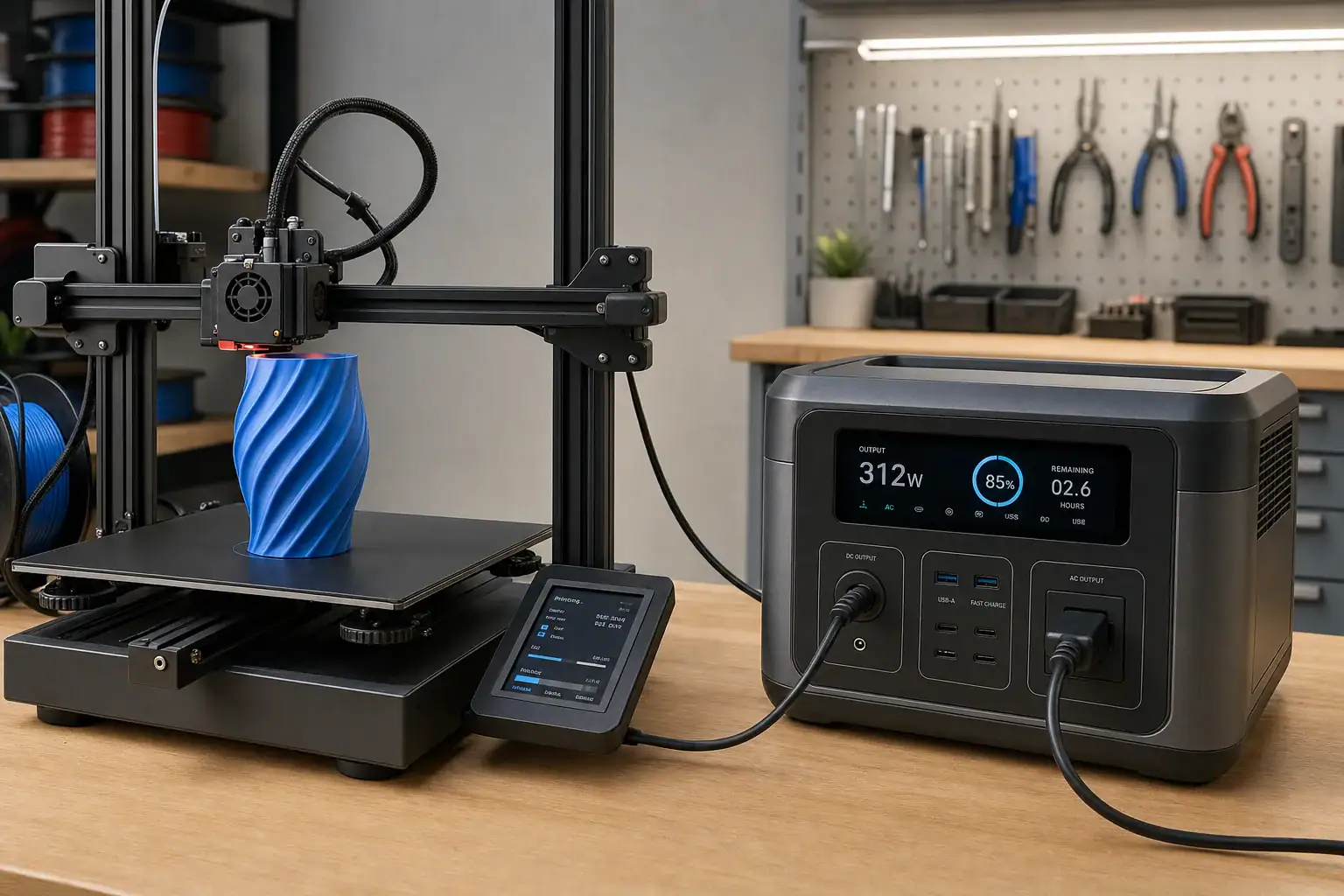
Yes, a portable power station can run most desktop 3D printers if its AC inverter can handle the printer’s peak heat-up demand and its battery has enough capacity for the full print. The important numbers are surge watts, continuous output, watt-hours, inverter efficiency, and expected runtime.
A 3D printer rarely draws one fixed amount of power. Consumption is usually highest while the nozzle and heated bed warm at the same time, then falls and cycles as the printer maintains temperature. A small printer may need relatively little energy, while a large heated bed, enclosed chamber, or high-temperature material can increase demand substantially.
For reliable operation, compare measured wall power with the power station’s ratings rather than relying only on the printer power supply label. Allow headroom for brief input current, heater cycling, cold-room operation, and battery aging. The power station should also provide regulated pure sine wave AC power and enough usable energy to finish without reaching low-battery shutdown.
Can a Portable Power Station Run a 3D Printer?
A portable power station can run a 3D printer when two separate requirements are met: the inverter must support the printer’s highest power demand, and the battery must store enough usable energy for the planned print duration. Passing only one requirement is not sufficient. A high-capacity battery with an undersized inverter may shut down during heat-up, while a powerful inverter attached to a small battery may start the printer but stop before the model is complete.
The printer’s power supply rating is not necessarily its normal wall consumption. A label showing 350 watts, for example, generally indicates the power supply’s maximum output capability rather than a constant 350-watt load. Actual demand depends on bed size, nozzle temperature, bed temperature, chamber heating, electronics, fans, motors, ambient conditions, and heater control behavior.
This distinction matters because a power interruption can ruin a long print. Some printers offer power-loss recovery, but recovery is not guaranteed to preserve layer alignment, bed adhesion, nozzle condition, or surface quality. Proper sizing is therefore more reliable than planning to restart after an avoidable shutdown.
How Heat-Up Demand, Inverter Output, and Runtime Work
The highest sustained demand often occurs during initial heating. The bed and hot end may operate near full power together until they reach their targets. This is commonly described as a heat-up surge, although it may last much longer than the split-second motor surge associated with some appliances. The printer’s AC power supply can also produce a very brief inrush current when switched on.
Compare the measured peak with the power station’s continuous AC output, not only its advertised surge rating. Surge ratings may apply for only a short interval, whereas printer heat-up can last several minutes. A practical target is continuous output at least 20% to 30% above the highest observed wall draw. More headroom may be appropriate for high-temperature printing or a cold workspace.
Runtime depends on usable battery energy rather than inverter watts. A basic estimate is:
Runtime in hours = battery watt-hours × usable fraction × inverter efficiency ÷ average printer watts
For example, a 1,000-watt-hour battery with a 90% usable fraction and 88% AC efficiency provides about 792 watt-hours to the printer. At a 120-watt average load, the estimated runtime is about 6.6 hours. Real results vary because battery temperature, inverter standby consumption, display power, heater cycling, and conversion losses change during use.
| Operating phase | Illustrative power range | What affects it |
|---|---|---|
| Printer startup | Brief inrush above normal draw | Power supply design and inverter response |
| Bed and nozzle heat-up | 180–450 watts | Bed area, heater size, target temperature, and room temperature |
| Typical printing | 60–180 watts average | Heater cycling, material, fans, motors, and enclosure losses |
| High-temperature printing | 150–500 watts average | Hot bed, chamber heater, larger build volume, and long heat cycles |
Real-World 3D Printer Runtime Examples
Consider a compact printer that peaks at 220 watts during heat-up and averages 80 watts during printing. A power station providing 500 usable watt-hours after losses could run it for approximately 6.25 hours. A six-hour job would be possible on paper, but the margin would be very small. A safer plan would reserve at least 15% to 25% for changing conditions and estimate around five hours of dependable runtime.
A medium printer might peak at 400 watts and average 140 watts. With 900 usable watt-hours available after battery and inverter losses, estimated runtime would be about 6.4 hours. The inverter should still have a continuous rating comfortably above the 400-watt heat-up load. A 300-watt inverter would remain unsuitable even though the battery contains enough energy for several hours.
A large enclosed printer with a chamber heater could peak near 900 watts and average 350 watts. A system delivering 1,600 usable watt-hours would provide roughly 4.6 hours. In this case, chamber preheating, repeated bed heating, and high ambient heat around the power station can materially change the result.
For a more accurate estimate, connect the printer to a plug-in power meter during a comparable utility-powered print. Record the highest wattage during startup and heat-up, then measure total watt-hours over one or more hours of stable printing. Use the actual filament, temperatures, enclosure settings, and room conditions expected during battery operation.
Common Sizing Mistakes and Troubleshooting Cues
A common mistake is sizing from the printer’s average draw while ignoring simultaneous bed and nozzle heating. If the power station shuts off during warm-up but runs smaller loads normally, an inverter overload or brief inrush limit is a likely cause. Confirm the printer’s measured peak and compare it with both the continuous and short-duration output specifications.
Another error is treating the battery’s labeled watt-hours as fully deliverable AC energy. Conversion losses and low-battery protection reduce usable capacity. If runtime is consistently shorter than a simple watt-hour calculation predicts, account for inverter efficiency, the power station’s own consumption, cold battery conditions, and battery age.
Unexpected shutdowns after printing begins can also result from heater cycles. The bed may return to full output when a door opens, room temperature falls, or a large part increases heat loss. An enclosed power station can overheat and reduce output or shut down, especially if printer and battery ventilation compete in a small cabinet.
- Shutdown during initial heat-up: Check peak watts, inverter overload indications, and whether the bed and nozzle heat simultaneously.
- Printer restarts but the station stays on: Look for a loose AC plug, intermittent extension cord, voltage drop, or an incompatible power-saving mode.
- Runtime is much shorter than expected: Measure average watts and total energy instead of using the power supply’s label alone.
- Output stops at a moderate battery percentage: Consider cold temperature, battery protection behavior, calibration error, or a high load near the end of discharge.
- Visible print defects without shutdown: Verify stable power, but also inspect normal printer causes such as bed adhesion, extrusion, motion, and temperature control.
Safety Basics for Battery-Powered 3D Printing
Place the power station on a stable, dry, nonflammable surface with all ventilation openings clear. Do not set it inside a sealed printer enclosure or near the heated bed, chamber exhaust, loose filament, solvents, or other combustible material. Follow the operating temperature ranges provided for both devices.
Use an undamaged printer power cord rated for the load. Avoid lightweight extension cords, coiled cable reels, overloaded power strips, and loose adapters. A long or undersized cord can develop voltage drop and heat even when the displayed wattage appears acceptable. Stop using any plug, outlet, or cord that becomes unusually warm, discolored, or damaged.
Pure sine wave AC output is the conservative choice for a printer’s switch-mode power supply and control electronics. Electrical noise is not the only consideration; the inverter must also maintain stable voltage during heater switching. Keep smoke detection appropriate for the workspace, and do not leave a printing setup unattended merely because it is battery-powered.
Do not open the power station, alter its battery pack, bypass protection circuits, or modify the printer to exceed electrical ratings. A portable unit should not be connected to household wiring through improvised backfeeding. Any integration with building circuits requires properly approved equipment and evaluation by a qualified electrician.
Maintenance and Storage for Reliable Print Power
Before a long print, inspect the AC receptacle, plug, cable, vents, and display for damage or warning indicators. Confirm the battery state of charge early enough to recharge without rushing. If practical, perform a short heat-up test using the intended bed and nozzle temperatures, then verify that the peak remains comfortably below the continuous output rating.
Battery capacity gradually declines with age and use, so a runtime test that worked when the unit was new may become optimistic. Periodically run a controlled printer load and compare delivered runtime with earlier results. A substantial unexplained decline may indicate battery aging, unusually cold conditions, or a change in printer power consumption.
For storage, keep the unit dry and within its recommended temperature and state-of-charge range. Avoid leaving it fully depleted for extended periods. Recharge checks may be needed during long storage because control electronics can consume a small amount of energy even when AC output is off. Clean exterior vents without opening the housing, and keep firmware or calibration procedures consistent with the manufacturer’s instructions.
| Maintenance item | Practical interval | Reason |
|---|---|---|
| Inspect cords, plugs, and vents | Before each long print | Reduces connection and overheating risks |
| Verify heat-up peak | After printer or temperature changes | Confirms adequate inverter headroom |
| Check stored battery charge | Every 1–3 months | Helps prevent extended deep discharge |
| Repeat a controlled runtime test | Every 6–12 months | Tracks capacity loss and estimate accuracy |
| Review operating temperature | Seasonally | Cold and heat can reduce performance or trigger protection |
Related guides: How to Choose the Right Size Portable Power Station • Peak Load Testing: How to Check If Your Power Station Can Start a Device • How to Estimate Runtime for Any Device: A Simple Wh Formula + 5 Worked Examples • Indoor Use Safety: Ventilation, Heat, and Fire-Prevention Basics
Practical Takeaways and Specs to Look For
Start with measurements: peak wall watts during heat-up, average watts during a representative print, and total job duration. Choose continuous inverter output based on the peak, then choose battery capacity based on the average load and desired runtime. Include a reserve rather than planning to use every advertised watt-hour.
If the print must finish during an outage, consider the full operating sequence. Heating, bed leveling, chamber conditioning, printing, pauses, and post-print heater operation all consume energy. Accessories such as lights, cameras, computers, filament dryers, ventilation fans, and network equipment must be added to both the power and energy calculations when connected to the same station.
Specs to look for
- Continuous AC output: Look for a rating roughly 20% to 30% above the printer’s measured heat-up peak so heater cycling does not operate the inverter at its limit.
- Short-duration surge output: Look for clearly stated surge capacity above the continuous rating to accommodate brief power-supply inrush, while remembering that it cannot replace adequate continuous output.
- Battery capacity: Choose watt-hours based on average printer watts multiplied by print hours, then add approximately 20% to 35% for losses and reserve.
- Usable energy information: Look for tested or clearly explained AC-delivered capacity because labeled battery watt-hours do not account for every conversion and protection loss.
- Pure sine wave inverter: Select regulated pure sine wave AC output to provide a conventional supply waveform for printer electronics and switch-mode power supplies.
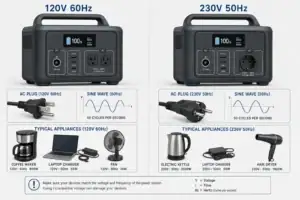
- AC output voltage and frequency: Confirm that output matches the printer power supply, commonly around 120 volts and 60 hertz in the United States.
- Display and energy monitoring: Look for real-time watts, estimated remaining time, battery percentage, and ideally cumulative watt-hours to improve runtime planning.
- Thermal and overload protection: Look for temperature, short-circuit, overcurrent, and low-battery protections with clear fault indicators for easier troubleshooting.
- Low-load or power-saving controls: Confirm that automatic AC shutoff can be disabled or will not mistake heater-off intervals for an inactive load.
- Recharge capability: Compare recharge time and input wattage with the interval between prints, especially when repeated off-grid jobs are expected.
A properly sized portable power station can support clean, stable 3D printing for hours. The most dependable setup is one based on measured peak and average consumption, adequate inverter headroom, realistic AC-delivered battery capacity, suitable ventilation, and a reserve large enough to finish the print under less-than-ideal conditions.
Frequently asked questions
How large of a portable power station do I need for a 3D printer?
Size the inverter from the printer’s measured peak wall draw during startup and heat-up, then size the battery from average printing watts and the expected job length. As a general margin, choose continuous AC output at least 20% to 30% above the measured peak and retain battery reserve for changing conditions.
What power station specs matter most for running a 3D printer?
The key specifications are continuous AC output, short-duration surge capability, battery watt-hours, and estimated usable AC-delivered energy. A regulated pure sine wave inverter, suitable output voltage and frequency, clear overload protection, and controls that do not shut off AC output during low-load intervals are also useful.
How long can a portable power station run a 3D printer?
Runtime depends primarily on usable battery watt-hours divided by the printer’s average wattage, after allowing for inverter losses and reserve capacity. Because heaters cycle during a print, measuring watt-hours over a representative job provides a more reliable estimate than using the power supply label.
Is it a mistake to choose a power station based only on average printer wattage?
Yes. Average draw may be far below the combined load of the heated bed and nozzle during warm-up, and an undersized inverter can shut down even when the battery has ample capacity. Check the highest measured wall draw against the station’s continuous AC rating, not just its brief surge rating.
Can a 3D printer damage a portable power station?
A properly matched printer should not damage a power station when both devices are used within their ratings. However, repeated overloads, blocked ventilation, excessive heat, damaged cords, or inappropriate adapters can trigger protection systems and may create electrical or overheating risks.
Is it safe to run a 3D printer from a portable power station indoors?
It can be safe when the power station is placed on a dry, stable, nonflammable surface with its vents unobstructed and away from the printer’s heated areas and enclosure exhaust. Use intact, correctly rated cords, follow both manufacturers’ temperature guidance, maintain appropriate smoke detection, and avoid leaving the setup unattended.
Related guides
Browse this topic →
- Beginner-friendly sizing, runtime & specs
- Solar & charging (MPPT, fast charging, cables)
- Batteries (LiFePO4, cycles, care & storage)
- Safety, cold-weather performance, real-world tips
More in Beginners
See all →- Portable Power Station for a Gaming PC: Runtime, Load Spikes, and UPS Considerations
- Portable Power Station for a Pop-Up Camper: Lights, Fans, Fridge, and Recharge Plan
- Portable Power Station for a Shed or Outbuilding: Lights, Chargers, and Security
- Portable Power Station for a Boat: 12V Loads, Salt Air, and Safer Storage
- Portable Power Station for a Small Jobsite: Tool Battery Chargers and Work Lights
Keep reading
About this site
Portable Energy Lab publishes practical, independent guides about portable power—clear sizing, safe use, and real-world expectations.
Affiliate disclosure
Some links on this site may be affiliate links. If you buy through these links, we may earn a small commission at no extra cost to you. This helps support our content. Read our affiliate disclosure.