
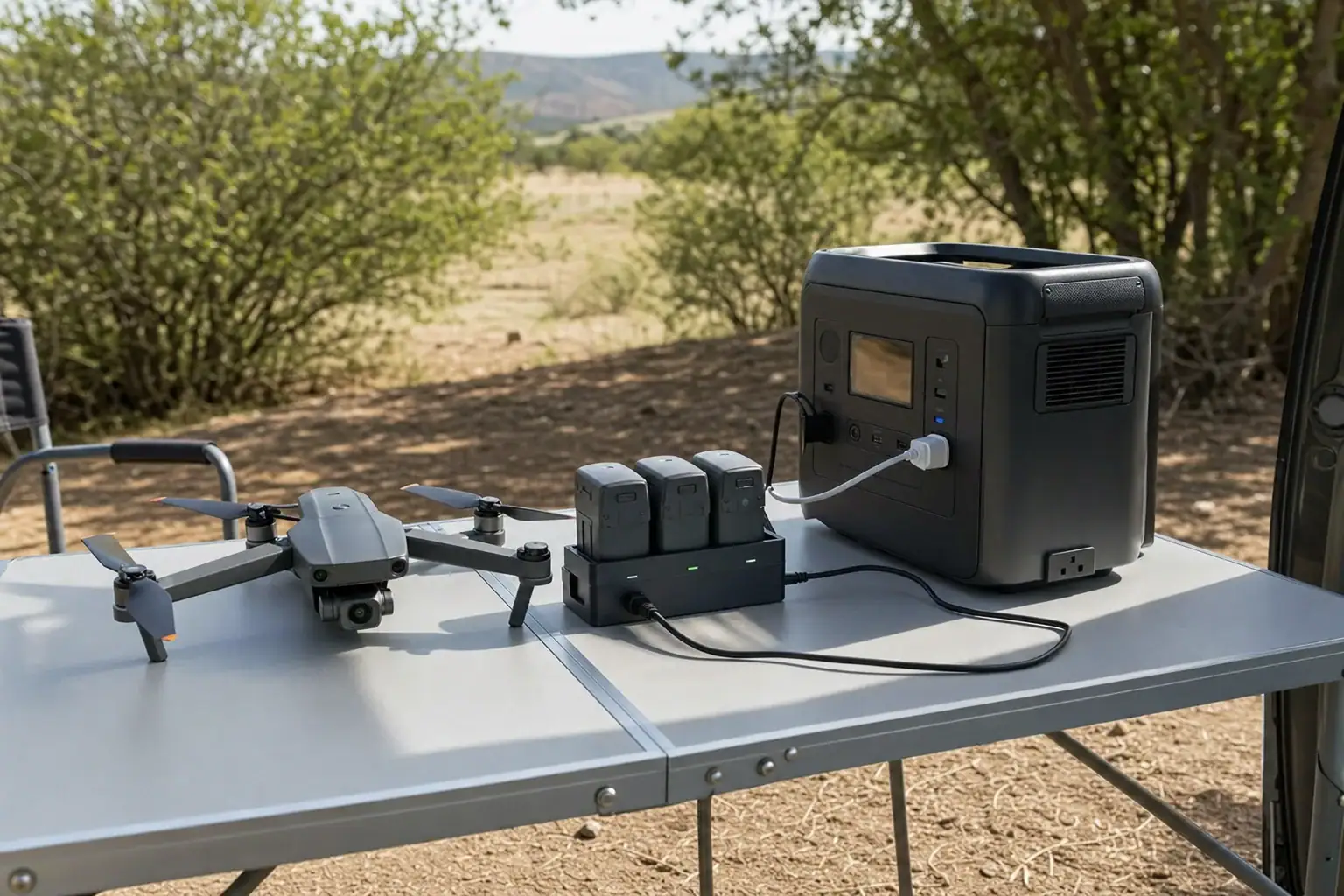
A portable power station can recharge drone batteries reliably in the field when its continuous output exceeds the charger’s draw, its usable watt-hours cover the planned flights, and both devices have room to release heat. Charging speed is usually controlled by the drone charger or charging hub, not by the power station, as long as the station can supply the requested power.
To choose and use one effectively, compare AC output, charger wattage, battery watt-hours, inverter efficiency, USB-C PD profiles, and expected runtime. Allow extra capacity for conversion losses and avoid assuming that a station’s advertised capacity is fully available at its outlets.
Field conditions matter as much as electrical ratings. Direct sun, a hot vehicle, blocked fan vents, or batteries that are still warm after flight can slow charging or trigger thermal protection. A shaded, dry, ventilated setup with short, organized cable runs is generally more dependable than charging equipment placed on the ground or inside a sealed case.
1. What a Portable Drone-Battery Charging Setup Does
A portable power station stores energy in an internal battery and supplies it through AC outlets, USB ports, or regulated DC outputs. For drone batteries, it normally powers the original charger or charging hub. The charger then controls battery voltage, charging current, cell balancing, and temperature-related protection.
The power station does not normally make a drone battery charge faster than its charger allows. A 100-watt charger will generally remain near its designed limit whether connected to a wall outlet or a sufficiently capable power station. If the station cannot maintain the required output, however, the charger may operate slowly, restart repeatedly, or fail to begin charging.
Correct sizing matters because output power and stored energy answer different questions. Watts indicate whether the station can run the charger at a given moment. Watt-hours indicate approximately how long it can continue and how many battery recharges it may provide. A station can have enough watts but too little capacity, or plenty of capacity but an undersized AC inverter.
Field reliability also depends on temperature. Drone charging creates heat in the battery, charger, inverter, and power station. That heat must dissipate without direct sun adding to the thermal load.
2. How Charging Speed, Capacity, and Efficiency Work
Start with the charger’s maximum input or output rating. For an AC charger, its wall-plug draw is the most useful value for power-station sizing. A basic power meter can reveal real draw, but the charger label provides a conservative planning reference. Give the inverter roughly 20% to 30% continuous-output headroom instead of matching the ratings exactly.
Battery energy is usually expressed in watt-hours. If only nominal voltage and amp-hours are shown, estimate energy with volts × amp-hours = watt-hours. A 15.4-volt, 5-amp-hour battery stores about 77 watt-hours. This is nominal energy, not the exact amount the power station must provide.
Conversion losses occur in the station’s inverter, the charger, cabling, and the battery itself. A practical estimate is to divide the energy being added to the drone battery by a combined efficiency of about 0.75 to 0.90. Adding 77 watt-hours at 85% overall efficiency would use roughly 91 watt-hours from the station.
Charging time depends on the battery’s starting state of charge, temperature, health, and charging curve. Lithium batteries typically accept power more slowly near full charge, so dividing battery watt-hours by charger watts gives only a rough minimum. Multi-battery hubs may charge packs sequentially, in groups, or simultaneously. That behavior can change total turnaround time without changing the energy required very much.
| Illustrative charging load | Approximate charger draw | Approximate session time | Estimated station energy used |
|---|---|---|---|
| One 60 Wh battery from near empty | 65 W | About 60 minutes | About 70–80 Wh |
| Two 77 Wh batteries charged sequentially | 100 W while active | About 100–120 minutes total | About 175–200 Wh |
| Three 100 Wh batteries charged simultaneously | About 300 W | About 45–60 minutes | About 325–375 Wh |
3. Real-World Drone Charging Examples
A small single-battery field kit
Consider a pilot carrying four 45-watt-hour drone batteries and a 60-watt AC charger. If each battery returns from flight with 20% remaining, about 36 watt-hours must be replaced per pack. At 80% overall path efficiency, each recharge may consume around 45 watt-hours from the station. Recharging all four once would therefore require about 180 watt-hours, plus a reserve for temperature, standby consumption, and battery aging.
A station with 250 usable watt-hours might cover this plan, although its advertised capacity would need to be higher than 250 watt-hours because not all stored energy reaches the outlet. Its AC output should also comfortably exceed 60 watts.
A multi-battery production day
A larger drone may use 100-watt-hour batteries and a hub drawing close to 300 watts while charging three packs. If nine near-empty packs must each receive about 80 watt-hours, the batteries need 720 watt-hours in total. At 85% combined efficiency, the station could expend about 847 watt-hours. Adding a 15% operational reserve raises the planning target to roughly 975 usable watt-hours.
In this example, a 300-watt inverter is too close to the expected continuous load. A higher continuous rating provides room for brief fluctuations, cooling-fan operation, and rating tolerances. The hub’s sequential or simultaneous behavior must also be confirmed because it determines whether the turnaround takes about three charging cycles or nine.
Direct USB-C charging
Some drone batteries or hubs accept USB-C Power Delivery. This can avoid AC inverter losses, but connector shape alone does not guarantee full speed. The source must offer a compatible PD profile, voltage, current, and cable rating. If the required profile is unavailable, charging may fall back to a lower wattage or not start. Use charging methods and cables specified as compatible with the equipment rather than improvised adapters.
4. Common Mistakes and Troubleshooting Cues
- Using advertised capacity as usable capacity: Outlet conversion and reserve limits reduce delivered energy. Plan with a loss allowance rather than dividing station capacity directly by drone-battery capacity.
- Confusing surge watts with continuous watts: Drone chargers usually need sustained power. A large surge rating does not compensate for an inadequate continuous rating.
- Ignoring the hub’s charging sequence: A hub that charges one battery at a time may draw less power but take much longer than expected.
- Charging immediately after landing: A warm battery may delay charging, accept reduced current, or display a temperature warning. Allow it to cool naturally in shade.
- Blocking ventilation: Soft cases, tall grass, dust, or stacked equipment can obstruct intake and exhaust vents. Fan cycling followed by output shutdown is a common overheating cue.
- Using an incompatible USB-C port or cable: Slow charging can indicate a missing PD profile, insufficient cable current rating, or a shared port whose output falls when another device is connected.
- Leaving power-saving mode enabled: Some stations shut off an outlet when a charger enters a low-power balancing phase. If charging stops near full, check whether an automatic outlet timer or low-load cutoff is involved.
- Overloading a shared output: Laptops, lighting, and multiple chargers all count toward the same inverter or port-group limit. Unplug secondary loads and test one charger at a time.
If a charger repeatedly starts and stops, first compare its required input with the station’s continuous output and port limits. Then check battery temperature, cable seating, outlet settings, and ventilation. An overload, high-temperature, or low-battery symbol on the station can help distinguish an output problem from a drone-battery problem.
5. Safety Basics for Charging in the Field
Use the drone manufacturer’s approved charging method and keep all battery-management protections active. Do not open battery packs, bypass temperature controls, modify connectors, or attempt to charge visibly damaged or swollen batteries.
Set the station and charger on a stable, dry, nonflammable surface. Keep them out of rain, standing water, direct sun, and enclosed vehicles. Do not cover either device to create shade; use an overhead canopy or another arrangement that preserves airflow. Maintain clearance around cooling vents and keep loose dry vegetation away from warm equipment.
Inspect batteries before charging. Stop using a pack that is swollen, leaking, punctured, unusually hot, or giving off an unusual odor. Move away from the immediate area if it can be done safely, follow the battery manufacturer’s emergency guidance, and contact an appropriate battery disposal or emergency service when needed.
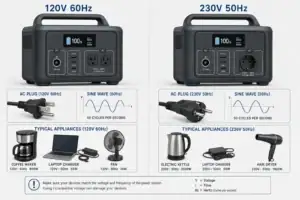
Avoid charging unattended, especially in remote areas where help is delayed. Keep cables where they will not become trip hazards or be crushed by vehicle doors. The power station’s output voltage and frequency should match the charger’s accepted input range. For sensitive AC chargers, a pure sine wave output is generally preferable.
Temperature limits vary, so follow the operating ranges printed for the drone battery, charger, and station. If any device reports an overtemperature condition, disconnect the load if safe and allow the equipment to cool naturally. Do not use ice, water, or a refrigerator to cool a lithium battery rapidly.
6. Maintenance, Transport, and Storage
Before a field day, charge the power station to the level needed for the mission and confirm that each intended outlet works. Inspect AC cords and USB-C cables for bent contacts, cuts, looseness, or heat discoloration. Update mission estimates when batteries age because older packs may charge differently and deliver less flight time.
During transport, prevent batteries and cables from moving freely. Protect battery terminals from conductive objects, and follow applicable carrier and aviation requirements when traveling. A station should be secured against impact and kept within its specified transport and storage temperature range.
For longer storage, avoid leaving lithium-based equipment fully depleted. Follow each device’s specified storage-charge guidance; many drone batteries have an automatic storage-discharge function. Periodically check the station because its display, battery-management system, and wireless functions may consume a small amount of energy even when outputs are off.
Keep vents free of dust using external, noninvasive cleaning methods recommended for the device. Do not open the station or charger for maintenance. If a fan grinds, an outlet feels loose, or the unit shows persistent faults, stop using it and seek qualified service.
| Timing | Useful check | Reason |
|---|---|---|
| Before departure | Verify charge level, outlet operation, cables, and charger compatibility | Prevents avoidable field failures |
| At setup | Check shade, dry footing, airflow, and cable routing | Reduces heat, moisture, and trip risks |
| During charging | Watch power draw, battery temperature, and remaining capacity | Reveals overloads and unrealistic energy estimates |
| After use | Let equipment cool, inspect it, and store at suitable charge levels | Supports battery life and readiness |
7. Practical Takeaways and Specs to Look For
Size a field system by working backward from the number of flights, energy replaced per battery, charger power, and available turnaround time. Add conversion losses and a reserve rather than planning to exhaust the station. For dependable performance, place heat management and port compatibility alongside capacity and wattage.
Related guides: Portable Power Stations for Photography and Drone Charging: A Field Guide • Usable Capacity vs Advertised Capacity: Why 1,000Wh Doesn’t Mean 1,000Wh at the Outlet • USB-C Power Delivery (PD) Explained for Portable Power Stations
Specs to look for
- Usable battery capacity: Look for enough delivered energy to cover the planned battery refills plus roughly 15% to 25% reserve; this helps account for losses, cold or hot conditions, and schedule changes.
- Continuous AC output: Choose a rating about 20% to 30% above the charger’s maximum draw; for example, a 300-watt hub is better paired with roughly 375 to 400 watts or more of continuous output.
- Pure sine wave inverter: Look for a clearly specified pure sine wave AC output; it provides cleaner power for electronically controlled chargers than a modified waveform.
- USB-C PD output and profiles: If charging directly by USB-C, verify both the wattage and required voltage profiles, such as 20 volts at 5 amps for a 100-watt load; this determines whether full-speed charging is available.
- Port-level and shared-output limits: Check the rating of each port and whether multiple ports share a power budget; this prevents unexpected speed reductions when several devices are connected.
- Display and energy monitoring: Look for real-time output watts, remaining percentage, estimated runtime, and warning indicators; these make field energy use easier to track.
- Thermal design and operating range: Favor well-spaced vents, temperature protection, and an operating range suited to expected conditions; sustained charging can produce significant internal heat.
- Station recharge input: Consider roughly 200 to 500 watts or more if the station must be replenished between sessions; higher input can shorten recovery time when a compatible source is available.
- Cycle-life rating: Frequent users may benefit from a rating of around 1,000 cycles or more to a stated remaining capacity; it helps compare expected long-term service rather than initial capacity alone.
- Size, weight, and environmental protection: Balance capacity against what can be carried safely, and check stated dust or moisture resistance; field portability is useful only when the equipment can be positioned securely and kept ventilated.
The final check should compare the charger’s actual behavior with the plan. Test the complete setup before a critical flight day, record how many watt-hours a normal recharge consumes, and adjust the capacity estimate using real field results.
Frequently asked questions
What size portable power station do I need for drone batteries?
Calculate the watt-hours you expect to replace across all drone batteries, then add allowance for charging and inverter losses plus a practical reserve. Also confirm that the station’s continuous output rating exceeds the charger or hub’s maximum draw, preferably with roughly 20% to 30% headroom.
Will a portable power station charge drone batteries faster?
Usually, no. Charging speed is set primarily by the battery, charger, or charging hub, provided the power station can supply the required continuous wattage. A station with insufficient output or an incompatible USB-C Power Delivery profile can cause slower charging, cycling, or failure to start.
What features matter most in a portable power station for drone batteries?
The most important features are sufficient usable watt-hours, continuous AC output, compatible USB-C PD profiles where applicable, and clear port-level power limits. A pure sine wave inverter, real-time power monitoring, effective ventilation, and a suitable operating-temperature range can also improve field reliability.
What is a common mistake when charging drone batteries from a power station?
A common mistake is treating the station’s advertised capacity as the exact energy available to recharge drone batteries. Energy is lost through the inverter, charger, cables, and battery charging process, so the delivered energy is lower. Planning only from the label capacity can leave the station short before the final batteries are charged.
Is it safe to charge drone batteries from a portable power station outdoors?
It can be safe when compatible equipment is used on a stable, dry, nonflammable surface with adequate airflow. Keep the station, charger, and batteries out of direct sun, rain, standing water, and enclosed vehicles, and do not charge damaged, swollen, leaking, or unusually hot packs. Follow the operating-temperature and charging guidance provided for each device.
Why does a drone battery charger stop or slow down in the field?
High battery temperature, blocked vents, direct sunlight, a low station charge level, or an overloaded output can reduce charging speed or trigger a shutdown. In USB-C setups, an unsupported power-delivery profile or underspecified cable can also limit power. Let warm batteries cool naturally in shade and check the station display for overload or temperature warnings.
Related guides
Browse this topic →
- Beginner-friendly sizing, runtime & specs
- Solar & charging (MPPT, fast charging, cables)
- Batteries (LiFePO4, cycles, care & storage)
- Safety, cold-weather performance, real-world tips
More in Beginners
See all →- Charging an Electric Wheelchair or Mobility Scooter From a Portable Power Station
- Portable Power Station for a Gaming PC: Runtime, Load Spikes, and UPS Considerations
- Portable Power Station for a Pop-Up Camper: Lights, Fans, Fridge, and Recharge Plan
- Portable Power Station for a Shed or Outbuilding: Lights, Chargers, and Security
- Portable Power Station for a Boat: 12V Loads, Salt Air, and Safer Storage
Keep reading
About this site
Portable Energy Lab publishes practical, independent guides about portable power—clear sizing, safe use, and real-world expectations.
Affiliate disclosure
Some links on this site may be affiliate links. If you buy through these links, we may earn a small commission at no extra cost to you. This helps support our content. Read our affiliate disclosure.