

You can estimate runtime with watt hours by dividing the battery’s watt-hours (Wh) by the total watts (W) your devices use and then multiplying by a realistic efficiency factor. In simple terms: hours ≈ Wh × efficiency ÷ watts. This turns a capacity label into practical hours of use for real devices.
Knowing how long a portable power station can run a fridge, CPAP, laptop, or lights helps you plan for power outages, camping, RV trips, and remote work. With a basic Wh formula and a few device specs, you can build a rough power budget, decide what to run at the same time, and avoid surprises.
This guide walks through the core runtime formula, shows how to apply it step by step, and then checks it against real-world examples. You will also see common mistakes, safety basics, long-term care tips, and a simple checklist of specs to look for when comparing portable power options.
What runtime estimation means and why it matters
Runtime estimation is the process of predicting how long a battery-powered system can run a specific device or combination of devices before it needs recharging. For portable power stations, that usually means turning a watt-hour capacity number into hours of usable power for your own loads.
Most units list capacity in watt-hours (Wh) and output limits in watts (W). Those numbers are useful only if you can translate them into questions like: “Can I run my mini fridge all night?” or “Will this keep my router and laptop going through a workday?” A simple Wh-based formula makes that translation possible.
Accurate runtime estimates matter most when power is limited or critical. During an outage, you may need to prioritize medical devices, refrigeration, or communications. On a camping trip or in a van, you might be balancing lights, fans, and electronics against limited charging opportunities. Even for casual use, understanding runtime helps you avoid overloading the inverter, draining the battery faster than expected, and shortening battery life through deep discharges.
Because every system has losses, real runtime is always somewhat less than the pure Wh ÷ W calculation. Inverter efficiency, battery management limits, temperature, and how your devices cycle on and off all affect results. Treating the formula as a planning tool (with a built-in safety margin) rather than a guarantee keeps expectations realistic.
Key concepts and the simple Wh runtime formula
Estimating runtime with watt hours is easier when you separate three basic ideas: energy, power, and time.
- Energy is stored in the battery and usually expressed in watt-hours (Wh).
- Power is how fast energy is used, usually expressed in watts (W).
- Time is how long the battery can supply a given power level, expressed in hours.
These three are linked by a simple relationship:
Runtime (hours) ≈ Battery capacity (Wh) × Efficiency ÷ Load (W)
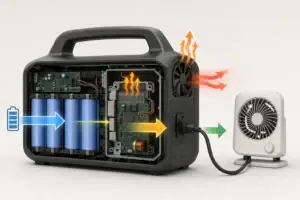
The efficiency factor accounts for energy lost as heat in the inverter and electronics. For AC outlets on a portable power station, a planning value of about 0.8 (80%) is a reasonable starting point. For lower-voltage DC or USB outputs, effective efficiency can be a bit higher, but using 0.8 still gives a conservative estimate.
Sometimes devices list current (amps) and voltage instead of watts. In that case, you can convert to watts first:
Watts (W) = Volts (V) × Amps (A)
Another important distinction is between running watts and surge watts:
- Running watts are the steady power draw once a device is operating.
- Surge watts (also called starting or peak watts) are short bursts some devices need at startup, especially motors and compressors.
The Wh-based runtime formula uses running watts, because surge events are brief. However, your inverter still has to handle the surge without shutting down. If the surge rating of the power station is too low, the device may never start, regardless of how many watt-hours you have.
When you run multiple devices at once, you add their running watts to get the total load. The same formula then applies to this combined wattage. Higher loads can slightly reduce efficiency, so heavy usage may shorten runtime more than the math alone suggests. Planning with a modest buffer helps offset that effect.
| Input | What it means | Typical example |
|---|---|---|
| Battery capacity (Wh) | Total stored energy available at 100% charge | 300 Wh, 500 Wh, 1,000 Wh |
| State of charge (%) | How full the battery is when you start | 50% SOC gives roughly half the labeled Wh |
| Efficiency factor | Fraction of Wh that becomes usable output | 0.8 for AC loads, 0.85–0.9 for some DC/USB |
| Device running watts (W) | Continuous power draw while operating | 10 W light, 60 W laptop, 300 W appliance |
| Total load (W) | Sum of all devices running at the same time | 60 W laptop + 20 W monitor = 80 W total |
| Inverter continuous rating (W) | Maximum watts the inverter can supply steadily | Stay below this with your total load |
| Device surge watts (W) | Short burst needed at startup | Fridge may need 2–3× its running watts |
How to apply the formula step by step
You can use the runtime formula in a short checklist:
- Find battery capacity in Wh. Use the labeled watt-hours on the power station.
- Adjust for state of charge. If the battery is not full, multiply Wh by the starting percentage (for example, 0.5 for 50%).
- List device running watts. Check labels or power adapters. Convert from volts and amps if needed.
- Add up total watts. Include every device you plan to run at the same time.
- Choose an efficiency factor. Use about 0.8 for AC outlets, or a similar conservative value.
- Calculate runtime. Runtime ≈ (Adjusted Wh) × efficiency ÷ total watts.
- Round down and add a buffer. Treat the result as a maximum and plan for slightly less.
Example: 500 Wh battery at 100% charge, 50 W light, efficiency 0.8.
- Adjusted Wh = 500 Wh
- Runtime ≈ 500 × 0.8 ÷ 50 = 8 hours
If you add another 50 W device at the same time (100 W total), runtime becomes:
- Runtime ≈ 500 × 0.8 ÷ 100 = 4 hours
The same method works for any combination of devices, as long as the total watts stay within the inverter’s continuous and surge ratings.
Real-world runtime examples using the Wh formula
Worked examples make the Wh formula easier to use in everyday situations. The scenarios below assume a starting efficiency of 0.8 for AC-powered devices. Actual results will vary with temperature, inverter design, and how your devices cycle on and off.
Example 1: Laptop for remote work
Assume a laptop power adapter averages 60 W while you are actively working. With a 500 Wh power station and 0.8 efficiency:
- Runtime ≈ 500 × 0.8 ÷ 60 ≈ 6.7 hours
If your workload is lighter and the laptop averages closer to 30 W, runtime could be roughly double. Features like automatic screen dimming and sleep modes help lower the average draw.
Example 2: CPAP machine overnight
Suppose a CPAP machine averages 40 W without a heated humidifier:
- Runtime ≈ 500 × 0.8 ÷ 40 = 10 hours
If you enable a heated humidifier and the average draw rises to 70 W:
- Runtime ≈ 500 × 0.8 ÷ 70 ≈ 5.7 hours
For critical medical equipment, many users plan extra capacity or a second charging source to avoid running the battery down to zero.
Example 3: Mini fridge during a short outage
Consider a small fridge with a running draw of 70 W that cycles on about half the time. The average power over an hour might be closer to 35 W. With a 1,000 Wh power station at 0.8 efficiency:
- Runtime ≈ 1,000 × 0.8 ÷ 35 ≈ 22.8 hours
Opening the door frequently, high room temperatures, or placing hot items inside will increase the average draw and reduce runtime.
Example 4: LED lighting and phone charging while camping
Imagine two LED lanterns at 10 W each plus phones charging at a combined 10 W. Total load is 30 W. With a 300 Wh power station at 0.8 efficiency:
- Runtime ≈ 300 × 0.8 ÷ 30 = 8 hours
If you only run the lanterns for 4 hours each evening and charge phones intermittently, the same battery could cover several nights.
Example 5: Work-from-anywhere setup
Consider a setup with a 60 W laptop, 10 W hotspot, and 20 W portable monitor. Total load is 90 W. With a 700 Wh power station at 0.8 efficiency:
- Runtime ≈ 700 × 0.8 ÷ 90 ≈ 6.2 hours
Turning off the monitor when not needed, lowering screen brightness, or disabling unused peripherals can reduce the total watts and add an hour or more of runtime over a workday.
| Scenario | Battery size (Wh) | Total load (W) | Assumed efficiency | Estimated runtime (hours) |
|---|---|---|---|---|
| Single laptop | 500 Wh | 60 W | 0.8 | ≈ 6.7 h |
| CPAP without humidifier | 500 Wh | 40 W | 0.8 | ≈ 10 h |
| Mini fridge (averaged) | 1,000 Wh | 35 W | 0.8 | ≈ 22.8 h |
| Camping lights + phones | 300 Wh | 30 W | 0.8 | ≈ 8 h |
| Mobile office setup | 700 Wh | 90 W | 0.8 | ≈ 6.2 h |
Common mistakes and troubleshooting cues
Many runtime surprises come from the same small set of errors. Watching for these issues will make your estimates more reliable and help diagnose problems when actual runtime is shorter than expected.
1. Ignoring efficiency and using Wh ÷ W directly
Using the full watt-hour rating without an efficiency factor often overstates runtime by 10–25% for AC loads. If your calculations always seem optimistic, introduce a factor of about 0.8 and compare again.
2. Forgetting surge or startup watts
A device may have modest running watts but high startup demand. If the inverter cannot supply the surge, you might see:
- Device trying to start and then stopping
- Overload or fault indicators on the power station
- Beeping or automatic shutdown when the device turns on
In these cases, the problem is not runtime capacity but inverter surge capability.
3. Underestimating total load from small extras
It is easy to focus on the largest device and forget the smaller ones. A monitor, speaker, router, or extra lights can add 30–100 W to your total load. When runtime is shorter than expected, list every device that was plugged in and redo the math with their combined watts.
4. Starting from a partially charged battery
Runtime estimates assume a full battery unless you adjust for state of charge. If you start at 60% instead of 100%, you only have about 60% of the labeled watt-hours available. Many power stations display a percentage; use that to scale your Wh before applying the formula.
5. Overlooking temperature effects
In cold conditions, lithium batteries can temporarily deliver less usable capacity. In very hot conditions, the battery management system may limit output or shut down to protect the cells. If your runtime drops sharply in extreme temperatures, the battery may be operating outside its ideal range.
6. Expecting charging to fully offset loads
When you run devices while charging from solar or a vehicle, think in terms of net power:
- If charging watts are less than load watts, the battery still discharges, just more slowly.
- If charging watts are greater than load watts, the battery charges, but more slowly than it would with no load.
If you see the state of charge barely moving or slowly dropping even while charging, the load may be close to or above the incoming power.
| Symptom | Likely cause | What to check |
|---|---|---|
| Runtime is 20–30% shorter than math | No efficiency factor used | Recalculate with 0.8 efficiency for AC loads |
| Device will not start, inverter overloads | Startup surge too high | Compare device surge needs to inverter peak rating |
| Battery drains faster than expected | Extra devices left plugged in | List all active loads and add their watts |
| Runtime drops in cold weather | Reduced effective capacity | Operate closer to room temperature if possible |
| Charging but SOC still falls slowly | Load exceeds charging input | Compare load watts to solar or vehicle input watts |
Safety basics when planning and using runtime
Runtime planning should always be paired with safe operating habits. A few simple precautions go a long way toward preventing damage or injury.
Placement and ventilation
Place the power station on a stable, dry surface with enough space around it for air to circulate. Avoid stacking items on top or pressing it into tight corners where vents can be blocked. If the unit feels unusually hot during heavy use, reduce the load and give it time to cool.
Cords and extension use
Use cords and extension cables that are rated for the loads you plan to run. Damaged or undersized cords can overheat, especially when powering higher-wattage devices for long periods. Avoid running cords under rugs, through doorways, or anywhere they can be pinched or tripped over.
Dry conditions
Keep the power station and connected plugs away from standing water, heavy condensation, or direct rain. Even though there is no exhaust like a fuel generator, it is still an electrical device that should be kept dry.
Home wiring and backfeeding
Do not connect a portable power station directly to household wiring unless a proper transfer mechanism has been installed by a qualified electrician. Improvised backfeeding into wall outlets or panels can be dangerous to people and equipment.
Monitoring during long runtimes
When you plan to run devices for many hours, check the power station periodically. Look for warning icons, unusual noises, or heat buildup. If you rely on it for critical devices, consider setting reminders to verify that remaining capacity still matches your plan.
Maintenance and storage for reliable runtime
Over time, batteries naturally lose some capacity, but good maintenance and storage habits help keep runtime as close as possible to your original estimates.
Partial-charge storage
For long-term storage, many lithium-based systems do best when kept at a moderate state of charge rather than at 0% or 100%. A mid-range level (around 40–60%) is a common guideline if the unit will sit unused for several months.
Periodic top-ups
Batteries slowly self-discharge in storage. Topping up the charge every few months helps prevent the battery from sitting at a very low state of charge, which can accelerate aging.
Temperature management
Store the power station in a cool, dry place away from direct sun, heaters, or freezing conditions. High heat speeds up battery wear; deep cold temporarily reduces capacity and can limit charging until the battery warms up.
Regular checks
Before storm season, trips, or any planned use, do a quick functional check. Confirm that the unit charges, outlets work, and a small test load runs for a reasonable time. Comparing current runtime to previous notes can reveal gradual capacity loss.
Handling and cleaning
Keep vents and ports free of dust and debris. Avoid dropping or striking the unit, as impacts can damage internal cells or connections. If you notice sudden, unexplained drops in runtime, unusual swelling, or strong odors, discontinue use and follow the manufacturer’s guidance for inspection or recycling.
Practical takeaways and specs to look for
Estimating runtime with watt hours comes down to a short formula and a few key inputs. Once you know the battery’s Wh rating, your devices’ watts, and a realistic efficiency factor, you can build a simple power budget for outages, camping, RV use, or remote work.
A good rule of thumb for AC loads is:
Runtime (hours) ≈ Battery capacity (Wh) × 0.8 ÷ total running watts
Treat the result as a planning number, not a promise. Round down, allow a safety margin, and adjust your assumptions based on real-world experience with your own devices.
When you track your actual runtimes and compare them to your calculations, you can quickly refine your efficiency factor and understand how temperature, device settings, and usage patterns change your results over time.
Specs to look for when comparing portable power options
- Battery capacity (Wh): The main number used in the runtime formula. Higher Wh means more potential hours of use.
- Inverter continuous rating (W): Maximum steady load you can run. Make sure it comfortably exceeds your total planned watts.
- Inverter surge rating (W): Short-term peak output. Important for starting fridges, pumps, or tools with motors.
- Output types and limits: Number and rating of AC outlets, DC ports, and USB connectors you can use at the same time.
- Display information: A clear readout of watts in, watts out, and remaining capacity makes runtime planning much easier.
- Supported charging inputs: Wall, vehicle, and solar input ratings determine how quickly you can refill the battery.
- Operating temperature range: Indicates how well the unit will perform in hot or cold conditions.
- Weight and size: Important if you plan to move the power station frequently or travel with it.
- Recommended storage practices: Manufacturer guidance on storage charge level and temperature for long-term reliability.
With these specs in hand and the simple Wh runtime formula, you can match a portable power station to your actual devices and confidently estimate how long it will keep them running.
Frequently asked questions
Which specifications and features should I prioritize when comparing portable power stations?
Prioritize battery capacity in watt-hours, the inverter’s continuous and surge watt ratings, and the types/limits of available outputs. Also consider supported charging inputs, display/readout clarity, operating temperature range, and weight — these affect how well the unit matches your intended use.
What’s the most common mistake people make when estimating runtime?
The most common mistake is using Wh ÷ W without an efficiency factor or failing to include all active loads and the actual state of charge. Use a conservative efficiency (about 0.8 for AC loads), include smaller devices, and adjust Wh for starting charge to get realistic estimates.
How should I account for device startup (surge) power when planning?
Use running watts for runtime calculations but separately verify the inverter’s surge rating because some motors and compressors need short startup bursts much higher than running watts. If the inverter can’t handle the surge, the device may not start even if enough watt-hours are available.
Is it safe to power medical equipment like a CPAP with a portable power station?
Portable power stations can safely power many medical devices when the unit reliably meets the device’s continuous and surge power needs and is in good condition. For critical equipment, plan additional capacity or a backup charging source and follow device manufacturer guidance.
Can I estimate runtime while charging from solar or a vehicle?
Yes — think in terms of net power: if charging input watts are less than your load, the battery will still discharge, just more slowly; if charging exceeds load, the battery may slowly charge. Compare incoming watts to total load to determine whether the state of charge will rise or fall over time.
How can I make my estimated runtime more accurate?
Measure actual device draw with a watt meter, track the power station’s state-of-charge, and run a timed test under typical conditions. Refine your efficiency factor from real results and account for temperature and device duty cycles for better precision.
Related guides
Browse this topic →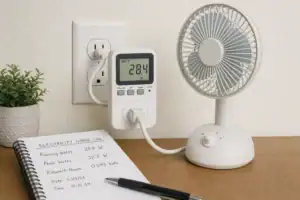

- Beginner-friendly sizing, runtime & specs
- Solar & charging (MPPT, fast charging, cables)
- Batteries (LiFePO4, cycles, care & storage)
- Safety, cold-weather performance, real-world tips
More in Capacity
See all →- Wh per Pound: How to Compare Portable Power Station Weight and Capacity
- Two Small Power Stations vs One Large Power Station: Which Backup Setup Is Better?
- How to Build a Load Priority List for a Portable Power Station During Blackouts
- Usable Capacity vs Advertised Capacity: Why 1,000Wh Doesn’t Mean 1,000Wh at the Outlet
- Why Output Ports Have Separate Watt Limits on Portable Power Stations
Keep reading
About this site
Portable Energy Lab publishes practical, independent guides about portable power—clear sizing, safe use, and real-world expectations.
Affiliate disclosure
Some links on this site may be affiliate links. If you buy through these links, we may earn a small commission at no extra cost to you. This helps support our content. Read our affiliate disclosure.