
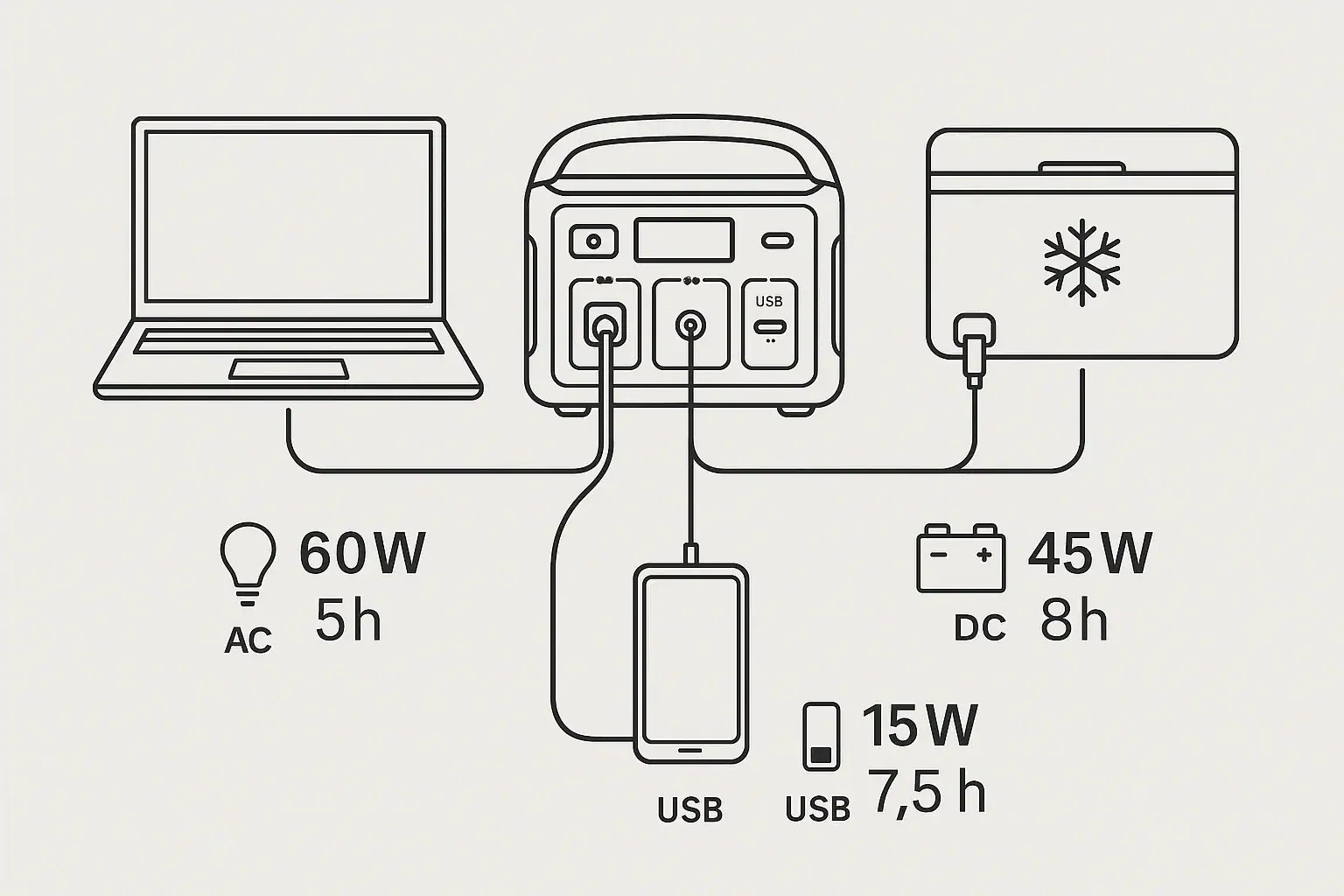
To plan runtime for AC, DC, and USB loads at the same time, add the real watt draw of each device, account for conversion losses, and keep the total below the power station’s continuous output limits.
Mixed-load runtime is often shorter than expected because each output path uses energy differently. An AC inverter has efficiency losses, a DC output regulator may have its own limit, and a USB-C PD profile can change how much power a device requests. Surge watts, standby drain, input limit, output watts, and usable watt-hours all affect the estimate.
The goal is not to calculate a perfect number. It is to build a realistic runtime range so you can decide which devices can stay on, which should cycle, and which output ports should be used for the best efficiency.
What Mixed-Load Runtime Planning Means and Why It Matters
Mixed-load runtime planning means estimating how long a portable power station can run several different types of devices at once. In this case, the loads are connected through AC outlets, DC ports, and USB ports at the same time.
This matters because a power station is not just a battery with outlets attached. It is a battery plus electronics that convert stored energy into different forms. AC outlets usually require an inverter. USB-C may require a negotiated Power Delivery profile. Regulated DC ports may step voltage up or down. Each conversion uses a small amount of energy as heat, so the full rated battery capacity is not available at the device.
For example, a 600 watt-hour power station will not usually deliver 600 watt-hours to AC appliances. Some capacity is reserved by the battery management system, and some is lost in conversion. If you run AC, DC, and USB loads together, the total draw can also push the unit closer to its thermal or output limits, which may reduce efficiency or trigger a shutdown.
A useful runtime plan answers three questions: how many watts are being used right now, how many watt-hours are realistically available, and whether any output port or system-wide limit is being exceeded.
How AC, DC, and USB Outputs Share Battery Capacity
All outputs draw from the same battery, but they do not draw from it in the same way. The battery stores energy as direct current. DC outputs may use that energy with less conversion than AC outlets, while AC loads require the inverter to create household-style alternating current.
The basic runtime formula is simple: usable watt-hours divided by total load watts equals estimated hours. If a power station has about 500 usable watt-hours and your combined loads average 100 watts, the estimate is about 5 hours. The hard part is choosing realistic inputs for the formula.
Use running watts, not only label watts. A device label may show a maximum rating, but actual draw can be lower, higher during startup, or variable over time. A laptop may draw 20 watts when full and 70 watts while charging. A small cooler may average 35 watts but spike higher when the compressor starts. A router may stay near 10 watts with very little change.
AC loads usually have the largest conversion penalty because the inverter must stay on and has idle consumption even when the connected device is small. A 5-watt AC gadget may be inefficient if it forces the inverter to remain active. Whenever a device can be powered directly by USB-C or DC at the correct voltage and current, it may improve runtime.
| Output type | Common use | Planning note |
|---|---|---|
| AC outlet | Laptop charger, small appliance, medical device | Include inverter losses and check continuous watts plus surge watts. |
| 12V DC port | Portable fridge, fan, lighting, router with adapter | Check the port amp limit and whether the voltage is regulated. |
| USB-A | Phones, lights, small accessories | Usually low draw, but many small devices can add up over time. |
| USB-C PD | Phones, tablets, laptops, cameras | Confirm the PD profile supports the voltage and wattage the device needs. |
Real-World Mixed-Load Runtime Examples
Consider a basic work setup: a laptop through USB-C at 45 watts, a phone charging by USB at 10 watts, and a small monitor through AC at 25 watts. The connected devices use about 80 watts. If the station has 700 rated watt-hours and about 590 usable watt-hours after normal reserves and conversion losses, the rough runtime is 590 divided by 80, or about 7.4 hours.
Now change the same setup so the laptop uses an AC charger instead of USB-C. The visible laptop load may still be around 45 watts, but the inverter must be on. If the inverter and charger together add several watts of overhead, the system draw may climb closer to 90 watts. Runtime could drop from roughly 7.4 hours to about 6.5 hours. That may not seem dramatic for one session, but it matters on long outages or trips.
A second example is a camping setup: a 12V fridge averaging 40 watts, LED lights using 12 watts, two phones averaging 15 watts combined while charging, and an occasional AC coffee grinder at 150 watts for a few minutes. The steady load is only about 67 watts, but the short AC load adds energy use and requires the inverter. Planning should separate continuous loads from short events. If the grinder runs for 5 minutes, it uses about 12.5 watt-hours, plus inverter losses. That is small compared with an overnight fridge load, but it can still affect the reserve margin.
A third example is communications backup: a router at 10 watts, a modem at 12 watts, a phone at 8 watts, and a small laptop at 35 watts. If the router and modem can use DC or USB-C adapters safely matched to their required input, the total may remain efficient. If all of them are plugged into AC adapters, the inverter overhead may become a meaningful part of the load.
Common Mistakes and Troubleshooting Cues
The most common mistake is using the battery’s rated watt-hours as if every watt-hour reaches the device. Rated capacity is a starting point, not the delivered energy at every port. A better planning range is often based on usable capacity after reserve and conversion losses.
Another mistake is adding only the devices you notice. Inverter idle draw, display lighting, cooling fans, wireless modules, and always-on USB ports can all consume energy. If runtime is much shorter than expected, look for loads that remain active after the main device is turned off.
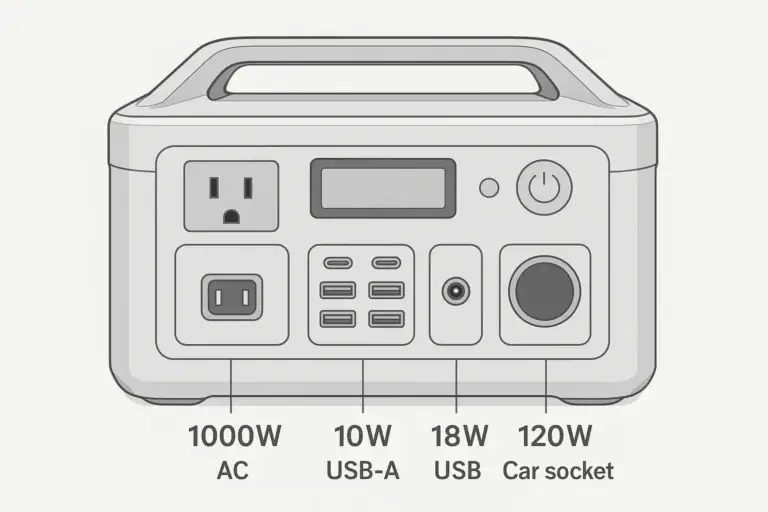
Port limits also cause confusion. A power station may have a high total output rating but a much lower limit on one DC port or one USB-C port. For example, a USB-C port labeled for high-watt charging may support certain PD profiles but not the exact voltage a laptop wants. The result can be slow charging, repeated disconnects, or no charging at all.
Surge behavior is another troubleshooting clue. A compressor, pump, printer, or motor may have a startup surge that is several times higher than its running watts. If the station shuts off immediately when a device starts, the issue may be surge watts rather than battery capacity. If it shuts down after running for a while, heat, overload, or low state of charge may be more likely.
If runtime drops sharply in cold weather, battery chemistry and device behavior may both be involved. Batteries deliver less usable energy in low temperatures, and some loads draw more power during startup or heating cycles. In hot conditions, the station may run cooling fans more often or reduce output to protect itself.
Safety Basics When Running Mixed Loads
Keep the combined load below the station’s continuous output rating and keep individual devices within the rating of the port they use. A high total rating does not mean every outlet or port can supply that full amount by itself.
Use properly rated cords and adapters. Avoid stacking adapters, using damaged cables, or forcing connectors that do not match. For USB-C, use cables rated for the power level being requested. For 12V DC, confirm voltage, polarity, plug size, and current needs before connecting sensitive electronics.
Do not bypass fuses, overload protection, temperature protection, or battery management features. Do not open the power station or modify the battery pack to increase runtime. These protections are part of the safety system and should remain intact.
Ventilation is important under mixed loads because multiple converters may be active at once. Leave space around intake and exhaust areas, keep the unit away from bedding or soft surfaces, and avoid enclosing it in a small unventilated box while it is working.
If the power station is used near home circuits, use only appropriate, code-compliant connection methods. Do not improvise connections to electrical panels or household wiring. For any permanent or semi-permanent home backup arrangement, consult a qualified electrician.
Maintenance and Storage Habits That Protect Runtime
Runtime planning gets easier when the power station is maintained consistently. The battery gauge should be treated as an estimate, especially near full and near empty. If the display changes quickly under load, it may be responding to voltage sag, temperature, or a changing load profile.
Store the unit in a moderate temperature range when possible. Very hot storage can age batteries faster, while very cold storage can reduce available output until the unit warms. For longer storage, many portable power stations are best kept partially charged rather than fully depleted.
Check cables and adapters before relying on them. A worn USB-C cable, undersized DC lead, or loose AC plug can cause intermittent charging, voltage drop, heat, or device resets. Labeling common cables by wattage or purpose can prevent mistakes when several devices are being powered at once.
For recurring use, make a simple load list. Record the typical watt draw of each device and whether it runs constantly or cycles. Over time, real results are more useful than label ratings. If a fridge runs for 12 hours and uses 350 watt-hours in mild weather, that field data is more valuable than a guess based on its peak rating.
| Planning habit | What to track | Why it helps |
|---|---|---|
| Load inventory | Running watts, surge behavior, port used | Prevents underestimating total draw. |
| Cable check | USB-C rating, DC plug fit, cord condition | Reduces disconnects, heat, and slow charging. |
| Temperature awareness | Cold starts, hot storage, fan activity | Explains changing runtime in different conditions. |
| Reserve margin | Remaining watt-hours or percent at shutdown target | Keeps critical devices powered longer. |
Related guides: Portable Power Station Watt-Hours Explained • Inverter Efficiency Explained: Why Your Runtime Is Shorter Than Expected • Inverter Idle Consumption Explained: How Much Power You Lose Just Having AC On
Practical Takeaways and Specs to Look For
The best runtime plan starts with the devices, not the battery. List what must run, what can run occasionally, and what can be turned off. Then add the running watts, account for the output path, and compare the result with both total and port-specific limits.
When possible, use the most direct efficient output that safely matches the device. USB-C can be efficient for compatible laptops and tablets. DC can be useful for 12V equipment if the voltage and current match. AC is flexible, but it often costs more energy because the inverter must operate.
Build in a reserve. If the estimate says 8 hours, plan as if 6 to 7 hours is more realistic when weather, battery age, cycling loads, and conversion losses are unknown. For critical equipment, test the exact setup before relying on it.
Specs to look for
- Usable watt-hours: Look for a clear rated capacity and expect a practical delivered range below that, such as 80% to 90% depending on output path, because runtime is based on usable energy.
- Continuous AC output: Look for a watt rating above your combined steady AC loads, such as 600 watts for a 400-watt planned load, because headroom reduces overload shutdowns.
- Surge watt rating: Look for short-duration surge capacity that can handle motors or compressors, often 2 times the running wattage, because startup demand can trip protection.
- Inverter idle consumption: Look for low idle draw or an automatic AC shutoff option, because small AC loads can waste runtime if the inverter stays on for hours.
- USB-C PD output profiles: Look for voltage and wattage support such as 9V, 12V, 15V, or 20V up to 60 to 100 watts, because compatible devices charge better when the PD profile matches.
- DC port rating: Look for voltage, current, and regulation details, such as 12V at 10A, because fridges, routers, and lighting can be sensitive to voltage drop or port limits.
- Total combined output limit: Look for the maximum output when AC, DC, and USB are active together, because individual port ratings may not all be available at the same time.
- Display and monitoring data: Look for live watts in and out, remaining time, and battery percentage, because real-time readings make mixed-load troubleshooting much easier.
- Thermal management: Look for clear ventilation requirements and fan behavior, because heat from multiple active converters can affect performance during long runs.
Mixed-load runtime planning is a practical estimate, not a one-time calculation. Use watt-hours for capacity, watts for load, and port ratings for limits. Once you test your actual devices together, you can refine the plan and make the power station far more predictable.
Frequently asked questions
How do I estimate runtime when AC, DC, and USB devices are all running together?
Add the real running watts of every device, then divide the power station’s usable watt-hours by that total load. Adjust for conversion losses, especially if AC output is involved, because inverter overhead reduces delivered energy. The result is usually a runtime range rather than a single exact number.
What specs matter most for mixed load runtime planning?
The most useful specs are usable watt-hours, continuous AC output, surge watt rating, inverter idle consumption, USB-C PD profiles, and DC port limits. It also helps to check the total combined output limit when multiple port types are active at once. These details determine both runtime and whether the station can support the load safely.
What is a common mistake people make with mixed loads?
A common mistake is using the battery’s rated watt-hours as if all of that energy is available at the outlets. Another frequent error is ignoring inverter idle draw or assuming a port can supply the same power as the station’s total output rating. Both mistakes can make runtime estimates too optimistic.
Is it safe to run AC, DC, and USB devices at the same time?
Yes, if the combined load stays within the station’s total output limit and each device stays within the rating of its port. Use properly rated cables and adapters, and make sure the unit has enough ventilation. If a device has a high startup surge or unusual power requirement, check the specifications before connecting it.
Why does runtime drop more than expected when I use AC outlets?
AC output usually requires an inverter, and that inverter uses energy even before the connected device draws much power. Small AC loads can be less efficient than direct DC or USB-C power because the conversion overhead becomes a larger share of the total draw. That is why direct output paths often last longer for compatible devices.
How can I make mixed-load runtime more efficient?
Use the most direct output that safely matches each device, such as USB-C for compatible electronics or DC for 12V equipment. Keep AC use for devices that truly need it, and turn off loads that do not need to run continuously. Testing your exact setup is the best way to find the most efficient combination.
Related guides
Browse this topic →

- Beginner-friendly sizing, runtime & specs
- Solar & charging (MPPT, fast charging, cables)
- Batteries (LiFePO4, cycles, care & storage)
- Safety, cold-weather performance, real-world tips
More in Capacity
See all →- Wh per Pound: How to Compare Portable Power Station Weight and Capacity
- Two Small Power Stations vs One Large Power Station: Which Backup Setup Is Better?
- How to Build a Load Priority List for a Portable Power Station During Blackouts
- Usable Capacity vs Advertised Capacity: Why 1,000Wh Doesn’t Mean 1,000Wh at the Outlet
- Why Output Ports Have Separate Watt Limits on Portable Power Stations
Keep reading
About this site
Portable Energy Lab publishes practical, independent guides about portable power—clear sizing, safe use, and real-world expectations.
Affiliate disclosure
Some links on this site may be affiliate links. If you buy through these links, we may earn a small commission at no extra cost to you. This helps support our content. Read our affiliate disclosure.