
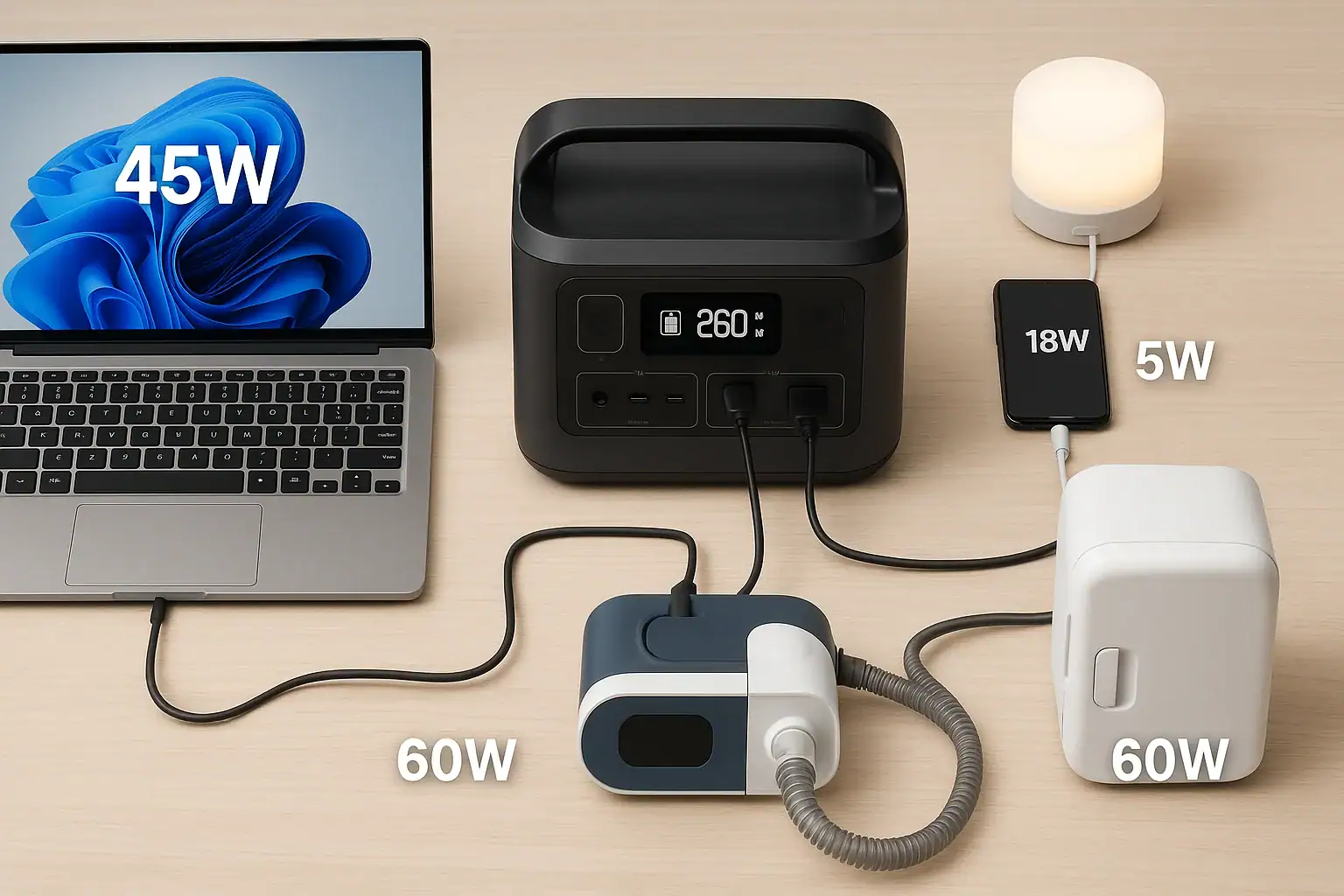
A portable power station can power anything that stays within its watt limit and battery capacity, from phones and laptops to mini fridges and CPAP machines. What really matters is matching device watts, surge watts, and expected runtime to the unit’s continuous output and watt-hour rating. Understanding limits like inverter capacity, DC output, and input limit for recharging helps you avoid overloads and disappointment.
People search for terms like “how many watts,” “runtime calculator,” “can it run a fridge,” or “can it power a TV” because they want to know exactly what a portable power station can handle. By learning how wattage, watt-hours, surge power, and efficiency losses work together, you can quickly tell whether a specific model will run your camping gear, home office, or emergency backup devices—and for how long.
This guide explains what you can realistically power, common mistakes that shorten runtime, and the key specs to compare before you buy or use a portable power station.
Understanding What a Portable Power Station Can Power and Why It Matters
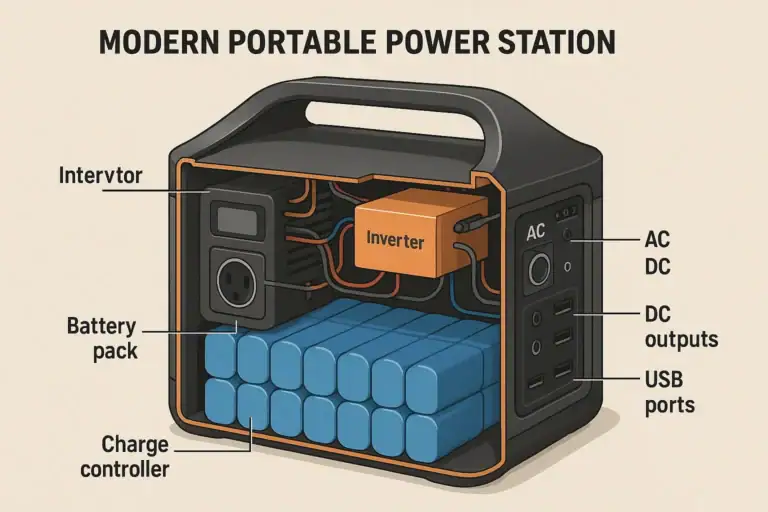
A portable power station is a rechargeable battery box with built-in inverters and ports that lets you run or charge devices without a wall outlet. What it can power is determined by two main limits: how much power it can output at once (watts) and how much total energy it stores (watt-hours).
Continuous output is the maximum wattage the power station can deliver steadily without shutting down. This tells you how many and which devices you can run at the same time. A unit with a 300-watt inverter, for example, can handle a laptop, phone chargers, and some LED lights together, but not a microwave.
Battery capacity, usually given in watt-hours (Wh), tells you how long it can run those devices before needing a recharge. Higher Wh means longer runtime, but also more weight and cost.
Understanding these limits matters because it prevents overloads, protects sensitive electronics, and ensures you choose a power station that actually meets your needs—whether that is keeping a CPAP machine running overnight, running a mini fridge during an outage, or powering cameras and laptops on a remote shoot.
Key Power Concepts: Watts, Watt-Hours, and Device Compatibility
To know what a portable power station can power, you need to understand a few core concepts: watts, watt-hours, surge power, and the difference between AC and DC outputs.
Watts (W) measure power—the rate of energy use. Every device has a watt rating or at least a voltage (V) and current (A) you can multiply (V × A = W). A 60-watt laptop charger and a 100-watt TV together draw about 160 watts while running.
Watt-hours (Wh) measure stored energy. A 500 Wh power station can theoretically supply 500 watts for 1 hour, or 100 watts for 5 hours. In real use, inverter losses and inefficiencies mean you should assume about 80–90% of the rated capacity is usable, especially for AC loads.
Continuous vs. surge watts: Many devices, especially those with motors or compressors, draw a short burst of higher power when starting up. This is surge or peak wattage. For example, a small fridge might run at 60–80 watts but spike to 200–300 watts for a second when the compressor kicks on. Your portable power station’s inverter must handle both the running watts and the brief surge, or it will shut down.
AC vs. DC outputs:
- AC outlets (the standard wall-style plugs) are powered by the internal inverter and usually support the highest wattage but waste some energy converting DC battery power to AC.
- DC outputs (USB-A, USB-C PD, 12V car sockets, barrel ports) bypass the inverter and are more efficient. They are ideal for phones, tablets, laptops that accept USB-C PD, and 12V fridges or fans.
Input limit refers to how quickly the power station can be recharged from wall power, solar panels, or a car outlet. While it does not change what the unit can power at any moment, it affects how long you can keep using it in off-grid or extended outage scenarios.
To check compatibility, compare each device’s running watts and surge watts to the inverter rating, then compare the total running watts to the battery capacity to estimate runtime.
| Concept | Typical Range | What It Affects |
|---|---|---|
| Battery capacity (Wh) | 200–2,000 Wh | How long devices can run |
| Continuous AC output (W) | 200–2,000 W | What devices you can run at once |
| Surge output (W) | 400–4,000 W | Ability to start motors/compressors |
| USB-C PD output (W) | 18–100 W | Fast charging laptops/phones |
| 12V DC car socket (A) | 8–10 A | 12V fridges, fans, pumps |
Real-World Examples: What You Can Typically Power
While exact capabilities depend on the specific model, it helps to see what different classes of portable power stations can usually handle. Below are common device categories and how they pair with small, medium, and larger units.
Small portable power stations (around 200–300 Wh, 150–300 W)
These compact units are best for light loads and short trips.
- Phones and tablets: Easily charge multiple times. A 10 Wh smartphone battery can be recharged roughly 10–15 times from a 200 Wh unit, accounting for losses.
- Laptops: A 60 W laptop can run or charge for 2–3 hours on a 200–250 Wh station.
- LED lights: A 5 W LED bulb can run for dozens of hours.
- Small USB fans: Typically 2–10 W, suitable for overnight use.
These units are not ideal for devices requiring high surge power, like most power tools or appliances with compressors.
Medium portable power stations (around 500–800 Wh, 500–800 W)
This range is popular for camping, van life, and short power outages.
- CPAP machines: Often 30–60 W without a heated humidifier. A 500–600 Wh station can run a CPAP for 8–12 hours, longer if you use DC output and disable heating features.
- Mini fridge or 12V fridge: Many draw 40–70 W when running, with intermittent cycles. A 500–700 Wh station can often keep them going for most of a day, depending on ambient temperature and usage.
- TVs and streaming devices: A 100 W TV plus a small streaming box and router might total 130–150 W, giving 3–4 hours of use on a 500 Wh unit.
- Small tools: Low-wattage tools like soldering irons or compact drills may work if their wattage stays below the inverter limit.
Larger portable power stations (around 1,000–2,000 Wh, 1,000–2,000 W)
These heavier units are suited for more demanding loads and longer runtimes.
- Refrigerators: Many standard fridges use 100–200 W running, with higher surge. A 1,000+ W inverter with adequate surge capacity can often handle them, and a 1,000–2,000 Wh battery can keep them running for several hours to a day with careful door use.
- Microwaves: Compact microwaves often draw 700–1,000 W. Only higher-output stations can run them, and runtime will be limited to short cooking bursts.
- Coffee makers and kettles: These can draw 800–1,500 W. Again, only larger stations can power them, and they will drain the battery quickly.
- Power tools: Some saws, drills, and air compressors can be run if their starting and running watts are within the inverter’s continuous and surge ratings.
Low-power essentials that almost any unit can handle
- Phone chargers (5–20 W each)
- LED lanterns and string lights (1–10 W)
- Battery chargers for cameras and drones (10–60 W)
- Bluetooth speakers and small radios (5–30 W)
For each device, check the label or power adapter for watts or volts and amps so you can add up the total and compare it to your portable power station’s ratings.
Common Mistakes and Signs You Are Overloading Your Power Station
Many issues with portable power stations come from misunderstanding what they can safely power. Recognizing these mistakes and troubleshooting cues can prevent shutdowns and premature battery wear.
Mistake 1: Ignoring surge watts
Users often look only at running watts and forget that devices with motors or compressors—like fridges, air pumps, and some power tools—draw a spike of power at startup. If the surge exceeds the inverter’s peak rating, the power station may:
- Shut off the AC output immediately
- Display an overload or error icon
- Beep or flash a warning indicator
If this happens, try unplugging other loads, then restarting with only the high-surge device connected. If it still fails, the unit’s surge capacity is insufficient for that device.
Mistake 2: Overestimating runtime
Another common error is assuming the full watt-hour rating is usable at the device’s labeled wattage. In reality, inverter losses, conversion inefficiencies, and standby power reduce effective capacity.
A quick approximation is:
Runtime (hours) ≈ Battery Wh × 0.8 ÷ Device watts
If your 500 Wh station is running a 100 W load, expect around 4 hours, not 5. Signs you have overestimated runtime include the battery percentage dropping faster than expected or the unit shutting down sooner than your mental math predicted.
Mistake 3: Running too many AC devices instead of using DC
Using AC for everything forces the inverter to work constantly, wasting energy as heat. When possible, power devices directly from USB or 12V DC outputs. This is especially important for CPAP machines and 12V fridges that often have DC-compatible power options.
If you notice the fan in the power station running frequently or the case getting warm when driving small loads via AC, consider switching those loads to DC ports to extend runtime.
Mistake 4: Exceeding the continuous-output-rating
Adding devices one by one can quietly push total watts over the inverter limit. Typical warning signs include:
- Overload icons or error codes on the display
- AC output turning off while the DC ports still work
- Repeated shutdowns when multiple devices are plugged in
To fix this, unplug everything, then reconnect devices starting with the most important ones, watching the wattage display as you go. Keep total draw well below the maximum continuous rating for reliability.
Mistake 5: Using incompatible or modified cords and adapters
Using mismatched voltage adapters, unregulated 12V accessories, or modified cables can cause devices not to start, run erratically, or even trip protections in the power station. If a device is not working:
- Confirm its voltage matches the port (for example, 12V device on 12V socket).
- Use the original or manufacturer-recommended adapter when possible.
- Avoid daisy-chaining multiple power strips and adapters from a single outlet.
Safety Basics When Powering Devices with a Portable Power Station
Portable power stations are generally safer than fuel generators, but they still store significant energy and can cause damage or injury if misused. Following basic safety practices helps protect both you and your devices.
Respect wattage and current limits
Never intentionally exceed the listed continuous or surge watt ratings. Overloading can trigger protective shutdowns and, in extreme cases, stress components. Similarly, do not exceed current ratings on 12V or USB ports; using splitters to run multiple high-draw devices from a single port can cause overheating.
Use the correct ports for each device
Always match devices to suitable outputs:
- Use USB or USB-C PD for phones, tablets, and compatible laptops.
- Use the 12V car socket for 12V fridges, pumps, and fans.
- Reserve AC outlets for devices that truly require them.
This reduces conversion losses and keeps components running cooler, which improves both safety and runtime.
Avoid blocking ventilation
Portable power stations often have built-in fans and vents. When powering higher loads, they can get warm. Place the unit on a stable, flat surface with several inches of clearance around vents. Do not cover it with blankets or place it in closed containers while in use.
Keep away from moisture and extreme temperatures
Most units are not waterproof. Avoid using them in heavy rain, near standing water, or where condensation can form. For outdoor use, shelter them from direct rain and splashes. Also, do not operate or charge them in extreme heat or cold outside the manufacturer’s recommended range, as this can reduce performance and stress the battery.
Do not attempt internal modifications
Never open the case, bypass built-in protections, or modify the internal battery pack. These actions can create fire and shock hazards and void warranties. If you suspect internal damage or a fault, discontinue use and contact a qualified service provider or the manufacturer.
High-power or household circuits
Do not attempt to hardwire a portable power station into home electrical panels, circuits, or outlets without a proper transfer mechanism installed by a licensed electrician. Incorrect connections can backfeed utility lines, posing serious risk to you and utility workers, and can damage both the power station and home wiring.
Maintenance and Storage to Preserve Power and Performance
Proper maintenance and storage help your portable power station deliver reliable power for years and retain its ability to run critical devices when you need it most.
Regular charging and cycling
Recharge the battery periodically, even if you are not using the station. Many lithium-based units perform best if kept between about 20% and 80% state of charge during regular use. For emergency backup, topping up to near 100% before a storm or planned outage is reasonable, but avoid leaving it fully discharged or fully charged for months on end.
Occasionally running devices from the station and then recharging it helps keep the battery management system active and provides a real-world check on runtime and performance.
Store in a cool, dry place
Heat accelerates battery aging. Store the unit in a cool, dry environment away from direct sunlight, heaters, and uninsulated attics or vehicles that can experience temperature extremes. Avoid damp areas that could encourage corrosion or condensation.
Inspect cables and ports
Periodically inspect AC cords, DC cables, and USB leads for fraying, bent connectors, or discoloration. Replace damaged cables promptly. Check ports for debris or corrosion and gently clean if necessary, following the manufacturer’s guidance.
Keep firmware and documentation handy
Some modern units allow firmware updates via apps or computers, which can improve charging profiles, efficiency, or compatibility. Keep any instructions or quick-start guides accessible so you can quickly review port limits, charging recommendations, and error codes during an outage or trip.
Pre-trip and pre-storm checks
Before relying on the station for camping, road trips, or emergency backup, perform a basic function test:
- Charge it to a suitable level.
- Plug in one or two key devices you plan to run.
- Confirm they start correctly and note the displayed wattage and estimated runtime.
This quick check helps you avoid surprises when you truly need the power.
| Maintenance Task | Suggested Frequency | Benefit |
|---|---|---|
| Top-up charge | Every 1–3 months | Prevents deep discharge damage |
| Full function test with loads | Before trips/outage seasons | Verifies real-world performance |
| Cable and port inspection | Every 3–6 months | Reduces risk of connection issues |
| Cleaning vents and surfaces | As needed | Maintains cooling efficiency |
Related guides: Portable Power Station Buying Guide • Portable Power Stations for CPAP and Medical Devices: What to Look For • How to Estimate Runtime for Any Device: A Simple Wh Formula + 5 Worked Examples
Practical Takeaways and Specs to Look For
When you understand watts, watt-hours, and surge power, it becomes much easier to answer “What can this portable power station power?” and “For how long?” Start by listing your must-run devices, checking their wattage, and estimating runtime using the battery capacity. Then, choose a unit that comfortably meets those needs without constantly running at its limits.
Use DC outputs whenever possible for better efficiency, and keep expectations realistic—high-watt appliances will drain even large batteries quickly. For emergency backup, prioritize essentials like communications, medical devices, and refrigeration over comfort appliances.
Specs to look for
- Battery capacity (Wh): Look for a capacity that covers your total watt draw for the desired hours (for example, 500–1,000 Wh for overnight essentials). This directly affects how long your devices can run.
- Continuous AC output (W): Choose an inverter rating at least 25–50% higher than your expected simultaneous load (for example, 600–1,000 W for small appliances). This provides headroom and reduces overload shutdowns.
- Surge/peak power (W): Ensure surge watts are roughly 2× the running watts of any motor or compressor device you plan to start. This helps fridges, pumps, and tools start reliably.
- AC outlets and DC ports: Look for enough AC sockets plus multiple USB-A, USB-C PD, and 12V outputs so you are not forced to use inefficient adapters. More appropriate ports mean better flexibility and efficiency.
- USB-C PD output (W): For modern laptops and fast-charging phones, a 45–100 W USB-C PD port allows direct, efficient charging without a bulky AC brick.
- DC output ratings (V and A): Check that 12V ports can supply 8–10 A or more if you plan to run 12V fridges or pumps. Adequate DC current prevents voltage drops and unexpected shutdowns.
- Recharge input limit (W): Higher input (for example, 100–400 W) lets you recharge faster from wall or solar, important for multi-day trips or extended outages.
- Display and monitoring: A clear screen showing input/output watts and remaining capacity or runtime helps you manage loads and avoid surprises.
- Weight and form factor: Consider 5–10 lb units for light travel and 20–40 lb units for home and vehicle-based use. Portability affects how often you will actually bring and use the station.
By matching these specs to your devices and usage patterns, you can confidently choose and use a portable power station that powers what you need, when you need it.
Additional practical example
Remote Worksites and DIY Projects
On construction sites or DIY projects away from outlets, portable power stations can run cordless tool chargers, small corded tools within their wattage limits, work lights, and measurement or testing equipment. For light carpentry or repairs, this can replace the need for long extension cords or small fuel generators.
Photographers, videographers, and event professionals also rely on power stations to run laptops, monitors, LED panels, audio gear, and battery chargers on location. The clean AC waveform and multiple USB ports simplify complex setups with many low-wattage devices.
Frequently asked questions
What specs and features matter most when choosing a portable power station?
Key specs are battery capacity (Wh) for runtime, continuous AC output (W) for what you can run at once, and surge/peak watts to start motors or compressors. Also check available ports (USB-C PD, USB-A, 12V), recharge input limit (for solar/wall recharge speed), and weight/portability to match your use case.
How can I tell if a power station will run my refrigerator?
Compare the fridge’s running watts and its startup surge to the station’s continuous and surge ratings, then estimate runtime using the battery Wh (allowing ~80% usable for AC loads). Account for compressor cycles and ambient temperature since those affect average power draw.
Why does my portable power station sometimes shut off unexpectedly?
Unexpected shutdowns commonly result from exceeding the inverter’s continuous or surge limits, overheating, or a depleted battery. Check the display for error codes, reduce or rearrange loads, and ensure proper ventilation and cable connections.
Is it safe to use a portable power station indoors during a power outage?
Yes—portable power stations are generally safer indoors than fuel generators because they produce no exhaust, but you should keep them dry, ventilated, and within the manufacturer’s temperature range. Never modify internal components and avoid connecting them to household wiring without a proper transfer switch installed by a professional.
What are practical ways to extend runtime when using a portable power station?
Use DC ports instead of AC when possible, run energy-efficient devices, lower screen brightness or heater settings, and stagger device use rather than running everything at once. Also reduce standby loads and keep the station charged to an appropriate level before extended use.
Can I recharge a power station with solar panels during an extended outage?
Many units support solar charging, but you must match panel wattage and voltage to the station’s input limits and connector type. Solar recharge rates depend on panel output, sunlight, and any built-in charge controller, so plan capacity and daily energy needs accordingly.
Related guides
Browse this topic →
- Beginner-friendly sizing, runtime & specs
- Solar & charging (MPPT, fast charging, cables)
- Batteries (LiFePO4, cycles, care & storage)
- Safety, cold-weather performance, real-world tips
More in Beginners
See all →- Charging an Electric Wheelchair or Mobility Scooter From a Portable Power Station
- Portable Power Station for a Gaming PC: Runtime, Load Spikes, and UPS Considerations
- Portable Power Station for a Pop-Up Camper: Lights, Fans, Fridge, and Recharge Plan
- Portable Power Station for a Shed or Outbuilding: Lights, Chargers, and Security
- Portable Power Station for a Boat: 12V Loads, Salt Air, and Safer Storage
Keep reading
About this site
Portable Energy Lab publishes practical, independent guides about portable power—clear sizing, safe use, and real-world expectations.
Affiliate disclosure
Some links on this site may be affiliate links. If you buy through these links, we may earn a small commission at no extra cost to you. This helps support our content. Read our affiliate disclosure.