
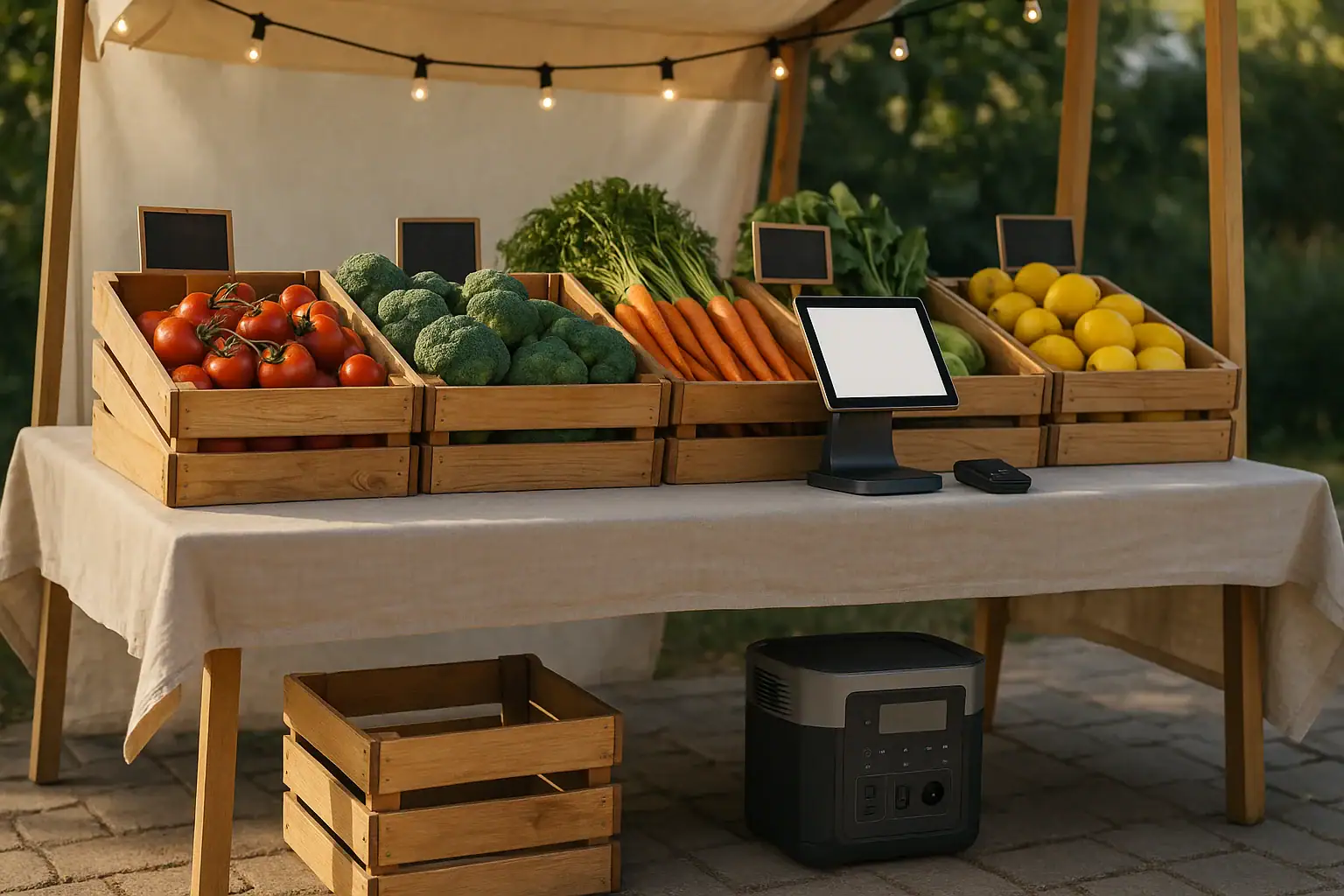
A portable power station can run a farmers market booth if its battery capacity, AC output, USB ports, and runtime match your lights, tablet, card reader, and any small accessories.
For most produce, craft, or bakery booths, the power needs are modest: LED lights, a tablet point-of-sale setup, a card reader, and maybe a receipt printer or small fan. The important terms are watt-hours, continuous watts, surge watts, USB-C PD profile, inverter efficiency, and runtime. If those specs are sized correctly, a compact or mid-size unit can often cover a full market day without using a gas generator.
The goal is not to buy the largest unit possible. It is to estimate your actual loads, allow a margin for weather and long sales days, and choose convenient outlets that keep payment devices charged and reliable.
What a portable power station does for a farmers market booth
A portable power station is a rechargeable battery system with built-in output ports. It may provide AC outlets for plug-in devices, USB-A or USB-C ports for phones and tablets, and 12-volt DC output for certain accessories. For a farmers market booth, it acts as a quiet, indoor-safe power source for low to moderate loads.
This matters because market booths often operate in places where electrical service is limited, shared, expensive, or unavailable. A booth may need reliable power for checkout more than for heavy equipment. If your tablet or card reader dies during peak hours, you may lose sales even if your display lighting is still working.
Compared with a fuel generator, a portable power station is usually quieter, produces no exhaust during use, and is easier to place near a table. It is best suited for electronics, LED lighting, small fans, labels, scales, and other light-duty booth equipment. It is not the right tool for high-draw appliances such as large refrigerators, commercial coffee machines, heat presses, or cooking equipment unless the unit is specifically sized for those loads.
For this use case, the most important question is simple: how many watt-hours do you need to get through setup, selling hours, teardown, and a reserve? Once you know that, outlet type and charging convenience become easier to evaluate.
How to estimate power needs for lights, tablet, and card reader
Start by listing every device that will run at the booth. Note its watt rating if available. If a device only lists volts and amps, multiply volts by amps to estimate watts. For example, a 5-volt device drawing 2 amps uses about 10 watts. Then estimate how many hours each device will be used.
Battery capacity is listed in watt-hours. A 300 watt-hour power station does not deliver every watt-hour at the outlet because the inverter and internal electronics use some energy. For AC loads, it is reasonable to allow for inverter efficiency loss. For USB loads, losses are often lower, but still present. A practical planning method is to calculate your expected energy use, then add 20% to 40% reserve.
Continuous watts describe how much power the station can provide steadily. Surge watts describe short bursts when some devices start up. Most booth electronics have little surge demand, but some printers, pumps, or fans may briefly draw more power than their running watts. A tablet and card reader usually matter more for port compatibility than surge capacity.
For tablets, USB-C Power Delivery can be useful because some tablets charge faster or only maintain battery level reliably when the port supports the right power profile. A low-output USB port may show charging but still let the battery drain during heavy screen use, cellular data, or point-of-sale activity.
| Booth device | Example running watts | Example use time | Estimated energy |
|---|---|---|---|
| LED string lights | 10 to 25 W | 5 hours | 50 to 125 Wh |
| Tablet point-of-sale device | 8 to 20 W | 6 hours | 48 to 120 Wh |
| Card reader | 2 to 5 W | 6 hours | 12 to 30 Wh |
| Small receipt printer | 10 to 40 W intermittent | 1 hour equivalent | 10 to 40 Wh |
| Small fan | 15 to 40 W | 4 hours | 60 to 160 Wh |
Real-world booth examples and sizing scenarios
A simple morning booth with a tablet, card reader, and one set of efficient LED lights may only need a few hundred watt-hours. If the market runs four to five hours and the tablet begins the day fully charged, a smaller unit can often keep the checkout system stable and provide lighting during early setup or cloudy conditions.
A busier booth with a tablet, card reader, label printer, compact scale, LED lighting, and a fan should plan for a larger battery. The fan alone can use as much energy as the checkout equipment. If the booth operates from early setup through afternoon teardown, the difference between a 4-hour and 8-hour runtime becomes significant.
A booth that depends on display lighting after sunset should treat lights as a core load, not an accessory. LED lights are efficient, but multiple strands, spotlights, signs, or illuminated menu boards can add up. In that case, calculate lighting separately and verify that the station has enough AC outlets or DC ports without unsafe adapters.
A prepared-food booth may have very different needs. A tablet and card reader are still small loads, but warmers, pumps, blenders, induction plates, refrigerators, or espresso equipment can exceed the output rating of many portable power stations. For food equipment, check running watts, start-up behavior, and local market rules before assuming a battery station is enough.
For many non-cooking booths, a practical target is enough capacity for expected use plus reserve. If the booth estimate is 250 watt-hours, a unit in the 350 to 500 watt-hour range may provide a reasonable buffer. If the estimate is 500 watt-hours, a 700 to 1,000 watt-hour class may be more comfortable, especially when lights and fans run continuously.
Common mistakes and troubleshooting cues at the market
The most common mistake is assuming that a fully charged power station will run everything all day without doing the math. A rated capacity is not the same as usable runtime under your exact load. Bright tablet screens, cellular connections, hot weather, and AC inverter losses can shorten runtime.
Another mistake is using the AC outlet for devices that could run from USB. If a tablet or card reader can charge from USB-C or USB-A, using the DC output may reduce conversion losses compared with plugging a wall charger into the AC inverter. The difference may be small for one device, but it can matter over a long market day.
If the tablet says it is charging but the battery percentage keeps dropping, the USB port may not provide enough power. Look for a higher-wattage USB-C port and confirm the cable supports the needed charging rate. Some cables are charge-only, some are limited to low power, and worn connectors can cause intermittent charging.
If the power station shuts off unexpectedly, check for overload, low battery, heat, or auto-sleep behavior. Some units turn off low-power outputs when they detect very small loads. A tiny card reader by itself may not draw enough to keep a port active. Combining it with a tablet charger or using a different output mode may help, depending on the unit.
If LED lights flicker, the issue may be a low-quality light string, a dimmer mismatch, a weak adapter, or an overloaded output. Check whether the lights require AC or DC power and whether their adapter is rated for outdoor conditions if exposed near a booth edge. Do not bypass plugs, cut connectors, or modify packs to force compatibility.
Safety basics for outdoor booth power
At a farmers market, the power station should be kept dry, shaded, ventilated, and protected from foot traffic. Most portable power stations are not intended to sit in rain, puddles, direct sprinkler spray, or wet grass. Even when a unit has some environmental resistance, its outlets and connected chargers may not.
Place the station where customers cannot trip over cords or bump the unit. Keep cords routed behind tables when possible, and avoid running them across walking paths. If a walkway crossing is unavoidable, follow market rules and use appropriate cord covers. Do not overload extension cords or power strips, and avoid daisy-chaining multiple strips together.
Use only equipment in good condition. Cracked chargers, frayed cords, loose plugs, and damaged outlet strips should be removed from service. Outdoor markets can be rough on equipment because cords are packed, unpacked, dragged, and exposed to dust. A quick visual inspection before each market day can prevent many problems.
Heat is another safety issue. Batteries and inverters work harder in hot environments. Do not put the power station inside a sealed plastic tote while it is operating. Do not cover its vents with tablecloths, boxes, or signage. Shade is helpful, but airflow still matters.
If your booth uses high-draw appliances, refrigeration, cooking equipment, or any connection to site electrical infrastructure, follow market rules and consult a qualified electrician or appropriate professional. A portable power station should not be modified, opened, or used to bypass built-in protections.
Maintenance, charging, and storage between market days
Reliability starts before market morning. Charge the power station fully the day before the event, then confirm the display shows an expected state of charge. If the station has been stored for months, test it with your actual booth devices before relying on it for payment processing.
Keep a simple power kit packed with the station: the correct charging cable, tablet cable, card reader cable, any approved adapters, and a small checklist. Label cables if several look similar. Many market-day power problems come from forgetting one small cord rather than from the battery itself.
Store the unit in a cool, dry place away from direct sun, freezing conditions, and moisture. Long-term storage at a partial charge is often preferred for lithium batteries, but follow the product manual for your specific unit. Recharge periodically if it will sit unused between seasons.
Clean dust from the exterior with a dry cloth and keep vents clear. Do not wash the unit, spray it, or use solvents. Check that buttons, ports, and outlet covers still work smoothly. If the case is swollen, cracked, smells unusual, or becomes unusually hot during use, stop using it and follow the manufacturer’s service guidance.
For recurring markets, track actual performance. Note the starting charge, ending charge, weather, devices used, and hours of operation. After a few events, you will know whether your setup has enough reserve or whether you need to reduce loads, improve charging habits, or choose a higher-capacity station later. For larger or multi-day setups, use a dedicated festival and vendor-event power plan.
| Maintenance item | What to check | Why it matters |
|---|---|---|
| Before market day | Charge level, cables, ports, and planned loads | Prevents checkout interruptions and missing-cable problems |
| During setup | Dry placement, shade, airflow, and cord routing | Reduces heat, water, and trip hazards |
| During the event | Battery percentage and device charging status | Shows whether runtime is matching expectations |
| After teardown | Remaining charge and any error messages | Helps improve sizing for future markets |
| Off-season | Storage charge, temperature, and periodic inspection | Supports battery health and readiness |
Related guides: Portable Power Station Watt-Hours Explained • USB-C Power Delivery (PD) Explained for Portable Power Stations • Surge Watts vs Running Watts: How to Size a Portable Power Station
Practical takeaways and specs to look for
For a farmers market booth, the best portable power station is the one that covers your real loads with reserve, has the right ports for your checkout equipment, and is easy to carry, charge, and protect outdoors. Lights, tablets, and card readers are usually manageable loads, but fans, printers, signs, and food equipment can change the sizing quickly.
Before comparing products, estimate watt-hours for the full market day. Include setup and teardown, not just posted selling hours. Then decide which devices should use AC outlets and which should use USB or DC ports. A good booth setup keeps payment devices powered first, display lighting steady second, and convenience accessories within the remaining energy budget.
Specs to look for
- Battery capacity: Look for a capacity above your calculated use, such as 300 to 500 Wh for a light checkout-and-LED setup or 700 to 1,000 Wh for longer days with fans or printers; this determines practical runtime.
- Continuous AC output: Look for enough steady wattage for all AC devices running together, often 300 to 600 W for basic booth electronics; this prevents overload shutdowns.
- Surge watt rating: Look for a surge rating above any device with a motor or printer startup draw; this helps with short spikes even when average wattage is low.
- USB-C Power Delivery: Look for a USB-C PD port around 30 to 100 W if using a tablet point-of-sale system; this helps the tablet charge while the screen and payment app are active.
- Number and type of outlets: Look for enough AC, USB-A, USB-C, and 12 V ports without stacking adapters; this keeps the booth cleaner and reduces connection problems.
- Recharge time: Look for a recharge time that fits your schedule, such as same-day or overnight charging; this matters for back-to-back market days.
- Display and low-battery information: Look for a clear percentage, watts-in, watts-out, or runtime estimate; this helps you manage power before checkout equipment fails.
- Operating temperature range: Look for a range suitable for hot summer markets and cool mornings; batteries may reduce performance outside comfortable conditions.
- Weight and handle design: Look for a size you can lift and transport with the rest of your booth gear, often under 20 to 35 pounds for many small vendors; portability affects whether you will actually bring it.
- Pass-through charging behavior: Look for clear support if you plan to charge the station while running devices; this can help during long events but should be used according to the product manual.
The practical approach is to size for reliability, not guesswork. Add up the lights, tablet, card reader, and accessories, add a reserve, and choose ports that match your actual devices. That gives your booth quieter power, fewer payment interruptions, and a cleaner setup without overspending on capacity you do not need.
Frequently asked questions
How long will a portable power station run a farmers market booth?
Runtime depends on the station’s usable watt-hours and the total watt draw of your devices. A small booth with LED lights, a tablet, and a card reader may run for a full market day on a modest unit, while adding a fan or printer can shorten runtime quickly. The best estimate comes from adding up each device’s watts and hours of use, then leaving a reserve.
What specs matter most when choosing a portable power station for a farmers market booth?
The most important specs are battery capacity in watt-hours, continuous AC output, USB-C Power Delivery, and the number of ports that match your devices. Recharge time, weight, and clear battery status display also matter because they affect how easy the unit is to use on market days. If you plan to run a tablet and card reader, port compatibility can be just as important as total capacity.
Can I use a portable power station for a tablet and card reader all day?
Yes, many booths can power a tablet and card reader for a full day if the station has enough capacity and the right USB output. A tablet that is heavily used for point-of-sale work may need a higher-watt USB-C port to keep up with screen brightness and cellular data use. Testing your exact setup before market day is the safest way to confirm runtime.
What is the most common mistake people make with booth power?
The most common mistake is assuming the rated battery size equals all-day usable power. In real use, inverter losses, bright screens, hot weather, and extra accessories reduce runtime. Another frequent issue is using AC power for devices that could run more efficiently from USB.
Is a portable power station safe to use outdoors at a market?
It can be safe when used correctly, but it should be kept dry, shaded, ventilated, and out of walkways. Use undamaged cords, avoid overloading outlets, and follow market rules for cord routing. Do not place the unit where it can sit in rain, puddles, or direct sprinkler spray.
Do I need a bigger unit if I use LED lights and a small fan?
Often yes, because a fan can use as much or more energy than the checkout devices. LED lights are efficient, but several strands or bright display lights can add up over several hours. If the fan will run for most of the market day, include it in your watt-hour estimate before choosing a unit.
Related guides
Browse this topic →
- Beginner-friendly sizing, runtime & specs
- Solar & charging (MPPT, fast charging, cables)
- Batteries (LiFePO4, cycles, care & storage)
- Safety, cold-weather performance, real-world tips
More in Beginners
See all →- Charging an Electric Wheelchair or Mobility Scooter From a Portable Power Station
- Portable Power Station for a Gaming PC: Runtime, Load Spikes, and UPS Considerations
- Portable Power Station for a Pop-Up Camper: Lights, Fans, Fridge, and Recharge Plan
- Portable Power Station for a Shed or Outbuilding: Lights, Chargers, and Security
- Portable Power Station for a Boat: 12V Loads, Salt Air, and Safer Storage
Keep reading
About this site
Portable Energy Lab publishes practical, independent guides about portable power—clear sizing, safe use, and real-world expectations.
Affiliate disclosure
Some links on this site may be affiliate links. If you buy through these links, we may earn a small commission at no extra cost to you. This helps support our content. Read our affiliate disclosure.