
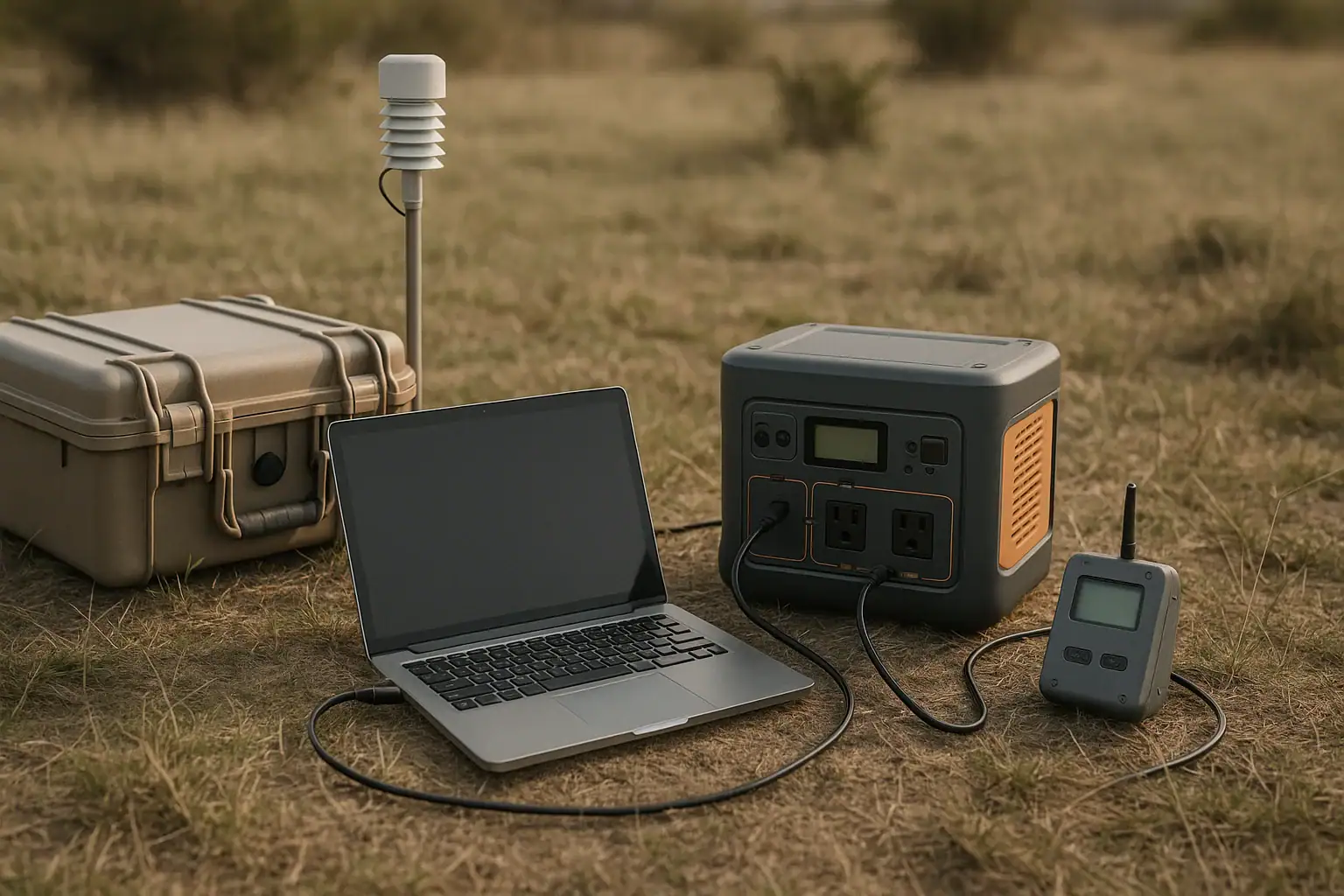
A portable power station for field research and data logging equipment should provide stable, correctly matched power for sensors, laptops, gateways, and chargers for the full deployment window.
The right unit is not just the one with the largest battery. Researchers also need to match runtime, DC output, USB-C PD profile, AC inverter capacity, surge watts, solar input limit, and recharge time to the actual instruments being used. A station that works well for charging a laptop may be poorly matched for a 12-volt data logger that runs continuously for several days.
This guide explains how portable power stations fit into field research workflows, how to estimate power needs, what problems cause shutdowns or short runtimes, and which specifications matter most before choosing a unit.
What a Portable Power Station Means for Field Research
A portable power station is a rechargeable battery system with built-in outputs for running or charging electrical equipment away from fixed power. In field research, it can support data loggers, environmental sensors, GPS receivers, laptops, tablets, small pumps, camera traps, radio modems, satellite communicators, lighting, and battery chargers.
For data logging, the main value is continuity. Many research instruments draw modest power, but they may need to operate for hours, days, or repeated field shifts without interruption. A sudden power loss can create gaps in measurements, corrupt files, interrupt sensor warm-up cycles, or require a site visit that was not planned.
Portable power stations matter because they combine battery storage, power conversion, protection circuitry, and multiple ports in one transportable device. Instead of carrying loose batteries, separate inverters, and several chargers, a field team can plan around one central power source. The tradeoff is that every conversion has limits and losses. A careful match between the station and the equipment is more important than the headline capacity alone.
How Portable Power Works for Data Logging Loads
Most field research power planning starts with watts and watt-hours. Watts describe how much power a device uses at a moment in time. Watt-hours describe how much energy is needed over a period. A 10-watt data logger running for 24 hours uses about 240 watt-hours before conversion losses. If that logger is powered through an AC adapter from the station inverter, real use may be higher than the label suggests because the battery must convert stored DC energy into AC and then the adapter converts it back to DC.
Output type matters. Many data loggers, sensor hubs, and communications devices use 12-volt DC, while laptops and tablets may use USB-C Power Delivery or AC adapters. Using a native DC or USB-C output can reduce conversion losses when voltage and connector requirements match. AC outlets are flexible but often less efficient for small continuous loads, especially if the inverter has its own idle draw.
Runtime also depends on duty cycle. A weather station that logs continuously but transmits once per hour may consume very little most of the time and spike briefly during communication. A laptop used for data downloads may draw heavily during processing but sit idle at lower wattage. For remote deployments, average load over time is usually more useful than peak load, while surge capacity is important for motors, pumps, and devices with startup draw.
| Load type | Typical planning factor | Why it matters |
|---|---|---|
| Low-power data logger | 2 to 10 watts continuous | Small loads can still use significant energy over multi-day deployments |
| Laptop or field tablet | 30 to 100 watts while charging or processing | Short, high-use sessions can dominate daily energy needs |
| Cellular or radio gateway | 5 to 25 watts average with transmit peaks | Communication spikes can trigger weak or undersized outputs |
| Small pump or active sampler | 20 to 150 watts plus startup surge | Motors may need higher temporary power than the running wattage |
Real-World Field Research Use Cases
In a short field survey, a portable power station may serve as a mobile charging hub. A team collecting soil, water, vegetation, or wildlife data might use it to recharge tablets, GPS units, camera batteries, handheld meters, and a laptop used for backups. In this case, the key specifications are usable capacity, USB-C output strength, number of ports, and how quickly the station can recharge between field days.
For unattended data logging, the use case changes. A station may be placed in a shelter or protective case to power a logger, sensor array, and telemetry device. The goal is not rapid charging but predictable runtime and stable output. Low self-consumption, suitable DC voltage, cold-weather performance, and compatibility with solar input become more important than the number of AC outlets.
For mobile research stations, the power station may support equipment during setup, calibration, and data download sessions. Examples include a laptop connected to a logger, a portable monitor, a small network router, rechargeable tool batteries, or sample processing equipment. This mixed-use pattern requires headroom because several devices may be connected at the same time.
For remote environmental monitoring, solar charging can extend deployment time, but it should not be treated as guaranteed daily full recharge. Cloud cover, shade, panel angle, dust, snow, short winter days, and the station solar input limit all affect recovery. A conservative plan assumes lower-than-ideal solar harvest and includes enough battery reserve for poor weather or delayed site access.
Common Mistakes and Troubleshooting Cues
The most common mistake is estimating runtime from capacity without accounting for usable energy and conversion losses. If a station is rated at 500 watt-hours, that does not mean every connected device will receive exactly 500 watt-hours. AC inverter use, voltage conversion, temperature, aging, and built-in reserve can reduce practical runtime. For critical logging, it is better to plan with a margin than to run the battery near empty.
Another frequent issue is using the wrong output. A 12-volt logger connected through an AC adapter may run, but it may waste energy compared with a suitable DC output. Conversely, plugging a sensitive device into an output with the wrong voltage, connector polarity, or current behavior can create faults or damage. If the equipment documentation is unclear, use manufacturer guidance or a qualified technician rather than improvising.
Shutdowns under load often point to overload, surge draw, low battery, temperature protection, or an output auto-sleep feature. Some stations turn off low-power outputs if the load is below a detection threshold. That can be a problem for very efficient loggers. A troubleshooting cue is a logger that runs during setup but turns off later even though the battery still shows charge.
Shorter-than-expected runtime can also come from background loads. AC inverters consume energy even when connected equipment is small. Heated enclosures, modems searching for signal, laptops charging internal batteries, and sensors with warm-up cycles can raise average demand. Measuring actual wattage during a representative test is more reliable than using only nameplate ratings.
Charging problems usually relate to input limits, panel mismatch, cable losses, or environmental conditions. A solar panel may be capable of a certain wattage, but the station can only accept power within its allowed voltage and input range. Long or undersized cables can reduce performance. In cold conditions, many batteries charge more slowly or block charging until they warm enough to protect the cells.
Safety Basics for Field Power Stations
Field power should be treated as research infrastructure, not an afterthought. Keep the power station dry, stable, ventilated, and protected from direct contact with mud, standing water, conductive dust, and heavy impacts. Most portable units are not designed to sit uncovered in rain or snow. If an enclosure is used, it should allow heat to escape and should not block vents.
Use outputs only as intended. Do not open the power station, modify the battery pack, bypass internal protections, or combine batteries in improvised ways. Do not force incompatible connectors. If a research platform requires custom wiring, higher-voltage systems, or integration with building power, involve a qualified electrician or an appropriate technical specialist.
Load limits deserve attention. Stay below the continuous watt rating of the output being used, and allow headroom for startup surge from pumps, fans, compressors, or motorized samplers. Extension cords and outlet strips should be suitable for the load and environment. Damaged cables, loose connectors, and exposed conductors are not field inconveniences; they are safety hazards.
Temperature is also a safety and performance factor. Batteries can lose capacity in cold weather, and charging may be restricted when cells are cold. High heat can shorten battery life and may trigger shutdown. Shade, elevation from hot ground, and controlled storage between uses can help maintain reliable operation.
Maintenance and Storage Between Field Deployments
Good maintenance starts with documentation. Label which devices were powered, for how long, through which ports, and under what weather conditions. This creates a field-specific power history that is more useful than theoretical estimates. Over time, teams can refine deployment kits and avoid overpacking or underpowering critical sites.
Before each trip, charge the station, inspect cables, verify adapters, and test the complete chain with the actual equipment. A brief bench test can reveal sleeping outputs, wrong connectors, underpowered USB-C ports, noisy adapters, or equipment that draws more wattage than expected. Also confirm that the station display or app, if present, gives readings that are useful enough for field decisions.
For storage, avoid leaving the battery fully depleted. Many lithium-based systems are best stored at a partial state of charge in a cool, dry place, then checked periodically. Very hot vehicles, freezing locations, damp sheds, and long-term neglect can reduce reliability. Keep ports clean, caps closed when available, and accessories stored with the station so the correct cables are not missing on deployment day.
If the station has been exposed to heavy dust, moisture, impact, or unusual heat, remove it from service until it can be inspected externally and tested safely. Do not continue using equipment that smells burnt, has swelling, visible damage, abnormal heating, or repeated fault messages.
| Maintenance task | Suggested timing | Reason |
|---|---|---|
| Full equipment runtime test | Before critical deployments | Confirms real-world load, output behavior, and reserve margin |
| Cable and connector inspection | Before and after field trips | Finds damage that can cause faults, heat, or intermittent shutdowns |
| Partial-charge storage check | Every few months during storage | Reduces the risk of deep discharge and preserves readiness |
| Solar input verification | Before remote solar-supported use | Confirms panel, cable, and input compatibility under realistic light |
Practical Takeaways and Specs to Look For
The best portable power station for field research is the one that matches the instruments, deployment time, environment, and charging plan. Start by listing every device, its voltage, its average and peak wattage, and the number of hours it must operate. Then add a reserve margin for conversion losses, weather, battery aging, and unexpected delays.
For data logging, reliability usually matters more than maximum outlet count. A station with suitable DC outputs, predictable low-load behavior, and enough reserve may be better suited than a larger unit used inefficiently through AC adapters. Test the full setup before relying on it in the field.
Specs to look for
- Usable battery capacity: look for enough watt-hours to cover the total load plus roughly 20 to 50 percent reserve; this helps prevent data gaps from weather delays or underestimated runtime.
- Continuous AC output: match the inverter watt rating to the combined AC loads with headroom, such as 300 watts for a 200-watt working load; this prevents overload shutdowns.
- Surge watt rating: allow extra capacity for pumps, fans, and motorized samplers, often two to three times the running wattage; this matters during startup.
- DC output options: look for regulated 12-volt or other required DC outputs with suitable current; native DC can improve efficiency for loggers and gateways.
- USB-C PD profile: check for profiles such as 45, 65, or 100 watts when powering laptops or tablets; the right profile avoids slow charging or failure to charge.
- Low-load behavior: confirm that outputs stay on for small continuous loads of only a few watts; auto-sleep can interrupt efficient data loggers.
- Solar input range and limit: compare panel voltage, connector type, and input watts, such as 100 to 400 watts; this determines realistic recovery in remote deployments.
- Recharge time: consider wall, vehicle, and solar recharge speeds; fast recovery matters when teams rotate between field sites.
- Operating temperature range: choose a station suited to expected cold, heat, and storage conditions; temperature affects capacity, charging, and shutdown behavior.
- Weight and enclosure practicality: balance capacity with carry distance, vehicle access, and protection from dust and moisture; an oversized station can be difficult to deploy safely.
For most research teams, the practical process is simple: measure or estimate the load, choose outputs that match the equipment directly, build in reserve, and test under realistic conditions. That approach makes a portable power station a dependable part of the field kit rather than a last-minute battery backup.
Frequently asked questions
What features matter most when choosing a portable power station for field research?
The most important features are usable battery capacity, the right output types for your equipment, and enough continuous and surge power for the full load. For data logging, native DC outputs, stable low-load behavior, and a suitable USB-C PD profile can matter more than a large AC inverter. Solar input range, recharge time, weight, and operating temperature range also affect how well the station fits field use.
How do I estimate how long a portable power station will run my data logger?
Start with the logger’s average watt draw and multiply it by the number of hours it must run to get watt-hours. Then account for conversion losses, built-in reserve, and any additional devices connected to the station. A bench test with the actual setup is the most reliable way to confirm runtime before deployment.
What is a common mistake people make with field research power setups?
A common mistake is assuming the battery capacity on the label equals usable runtime for every device. In practice, AC inverter losses, temperature, aging, and low-load shutdown behavior can reduce performance. Another frequent issue is using an AC outlet when a direct DC output would be more efficient for a continuous logger.
Is it safe to use a portable power station outdoors in remote field sites?
Yes, if it is kept dry, ventilated, and protected from impact, mud, and standing water. Most units are not meant to sit uncovered in rain or snow, and they should not be modified or overloaded. Use cables and enclosures that match the environment and the electrical load.
Can solar panels reliably keep a portable power station charged during field deployments?
Solar can extend runtime, but it is rarely reliable enough to assume a full recharge every day. Output depends on sun angle, shade, weather, cable quality, panel size, and the station’s input limit. For remote work, it is safer to plan for partial solar recovery and keep enough battery reserve for poor conditions.
Why does my portable power station shut off even though the battery is not empty?
This can happen when the load exceeds the output limit, startup surge is too high, or the station’s low-load auto-sleep feature turns off a small device. Temperature protection or a weak cable connection can also cause shutdowns. Testing the setup with the actual equipment usually helps identify the cause.
Related guides
Browse this topic →
- Beginner-friendly sizing, runtime & specs
- Solar & charging (MPPT, fast charging, cables)
- Batteries (LiFePO4, cycles, care & storage)
- Safety, cold-weather performance, real-world tips
More in Beginners
See all →- Charging an Electric Wheelchair or Mobility Scooter From a Portable Power Station
- Portable Power Station for a Gaming PC: Runtime, Load Spikes, and UPS Considerations
- Portable Power Station for a Pop-Up Camper: Lights, Fans, Fridge, and Recharge Plan
- Portable Power Station for a Shed or Outbuilding: Lights, Chargers, and Security
- Portable Power Station for a Boat: 12V Loads, Salt Air, and Safer Storage
Keep reading
About this site
Portable Energy Lab publishes practical, independent guides about portable power—clear sizing, safe use, and real-world expectations.
Affiliate disclosure
Some links on this site may be affiliate links. If you buy through these links, we may earn a small commission at no extra cost to you. This helps support our content. Read our affiliate disclosure.