
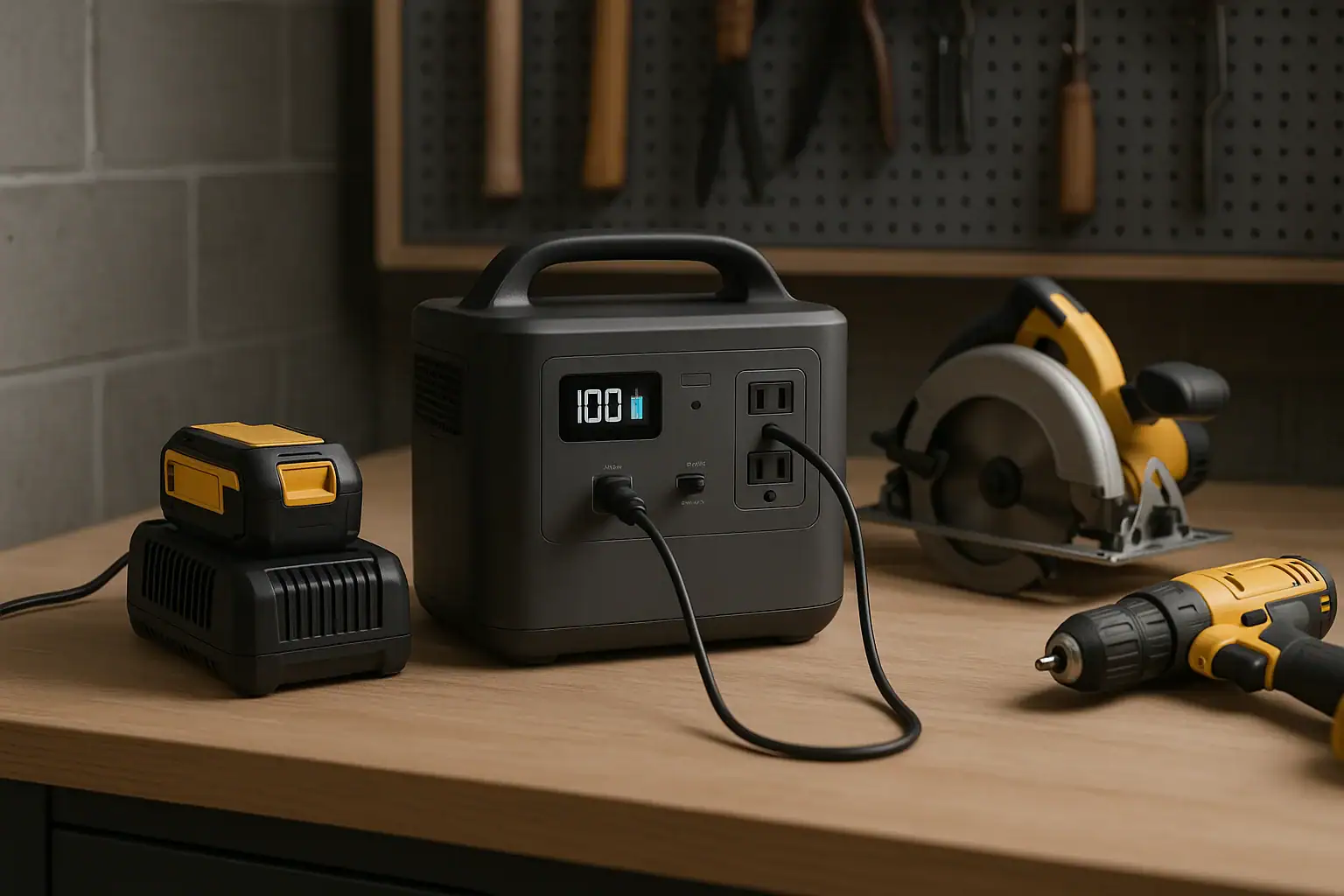
A portable power station can run many drills, saws, and battery chargers if its continuous watts, surge watts, outlet type, and battery capacity match the tool.
The key is to size the station for the load, not just the label on the tool box. A cordless tool charger may need only a modest AC output, while a corded circular saw or miter saw can demand a high peak load when the motor starts. Users commonly search for terms like inverter, runtime, surge watts, watt-hours, AC outlet, and battery charger compatibility because those specs determine whether the setup works reliably.
For garage work, mobile repairs, light construction, and remote jobsites, a portable power station can be a cleaner and quieter alternative to running an engine generator for small to medium tasks. It is not a universal replacement for high-amperage shop circuits, but it can be very practical when matched to the right tools.
What a Portable Power Station Does for Power Tools
A portable power station is a rechargeable battery system with built-in power electronics. For power tools, its most important job is converting stored battery energy into usable AC power for corded tools or battery chargers. Many units also provide DC and USB outputs, but drills, saws, and most tool chargers usually rely on a 120-volt AC outlet.
This matters because power tools are not all the same type of load. A small drill battery charger is typically predictable and steady. A corded drill draws more power while drilling under pressure. A saw may draw a sharp startup surge and then fluctuate as the blade meets material. The portable station must be able to handle both the initial peak and the running load without shutting down.
The best use case is usually charging cordless tool batteries, running small corded tools, or powering one moderate tool at a time. Heavy table saws, large compressors, welders, and high-draw dust collectors may exceed what many portable stations can support, especially when used continuously. Understanding this distinction prevents nuisance overloads and unrealistic runtime expectations.
Key Watts, Surge, and Charging Concepts
The first number to check is continuous AC output, usually expressed in watts. This is the power the station can supply while the tool is running. If a tool draws 900 watts in normal use, a station rated below that level may overload, even if the battery has plenty of stored energy.
The second number is surge or peak output. Motor-driven tools often need extra power for a fraction of a second at startup. A saw that runs at 1,200 watts may briefly demand much more when the blade starts. If the surge rating is too low, the station may beep, shut off the AC inverter, or refuse to start the tool.
Battery capacity is different from output. Capacity is usually shown in watt-hours. A 1,000 watt-hour station does not mean it can power any 1,000-watt tool; it means it stores about that amount of energy before conversion losses. Real runtime is lower because the inverter uses some energy and tool loads vary. A rough estimate is usable watt-hours divided by tool watts, then reduced for losses and stop-start use.
For chargers, also consider how many batteries will be charged at once. A single charger may be easy for a station, but several rapid chargers can add up quickly. The AC inverter must support the combined draw, and the station capacity must be large enough to make the charging session worthwhile.
| Tool or charger type | Illustrative power range | What it means for a power station |
|---|---|---|
| Single cordless drill charger | 50 to 150 watts | Usually easy for many stations, with runtime depending on battery capacity. |
| Multi-port or rapid chargers | 150 to 600 watts combined | Check total AC draw when several chargers run at the same time. |
| Corded drill | 500 to 900 running watts | Needs enough continuous output and some surge capacity under load. |
| Circular saw | 1,200 to 1,800 running watts | Requires a stronger inverter and higher surge capability. |
| Miter saw or heavy cutting tool | 1,500 to 2,000 plus running watts | May exceed smaller stations, especially during startup and hard cuts. |
Real-World Examples for Drills, Saws, and Battery Chargers
For cordless drill users, the most practical setup is often simple: plug the charger into the AC outlet and recharge packs during the workday. If the charger draws 100 watts and the station has about 700 usable watt-hours after losses, it may support several hours of charger operation. The number of tool batteries charged depends on the charger efficiency, battery pack size, and how depleted each pack is.
For a cordless tool crew, the station becomes a mobile charging hub. Instead of sizing for the drill itself, size for the chargers. Two rapid chargers drawing 250 watts each create a 500-watt load. That is much easier than running a large saw, but it can still drain a station over a long day. If solar or vehicle charging is part of the plan, input power also matters because slow recharging may not keep up with battery use.
For corded drills and small sanders, a mid-range AC inverter may be enough if the tool is used intermittently. These loads often fluctuate with pressure. A drill boring through dense wood can demand much more than the same drill spinning freely. If the station shuts down only during hard use, the cause is often motor load rather than a defective outlet.
For saws, the margin needs to be larger. A circular saw, reciprocating saw, or miter saw can trip overload protection if the inverter cannot provide the starting surge. Even when it starts, forcing the cut can pull the voltage down or cause a shutdown. A station that works for quick trim cuts may not be suitable for repeated framing cuts or thick hardwood.
Common Mistakes and Troubleshooting Cues
The most common mistake is comparing battery capacity to tool wattage as if they are the same spec. A large battery capacity helps runtime, but it does not guarantee the inverter can start a saw. Always check AC continuous output and surge output separately.
Another mistake is ignoring the total load. A station may run one charger, but overload when a second charger, work light, and fan are added. If the station shuts off after adding another device, unplug everything, restart the AC output if needed, and test one load at a time. This identifies whether the issue is total wattage, startup surge, or a specific device.
If a charger does not power on, check whether the station AC outlet is enabled. Many units require the AC inverter to be turned on separately. Also confirm the charger is designed for the outlet voltage and frequency available from the station. Most standard tool chargers are straightforward, but unusual chargers or imported equipment may have different requirements.
If a saw starts and immediately stops, the likely issue is surge demand. If it runs for a few seconds and then stops during cutting, the likely issue is continuous load or overheating protection. If runtime is far shorter than expected, the tool may be drawing more power than the estimate, the station may be cold, or multiple hidden loads may be active.
Long, undersized extension cords can also create problems. Voltage drop can make motors work harder and may contribute to poor startup. For portable station use, keep cords as short and appropriately rated as practical, and avoid coiled cords under heavy load.
Safety Basics for Jobsite and Garage Use
Use a portable power station within its rated output and environmental limits. Power tools can create vibration, dust, sparks, and debris, so keep the station on a stable surface away from cutting paths and falling materials. Do not place it where sawdust can block vents or where metal shavings may enter openings.
Keep the station dry. Many portable stations are not designed to sit in rain, wet grass, or puddles. If work must happen outdoors, use a dry, protected location with adequate airflow. Do not cover the station tightly while it is running because the inverter and battery management system need to dissipate heat.
Do not modify power cords, bypass overload protection, open the station, or alter tool battery packs. Built-in protections are there to reduce fire, shock, and battery failure risks. If the station repeatedly trips with a specific tool, treat that as a sizing or compatibility problem rather than something to defeat.
Portable power stations should not be wired into home electrical panels, shop subpanels, or building circuits without proper equipment and professional guidance. For any fixed electrical connection, transfer equipment, or code-related installation, consult a qualified electrician. For normal tool use, plug tools and chargers directly into the station or into appropriately rated portable accessories.
Maintenance and Storage for Tool Use
For reliable tool use, keep the station charged enough for the work planned. Storing it completely empty for long periods can reduce readiness and may be hard on the battery. Many users store a lithium-based station at a moderate state of charge and top it off before a job. Follow the manufacturer instructions for the chemistry and storage range of the specific unit.
After dusty work, wipe the exterior with a dry cloth and check that vents are clear. Avoid blowing debris deep into openings with high pressure air. If the station was used near cutting, sanding, or grinding, inspect the area around outlets before storing it. Clean, dry outlets reduce the chance of poor contact later.
Temperature affects performance. Cold batteries may deliver less power and show shorter runtime, while heat can trigger protective shutdowns or accelerate wear. Store the station in a dry indoor area when possible, away from direct sun, freezing conditions, and flammable clutter. Let a very cold station warm up before asking it to power a high-draw tool.
Recharge planning is part of maintenance. If the station supports wall, vehicle, or solar input, know the input limit and realistic recharge time before relying on it at a remote site. A large station with a slow input may take many hours to recover after running chargers all day.
| Care item | Suggested habit | Why it helps |
|---|---|---|
| State of charge | Store partially charged and top off before work | Improves readiness and avoids starting a job with limited runtime. |
| Dust control | Keep vents and outlets clear after cutting or sanding | Supports cooling and reduces contact problems. |
| Temperature | Store indoors when practical | Helps preserve battery performance and reduces shutdown risk. |
| Recharge plan | Match input power to the next work session | Prevents slow charging from becoming the limiting factor. |
Practical Takeaways and Specs to Look For
Related guides: Portable Power Station Basics: Outputs, Inputs, and What the Numbers Mean • Portable Power Station Watt-Hours Explained • How to Choose the Right Size Portable Power Station
A portable power station for power tools is most dependable when it is sized around the hardest job it will actually do. For many users, that means choosing enough capacity for cordless battery charging and enough inverter strength for occasional corded tools. For saws and other motor loads, leave a generous margin for startup surge and cutting resistance.
Think in three layers: output, capacity, and recovery. Output determines whether the tool starts and keeps running. Capacity determines how long the work can continue. Recovery determines how quickly the station can recharge from wall power, a vehicle, or solar input before the next use.
Specs to look for
- Continuous AC output: Look for a rating above your highest running load, such as 1,000 to 2,000 watts for many corded tools; this prevents overload during normal operation.
- Surge or peak output: Look for a meaningful short-term surge rating, often 2,000 to 4,000 watts for saw-capable setups; this helps motors start without tripping protection.
- Battery capacity in watt-hours: Look for enough capacity for the work session, such as 500 to 1,500 watt-hours for charging and light tool use; this drives realistic runtime.
- Pure sine wave inverter: Look for clean AC output for chargers and motor tools; this supports compatibility and smoother operation with sensitive electronics.
- AC outlet count and spacing: Look for enough outlets for chargers without blocking adjacent plugs; this matters when running multiple battery chargers.
- Recharge input limit: Look for wall or solar input that matches your turnaround needs, such as several hundred watts or more; slow input can delay the next job.
- Display with watts in and out: Look for real-time load and remaining runtime estimates; this makes troubleshooting overloads and planning charge sessions easier.
- Thermal and overload protection: Look for clear alerts and automatic shutdown behavior; these protections help prevent unsafe operation when tools exceed limits.
- Portability and durability: Look for a weight, handle design, and casing style that fit garage or jobsite movement; the best specs are less useful if the station is too awkward to place safely.
The right match is not always the largest station. A small charging station may be ideal for keeping drill batteries ready, while a larger inverter and battery are needed for saws. Start with the tools and chargers you plan to use, add their realistic wattage, allow for surge, and choose specs that leave a comfortable operating margin.
Frequently asked questions
What specs matter most when choosing a portable power station for power tools?
The most important specs are continuous AC output, surge or peak output, battery capacity in watt-hours, and the type of inverter. For tool charging, AC outlet count and spacing also matter because multiple chargers can take up more room than expected. If you plan to run saws or other motor tools, surge rating is especially important.
Can a portable power station run a circular saw?
Sometimes, but only if the station has enough continuous output and a high enough surge rating for startup. Circular saws often draw a large peak load when the motor starts and can overload smaller units. The exact result depends on the saw, the material being cut, and how much reserve the station has.
What is the most common mistake people make with tool loads?
A common mistake is assuming watt-hours alone tell the whole story. Battery capacity affects runtime, but it does not guarantee the inverter can start or sustain a power tool. Another frequent error is forgetting to add the watt draw of multiple chargers or accessories at the same time.
Is it safe to use a portable power station in a garage or on a jobsite?
Yes, if it is used within its rated limits and kept dry, ventilated, and away from dust buildup and cutting paths. It should not be covered while operating, and vents should stay clear. For fixed wiring or panel connections, professional electrical guidance is needed.
How do I estimate runtime for a drill charger or saw?
Start with the station’s watt-hour rating, then subtract some margin for inverter losses and real-world variation. Divide the usable energy by the tool or charger’s watt draw to get a rough estimate. Runtime will be shorter if the load cycles, starts and stops often, or draws more power under pressure.
Why does my power station shut off when I start a tool?
That usually means the startup surge is higher than the station can supply. Motor-driven tools often need a brief burst of extra power before settling into normal running draw. If the station works with chargers but not with a saw, surge capacity is likely the limiting factor.
Related guides
Browse this topic →
- Beginner-friendly sizing, runtime & specs
- Solar & charging (MPPT, fast charging, cables)
- Batteries (LiFePO4, cycles, care & storage)
- Safety, cold-weather performance, real-world tips
More in Beginners
See all →- Charging an Electric Wheelchair or Mobility Scooter From a Portable Power Station
- Portable Power Station for a Gaming PC: Runtime, Load Spikes, and UPS Considerations
- Portable Power Station for a Pop-Up Camper: Lights, Fans, Fridge, and Recharge Plan
- Portable Power Station for a Shed or Outbuilding: Lights, Chargers, and Security
- Portable Power Station for a Boat: 12V Loads, Salt Air, and Safer Storage
Keep reading
About this site
Portable Energy Lab publishes practical, independent guides about portable power—clear sizing, safe use, and real-world expectations.
Affiliate disclosure
Some links on this site may be affiliate links. If you buy through these links, we may earn a small commission at no extra cost to you. This helps support our content. Read our affiliate disclosure.