
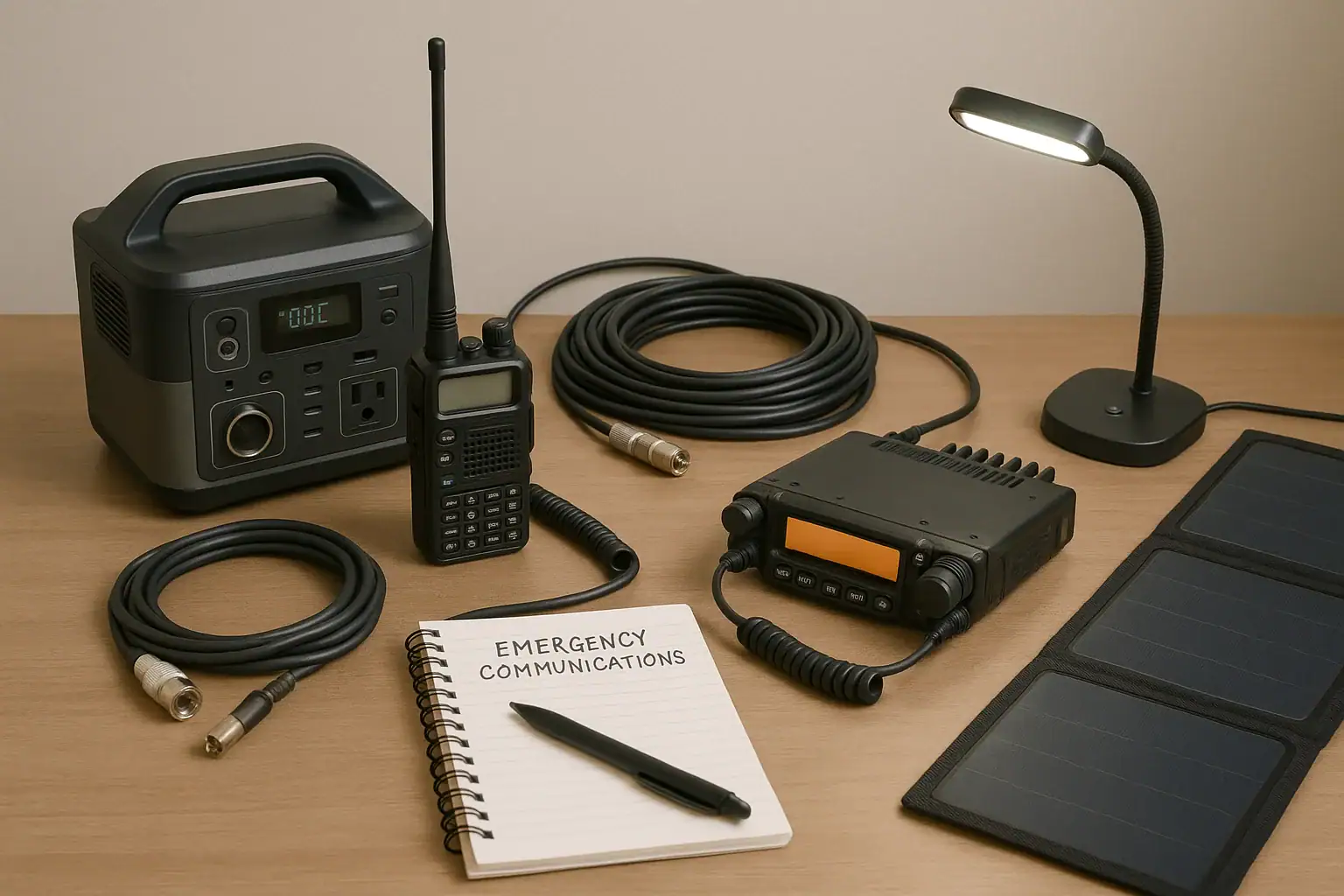
A portable power station can run amateur radio and emergency communications gear when it provides clean output, enough watt-hours, and the right DC and AC ports for your station. For radio use, the most important factors are runtime, voltage stability, low electrical noise, recharge options, and whether the unit can handle both small receive loads and higher transmit bursts.
Unlike camping lights or phone charging, radio equipment can be sensitive to inverter noise, DC output limits, voltage drop, and grounding choices. Operators often search for terms such as pure sine wave, surge watts, input limit, solar charging, duty cycle, and noise floor because those details affect whether communications stay reliable during an outage, field exercise, or storm response.
The best choice is not simply the biggest battery. It is the power station whose usable capacity, ports, charging speed, and electrical behavior match the radios, accessories, and emergency plan you actually use.
What a Portable Power Station Does for Amateur Radio
A portable power station is a rechargeable battery system with built-in outputs for powering devices without a generator or wall outlet. For amateur radio, it can support handheld chargers, mobile transceivers, HF radios, tuners, small computers, LED lighting, hotspot devices, USB accessories, and limited household communication gear.
The main reason it matters is continuity. During emergency communications, the goal is not maximum power for a few minutes; it is predictable operation for hours or days. A station that can receive for long periods, transmit when needed, and recharge by AC, vehicle power, or solar is more useful than a high-output unit that drains quickly or creates radio-frequency interference.
Portable power stations also reduce fuel, noise, and ventilation concerns compared with engine-driven generators. They can be used indoors when operated according to the manufacturer’s instructions, and they are generally quiet enough for shelters, field day setups, public service events, and neighborhood emergency nets. However, they are still electrical devices with limits. Choosing one for radio service means looking beyond headline wattage and asking how the unit behaves with low-current loads, high transmit current, cold weather, charging cycles, and sensitive receivers.
How Portable Power Stations Support Radio Loads
Most power stations combine a battery pack, battery management system, inverter, DC outputs, USB outputs, charging inputs, and a display. The battery is usually rated in watt-hours, which estimates stored energy. A 500 watt-hour unit does not always deliver the full number to your radio because conversion losses occur, especially when running AC equipment through the inverter.
Radio loads vary by operating mode. Receive current is often modest, while transmit current can rise sharply. A VHF or UHF mobile radio may draw little while listening but much more at high power. An HF transceiver may have a low receive draw and a much higher transmit draw, especially at 100 watts output. Digital modes, packet, Winlink-style operation, and data interfaces can increase average consumption because transmit time may be longer than casual voice operation.
DC output is usually more efficient than AC when the radio accepts the available voltage and connector type. Many mobile and HF radios expect about 13.8 volts DC, while some power stations provide regulated 12-volt ports that may be limited in current. If the station cannot provide enough DC amperage, the radio may reset, reduce output, or fail during transmit. AC output can solve connector compatibility, but it adds inverter losses and can introduce electrical noise if the inverter or charger is noisy.
USB-C power delivery can be useful for laptops, tablets, hotspots, and some compact radio accessories. The PD profile matters because a port that supports only low wattage may not sustain a laptop or field computer. Solar input helps extend runtime, but the input limit controls how fast the battery can recharge from panels in good sun.
| Radio setup | Illustrative average load | Planning note |
|---|---|---|
| Handheld radio charging and USB light | 10 to 25 watts | Small stations can run a long time, but keep spare charged batteries if possible. |
| VHF or UHF mobile transceiver, mostly monitoring | 15 to 40 watts average | Transmit bursts raise current, so check the DC port rating. |
| HF transceiver, mixed receive and voice transmit | 35 to 100 watts average | Duty cycle changes runtime more than advertised transmit power alone. |
| HF digital station with laptop | 60 to 150 watts average | Laptop charging, interface devices, and longer transmit periods increase demand. |
Real-World Emergency Communications Examples
For a neighborhood VHF net, a portable power station might run a mobile radio at low or medium power, charge handheld batteries, and keep a phone or tablet available for logging. In this situation, the most valuable features are efficient 12-volt output, enough amperage for transmit, low idle drain, and a display that shows remaining watt-hours or estimated runtime.
For an HF field station, the power station may support a 100-watt transceiver, an antenna tuner, a small LED lamp, and a logging laptop. The operator may choose lower transmit power, shorter overs, and a higher-efficiency mode to extend runtime. If the inverter creates noise on the band, DC operation or physical separation between the power station and antenna feed line may help.
For a shelter or emergency operations table, the load may include radios, chargers, a hotspot, a small router, and administrative electronics. This kind of setup benefits from multiple outputs, clear load monitoring, and the ability to prioritize communications gear over comfort loads. A small fan, printer, or large laptop can consume more energy than expected, shortening radio runtime.
For a multi-day outage, recharge strategy becomes as important as capacity. A mid-size battery paired with practical solar input may outperform a larger unit that cannot recharge quickly. Solar charging is variable, so planning should assume partial production due to clouds, short winter days, panel angle, and shading. Vehicle charging can help, but it should be treated as a supplemental option and used safely according to vehicle and power station guidance.
Common Mistakes and Troubleshooting Cues
One common mistake is sizing by inverter watts instead of watt-hours. Inverter wattage tells you the maximum load the unit can run at one time. Watt-hours estimate how long it can run. A high-watt inverter does not guarantee long radio runtime if the battery capacity is small.
Another mistake is ignoring the 12-volt output rating. Many radios need more current during transmit than a small DC socket can deliver. If the radio powers on but shuts down, resets, or drops output when you transmit, the issue may be a current limit, voltage sag, an undersized cable, or a connector that is not meant for the load.
Noise is another troubleshooting clue. If the receiver noise floor rises when the power station, inverter, charger, or solar controller is connected, the source may be electrical interference. Try comparing battery-only operation against AC inverter operation, increasing physical separation, routing power leads away from antenna lines, and using ferrite chokes when appropriate. Avoid opening or modifying the power station or radio to chase noise problems.
Unexpectedly short runtime usually comes from average load being higher than assumed. Transmitting more often, charging a laptop, running an inverter with light loads, using bright lighting, or leaving accessories on can drain capacity quickly. Displays that estimate runtime can lag behind changing duty cycles, so manual calculations are still useful.
Charging problems often trace back to the input limit. A power station may accept only a certain wattage from solar or vehicle charging, even if the panel or adapter can produce more. Cold temperatures may also limit or prevent charging on many lithium-based systems. If the unit refuses to charge in winter conditions, temperature protection may be working as designed.
Safety Basics for Radio Use and Emergency Power
Use a portable power station within its rated limits and follow the manufacturer’s instructions for ventilation, charging, output use, and temperature range. Do not open the unit, modify the battery pack, bypass protection circuits, or use damaged cables. Battery systems can store significant energy even when they look compact.
For radio setups, protect cables from abrasion, foot traffic, moisture, and strain. Use appropriately sized power leads for the current involved, keep connectors secure, and avoid daisy-chaining multiple adapters that can loosen or overheat. If a connector feels hot, smells unusual, or shows discoloration, stop using it until the cause is identified.
Keep the power station away from standing water, blowing rain, and conductive surfaces. Outdoor emergency communications often happen in poor weather, so sheltering the power equipment is important. Water-resistant cases and covers can help protect accessories, but they should not block cooling vents or trap heat.
Do not connect a portable power station directly into home electrical wiring, panels, transfer equipment, or receptacles in a way that could backfeed utility lines. Whole-home or circuit-level backup arrangements require proper equipment and a qualified electrician. For communications readiness, it is usually simpler and safer to plug radio gear directly into the power station or into a properly rated power strip used within its limits.
Maintenance, Storage, and Readiness for Communications
Emergency communications gear should be ready before the outage starts. Store the power station at a moderate state of charge if it will sit unused, unless the manufacturer recommends a different approach. Check it periodically and top it up before storm season, field events, or planned drills.
Test the station with the actual radio load you expect to use. A short real-world test can reveal connector limitations, inverter noise, inaccurate runtime assumptions, laptop charging issues, and whether solar input is practical at your location. Keep a simple load list with estimated watts and priority levels so you know what to unplug first when capacity drops.
Temperature matters. Avoid storing the unit in very hot vehicles or freezing locations for long periods. In cold weather, charging may be restricted, while discharge performance can decline. If the power station has been stored in a cold area, let it reach an appropriate operating temperature before charging if the instructions call for it.
Keep supporting items together: DC cables, radio adapters, a compact watt meter if used, USB-C cables with sufficient rating, ferrites, extension cords for low-power accessories, solar cables, and printed operating notes. During an emergency, the missing adapter is often the weak link.
| Readiness task | Suggested interval | Why it matters |
|---|---|---|
| Check battery state of charge | Every 2 to 3 months | Reduces the chance of finding an empty unit during an outage. |
| Run a radio load test | Before drills or storm season | Confirms runtime, noise behavior, and connector compatibility. |
| Inspect cables and adapters | Before each field use | Damaged or undersized cables can cause heat, voltage drop, or resets. |
| Review solar charging setup | Seasonally | Panel angle, shade, and input limits affect recharge expectations. |
Practical Takeaways and Specs to Look For
Related guides: Portable Power Station Watt-Hours Explained • Pure Sine Wave vs Modified Sine Wave: Does It Matter for a Portable Power Station? • Portable Power Station Basics: Outputs, Inputs, and What the Numbers Mean
A portable power station for amateur radio should be chosen as part of the whole communications system, not as a generic battery. Start with the radios, expected duty cycle, accessories, and likely outage duration. Then compare the required watt-hours, DC current, inverter quality, charging inputs, and portability.
For many operators, the best setup is a balance: enough capacity for core communications, efficient DC output, clean electrical behavior, and a recharge plan that works in real conditions. Oversizing can add weight and cost, while undersizing can leave the station unusable during the most important hours.
Specs to look for
- Battery capacity: Look for a usable range such as 300 to 1000 watt-hours for many portable radio setups; this determines realistic runtime more than inverter wattage.
- 12-volt DC output current: Look for enough amperage for your transceiver, often 10 to 30 amps depending on radio power; this helps prevent shutdowns during transmit.
- Pure sine wave AC inverter: Look for a clean inverter if you must run AC chargers or a laptop supply; it reduces compatibility problems and may reduce electrical noise.
- Low idle consumption: Look for efficient operation at small loads; radios often spend long periods receiving, so idle drain can waste capacity.
- Solar input rating: Look for an input range such as 100 to 400 watts for field replenishment; the input limit controls how quickly panels can recharge the battery.
- USB-C PD output: Look for ports that match laptop or tablet needs, such as 45, 65, or 100 watts; this avoids running an inverter just to power small electronics.
- Recharge time: Look for AC and solar recharge times that fit your emergency plan; fast enough charging matters during short generator windows or limited sun.
- Weight and form factor: Look for a size you can carry with radios, antennas, and cables; a powerful unit is less useful if it cannot be deployed.
- Operating temperature range: Look for practical cold and heat performance; charging restrictions and capacity loss can affect winter or summer deployments.
- Display and load monitoring: Look for watts-in, watts-out, state of charge, and estimated runtime; these help operators make better decisions during an event.
The practical goal is simple: keep essential communications running with predictable power. If the power station can support your radio’s transmit current, avoid adding noise, recharge from realistic sources, and remain ready in storage, it can be a strong foundation for amateur radio emergency preparedness.
Frequently asked questions
What size portable power station do I need for amateur radio?
The right size depends on your radio type, transmit power, duty cycle, and how long you need to operate without recharging. Many portable radio setups work well in the 300 to 1000 watt-hour range, but higher-power HF or digital stations may need more. The best way to size it is to estimate average watts, then add margin for transmit bursts and accessory loads.
What features matter most when choosing a portable power station for amateur radio?
Look for usable watt-hours, enough 12-volt DC output current, low idle drain, and a clean inverter if you need AC power. USB-C PD, solar input, recharge speed, and a clear display are also useful for field and emergency use. For radio service, stable output and low electrical noise are often more important than peak inverter wattage.
Why does my radio reset or shut off when I transmit from a power station?
This usually means the DC output cannot supply enough current, the cable is too small, or voltage is dropping under transmit load. Some power stations have 12-volt ports that are limited to a lower amperage than a mobile or HF radio needs. Using a properly rated DC connection and shorter, heavier cables often helps.
What is the most common mistake people make with portable power stations for radio use?
A common mistake is choosing by inverter watts instead of battery capacity and DC output capability. A unit can advertise high AC power but still have limited runtime or insufficient 12-volt current for transmit. Another frequent error is forgetting that laptops, lights, and chargers all reduce available radio runtime.
Is it safe to use a portable power station indoors for emergency communications?
Yes, it is generally safe indoors when the unit is used according to the manufacturer’s instructions and kept in a dry, ventilated area. Unlike fuel generators, it does not produce exhaust, but it still needs protection from heat, moisture, and damaged cables. Never modify the battery pack or connect it in a way that could backfeed household wiring.
How can I reduce electrical noise from a portable power station on my receiver?
First compare battery-only operation with inverter or charger operation to identify the source of the noise. If needed, increase physical separation, route power leads away from antenna cables, and use ferrites on problem lines. In some cases, running the radio directly from DC instead of AC can reduce interference.
Related guides
Browse this topic →
- Beginner-friendly sizing, runtime & specs
- Solar & charging (MPPT, fast charging, cables)
- Batteries (LiFePO4, cycles, care & storage)
- Safety, cold-weather performance, real-world tips
More in Beginners
See all →- Charging an Electric Wheelchair or Mobility Scooter From a Portable Power Station
- Portable Power Station for a Gaming PC: Runtime, Load Spikes, and UPS Considerations
- Portable Power Station for a Pop-Up Camper: Lights, Fans, Fridge, and Recharge Plan
- Portable Power Station for a Shed or Outbuilding: Lights, Chargers, and Security
- Portable Power Station for a Boat: 12V Loads, Salt Air, and Safer Storage
Keep reading
About this site
Portable Energy Lab publishes practical, independent guides about portable power—clear sizing, safe use, and real-world expectations.
Affiliate disclosure
Some links on this site may be affiliate links. If you buy through these links, we may earn a small commission at no extra cost to you. This helps support our content. Read our affiliate disclosure.