
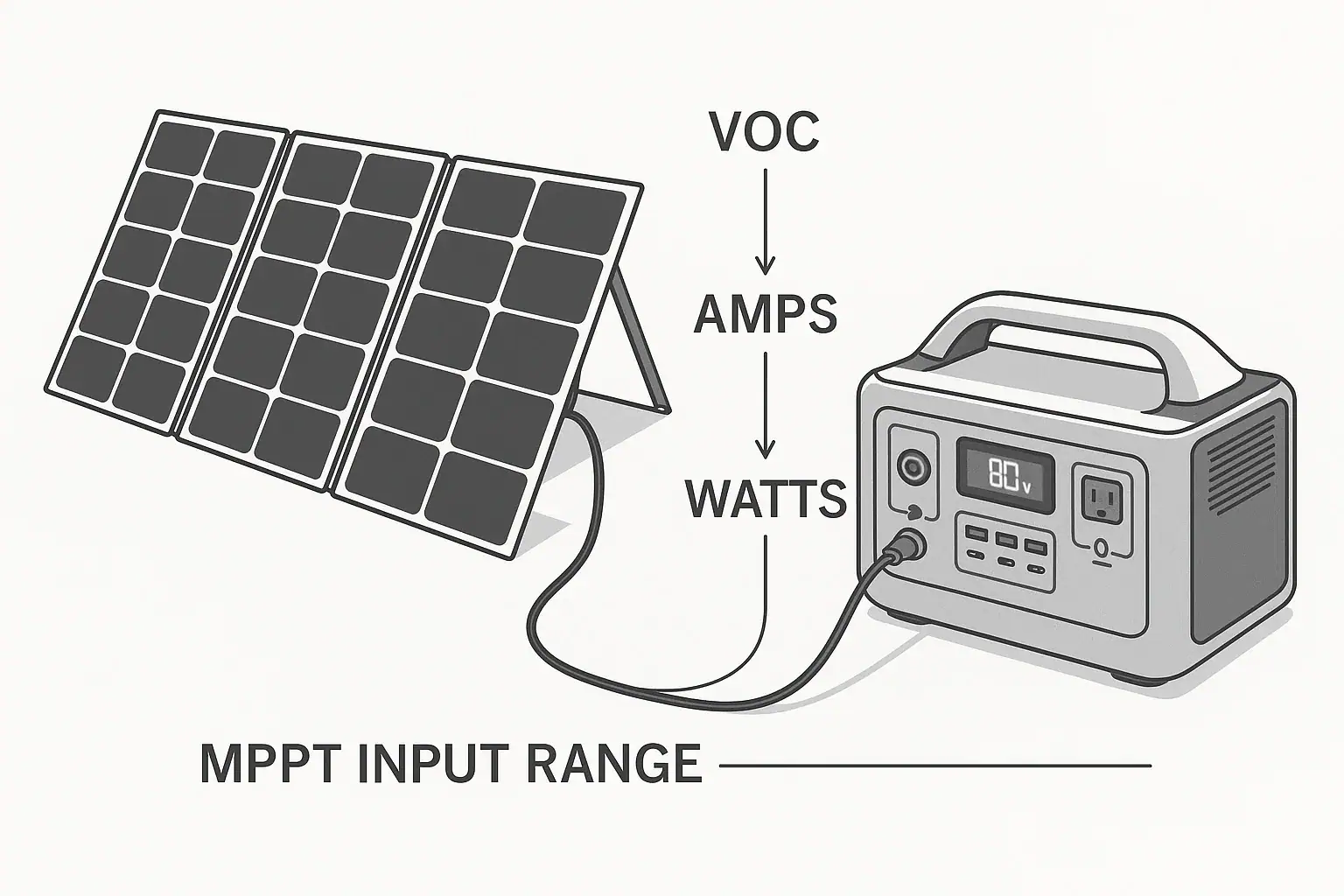
To stay inside solar input voltage and amp limits, match the solar panel array’s open-circuit voltage, working voltage, and current output to the power station’s published solar input range.
The most important numbers are the power station’s maximum input voltage, maximum input current, and maximum solar watts, plus the panel’s Voc, Vmp, Isc, and Imp ratings. These specs explain why a solar panel may not charge, why an input limit is being reached, or why an MPPT controller reduces power even when the panels are capable of more.
This matters most when combining panels in series, parallel, or series-parallel wiring. A setup that looks fine by wattage can still exceed open-circuit voltage on a cold morning, while a high-current array may simply be clipped by the station’s amp limit.
What Solar Input Voltage Means and Why It Matters
Solar input voltage is the voltage a portable power station can accept from solar panels through its DC solar charging port. Most modern units use an internal MPPT charge controller that converts variable solar panel output into the correct charging power for the battery. The controller can only work safely within its designed voltage and current window.
The key voltage number is the maximum solar input voltage. Your panel array must remain below this limit even at open circuit, which is when the panels are connected to light but not drawing load. This is where Voc, or open-circuit voltage, matters. Voc is usually higher than the voltage a panel produces while actively charging.
The key current number is the maximum solar input current, often listed in amps. If the solar array can produce more current than the power station can accept, the station generally limits or clips the input. Exceeding current is usually less severe than exceeding voltage, but it can still cause charging problems, heat, connector stress, or compatibility issues depending on the design.
Wattage is important, but it is not enough by itself. A 400-watt solar array can be safe or unsafe depending on whether its voltage and amps fit the station’s MPPT input range. For solar charging, voltage compatibility comes first, current compatibility comes second, and wattage tells you the likely charging ceiling.
How Voc, Vmp, Amps, and MPPT Limits Work Together
A solar panel has several electrical ratings on its label. Voc is open-circuit voltage. Vmp is voltage at maximum power. Isc is short-circuit current. Imp is current at maximum power. For matching panels to a power station, Voc and Isc represent worst-case compatibility checks, while Vmp and Imp describe normal operating behavior under strong sun.
Panels wired in series add voltage while current stays about the same. Two panels with a Voc of 24 volts each become about 48 volts Voc in series. This can be useful for reaching the MPPT operating range, but it is also the easiest way to exceed a station’s voltage limit.
Panels wired in parallel add current while voltage stays about the same. Two panels with an Imp of 8 amps each become about 16 amps Imp in parallel. This can improve charging under mixed light and keep voltage lower, but it may run into the station’s amp limit.
Temperature changes the calculation. Solar panel voltage rises in cold weather and drops in heat. A panel with a listed Voc of 24 volts at standard test conditions may produce a few volts more on a cold, bright day. For that reason, a safe array should leave headroom below the power station’s maximum solar input voltage rather than matching it exactly.
MPPT controllers also have an operating voltage range. For example, a station might accept 12 to 60 volts and up to 10 amps, with a 500-watt solar input rating. The array must be high enough to start charging, low enough to avoid overvoltage, and not dependent on more current than the port can use.
| Specification | What it means | Why it matters |
|---|---|---|
| Voc | Open-circuit panel voltage | Used to check the maximum voltage limit, especially in cold weather |
| Vmp | Voltage while producing rated power | Helps show whether the array will operate inside the MPPT range |
| Isc | Short-circuit current | Useful for checking possible maximum current from the array |
| Imp | Current while producing rated power | Helps estimate real charging current under good sun |
| Solar watts | Panel power rating under test conditions | Estimates charging potential but does not replace voltage and amp checks |
Real-World Examples of Staying Within Solar Input Limits
Consider a power station with a solar input range of 12 to 60 volts, a 10-amp current limit, and a 500-watt maximum solar input. A single 200-watt panel might list 23 volts Voc, 19 volts Vmp, 11 amps Isc, and 10.5 amps Imp. It is likely within the voltage range and close to the current limit. The station may accept it, but peak current may be clipped slightly.
Now consider two of those panels in series. The array Voc becomes about 46 volts, and Vmp becomes about 38 volts. Current remains roughly the same as one panel. This fits the 60-volt maximum more comfortably than three panels would, and it may allow the MPPT controller to operate efficiently. However, cold-weather Voc still needs headroom.
If three panels are wired in series, the array Voc becomes about 69 volts before any cold-weather increase. That exceeds a 60-volt input limit and should not be connected. Even if the array’s wattage seems reasonable, the voltage is outside the acceptable range.
For a parallel example, two 200-watt panels with about 10.5 amps Imp each would stay around 19 volts Vmp but could offer about 21 amps at maximum power. If the station accepts only 10 amps, it will not use the full current. Charging may still work if the voltage is high enough and connectors are appropriate, but the extra panel capacity is mostly useful for low-light improvement rather than higher peak input.
A higher-voltage power station might accept 12 to 150 volts and up to 15 amps. In that case, a string of several compatible panels may be possible, but the same principles apply. Add the series Voc, account for cold conditions, compare current in parallel branches, and stay below every input limit at the same time.
Common Mistakes and Troubleshooting Cues
The most common mistake is checking watts only. Users often see that a power station accepts 600 watts of solar and assume any 600-watt panel combination will work. In reality, a 600-watt array can exceed the voltage limit, exceed the current limit, fall below the MPPT starting voltage, or use incompatible connectors.
Another common mistake is ignoring cold-weather voltage rise. A series string that is just under the maximum voltage at room temperature may exceed the limit on a cold clear morning. If the power station shows a solar input error, refuses to start charging, or cycles on and off when sunlight is strong, overvoltage or marginal voltage may be involved.
Low input can also be confusing. If the display shows far less wattage than expected, the cause may be shade, panel angle, haze, high panel temperature, current clipping, dirty panels, cable loss, or the battery nearing full charge. Solar ratings are measured under laboratory conditions, so real-world output is often lower.
Parallel wiring can trigger a different issue. If voltage remains too low, the MPPT controller may not wake up or may operate inefficiently. In that case, adding panels in series may help, but only if the resulting Voc remains safely below the maximum input voltage.
Connector polarity is another troubleshooting cue. Many solar panels and adapter cables look similar but may not share the same polarity or current rating. Reversed polarity, undersized cables, loose adapters, or damaged connectors can prevent charging or create heat at the connection point.
When a power station starts charging and then drops to zero, check whether the battery is already near full, whether the array voltage is near the minimum startup voltage, and whether intermittent shade is crossing one panel in a series string. A single shaded panel can reduce output from the entire series string.
Safety Basics for Voc and Amp Limits
Never intentionally exceed the maximum solar input voltage of a power station. Overvoltage is the limit that deserves the least experimentation because it can damage internal electronics and may not be covered by built-in protections. Leave practical headroom for cold weather, measurement variation, and panel tolerances.
Use current limits conservatively. Many MPPT inputs can clip excess panel current, but that does not mean every oversized array is appropriate. Cables, connectors, adapters, and combiner accessories must be rated for the current they may carry. Heat, discoloration, soft plastic, or intermittent charging are warning signs to stop using the setup until it is inspected.
Do not open a power station, modify the battery pack, bypass a charge controller, or defeat protective circuits. Portable power stations are integrated electrical systems, and the solar input is designed for specific DC limits. Altering those protections can create fire, shock, and battery safety hazards.
Do not use a portable power station solar setup as a substitute for properly installed home electrical equipment. If solar charging is part of a larger backup power plan involving building wiring, transfer equipment, or permanent circuits, use a qualified electrician. This article only addresses panel-to-power-station solar input matching.
Check polarity before connecting unfamiliar panels or adapters. Avoid connecting or disconnecting under heavy load when practical, and keep connectors dry and clean. If a cable or adapter becomes hot in normal sunlight, the setup may be undersized, loose, or overloaded.
Maintenance and Storage for Reliable Solar Charging
Solar input problems are not always caused by a bad panel or a failed power station. Many issues come from storage, cable wear, dust, moisture, or weak connections. A simple inspection habit can prevent confusing charging behavior later.
Keep panel surfaces clean enough to receive direct light. Dust, pollen, salt film, bird droppings, and leaves can reduce output. Use gentle cleaning methods appropriate for the panel type, and avoid abrasives that can scratch the surface. For folding panels, make sure fabric hinges and cable exits are not strained during setup and packing.
Store cables loosely coiled rather than sharply bent. Repeated tight bends near connector ends can break internal conductors. Inspect connectors for cracks, corrosion, looseness, or melted plastic before relying on a solar array for backup power.
Store the power station within its recommended temperature range and avoid leaving it in a hot vehicle for long periods. Battery temperature can affect charging behavior. Some units limit or pause charging when the battery is too cold or too hot, even when the solar array is correctly matched.
Before seasonal use, compare your current panel configuration with the power station’s solar input label or manual. Panels and adapters often get mixed over time, and a setup that was safe for one device may not be safe for another. If you change from one panel count to another, recalculate series voltage and parallel current before connecting.
| Symptom | Likely area to check | Typical clue |
|---|---|---|
| No solar charging | Voltage range or polarity | Input voltage too low, too high, or reversed connection |
| Charging starts and stops | Marginal voltage or heat limit | Clouds, shade, or temperature protection causing cycling |
| Lower watts than expected | Sun conditions or current clipping | Panel angle, haze, hot panels, or amp limit reached |
| Connector gets warm | Current rating or loose contact | Undersized adapter, worn plug, or poor fit |
| Error after adding panels | Series Voc or parallel amps | New array exceeds voltage or current assumptions |
Practical Takeaways and Specs to Look For
The safest way to size solar panels for a portable power station is to work from the input limits backward. First confirm the maximum solar input voltage. Then add the Voc of panels in series and leave cold-weather headroom. Next, check current based on parallel strings and compare it with the station’s amp limit. Finally, compare array wattage with the station’s maximum solar charging watts to estimate realistic performance.
Remember that overpaneling is not automatically unsafe, but it must be done within voltage limits and with suitable current-rated parts. Extra panel capacity can help in cloudy weather, morning sun, winter conditions, or imperfect angles, but it will not force the power station to accept more power than its MPPT controller allows.
If the goal is faster solar charging, look for a wider MPPT voltage range, a higher solar watt limit, and enough current capacity to use the panel layout you prefer. If the goal is simple portable charging, a lower-voltage single-panel setup may be easier to manage. Either way, the best specification is the one that matches your panels, your climate, and your expected setup style.
Specs to look for
- Maximum solar input voltage: Look for a limit with comfortable headroom above your planned series Voc, such as 60 volts, 100 volts, or 150 volts; this matters because cold panels can exceed their label voltage.
- MPPT operating voltage range: Look for a clear range such as 12 to 60 volts or 30 to 150 volts; this matters because the array must be high enough to start charging but low enough to stay safe.
- Maximum input current: Look for a current rating such as 10, 12, or 15 amps that fits your parallel panel plan; this matters because excess current may be clipped or stress weak connectors.
- Maximum solar input watts: Look for a watt ceiling that matches your runtime and recharge goals, such as 200 to 1200 watts depending on capacity; this matters because it sets the fastest likely solar recharge rate.
- Supported connector type and rating: Look for DC connectors and adapters rated for the expected voltage and amps; this matters because loose or undersized connectors can heat up and reduce reliability.
- Cold-weather charging behavior: Look for listed battery charging temperature ranges and low-temperature protection; this matters because the station may pause charging even when panel voltage is correct.
- Input display detail: Look for a display that shows solar watts and, ideally, input volts or amps; this matters because troubleshooting is easier when you can see what the controller is receiving.
- Multiple solar inputs or independent MPPT controllers: Look for separate inputs when using panels with different angles or sizes; this matters because mismatched panels on one input can reduce total harvest.
- Panel compatibility information: Look for examples of supported panel voltage and wiring layouts; this matters because clear documentation reduces the chance of exceeding Voc or amp limits.
When in doubt, choose a conservative configuration. Staying well inside Voc and amp limits protects the power station, improves reliability, and makes solar charging more predictable in real outdoor conditions.
Frequently asked questions
What specs matter most when matching solar panels to a power station?
The most important specs are the power station’s maximum solar input voltage, maximum input current, and maximum solar watts, along with the panel’s Voc, Vmp, Isc, and Imp. Voc is the key safety check for series wiring, while current matters most for parallel wiring. The MPPT operating range also matters because the array must be high enough to start charging and low enough to stay within limits.
Can I go over the power station’s solar watt rating if the voltage is safe?
Sometimes a slightly oversized array is acceptable, but only if the voltage and current stay within the station’s limits. The controller may clip extra power, which means you will not get the full panel output. If the array also exceeds the current limit or uses undersized wiring, the setup may become inefficient or unsafe.
What is the most common mistake people make with solar input voltage?
The most common mistake is checking panel watts and ignoring Voc. A series string can look fine on paper by wattage but still exceed the power station’s maximum input voltage, especially in cold weather. That is why safe planning should always start with voltage, not wattage.
How do I know if my panels should be wired in series or parallel?
Series wiring raises voltage and is useful when the power station needs a higher input voltage to charge efficiently. Parallel wiring raises current and can help when you want to keep voltage lower or improve performance in mixed light. The right choice depends on the station’s voltage window, current limit, and the panel ratings.
What should I check if the power station starts charging and then stops?
Check whether the array voltage is near the minimum startup point, whether shade is crossing one panel in a series string, and whether the battery is already close to full. Loose connectors, heat protection, or a marginally high or low input voltage can also cause cycling. A quick inspection of the display and cabling often reveals the cause.
Is it safe to exceed the current limit a little if the voltage is within range?
It may be tolerated by some systems, but it is still better to stay within the published current limit. Excess current is often clipped, yet it can also stress connectors, adapters, and cables if they are not rated for the load. A conservative design is the safest way to keep solar charging reliable.
Related guides
Browse this topic →
- Beginner-friendly sizing, runtime & specs
- Solar & charging (MPPT, fast charging, cables)
- Batteries (LiFePO4, cycles, care & storage)
- Safety, cold-weather performance, real-world tips
More in Solar
See all →- How to Clean Portable Solar Panels Without Damage
- Solar Charging on Cloudy Days: What Output Can a Portable Power Station Expect?
- How Many Portable Solar Panels Do You Need for a 1,000Wh Power Station?
- Solar Adapter Polarity Mistakes: How to Avoid Reverse-Polarity Charging Problems
- Portable Solar Panel Waterproof Ratings: What Rain, Dew, and Splash Resistance Mean
Keep reading
About this site
Portable Energy Lab publishes practical, independent guides about portable power—clear sizing, safe use, and real-world expectations.
Affiliate disclosure
Some links on this site may be affiliate links. If you buy through these links, we may earn a small commission at no extra cost to you. This helps support our content. Read our affiliate disclosure.