
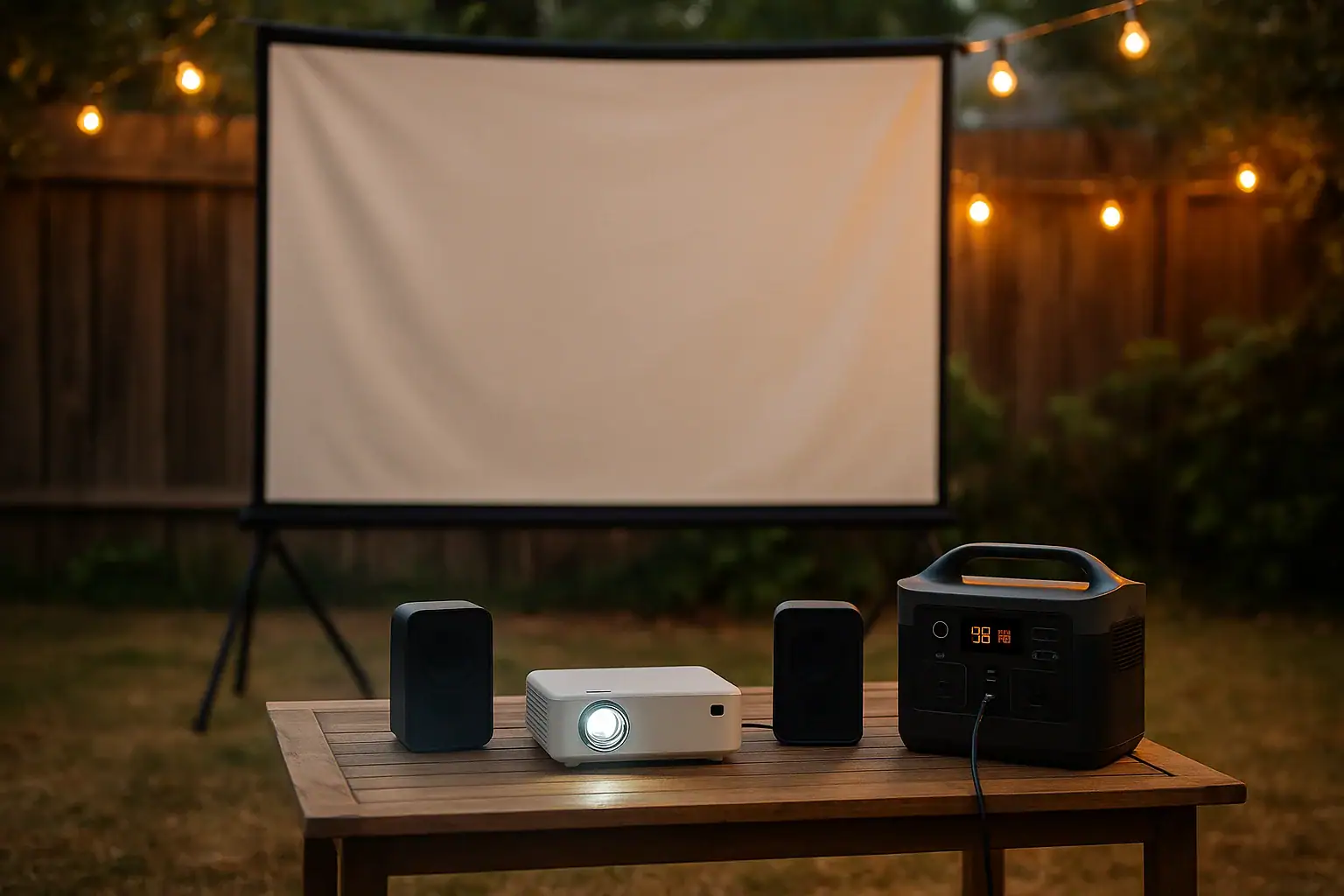
A portable power station can run an outdoor movie night if its AC output can handle the projector and speakers, and its usable watt-hours are high enough for the full runtime.
For most backyard setups, the biggest factors are projector power draw, speaker load, battery capacity, inverter efficiency, and whether the station provides pure sine wave AC power. Terms like runtime, surge watts, watt-hours, AC outlet rating, and pass-through charging matter because they determine whether the movie plays smoothly or shuts off early.
The right size depends on the equipment, the length of the movie, and how much reserve power you want for setup time, previews, streaming devices, or a small fan. A compact projector and modest speakers may need far less power than a bright full-size projector with a soundbar and accessories.
What a portable power station does for outdoor movie nights and why it matters
A portable power station is a rechargeable battery system with built-in outlets for powering electronics away from a wall outlet. For an outdoor movie night, it acts as the central power source for the projector, speakers, media player, router or hotspot, and small accessories.
This matters because projectors and audio gear are more sensitive than many people expect. A projector may have a steady running wattage, a brief startup spike, and a cooling fan that needs stable power after the movie ends. Speakers may use little power at low volume but more when playing loud outdoor audio. If the battery is undersized, the setup may work at first and then shut down before the end credits.
The main sizing question is simple: how many watts will the equipment use, and for how many hours? A power station with enough continuous AC output and enough usable battery capacity can support a predictable movie experience. A station that only matches the average load with no reserve can be frustrating, especially when the movie is long, the projector brightness is high, or the weather is warm enough to require extra accessories.
Outdoor movie nights also introduce practical issues that do not matter indoors. Extension cord length, damp grass, uneven surfaces, dust, nighttime visibility, and trip hazards all affect how safe and convenient the system feels. A well-chosen power station reduces cable runs and makes the setup easier to place near the projector rather than near a distant outlet.
How runtime, watt-hours, and AC output work together
To estimate runtime, start with the total watts used by everything plugged in. Add the projector, speakers, streaming device, screen motor if used, and any supporting electronics. Then compare that load with the power station capacity in watt-hours. The basic idea is that a 500 watt-hour battery running a 100-watt load might seem like it should last five hours, but real runtime is lower because the inverter and electronics use some energy too.
A practical estimate is to multiply the listed battery capacity by 0.80 to 0.90 for AC loads. This accounts for inverter losses and normal operating overhead. For example, a 600 watt-hour unit may provide roughly 480 to 540 watt-hours of usable AC energy. If the outdoor movie setup draws 150 watts, that could mean about 3.2 to 3.6 hours of runtime under typical conditions.
Continuous AC output is different from battery capacity. Capacity tells you how long the system may run. Continuous AC output tells you how much load it can support at one time. A projector drawing 220 watts and speakers drawing 60 watts require at least 280 watts of continuous output, plus margin. Surge watts are also worth checking because some electronics draw a brief startup current when first powered on.
Pure sine wave AC output is generally preferred for projectors, powered speakers, media players, and chargers because it more closely resembles utility power. Many modern electronics are tolerant, but stable AC power helps reduce noise, overheating, unexpected shutdowns, or buzzing from audio equipment.
| Example setup | Estimated load | Usable energy needed for 3 hours | Capacity range to consider |
|---|---|---|---|
| Mini projector plus small Bluetooth-style speaker | 60 to 100 watts | 180 to 300 watt-hours | 250 to 400 watt-hours |
| LED projector plus powered stereo speakers | 120 to 200 watts | 360 to 600 watt-hours | 500 to 800 watt-hours |
| Bright projector plus soundbar and streaming device | 220 to 350 watts | 660 to 1050 watt-hours | 800 to 1200 watt-hours |
| Large projector plus audio system and fan | 350 to 600 watts | 1050 to 1800 watt-hours | 1200 to 2000 watt-hours |
Real-world outdoor movie night examples
A simple family movie night might use a compact LED projector rated around 70 watts, a small powered speaker drawing 15 watts, and a streaming stick powered by USB. The combined load may be under 100 watts. For a two-hour movie plus setup time, a small to mid-size power station can often provide enough runtime if it starts fully charged.
A more typical backyard setup might use a brighter projector in the 150 to 250 watt range, a pair of powered speakers at 30 to 80 watts combined, and a media device. This setup can draw 200 to 325 watts during normal operation. For a three-hour session, including time to focus the image and let the projector cool down afterward, a larger battery capacity becomes more important.
A neighborhood screening or sports watch party may use a high-brightness projector, an audio mixer, multiple speakers, a laptop, decorative lighting, and possibly a fan. Even if each item seems manageable, the total can climb quickly. In this case, both inverter output and total energy capacity need more margin. The power station should not be running near its maximum rating for hours if avoidable.
Runtime also changes with brightness settings. Many projectors use more power in bright or high-performance modes and less in eco mode. Audio volume has a similar effect, although it is usually smaller than projector demand. If the image is bright enough in a lower lamp or LED mode, reducing brightness can noticeably extend battery life.
Temperature can affect performance too. Batteries generally work best in moderate conditions. Very hot or cold evenings may reduce efficiency or trigger protection limits. For outdoor movie nights, it is wise to keep the unit shaded, dry, and ventilated rather than placing it under a blanket, inside a sealed box, or directly on wet ground.
Common mistakes and troubleshooting cues
Assuming the battery capacity equals usable runtime
The most common mistake is dividing battery watt-hours by equipment watts without allowing for inverter losses, idle consumption, or reserve time. If a power station is rated at 500 watt-hours, the usable AC energy may be closer to 400 to 450 watt-hours. Build in a buffer so the movie can finish even if the projector draws more than expected.
Ignoring the projector startup and shutdown behavior
Some projectors briefly draw more power when starting. Others keep fans running after the image turns off to cool internal components. If the station is nearly empty at the end of the movie, the projector may not complete its normal cooldown. That can be hard on the projector over time.
Using too many adapters or long light-duty cords
Multiple adapters, old extension cords, and thin cables can create voltage drop, heat, and clutter. If an extension cord is necessary, use one appropriate for outdoor conditions and for the load. Keep connections elevated and away from wet grass or foot traffic.
Overlooking outlet limits
A power station may have several outlets, but the total inverter limit still applies. If the AC output is rated for 300 watts continuous, plugging in three devices that total 420 watts can cause an overload shutdown. USB ports and DC outputs may also have their own limits.
Not testing the full setup before guests arrive
A projector may work alone, but the full setup may fail once speakers, a media player, and accessories are added. A short test at the same brightness and volume planned for the event is the easiest way to confirm expected runtime and catch buzzing, overload warnings, or connection problems.
Safety basics for backyard power and electronics
Outdoor power setups should be treated with more caution than indoor setups because moisture, people, pets, and darkness add risk. Place the portable power station on a stable, dry, elevated surface when possible. Keep it away from sprinklers, puddles, damp grass, pool areas, and drink tables.
Do not cover the unit while it is operating. Power stations need airflow to cool the inverter, battery management system, and charging electronics. If the unit becomes hot, shows an overload warning, or shuts down repeatedly, reduce the load and allow it to cool in a ventilated area.
Use outdoor-rated cords when cords are needed, and route them where people will not trip. Avoid pinching cords under furniture or running them through standing water. If the event requires permanent outdoor wiring, a dedicated outdoor receptacle, or integration with a building electrical system, consult a qualified electrician rather than improvising.
Keep children from pressing buttons, pulling plugs, or moving the power station during the movie. Also keep flammable materials away from vents and outlets. Most modern power stations include protective electronics, but those protections should not be treated as permission to overload, modify, or bypass the equipment.
Charging safety matters too. If you charge during the day with solar panels or from an outlet, use compatible charging inputs and cables. Do not force connectors, combine incompatible panels, or exceed the input limit. For movie night itself, starting with a full charge is usually simpler and more predictable than relying on charging while running the projector.
Maintenance, storage, and preparation before movie night
Good maintenance starts with charging the power station before the event and checking the display under load. Battery percentage indicators can be approximate, so a real test with the projector and speakers is more useful than relying only on a full icon.
Store the unit in a clean, dry, moderate-temperature location. Avoid long-term storage in a hot car, freezing shed, or humid garage corner. For many battery systems, storing at a partial charge when not in use is preferable to leaving the unit completely empty for months. Check the manual for the model-specific storage range, but as a general habit, recharge periodically and avoid deep discharge during storage.
Before guests arrive, inspect cords, plugs, and ports for damage or debris. Confirm that the projector, speakers, and media device all turn on from the station at the same time. If the power station has an estimated runtime display, watch it for several minutes after the load stabilizes. Early readings may change as the inverter calculates demand.
After the movie, let the projector complete its cooldown cycle before turning off the power station. Then unplug devices, wipe dust or moisture from the exterior, and recharge the station when practical. If the unit was used in a dusty yard, keep vents clear without opening the device or modifying it.
| Preparation item | What to check | Why it helps |
|---|---|---|
| Battery charge | Start near full for the event | Reduces early shutdown risk |
| Combined load | Run projector, speakers, and media device together | Confirms inverter capacity |
| Runtime estimate | Compare display estimate with the movie length | Shows whether more reserve is needed |
| Cord placement | Keep cords dry and out of walkways | Reduces trip and moisture hazards |
| Ventilation | Leave space around vents | Helps prevent heat-related shutdowns |
Related guides: Portable Power Station Basics: Outputs, Inputs, and What the Numbers Mean • Portable Power Station Watt-Hours Explained • Pure Sine Wave vs Modified Sine Wave: Does It Matter for a Portable Power Station? • Surge Watts vs Running Watts: How to Size a Portable Power Station
Practical takeaways and specs to look for
The best portable power station for an outdoor movie night is not necessarily the largest one. It is the one that matches the projector load, speaker demand, movie length, and outdoor conditions with enough reserve to avoid stress. For a small setup, a modest capacity may be enough. For bright projectors, larger speakers, or longer gatherings, prioritize both battery capacity and continuous AC output.
A useful sizing shortcut is to add the watts for every device, multiply by the number of hours you need, and then add 20 to 30 percent for inverter losses and reserve time. If the event matters, test the exact setup before the night of the screening. Real measurements beat guesses from labels, especially when projector brightness and speaker volume can change the load.
Specs to look for
- Battery capacity: Look for roughly 300 to 600 watt-hours for compact setups, 700 to 1200 watt-hours for typical backyard projectors, and more for large systems; this determines how long the equipment can run.
- Continuous AC output: Choose an output rating comfortably above the combined projector, speaker, and accessory load, such as 300 watts for light setups or 600 watts and higher for demanding ones; this prevents overload shutdowns.
- Surge watts: Look for surge capacity above the expected startup draw of the projector and audio gear; this helps the system handle brief power spikes.
- Pure sine wave inverter: Prefer pure sine wave AC for projectors, powered speakers, laptops, and media devices; it supports cleaner, more stable operation.
- Usable runtime display: A display showing watts in, watts out, and estimated time remaining is helpful; it lets you monitor the event before the battery gets too low.
- Number and type of outlets: Look for enough AC outlets plus USB-A, USB-C, or DC ports for media devices; this reduces adapter clutter and keeps the setup organized.
- USB-C output: A 30 to 100 watt USB-C port can power many streaming devices, tablets, or laptops; using DC or USB where practical may reduce AC outlet congestion.
- Recharge options: AC charging, vehicle charging, and compatible solar input add flexibility; solar is most useful for daytime recharging before the movie rather than nighttime operation.
- Operating temperature range: Look for a range suitable for local evenings; heat and cold can reduce efficiency or trigger protection modes.
- Weight and handle design: A manageable weight and sturdy handles matter if the setup moves between the house, yard, campsite, or community space.
For most outdoor movie nights, the winning approach is to size with margin, keep the power station dry and ventilated, and simplify the number of devices plugged in. A well-planned setup lets the projector, speakers, and media source run quietly in the background so the focus stays on the movie.
Frequently asked questions
What size portable power station do I need for a projector and speakers?
The right size depends on the combined watt draw of the projector, speakers, and any streaming device, plus how long you want them to run. For a small setup, a few hundred watt-hours may be enough, while brighter projectors and louder speakers often need 700 watt-hours or more. It is usually best to add a buffer for inverter losses and startup spikes.
What specs matter most when choosing a portable power station for outdoor movie nights?
The most important specs are battery capacity in watt-hours, continuous AC output, surge capacity, and pure sine wave AC power. Also look for enough outlets, a clear runtime display, and charging options that fit your setup. These features determine whether the projector and speakers can run smoothly for the full movie.
How long will a portable power station run a projector and speakers?
Runtime depends on the total load and the usable portion of the battery, not just the listed capacity. A simple setup drawing under 100 watts may run for several hours on a mid-size unit, while a brighter projector with larger speakers can use battery power much faster. The most accurate estimate comes from testing the actual equipment together.
What is the most common mistake people make with outdoor movie night power?
A common mistake is assuming the battery rating equals real AC runtime. In practice, inverter losses and reserve needs reduce the usable energy, so a station that looks large on paper may still fall short. Another frequent issue is forgetting to test the full setup before the event.
Is it safe to use a portable power station outside for a movie night?
Yes, if it is kept dry, ventilated, and placed on a stable surface away from water and foot traffic. Use outdoor-rated cords when needed and avoid covering the unit while it is running. Safety is mostly about preventing moisture exposure, overheating, and trip hazards.
Can I charge the power station while the projector is running?
Some units support pass-through charging, but it is not always the best choice for a movie night. Charging while powering the setup can add heat and complexity, and it may reduce available output on some models. Starting with a full charge is usually the simplest and most reliable option.
Related guides
Browse this topic →
- Beginner-friendly sizing, runtime & specs
- Solar & charging (MPPT, fast charging, cables)
- Batteries (LiFePO4, cycles, care & storage)
- Safety, cold-weather performance, real-world tips
More in Beginners
See all →- Charging an Electric Wheelchair or Mobility Scooter From a Portable Power Station
- Portable Power Station for a Gaming PC: Runtime, Load Spikes, and UPS Considerations
- Portable Power Station for a Pop-Up Camper: Lights, Fans, Fridge, and Recharge Plan
- Portable Power Station for a Shed or Outbuilding: Lights, Chargers, and Security
- Portable Power Station for a Boat: 12V Loads, Salt Air, and Safer Storage
Keep reading

About this site
Portable Energy Lab publishes practical, independent guides about portable power—clear sizing, safe use, and real-world expectations.
Affiliate disclosure
Some links on this site may be affiliate links. If you buy through these links, we may earn a small commission at no extra cost to you. This helps support our content. Read our affiliate disclosure.