
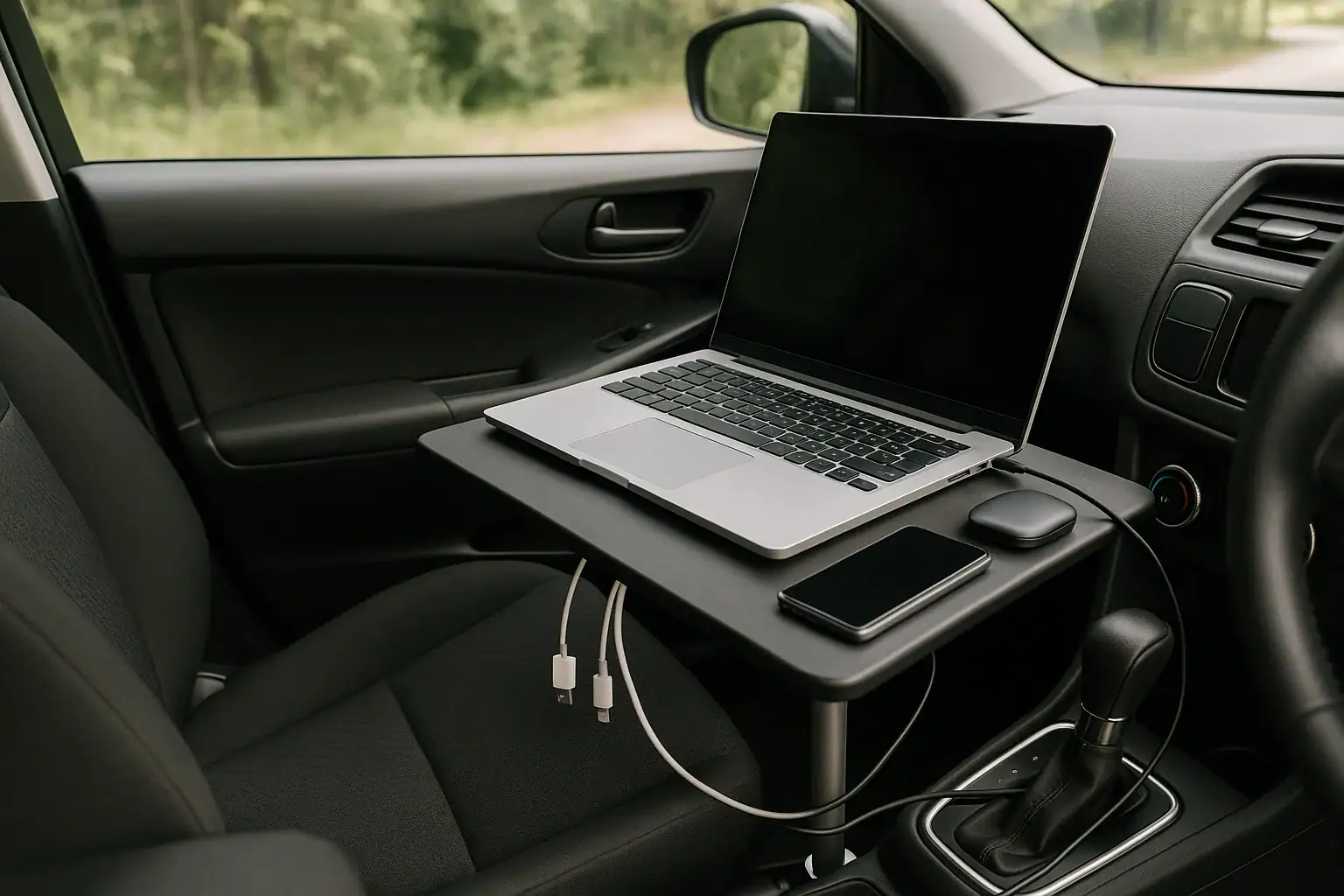
A mobile office power kit lets you run a laptop, phone, and hotspot from a car by combining efficient USB-C charging, a safe 12-volt or portable power station source, and enough battery capacity for your runtime.
The right setup depends on your devices, workday length, and whether the vehicle will be parked, idling, or used between stops. The key search terms to understand are capacity, input limit, USB-C PD profile, inverter efficiency, surge watts, and runtime.
For most car-based work, the goal is not maximum power. It is stable, quiet, organized power that keeps you online without draining the starter battery, overheating electronics, or creating cable clutter that makes the workspace hard to use.
What a mobile office power kit is and why it matters
A mobile office power kit is a small power system for doing real work from a vehicle. It usually includes a power source, charging cables, a way to keep internet devices running, and basic organization so the setup can be used repeatedly without guesswork.
The power source might be the car 12-volt outlet, a portable power station, a dedicated laptop car charger, or a high-capacity power bank. Many people combine two options: the vehicle charges the power station while driving, and the power station runs the laptop, phone, and hotspot while parked.
This matters because a car is not automatically a good office. A laptop may need more power than a phone charger can provide. A hotspot may disconnect if its battery dies or overheats. A phone used for calls, navigation, and tethering can drain quickly. If everything relies on the vehicle starter battery while parked, the workday can turn into a no-start problem.
A good kit answers three questions before they become problems: how much power your devices need, how long the setup must run, and how it will recharge. Once those are clear, the rest is mostly choosing the right ports, cables, and capacity.
How car-based laptop, phone, and hotspot power works
Every device in a mobile office has a wattage demand. Phones often charge at 10 to 30 watts. Mobile hotspots often use 5 to 15 watts while charging or running. Laptops vary widely: an efficient ultraportable may work at 30 to 65 watts, while a larger workstation laptop may ask for 90 to 140 watts or more.
Capacity is usually listed in watt-hours. A 300 watt-hour power source does not deliver a full 300 watt-hours to devices in every situation because conversion losses occur. inverter efficiency is usually more efficient than using an AC inverter, because it avoids converting battery power to household AC and then back to device charging voltage.
USB-C Power Delivery, often called USB-C PD, is especially important for laptops. A charger and cable must both support the PD profile the laptop needs, such as 45 watts, 65 watts, 100 watts, or 140 watts. If the port is too weak, the laptop may charge slowly, drain while plugged in, or display a low-power charger warning.
AC outlets are useful for devices that cannot charge by USB-C, but they add inverter overhead. Even a small inverter consumes some power just by being on. For a simple laptop, phone, and hotspot setup, choose USB-C when possible and use AC only when needed.
Vehicle 12-volt outlets usually have a practical power ceiling. Some can power a modest laptop charger, while others are better suited to phones and small accessories. The vehicle manual and outlet labeling matter, especially because a loose plug or weak adapter can cause resets, heat, or intermittent charging.
| Device or load | Typical working draw | Planning note |
|---|---|---|
| Phone charging | 10 to 30 watts | Higher draw is usually temporary, then it tapers as the battery fills. |
| Mobile hotspot | 5 to 15 watts | Keeping it plugged in can prevent mid-call shutdowns. |
| Efficient laptop | 30 to 65 watts | Common for office apps, email, calls, and browser work. |
| Performance laptop | 90 to 140 watts | May need a stronger USB-C PD port or an AC adapter. |
| Small AC inverter overhead | 5 to 15 watts | This can reduce runtime even when the laptop is idle. |
Real-world mobile office examples
A light-duty mobile office might include an efficient laptop, a smartphone, and a dedicated hotspot. If the laptop averages 45 watts during document work, the hotspot uses 8 watts, and the phone averages 10 watts while topping up, the working load is about 63 watts. A usable 250 watt-hours after losses could provide roughly three to four hours of working time.
A longer workday needs a different plan. Suppose the laptop uses closer to 70 watts during video calls, with a hotspot at 10 watts and a phone at 15 watts. That is about 95 watts before conversion losses. In that case, a compact power source may cover a few meetings, while a larger portable power station may be needed for a half day or more. For longer deployments involving sensors and continuous recording, plan separately for field research and data logging equipment.
A field sales or service worker may drive between stops. This changes the equation because recharge time becomes part of the kit. If the power station or power bank can accept strong 12-volt or USB-C input while driving, it may recover a useful amount between appointments. If its input limit is low, it may not refill fast enough to matter.
A remote worker parked for calls has another concern: fuel, noise, heat, and ventilation if relying on the vehicle. Many users prefer a charged portable power station for quiet parked operation, then recharge while driving later. This keeps the internet connection and laptop charger separate from the starter battery and reduces the urge to idle unnecessarily.
A content creator or analyst using a high-performance laptop may need more than a basic kit. Running heavy software, external drives, or a portable monitor increases demand. In this case, the kit should be sized around peak work sessions, not just light email use.
Common mistakes and troubleshooting cues
The most common mistake is assuming that any USB-C port can charge any USB-C laptop. The connector shape does not prove the wattage. If the laptop reports slow charging, loses battery while plugged in, or only charges when sleeping, the likely issue is an underpowered PD profile, a cable that cannot carry the required wattage, or a port with limited output.
Another common problem is runtime that is shorter than expected. This often happens when people divide battery capacity by the laptop charger rating instead of the laptop actual draw, or when they forget inverter losses. A laptop with a 65-watt charger does not always use 65 watts, but an AC inverter may still add overhead. Measuring or estimating average load gives a better answer than relying only on charger labels.
Frequent power interruptions can point to loose 12-volt plugs, overloaded adapters, or heat. Car outlets were not designed as perfect office outlets, and some plugs wiggle during use. If a charger cuts on and off, stop using that setup until you identify whether the plug, outlet, cable, or device is the weak link.
If a hotspot keeps disconnecting, power may not be the only cause. Heat, weak cell signal, auto sleep settings, or a drained internal battery can all affect reliability. Still, keeping the hotspot powered from a stable USB port and placing it where it has airflow and signal can reduce many issues.
Cable clutter is also a real reliability problem. A laptop cable pinched under a seat, a phone cable stretched across controls, or a hotspot hidden in direct sun can create failures that look like battery problems. A dependable kit should be easy to plug in the same way every time.
Safety basics for working from a car
Use high-level caution with any mobile power setup. Do not open battery packs, bypass safety protections, modify charging circuits, or use damaged cables. If a device, adapter, or power station becomes unusually hot, smells odd, swells, sparks, or shuts down repeatedly, stop using it.
Keep electronics out of footwells where pedals, seat tracks, or passengers can crush cables. Avoid placing power stations or power banks in direct sunlight under glass, especially in warm weather. Cars can become much hotter than the outside air, and heat reduces battery performance and may trigger shutdowns.
Do not run combustion engines in enclosed spaces to power electronics. If the vehicle must be on for climate control or charging, it should be outdoors with safe ventilation. Carbon monoxide is not detectable by smell and can be deadly.
Protect the vehicle starter battery. Many 12-volt outlets shut off when the ignition is off, but some remain active. If you are unsure, assume the starter battery can be drained and use a separate power source for parked work. A portable jump starter is not a substitute for good power planning, but some drivers keep one as a backup.
Respect the limits of outlets and adapters. Avoid stacking multiple splitters and high-load devices on one socket. If you need unusually high power or a permanent vehicle power installation, consult a qualified professional rather than improvising wiring.
Maintenance and storage for reliable workdays
A mobile office kit works best when it is treated like work equipment, not a random bag of chargers. Keep a dedicated set of cables in the car or work bag so the kit is always complete. Labeling high-wattage USB-C cables can prevent accidentally using a low-power cable with a laptop.
Recharge the main power source after each workday. Portable power stations and power banks are most useful when they are ready before an outage, travel day, or unexpected parking-lot meeting. If the kit sits unused for weeks, check the charge level periodically and store it in a moderate temperature range.
Inspect cables and adapters for strain, bent connectors, exposed conductors, or melted plastic. Replace questionable accessories rather than troubleshooting them repeatedly. A failing cable can cause slow charging, intermittent operation, or heat buildup.
Keep the kit physically organized. A small pouch for cables, a stable place for the hotspot, and a short charging cable for the phone can make the difference between a clean setup and a distracting mess. During hot or cold seasons, avoid leaving sensitive electronics in the car longer than necessary.
| Maintenance item | Suggested interval | Why it helps |
|---|---|---|
| Recharge main battery source | After each work session or trip | Keeps the kit ready for unplanned work or delays. |
| Check stored charge level | Every 1 to 3 months | Reduces the chance of finding an empty battery when needed. |
| Inspect USB-C and 12-volt cables | Monthly during regular use | Finds wear before it causes heat or unstable charging. |
| Clean vents and keep airflow clear | Before long sessions | Helps chargers and power stations manage heat. |
| Review device power needs | When adding gear | Prevents overloads after adding monitors, drives, or new laptops. |
Practical takeaways for building a dependable kit
Related guides: Portable Power Station Basics: Outputs, Inputs, and What the Numbers Mean • USB-C Power Delivery (PD) Explained for Portable Power Stations • Charging From a Car: What’s Safe, What’s Slow, and What Can Break • Portable Power Station vs Power Bank: Where the Line Really Is
The best mobile office power kit is sized for your actual work, not for the biggest number on a product box. Start with your laptop charging requirement, then add the phone and hotspot. Decide how many hours you need while parked, and choose charging methods that match your devices without relying too heavily on inefficient conversions.
For most people, the most useful features are adequate USB-C PD output, enough watt-hours for the work session, safe recharging while driving, clear battery status, and a compact layout that does not interfere with driving or passenger space. A quiet, reliable setup is usually better than an oversized one that is hard to store.
Specs to look for
- Battery capacity: Look for roughly 250 to 700 watt-hours for common laptop, phone, and hotspot work sessions; this determines practical runtime while parked.
- USB-C PD output: Look for at least 65 watts for many office laptops, 100 watts for higher-demand laptops, or 140 watts for newer high-power USB-C systems; this helps avoid slow-charging warnings.
- Number of USB-C ports: Look for two or more useful USB-C outputs if you run a laptop and phone at the same time; this reduces adapter clutter.
- AC inverter rating: Look for enough continuous watts for any device that cannot use USB-C, such as 150 to 300 watts for light office gear; this prevents overload shutdowns.
- Surge watts: Look for a surge allowance above the continuous rating when using AC accessories; this helps with brief startup spikes from some electronics.
- Vehicle charging input: Look for a 12-volt car input or USB-C input that can recover meaningful energy during drives; a low input limit may make recharging between stops too slow.
- Display or battery meter: Look for estimated time remaining, watts in, and watts out; these readings make troubleshooting runtime much easier.
- Operating temperature range: Look for a range suitable for parked-car conditions, while still avoiding extreme heat or cold; temperature affects safety, charging, and battery life.
- Size and cable management: Look for a compact shape, stable placement, and ports that face a usable direction; a kit that is easy to set up is more likely to be used safely.
Before relying on the kit for important work, test it for a normal session at home or in a parked car. Run the laptop, phone, and hotspot together, watch the wattage, and confirm how long the setup lasts. That single test often reveals whether you need more capacity, a stronger USB-C port, a better cable, or simply a cleaner layout.
Frequently asked questions
How much battery capacity do I need for a laptop, phone, and hotspot in a car?
For light office use, a few hundred watt-hours may be enough for a short session, while longer workdays usually need more capacity. The right size depends on your laptop’s actual draw, how long you stay parked, and whether you can recharge while driving. It is better to estimate based on average watts used than on charger labels alone.
What specs matter most when choosing a mobile office power kit?
The most important specs are usable battery capacity, USB-C PD output, vehicle charging input, and whether the kit can run your laptop without relying on an inefficient inverter. A clear battery display and enough cable length also matter because they make the setup easier to monitor and use. If you run multiple devices at once, the number of ports becomes important too.
Can I charge a laptop from a car outlet while driving?
Yes, if the outlet and adapter can supply enough power for the laptop. Some vehicles support modest laptop charging well, while others are better for phones and small accessories only. Check the outlet rating, the charger wattage, and whether the connection stays stable during bumps or turns.
What is the most common mistake people make with car-based laptop charging?
One common mistake is assuming that any USB-C charger or cable will work at full speed with any laptop. Another is overestimating runtime by using the charger’s rated wattage instead of the device’s actual average draw. Both mistakes can lead to slow charging, unexpected shutdowns, or a battery that runs out sooner than planned.
Is it safe to run a mobile office power kit while the car is parked?
It can be safe if the setup uses proper equipment, stays within power limits, and does not overload the starter battery. Keep devices out of direct heat, avoid damaged cables, and do not run an engine in an enclosed space. If you are unsure whether the vehicle outlet stays live when the ignition is off, use a separate power source for parked work.
Why does my hotspot or laptop keep disconnecting in the car?
Intermittent power, heat, weak signal, or an underpowered charger can all cause disconnects. A loose 12-volt plug or a cable that cannot carry the needed wattage is a common cause for laptops. For hotspots, stable power plus better airflow often improves reliability.
Related guides
Browse this topic →
- Beginner-friendly sizing, runtime & specs
- Solar & charging (MPPT, fast charging, cables)
- Batteries (LiFePO4, cycles, care & storage)
- Safety, cold-weather performance, real-world tips
More in Beginners
See all →- Charging an Electric Wheelchair or Mobility Scooter From a Portable Power Station
- Portable Power Station for a Gaming PC: Runtime, Load Spikes, and UPS Considerations
- Portable Power Station for a Pop-Up Camper: Lights, Fans, Fridge, and Recharge Plan
- Portable Power Station for a Shed or Outbuilding: Lights, Chargers, and Security
- Portable Power Station for a Boat: 12V Loads, Salt Air, and Safer Storage
Keep reading


About this site
Portable Energy Lab publishes practical, independent guides about portable power—clear sizing, safe use, and real-world expectations.
Affiliate disclosure
Some links on this site may be affiliate links. If you buy through these links, we may earn a small commission at no extra cost to you. This helps support our content. Read our affiliate disclosure.