
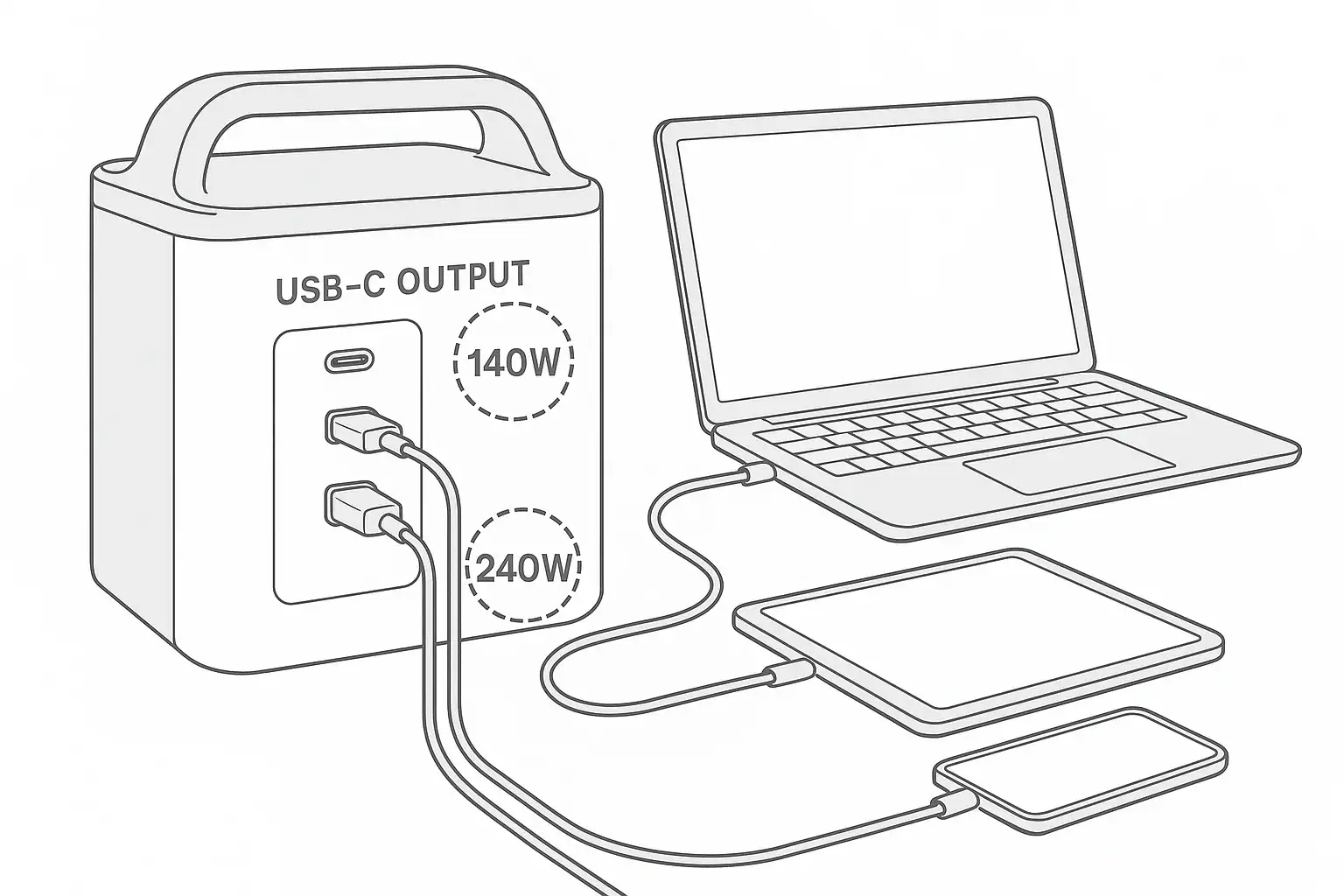
A 240W USB-C output matters only if your device can actually accept more than 140W and the power station supports the right USB Power Delivery profile; otherwise, port quality, runtime, and total output capacity usually matter more.
For most phones, tablets, small laptops, cameras, and handheld devices, a 140W USB-C port is already more than enough. The difference becomes important for power-hungry laptops, mobile workstations, some battery chargers, and setups where you want faster charging without using an AC adapter. Search terms such as PD profile, input limit, charging speed, output watts, runtime, and pass-through charging all point to the same issue: the number printed beside the USB-C port is only one part of the charging equation.
The practical goal is not to buy the highest USB-C watt rating on paper. It is to match the power station output, the device input limit, and the cable capability so the system can deliver stable power safely and efficiently.
What 140W and 240W USB-C Output Mean on a Power Station
USB-C output wattage describes the maximum amount of power a port can provide to a compatible device. A 140W USB-C port can deliver up to about 140 watts under the right conditions. A 240W USB-C port can deliver up to about 240 watts when the device, cable, and power station all support the required charging mode.
The key phrase is up to. A 240W port does not force 240 watts into every device. A phone may draw 15W to 30W, a tablet may draw 20W to 45W, and a typical laptop may draw 45W to 100W. If the device requests only 65W, both a 140W port and a 240W port may charge it at the same speed.
USB-C output matters because it can replace a bulky AC power brick. Charging through DC-based USB-C is often more efficient than converting battery power to AC and then back to DC inside a laptop charger. That efficiency can slightly improve runtime, reduce heat, and free up AC outlets for appliances that truly need them.
However, USB-C wattage is not the same as total power station capability. A unit may have a large battery but limited USB-C ports, or it may have a strong USB-C port but a small battery. The feature that actually matters depends on what you plan to charge and for how long.
How USB-C Power Delivery Actually Works
Modern high-wattage USB-C charging relies on USB-C Power Delivery, often shortened to USB PD. Instead of sending maximum power immediately, the power station and device negotiate a voltage and current combination. This is why the PD profile matters as much as the headline wattage.
Power is calculated as volts multiplied by amps. A 100W USB-C connection might use 20 volts at 5 amps. Higher outputs such as 140W or 240W generally require newer extended power range profiles, higher voltages, and properly rated cables. If one part of the chain does not support the needed profile, charging falls back to a lower level.
The cable is a common limiting factor. Some USB-C cables are designed only for basic charging. Others are rated for higher current and include an electronic marker that identifies their capability to the charger and device. Without the right cable, a 240W port may behave like a lower-wattage port.
The device also sets the ceiling. A laptop with a 96W input limit will not suddenly accept 140W or 240W. A power station can offer more, but the device decides what it requests. This is why two people can use the same power station and see very different charging speed results.
| Feature | Typical 140W USB-C Output | Typical 240W USB-C Output | Why It Matters |
|---|---|---|---|
| Best fit | Phones, tablets, many laptops, compact work setups | High-power laptops and demanding USB-C equipment | Higher wattage helps only when the device can use it |
| Negotiation | Requires compatible USB PD profile | Requires higher USB PD profile and compatible cable | Unsupported profiles reduce actual charging speed |
| Cable sensitivity | Moderate to high | High | The cable can cap charging below the port rating |
| Runtime impact | Lower drain at maximum output | Faster battery drain at maximum output | Higher output can empty the power station sooner |
Real-World Examples: When 140W Is Enough and When 240W Helps
For a smartphone, the difference between 140W and 240W is usually irrelevant. Most phones draw far less than 140W. The charging speed will be limited by the phone, its battery temperature, and its supported charging protocol. In this case, a reliable 60W or 100W USB-C port may already exceed what the phone needs.
For tablets and compact laptops, 140W is often more than adequate. Many everyday laptops work well at 45W, 65W, 90W, or 100W. Even a laptop that ships with a 100W charger may not draw that continuously; it may peak briefly, then settle lower once the battery fills or workload changes.
A 140W port becomes especially useful when you want to charge a laptop directly from the power station without occupying an AC outlet. It can also help maintain charge while doing moderate work, such as web browsing, video calls, photo management, or document editing. In these uses, 240W usually does not improve anything unless the laptop is designed for it.
A 240W USB-C port is more relevant for high-performance laptops, mobile workstations, portable monitors combined with laptop charging, drone battery chargers that support high-power USB-C, or professional field kits that need faster turnaround. It can reduce charge time if the receiving device supports high input and if the station can maintain the output without overheating or throttling.
There is also a battery capacity tradeoff. Drawing 240W from a power station can drain a small unit quickly. For example, a 500 watt-hour power station running a true 240W load will not run for two full hours after conversion losses and reserve limits. Higher output is useful, but capacity determines how long that output is useful.
Common Mistakes and Troubleshooting Cues
The most common mistake is assuming a device will charge at the number printed on the power station. If a laptop charges at 65W from a 240W port, that does not automatically mean the power station is defective. It may mean the laptop requested 65W, the cable is limiting the connection, or the battery management system reduced charging because the device is warm or nearly full.
Another mistake is using a low-rated USB-C cable with a high-wattage port. If the charging wattage seems stuck at a lower level, the cable should be one of the first things to check. A cable intended for light phone charging may not support high current. Cable length and build quality can also affect stability, especially at higher wattage.
Users also confuse output limits with input limits. A power station may have a 140W or 240W USB-C output for charging devices, but its own input limits may be different. The input limit controls how fast the power station can be recharged through USB-C, while the output limit controls how fast it can charge other devices.
Shared port limits can cause surprises. Some power stations advertise multiple USB-C ports, but the total USB output may be capped when several ports are used at once. A single port might provide 140W by itself, then drop to 100W or 65W when another port is active. This is normal if the design uses a shared power budget.
Troubleshooting cues include unexpected slow charging, charging that starts and stops, a laptop that drains while plugged in under heavy load, or a cable that gets unusually warm. These signs point to a mismatch among device demand, PD profile, cable rating, or the power station output budget.
Safety Basics for High-Wattage USB-C Charging
High-wattage USB-C charging is designed to negotiate power automatically, but it still deserves basic caution. Use cables rated for the wattage you expect, keep connectors clean and fully seated, and avoid using damaged, kinked, or frayed cables. A loose connector can create heat and intermittent charging.
Do not try to bypass USB-C protections, modify battery packs, open the power station, or adapt connectors in a way that defeats the normal negotiation process. The safety advantage of USB-C Power Delivery comes from communication between the charger and device. Improvised adapters can remove that protection and create overheating or failure risks.
Heat is another practical safety factor. Charging a laptop at high wattage while the power station is in direct sun, a hot vehicle, or a covered compartment can trigger thermal limits. Good ventilation helps the internal electronics maintain stable output. If the station reduces output or shuts down, let it cool and reduce the load rather than repeatedly restarting it.
For home backup use, remember that USB-C ports are for device charging, not for wiring a power station into household circuits. Any connection to a home electrical system should be handled with appropriate equipment and a qualified electrician. This is separate from normal portable use such as charging laptops, phones, radios, medical accessories, or camera batteries.
Maintenance and Storage Habits That Preserve USB-C Performance
USB-C output performance depends on healthy electronics, clean ports, and a battery that can support the requested load. Store the power station in a dry, moderate-temperature location. Extreme heat accelerates battery aging, while deep cold can reduce available output temporarily.
Keep USB-C ports free from dust, grit, and moisture. A port cover can help during camping, field work, or garage storage. If debris is visible, use gentle external cleaning only; do not insert metal objects into the port. Damaged pins or contamination can cause unreliable negotiation and slow charging.
Battery state of charge also matters. For long-term storage, many lithium-based power stations prefer being stored partially charged rather than completely full or completely empty. Check the unit periodically and recharge as needed. A deeply discharged battery may limit output or require a recovery charge before normal use.
Update settings only through normal user controls if the device provides them. Some power stations have eco modes, screen-off timers, USB always-on settings, or app-based options that affect port behavior. These settings can be useful, but they should not be confused with the electrical capability of the USB-C port itself.
| Symptom | Likely Cause | Practical Check |
|---|---|---|
| Charging stays below expected wattage | Device input limit or cable limit | Compare the device input rating and use a high-wattage USB-C cable |
| Charging starts and stops | Loose connector, heat, or unstable negotiation | Reseat the cable, reduce load, and improve ventilation |
| Port output drops when another device is connected | Shared USB power budget | Check single-port and multi-port output ratings |
| Power station drains faster than expected | High sustained wattage and conversion losses | Estimate runtime from watt-hours, not just port rating |
Related guides: Portable Power Station Basics: Outputs, Inputs, and What the Numbers Mean • USB-C Power Delivery (PD) Explained for Portable Power Stations • Input Limits (Volts/Amps/Watts) Explained: How Not to Damage Your Unit
Practical Takeaways: Which Feature Actually Matters?
The most important feature is not automatically 240W USB-C. The feature that matters is the highest stable USB-C output your actual devices can use, supported by the right PD profiles, enough battery capacity, and clear shared-output ratings. For many users, a well-implemented 140W port is more useful than a poorly documented 240W port.
Choose 140W USB-C output when your main devices are phones, tablets, cameras, portable monitors, and mainstream laptops. It is also a strong fit if you value efficiency and want to avoid using AC adapters for everyday electronics. Choose 240W USB-C output when you have a high-power laptop or specialized USB-C equipment that specifically supports higher input and benefits from faster charging.
Runtime still matters. A high-output port on a small battery can be useful for short bursts but less useful for all-day work. If you plan to power a laptop through long sessions, compare watt-hours, expected device draw, and whether you will also run lights, routers, fans, or other devices at the same time.
Specs to look for
- Single-port USB-C output: Look for 100W, 140W, or 240W ratings that match your highest-demand device; this determines whether you can charge directly without an AC adapter.
- Supported PD profiles: Look for clear voltage and current options such as 20V, 28V, 36V, or 48V examples; this matters because the device and power station must agree on a profile.
- USB-C cable rating: Look for cables rated for the wattage you intend to use, such as 100W, 140W, or 240W; the wrong cable can cap charging or cause dropouts.
- Total USB output budget: Look for a combined rating when multiple USB ports are used, such as 100W plus 60W or 140W shared; this prevents surprises when charging several devices.
- Battery capacity: Look for watt-hour capacity that fits your runtime needs, such as 300Wh for light electronics or 700Wh and above for longer laptop sessions; output wattage does not indicate duration.
- AC inverter rating: Look for continuous watts and surge watts separately, especially if you also run AC devices; USB-C output does not replace the need for adequate inverter capacity.
- USB-C input capability: Look for input limits such as 60W, 100W, or higher if you plan to recharge the power station by USB-C; input is separate from output.
- Thermal and overload protection: Look for documented protections against overheating, overcurrent, and short circuits; stable high-wattage charging depends on safe power management.
- Pass-through charging behavior: Look for clear guidance on using USB-C output while the station is recharging; this matters for desk setups, travel days, and backup workflows.
In short, 240W USB-C is a valuable premium feature for the right equipment, but it is not automatically better for every user. A balanced power station with the right USB-C output, sufficient capacity, transparent port limits, and compatible cabling will usually deliver a better real-world experience than a unit chosen only for the biggest number beside one port.
Frequently asked questions
Is 140W USB-C output enough for most laptops?
Yes, for many everyday laptops 140W is more than enough. A lot of models charge at 45W, 65W, 90W, or 100W, so the device often sets the real limit. If your laptop does not support higher input, a 240W port will not make it charge faster.
When does 240W USB-C output actually matter?
240W matters for devices that can accept very high USB-C input, such as some performance laptops and specialized equipment. It can also help when you want faster charging without using an AC adapter. If the device only requests lower power, the extra wattage will not be used.
What specs matter more than the watt rating alone?
The most important specs are the supported USB Power Delivery profiles, the device input limit, the cable rating, and the total USB output budget. Battery capacity also matters because it determines how long the power station can sustain the load. A higher watt number is only useful when the whole chain supports it.
What is a common mistake people make with high-wattage USB-C charging?
A common mistake is assuming the port rating guarantees that speed for every device. Another frequent issue is using a cable that cannot support the needed wattage, which can cap charging or cause dropouts. Shared-port limits can also reduce output when multiple devices are connected.
Is high-wattage USB-C charging safe?
It is generally safe when the power station, device, and cable all support the same charging standard. Use properly rated cables, keep connectors in good condition, and avoid damaged or improvised adapters. Heat management also matters, so good ventilation helps maintain stable charging.
Why is my device charging slower than the port rating?
The device may have a lower input limit than the port can provide. The cable may also be limiting the connection, or the device may reduce charging because it is warm or nearly full. In some cases, the power station shares output across multiple ports, which lowers the available wattage.
Related guides
Browse this topic →

- Beginner-friendly sizing, runtime & specs
- Solar & charging (MPPT, fast charging, cables)
- Batteries (LiFePO4, cycles, care & storage)
- Safety, cold-weather performance, real-world tips
More in Charging
See all →- Can You Daisy-Chain Portable Power Stations? Why It Usually Isn’t a Good Idea
- USB-C Input vs AC Input on Portable Power Stations: Which Charging Method Makes Sense?
- Car Alternator Charging vs Cigarette Lighter Charging: What Changes for Power Stations?
- Charging a Portable Power Station From an RV Outlet: 12V, 24V, and Safety Limits
- Fast AC Charging vs Battery Longevity: Should You Use Turbo Mode Every Time?
Keep reading
About this site
Portable Energy Lab publishes practical, independent guides about portable power—clear sizing, safe use, and real-world expectations.
Affiliate disclosure
Some links on this site may be affiliate links. If you buy through these links, we may earn a small commission at no extra cost to you. This helps support our content. Read our affiliate disclosure.