
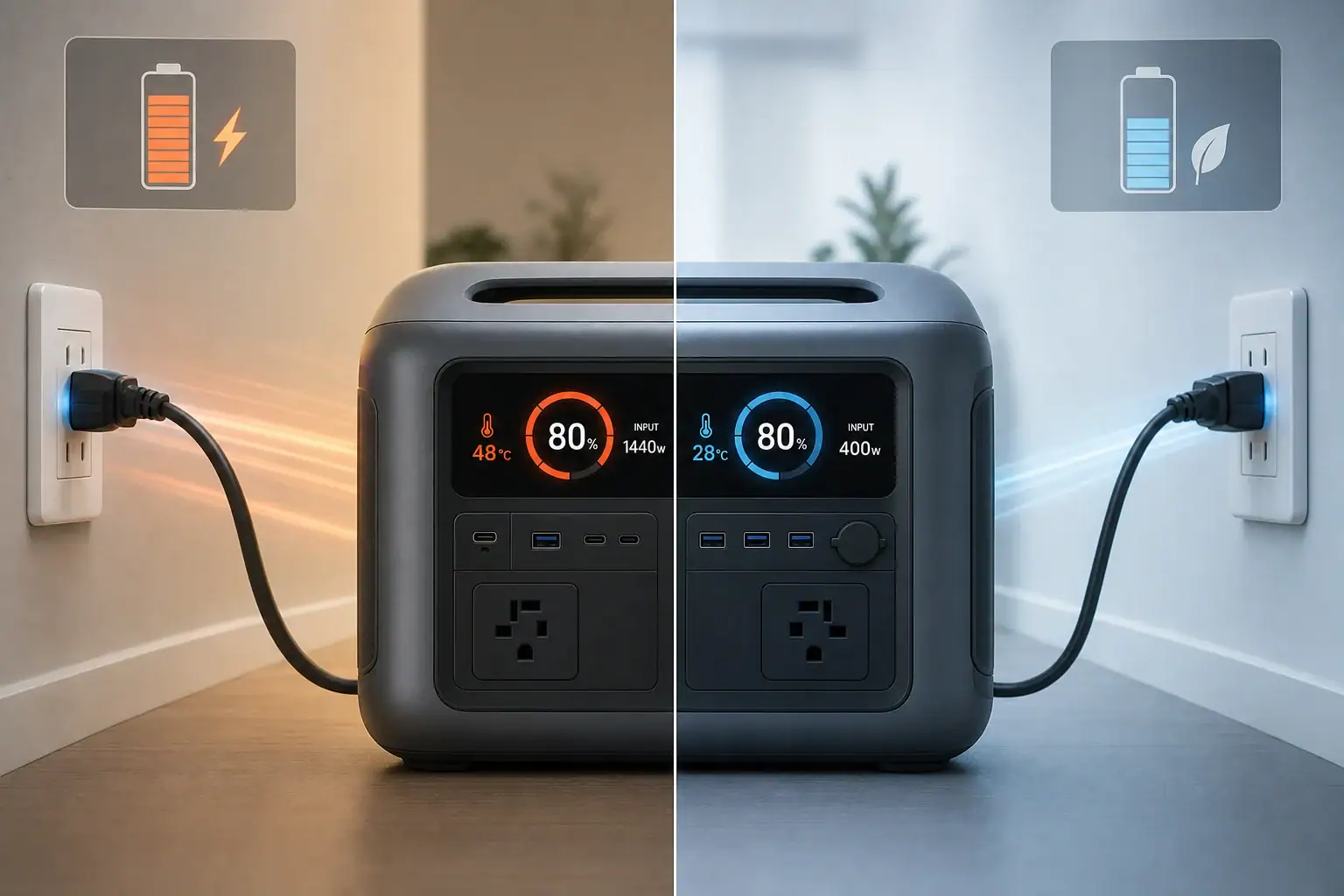
You do not need to use turbo mode every time; fast AC charging is best reserved for situations when short recharge time matters more than minimizing battery heat and long-term wear. A compatible power station manages its own input limit, charging current, state of charge, and battery temperature, so occasional use of its built-in fast mode is normally expected.
However, routinely charging at maximum input watts can create more heat than a slower setting, especially in a warm room or immediately after a heavy discharge. Heat, sustained high voltage near 100%, and frequent deep charge cycles can all affect battery longevity. The actual impact depends on battery chemistry, thermal management, charge rate, and how long the unit remains full.
For everyday use, a moderate AC charging setting is usually the more conservative choice when there is no deadline. Turbo mode is useful before an outage, trip, or job, but it should not automatically be the default for every recharge.
1. What Turbo AC Charging Means and Why It Matters
Turbo mode, fast AC charging, rapid charging, and boost charging generally describe a power station’s highest available charging setting from a wall outlet. The setting raises AC input power so the battery can recover more energy in less time. Depending on capacity and design, input may range from a few hundred watts to well over 1,000 watts.
The advertised input figure is not the amount of energy that reaches the battery at every moment. Some energy is lost in AC conversion, battery charging, cooling fans, and internal electronics. The battery management system, or BMS, also reduces power when temperature, cell voltage, or state of charge requires it.
Battery longevity is normally expressed as cycle life to a stated remaining capacity. One cycle represents cumulative use equal to 100% of the battery’s rated capacity, not necessarily one connection to an outlet. Two discharges of 50%, followed by two recharges, roughly equal one full cycle.
Fast charging matters because higher current can produce additional internal heat. It may also keep cooling fans running and place more sustained load on charging components. This does not mean turbo mode is inherently unsafe or immediately damaging. It means charging speed is one of several conditions that can influence gradual battery aging.
2. How Charging Speed, Heat, and Battery Chemistry Interact
A useful way to compare charge intensity is the C-rate. Charging a 1,000-watt-hour battery at approximately 1,000 watts is roughly a 1C input before conversion losses and power tapering. Charging the same battery at about 500 watts is roughly 0.5C. Manufacturers may limit the actual cell-level rate below the apparent AC input rate.
Electrical resistance produces heat as current moves through cells and conductors. Higher charging current can therefore raise temperature, although cooling design, ambient conditions, and battery size strongly affect the result. A large battery accepting 800 watts may be under less relative stress than a much smaller battery accepting the same power.
Battery chemistry also matters. Lithium iron phosphate cells are commonly selected for high cycle life and thermal stability, while nickel manganese cobalt formulations often provide greater energy density for a given weight. Neither chemistry is immune to aging. Both generally benefit from avoiding unnecessary heat and extended storage at a completely full or empty state.
Charging is fastest during the main constant-current phase. As the battery approaches full charge, the BMS usually tapers current to prevent cell voltage from rising too far. This is why a claimed short recharge time may apply to a partial range, such as 20% to 80%, rather than sustaining peak input all the way to 100%.
| Illustrative charging setting | Approximate input for a 1,000 Wh unit | Likely behavior | Typical use case |
|---|---|---|---|
| Quiet or slow | 200–350 W | Longer charge time, less fan activity, lower heat potential | Overnight or routine charging |
| Standard | 400–700 W | Balanced speed, noise, and temperature | General daily use |
| Turbo or maximum | 800–1,200 W | Shortest charge time, more fan activity, greater heat potential | Urgent preparation or short turnaround |
| Taper near full | Falling below peak input | BMS reduces current as cell voltage rises | Final stage of any charging mode |
3. Real-World Examples of When Fast Charging Helps
Preparing for an approaching outage
A power station is at 35%, and severe weather may interrupt utility service within two hours. Turbo mode is practical because the immediate value of stored energy outweighs the small potential benefit of slower charging. Place the unit in a cool, ventilated area and let its built-in controls manage the charge.
Recharging between work sessions
A user has a limited lunch break between periods of running tools or field equipment. Fast AC charging can restore a useful amount of energy during that window. The battery may not need to reach 100%; stopping at 80% or 90% can save time because charging often slows near full.
Routine charging after light use
A unit falls from 80% to 60% after powering a few devices, and it will not be needed until the next day. A standard or quiet charging mode is sufficient. Maximum input provides little practical advantage because the available charging window is long.
Charging after a heavy, hot discharge
A power station has just operated near its continuous output limit in warm weather. Starting turbo charging immediately may add charging heat to an already warm battery. If there is no urgent need, allow the unit to return to a normal operating temperature, following its manual, and then use a moderate charging setting.
Daily backup cycling
When a unit is charged and discharged every day, operating habits have more opportunity to affect long-term capacity. Moderate charging, avoiding unnecessary time at 100%, and reducing heat exposure are generally more meaningful than optimizing an occasional recharge.
4. Common Charging Mistakes and Troubleshooting Cues
Assuming the displayed input must equal the advertised maximum: Peak AC input may appear only within a suitable temperature and state-of-charge range. Household voltage, enabled settings, system loads, and power tapering can also reduce the display.
Running appliances while measuring recharge time: Pass-through operation can make charging appear slower because part of the wall power supports connected loads. Compare charging performance with outputs turned off if the manual permits normal charging in that condition.
Blocking cooling airflow: Placing the unit against a wall, inside a cabinet, or on a soft surface can restrict vents. The BMS may reduce input power, fans may become louder, and internal temperature may rise.
Charging in extreme temperatures: Cold conditions can trigger reduced current or a low-temperature charging lockout. High ambient temperatures can also cause throttling. Move the unit to a dry environment within its specified charging range rather than trying to defeat the protection.
Expecting peak power near 100%: Falling input above roughly 80% to 90% is often normal charge tapering. A sudden reduction earlier in the cycle may instead indicate high temperature, an active input limit, unstable AC power, or simultaneous output loads.
Ignoring unusual behavior: Repeated shutdowns, error codes, abnormal odor, swelling, crackling, or excessive heat are not routine signs of fast charging. Stop use, disconnect the charging source if it is safe to do so, move away from combustible materials, and follow the manufacturer’s service guidance.
5. Safety Basics for High-Power AC Charging
Use the supplied or specifically approved AC charging cable and connect it directly to a properly grounded outlet when required by the product. High-input charging can draw substantial current for an extended period. Loose receptacles, damaged cords, overloaded power strips, and undersized extension cords can overheat.
- Inspect the plug, cable, inlet, and outlet for damage or unusual discoloration before charging.
- Keep vents clear and leave space around the power station for airflow.
- Charge on a stable, dry surface away from heaters, direct sun, moisture, and combustible clutter.
- Do not cover the unit to reduce fan noise.
- Do not open the enclosure, modify the battery, bypass temperature controls, or replace protective components.
- Stop charging if the unit displays a persistent fault or develops an unusual smell, deformation, smoke, or extreme surface heat.
Some high-capacity models can approach the practical load limit of a household branch circuit, particularly when other appliances share it. If an outlet becomes hot, a breaker trips repeatedly, or the installation is uncertain, stop using that circuit and consult a qualified electrician. Do not improvise a connection to a home electrical panel or attempt to backfeed household wiring.
6. Maintenance and Storage Habits That Support Battery Life
Charging mode is only one part of battery care. Temperature and storage state of charge often matter more than whether turbo mode was used occasionally. Store the power station in a cool, dry location within the specified storage temperature range. Avoid leaving it in a hot vehicle, direct sunlight, or an unconditioned space that regularly experiences extreme heat.
For extended storage, many lithium battery products are best kept at a partial charge rather than continuously at 100% or completely empty. A range around 40% to 70% is a common example, but the product manual should take priority because standby consumption, cell balancing, and storage recommendations vary.
Check the battery periodically because internal electronics can slowly consume energy while the unit is off. Recharge before it becomes deeply depleted. If the power station is maintained for emergency readiness, keeping it near full may be operationally justified even though partial-charge storage can be gentler on the cells. Reliability during an outage may be more important than maximizing theoretical cycle life.
Keep firmware current through supported methods when updates address charging control or battery reporting. Clean exterior vents without opening the enclosure, and periodically inspect cords and connectors. Capacity estimates can drift, so an occasional normal discharge and full recharge may help some battery gauges recalibrate when the manual recommends it; this process does not restore lost battery capacity.
| Situation | Practical charge target | Charging approach | Main reason |
|---|---|---|---|
| Frequent daily use | About 80%–90% when full capacity is unnecessary | Slow or standard | Reduces time spent at maximum state of charge |
| Emergency readiness | Near 100% | Any suitable mode | Prioritizes available runtime |
| Storage for several months | About 40%–70% | Standard, then power down | Limits prolonged high or very low charge |
| Immediate reuse | Enough for the next load | Turbo if turnaround is limited | Prioritizes charging speed |
Related guides: AC Charging Heat & Fan Noise: Why It Happens and How to Reduce It Safely • Temperature Limits Explained: Safe Charging/Discharging Ranges and What Happens Outside Them • Best Storage Charge Percentage: 40% vs 60% vs 80% (What Battery Chemistries Prefer)
7. Practical Takeaways and Specs to Look For
Use turbo mode when time matters, not simply because it is available. Occasional fast AC charging within the unit’s stated operating conditions is a normal use case. For routine charging with several hours available, a slower or standard setting can reduce noise and heat while placing less demand on the outlet.
A practical strategy is to reserve maximum charging for outage preparation, travel days, work breaks, and other short turnaround periods. After heavy discharge or hot operation, let temperature normalize when possible. Avoid keeping the unit at 100% for long periods unless readiness requires it, and do not intentionally run the battery to zero for every cycle.
Specs to look for
- Adjustable AC input power: Look for multiple settings or a user-selectable range, such as 200–1,200 watts; this allows charging speed, fan noise, and heat to be matched to the available time.
- Full recharge time: Compare stated times from 0% to 100% as well as partial-charge claims; full-range figures better reflect tapering near maximum state of charge.
- Battery chemistry: Check whether the unit uses lithium iron phosphate or another lithium formulation and review its stated cycle-life conditions; chemistry influences weight, energy density, and expected longevity.
- Cycle-life rating: Look for a rating such as 2,000–4,000 cycles to about 80% remaining capacity, including the test conditions; this makes longevity claims easier to compare.
- Thermal management: Look for temperature sensors, active cooling, low-temperature charge protection, and high-temperature throttling; these features help keep cells within a suitable operating range.
- Charge limit controls: A selectable maximum state of charge, such as 80%, 90%, or 100%, can reduce time spent completely full when maximum runtime is unnecessary.
- AC input limit: Check both maximum watts and approximate current draw; this helps determine whether the charging load is appropriate for the intended household circuit.
- Charging temperature range: Look for a clearly stated range, often narrower than the discharge range; charging outside suitable temperatures may be blocked or reduced.
- Pass-through power behavior: Check whether outputs remain available during AC charging and whether input power is shared with connected loads; this affects actual recharge time and heat.
The best balance is situational: choose fast charging for urgency and moderate charging for routine use. Battery-friendly habits should focus on controlling heat, avoiding unnecessary extremes of charge, providing ventilation, and following the power station’s specified charging and storage conditions.
Frequently asked questions
Does fast AC charging reduce battery life?
Fast AC charging can contribute to additional battery wear over time because higher charging current may create more heat. Occasional use within the product’s specified temperature and charging limits is generally an intended operating condition. For routine charging when time is available, a moderate setting is usually the more conservative option.
Is it better to charge a power station to 80% or 100%?
Charging to 80% or 90% can reduce the amount of time a lithium battery spends at a high state of charge, which may be helpful for frequent-use situations. Charging to 100% is appropriate when maximum runtime is needed, such as before travel or possible utility outages. The product manual and any available charge-limit setting should guide the choice.
What specifications and features matter most for battery-friendly AC charging?
Useful features include adjustable AC input power, selectable charge limits, temperature monitoring, active cooling, and low- and high-temperature charging protection. Also compare the battery chemistry, cycle-life rating, stated charging temperature range, and full recharge time rather than relying only on a peak input-watt figure. These details provide a clearer view of charging flexibility and expected long-term use.
Why is my power station charging slower than its advertised maximum input?
A lower displayed input can be normal when the battery is nearing full charge because the charging system reduces current to protect cell voltage. Temperature, household voltage, enabled input limits, connected output loads, and restricted airflow can also lower charging power. Check the selected mode and operating conditions before assuming there is a fault.
Is it safe to use turbo charging on a regular household outlet?
It can be safe when the power station, charging cable, and outlet are in good condition and the circuit can support the sustained load. Use a properly grounded outlet when required, keep the unit ventilated, and avoid damaged cords, overloaded power strips, or undersized extension cords. Stop charging if the outlet or plug becomes unusually hot, a breaker repeatedly trips, or the unit shows a persistent fault.
Should I let a hot power station cool down before charging it?
If the unit has just been heavily discharged or used in a warm environment, allowing it to return to a normal operating temperature can help avoid adding charging heat to an already warm battery. Follow the manufacturer’s stated charging temperature range and built-in protection messages. Use turbo mode immediately only when the need for a fast recharge outweighs the benefit of waiting.
Related guides
Browse this topic →

- Beginner-friendly sizing, runtime & specs
- Solar & charging (MPPT, fast charging, cables)
- Batteries (LiFePO4, cycles, care & storage)
- Safety, cold-weather performance, real-world tips
More in Charging
See all →- Can You Daisy-Chain Portable Power Stations? Why It Usually Isn’t a Good Idea
- USB-C Input vs AC Input on Portable Power Stations: Which Charging Method Makes Sense?
- Car Alternator Charging vs Cigarette Lighter Charging: What Changes for Power Stations?
- Charging a Portable Power Station From an RV Outlet: 12V, 24V, and Safety Limits
- Solid-State Batteries and Portable Power Stations: What Could Change?
Keep reading
About this site
Portable Energy Lab publishes practical, independent guides about portable power—clear sizing, safe use, and real-world expectations.
Affiliate disclosure
Some links on this site may be affiliate links. If you buy through these links, we may earn a small commission at no extra cost to you. This helps support our content. Read our affiliate disclosure.