
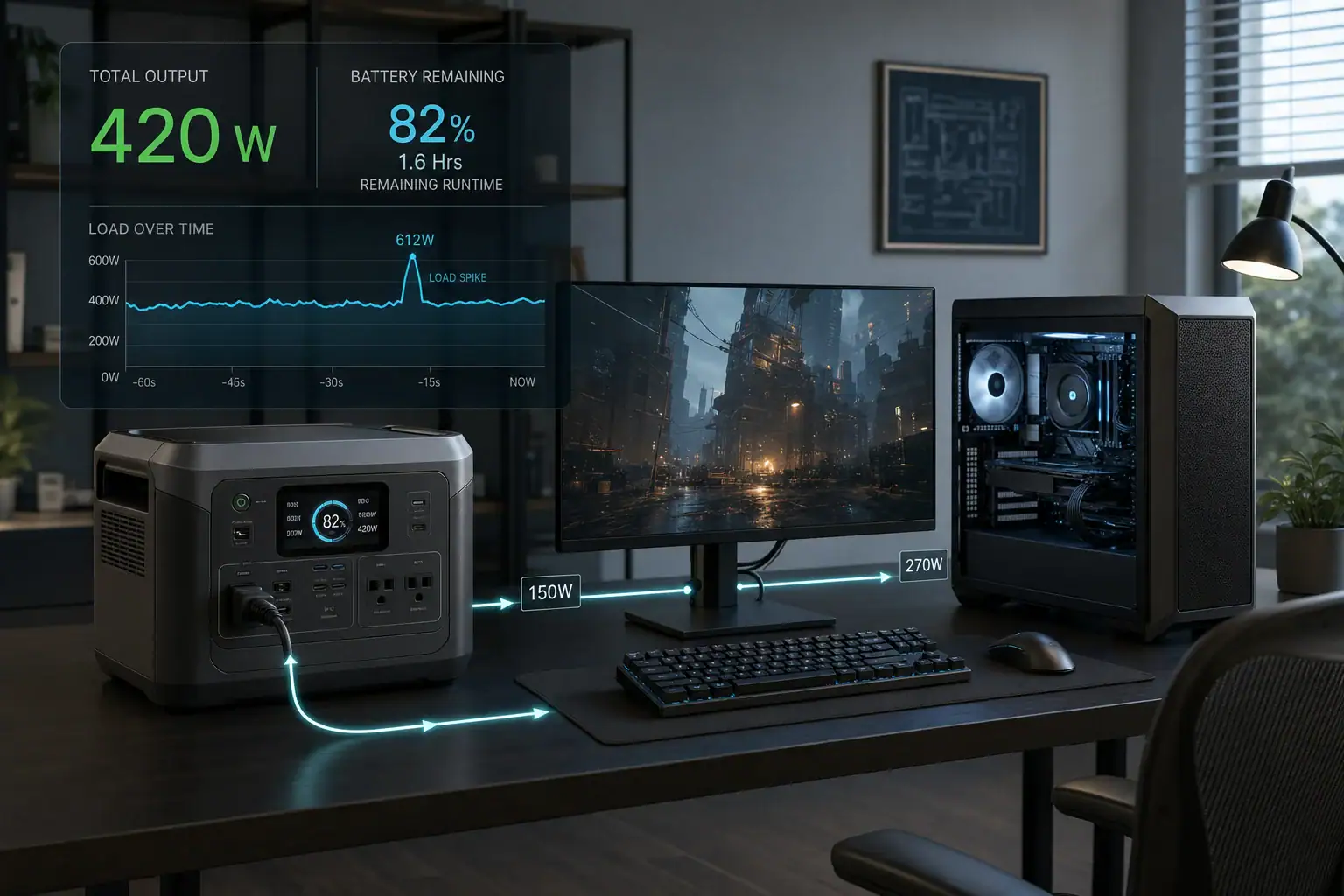
A portable power station can run a gaming PC if its inverter supports the computer’s sustained power draw, brief load spikes, and required runtime without exceeding its output limits. The most important numbers are continuous watts, surge watts, battery capacity in watt-hours, inverter efficiency, and UPS transfer time.
Do not size the station from the wattage printed on the PC power supply alone. A 750-watt or 1,000-watt power supply describes how much the unit can provide, not how much the computer continuously consumes. Actual demand changes with the processor, graphics card, frame rate, game, monitor, and connected accessories.
For reliable backup power, measure the complete setup at the wall and leave headroom above the highest observed load. Also determine whether the station’s EPS or UPS mode can switch quickly enough to prevent a reboot during an outage.
1. What It Means to Power a Gaming PC With a Portable Station
A portable power station combines a rechargeable battery, battery management system, charger, and AC inverter in one enclosure. When a gaming PC is connected to its AC outlet, the inverter converts stored direct-current energy into the alternating current expected by the computer’s power supply.
Successful operation depends on both power and energy. Power, measured in watts, determines whether the station can operate the PC at a given moment. Energy, measured in watt-hours, determines approximately how long it can do so. A station may have enough inverter output to start a high-performance computer but too little battery capacity for a useful gaming session. Conversely, a large battery with a low-output inverter may shut down when the graphics card boosts.
This distinction matters because gaming is a variable workload. Menu screens, uncapped frame rates, shader compilation, streaming, and sudden changes in scene complexity can produce substantially different wall-power readings.
2. How Runtime, Continuous Load, and Spikes Work
The best starting point is a plug-in power meter that measures the entire setup under realistic conditions. Include the desktop, monitor, speakers, networking equipment, external drives, and any other devices that must remain powered. Record idle demand, typical gaming demand, and the highest short-duration reading you can observe.
Estimated runtime in hours = battery watt-hours × usable fraction × inverter efficiency ÷ average load in watts. For a rough estimate, a combined usable fraction and conversion efficiency of about 0.75 to 0.90 may be reasonable, depending on the station, load, battery state, temperature, and automatic shutdown thresholds. Manufacturer capacity is normally a nominal figure, so dividing watt-hours directly by watts tends to overstate runtime.
Continuous output is the wattage the inverter can sustain. Surge or peak output is a temporary limit intended for short increases, not a rating for continuous operation. Gaming PCs usually have less dramatic startup surges than refrigerators or power tools, but a graphics card and processor can still create rapid transient demand. The station must tolerate these events without voltage collapse, overload protection, or an inverter reset.
For practical sizing, keeping normal gaming demand near or below roughly 60% to 80% of the station’s continuous rating provides useful headroom. More margin may be appropriate for a heavily overclocked system, a high-power graphics card, or several peripherals.
| Measurement | What it indicates | Illustrative value |
|---|---|---|
| Idle load | Demand during light desktop use | 90 W |
| Average gaming load | Main value used for runtime | 420 W |
| Brief observed peak | Headroom needed for changing workloads | 560 W |
| Station continuous output | Maximum sustained AC load | 800 W |
3. Real-World Gaming PC Runtime Examples
Midrange PC and one monitor
Consider a desktop and monitor averaging 300 watts while gaming. A 600-watt-hour station with an assumed 85% delivered-energy factor would provide about 510 usable watt-hours. Dividing 510 by 300 gives an estimated runtime of 1.7 hours. Actual operation could be shorter if the game draws more power, the cooling fans run faster, or the battery is cold or aged.
High-performance PC with accessories
A more demanding system might average 600 watts after including a large monitor, speakers, network hardware, and streaming equipment. A 1,200-watt-hour battery at the same assumed 85% delivered-energy factor provides about 1,020 usable watt-hours, or roughly 1.7 hours at that load. Its inverter should also have comfortable margin above 600 watts for transient demand.
Backup for saving and shutting down
Runtime requirements change if the goal is only to bridge brief outages or shut down safely. A setup drawing 450 watts for 15 minutes uses about 113 watt-hours at the AC output. Allowing for conversion losses and reserve, a station with several hundred watt-hours may be adequate for that limited purpose even if it cannot support hours of gaming.
These calculations should be treated as planning estimates rather than guarantees. Battery displays often predict remaining time from recent demand, so their estimates can fluctuate as a game moves between menus, cutscenes, and graphics-intensive scenes.
4. Common Sizing Mistakes and Troubleshooting Cues
- Using the PC power supply rating as actual consumption: Measure wall draw instead. A power supply’s rated wattage is a capacity ceiling, not a constant load.
- Ignoring the monitor and peripherals: Multiple displays, powered speakers, networking equipment, and external storage reduce runtime and add to inverter load.
- Choosing by watt-hours alone: Battery capacity does not confirm that the inverter can support the computer’s continuous or peak demand.
- Assuming surge watts are continuously available: A station may advertise a much higher short-term peak while still shutting down if sustained load exceeds its continuous rating.
- Expecting the full labeled capacity: Inverter losses, reserve capacity, temperature, and battery aging reduce energy delivered at the AC outlets.
- Assuming every backup mode is a true UPS: Some stations interrupt output for several milliseconds while transferring from wall power to battery. A sensitive PC may restart even though less sensitive devices remain on.
If the station shuts off only during demanding games, watch for an overload warning and compare the highest wall reading with the continuous rating. If it operates normally on battery but the PC reboots when utility power fails, transfer time or output behavior is a more likely cause than insufficient battery capacity. Random shutdowns at a low indicated load can also point to heat, a loose connection, a damaged cable, or an incompatible power strip.
5. UPS Operation and Electrical Safety Basics
A portable station with pass-through charging may accept utility power while supplying connected equipment, but that does not automatically make it equivalent to a dedicated uninterruptible power supply. Check the stated transfer time, maximum pass-through load, charging behavior, and whether backup mode remains active at the desired battery limit. Some computer power supplies can ride through a short interruption; others may reboot during the same event.
Use the station in a dry, ventilated location with clearance around its cooling openings. Avoid covering it, placing it against a heat source, or operating it where liquids can spill. Connect the PC within the station’s rated AC output and avoid daisy-chaining power strips or extension cords. Stop using equipment that has damaged plugs, unusual odors, swelling, excessive heat, or repeated electrical faults.
Portable stations should not be connected to home wiring through improvised backfeeding methods. Any integration with building circuits, transfer equipment, or grounding arrangements should be evaluated and installed by a qualified electrician according to local requirements.
6. Battery Care, Testing, and Storage
Test the setup before relying on it. With important files closed, run a representative game or benchmark and confirm that the station remains stable through load changes. Separately test its backup transfer behavior according to the manufacturer’s safe operating guidance. A successful light-load test does not prove that the system will remain stable at full gaming demand.
For storage, keep the station in a cool, dry area and follow its specified storage charge range. A moderate state of charge, often around 40% to 60%, is commonly suitable for extended storage unless the instructions state otherwise. Check and recharge it periodically because control electronics can slowly consume energy. Avoid leaving the battery fully depleted, and inspect cables, vents, and connectors before reuse.
| Check | Suggested interval | Reason |
|---|---|---|
| Battery charge | Every few months in storage | Prevents excessive self-discharge |
| Gaming load test | Before planned backup use | Confirms output stability |
| Transfer test | After setup changes | Reveals reboot sensitivity |
| Vent and cable inspection | Before each extended session | Identifies blockage or damage |
7. Practical Takeaways and Buying Specifications
Measure the complete gaming setup, size the inverter with headroom, and calculate runtime from realistic usable energy rather than labeled capacity alone. If uninterrupted operation matters, verify backup transfer performance with the specific PC instead of assuming that any pass-through feature will prevent a reboot.
Related guides: Portable Power Station vs UPS: What Changes for Computers and Networking? • How to Estimate Runtime for Any Device: A Simple Wh Formula + 5 Worked Examples • Pure Sine Wave vs Modified Sine Wave: Does It Matter for a Portable Power Station? • Portable Power Station Buying Guide
Specs to look for
- Continuous AC output: Look for a rating roughly 25% to 60% above measured sustained gaming demand; this provides headroom for workload changes and reduces overload risk.
- Surge or peak output: Look for a clearly stated short-duration rating above observed peaks, such as 1.5 times the typical load; this helps the inverter tolerate brief transients.
- Battery capacity: Compare options in watt-hours, such as 500 Wh, 1,000 Wh, or more; greater capacity extends runtime but usually increases size, weight, and recharge time.
- Usable AC energy or efficiency: Look for test data or specifications that clarify conversion losses; delivered AC energy may be roughly 75% to 90% of nominal capacity.
- Transfer time: For backup use, look for a documented value, often under about 10 to 20 milliseconds in faster EPS modes; shorter switching reduces the chance of a PC reboot but does not guarantee compatibility.
- Pass-through load limit: Confirm that the station can power the full setup while charging; this limit may differ from ordinary inverter output.
- AC output waveform: Look for a pure sine wave output; it is generally the appropriate choice for modern active-power-factor-correction computer power supplies.
- Recharge power: Compare charging input in watts and estimated full-charge time; faster charging improves readiness between outages but may create more fan noise and heat.
- Battery cycle life and warranty terms: Look for capacity-retention information at a stated cycle count, such as 80% capacity after several thousand cycles; this helps estimate long-term usefulness.
The right capacity ultimately depends on whether the goal is a safe shutdown, short outage coverage, or hours of continued gaming. Measured load, required runtime, transient headroom, and transfer compatibility are more useful than a single advertised wattage.
Frequently asked questions
Can a portable power station run a gaming PC?
Yes, provided its continuous AC output exceeds the measured load of the complete setup and it has enough battery capacity for the desired runtime. Include the monitor and essential peripherals, and allow headroom for short power spikes during demanding workloads.
What specs matter most in a portable power station for a gaming PC?
Key specifications include continuous AC output, short-term surge capability, battery capacity in watt-hours, and pure sine wave AC output. For outage protection, also check the documented transfer time and pass-through load limit, then test compatibility with the specific computer.
How long will a portable power station power a gaming PC?
Runtime depends on average wall-power draw and usable delivered battery energy, not just the battery’s labeled watt-hours. Divide estimated usable watt-hours by the setup’s average load in watts; inverter losses, temperature, battery condition, and changing game loads can reduce the result.
Is using my PC power supply wattage to size a power station a mistake?
Yes. The wattage printed on a computer power supply is its maximum output capability, not a measurement of the computer’s normal electricity use. Measure the whole setup at the wall during realistic gaming and use the highest observed demand when selecting inverter headroom.
Will a portable power station keep a gaming PC on during a power outage?
It may, but only if its backup or EPS transfer time is fast enough for that PC’s power supply to ride through the interruption. Pass-through charging alone does not guarantee uninterrupted operation, so a controlled transfer test is the most reliable way to check.
Is it safe to use a portable power station with a gaming PC indoors?
It can be safe when the station is used within its rated output limits in a dry, well-ventilated location. Keep vents clear, inspect cords and plugs for damage, avoid improvised connections to household wiring, and follow the manufacturer’s operating instructions.
Related guides
Browse this topic →
- Beginner-friendly sizing, runtime & specs
- Solar & charging (MPPT, fast charging, cables)
- Batteries (LiFePO4, cycles, care & storage)
- Safety, cold-weather performance, real-world tips
More in Beginners
See all →- Charging an Electric Wheelchair or Mobility Scooter From a Portable Power Station
- Portable Power Station for a Pop-Up Camper: Lights, Fans, Fridge, and Recharge Plan
- Portable Power Station for a Shed or Outbuilding: Lights, Chargers, and Security
- Portable Power Station for a Boat: 12V Loads, Salt Air, and Safer Storage
- Portable Power Station for a Small Jobsite: Tool Battery Chargers and Work Lights
Keep reading
About this site
Portable Energy Lab publishes practical, independent guides about portable power—clear sizing, safe use, and real-world expectations.
Affiliate disclosure
Some links on this site may be affiliate links. If you buy through these links, we may earn a small commission at no extra cost to you. This helps support our content. Read our affiliate disclosure.