
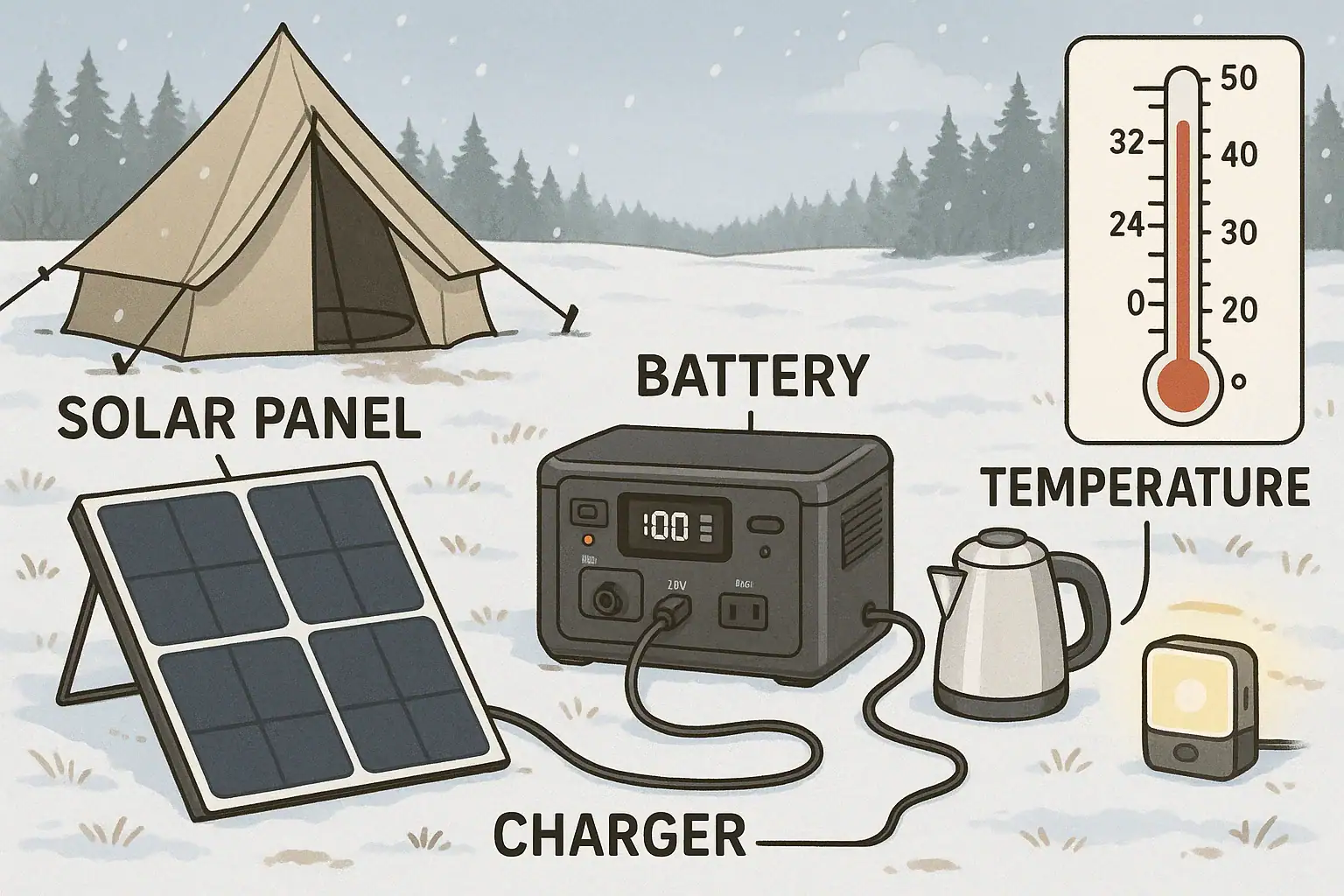
Charging slows in cold weather because low temperatures reduce battery chemistry activity and trigger built‑in protection limits that cut charging current and input watts. Portable power stations automatically restrict charge rate, adjust voltage, or pause charging to avoid damage when the battery pack is too cold. That is why you see lower input watts, longer charge time, and sometimes “temperature” or “low temp” warnings on the display during winter use.
If you rely on a portable power station for winter camping, backup power, off‑grid cabins, or van life, cold‑weather charging behavior matters. Understanding how temperature affects charge rate, runtime, state of charge (SoC) accuracy, and solar input lets you plan around slower charging instead of being surprised by it. With a few simple strategies—insulating the unit, pre‑warming, adjusting your charge schedule, and choosing the right specs—you can keep winter performance predictable and safe.
This guide explains what is happening inside the battery, why your charge time estimate changes, how different chemistries behave in the cold, and what to look for when comparing portable power stations for cold‑weather use.
Cold-Weather Charging: What It Means and Why It Matters
Cold‑weather charging is any situation where you charge a portable power station while its battery is below normal room temperature, especially near or below freezing. In this range, the charger and battery management system (BMS) automatically change how fast the battery can accept energy.
For users, this shows up as reduced input watts, longer charge time, and sometimes a charge that stops before reaching 100% until the battery warms up. You might also see the estimated runtime jump around because the state of charge reading becomes less accurate when the cells are cold.
This matters because many people depend on portable power stations for critical winter tasks: running a CPAP overnight, powering communication devices, keeping a small heater fan or furnace blower running, or supporting tools on a job site. If you expect a two‑hour recharge from wall power or solar and it actually takes four hours in low temperatures, your entire power plan can fail.
Understanding cold‑weather charging helps you:
- Estimate realistic charge time in winter conditions.
- Avoid forcing the battery to charge when it is too cold, which can shorten its lifespan.
- Decide where to place the power station (indoors vs. outdoors, insulated vs. exposed).
- Choose models and specs that handle low temperatures better.
Instead of treating slow winter charging as a defect, it is more accurate to see it as a built‑in safety feature. Once you know how it works, you can plan around it.
How Temperature Affects Battery Charging Inside a Portable Power Station
Portable power stations rely on lithium‑based batteries, usually either lithium iron phosphate (LiFePO4) or lithium‑ion variants such as NMC. Both chemistries are sensitive to temperature, and their safe charging window is narrower than their safe discharging window.
At the cell level, low temperatures slow down the chemical reactions that move lithium ions between electrodes. When you try to push the same charging current into a cold cell, ions can plate onto the surface of the anode instead of inserting into it. This lithium plating is permanent damage that reduces capacity and can increase internal resistance and safety risk. To prevent this, the BMS and charger reduce current or stop charging when the battery is too cold.
Most portable power stations monitor:
- Cell temperature: Internal sensors track how warm or cold the pack is.
- Input current and power: The BMS caps the charge amps or watts based on temperature.
- Voltage: The charger adjusts its profile (constant current/constant voltage) to stay within safe limits.
As the battery gets colder, several things happen:
- Charge current limit drops: The system may cut maximum input from, for example, 400 W at room temperature down to 100–200 W or less in the cold.
- Internal resistance rises: More energy is lost as heat, and the pack cannot accept high power efficiently.
- Usable capacity shrinks temporarily: You might only see 60–80% of the usual watt‑hours available until the battery warms up.
- SoC estimation becomes less accurate: Voltage‑based fuel gauges can misread charge level when the battery is cold, especially under load.
Some portable power stations include built‑in battery heaters or “low‑temperature charging” features. These systems divert part of the input power to warming the pack before allowing a higher charge rate. Others simply refuse to charge below a certain temperature, displaying a temperature warning instead of accepting power.
Solar charging in cold weather adds another layer. Solar panels often produce higher voltage in low temperatures, which can help reach the minimum MPPT input voltage. But the battery’s cold‑limited charge current still caps how much of that solar power can actually flow into the pack, so you might see the solar input fluctuate or sit below the panel’s rated watts.
| Battery Temperature | Typical Charge Power Limit | Approx. Usable Capacity | Common BMS Behavior |
|---|---|---|---|
| 68°F (20°C) | 80–100% of rated input (e.g., 400–600 W) | 90–100% | Normal charging, accurate SoC |
| 41°F (5°C) | 50–80% of rated input | 80–95% | Moderate current limit, slightly slower charging |
| 32°F (0°C) | 25–60% of rated input | 70–90% | Noticeable slowdown, possible warnings |
| 14°F (-10°C) | 0–30% of rated input | 50–80% | Severely limited or disabled charging |
Real-World Winter Scenarios: What Slow Charging Looks Like
In practice, cold‑weather charging issues show up differently depending on how and where you use your portable power station. Seeing specific scenarios helps you recognize normal behavior versus real problems.
Winter Camping and Overlanding
Imagine winter camping with overnight lows around 20°F (−6°C). You leave your portable power station in the unheated tent vestibule, running LED lights and a small 12 V fridge. By morning, the battery is cold and at 40% SoC. When you connect a 400 W AC charger from a nearby cabin outlet, the display only shows 120–150 W of input and estimates 4–5 hours to full instead of the usual 2 hours.
This is typical behavior: the BMS is limiting current to protect the cold battery. If you move the unit inside the cabin for 30–60 minutes and then plug it in again, you may see the input rise to 300–400 W as the battery warms.
Van Life and RV Use in Freezing Conditions
For van dwellers, the power station might sit on the floor near a door, where temperatures overnight drop close to freezing. In the morning, you start driving and expect the alternator or DC‑DC charger to push 300 W into the station. Instead, you see 80–150 W for the first hour, slowly increasing as the van interior warms.
Solar input behaves similarly. On a clear, cold morning, your panels may be capable of 500 W, but the power station only accepts 200–250 W until the pack temperature rises. If you do not account for this delayed ramp‑up, you might assume something is wrong with your solar setup.
Emergency Backup During Winter Outages
During a winter power outage, you may keep the portable power station in an unheated garage to run a sump pump or charge phones. After several hours of use, you bring it inside to charge from a small generator. Because the pack is cold and partially depleted, the BMS may limit charge current, so your generator runs for longer than expected to refill the battery.
If you are powering sensitive loads like medical devices, the combination of reduced usable capacity and longer recharge time can be critical. Planning extra runtime margin and bringing the unit into a warmer space before charging becomes essential.
Job Sites and Outdoor Work
On winter job sites, portable power stations often sit on concrete or in the back of a truck. At 15–25°F (−9 to −4°C), tools may still run, but charging between tasks is slow. Even if you plug into a high‑power AC circuit, the unit might only accept a fraction of its rated input. Workers sometimes misinterpret this as a faulty charger when it is simply temperature‑limited charging.
Common Cold-Weather Mistakes and Troubleshooting Clues
Many winter charging problems are avoidable once you recognize how temperature interacts with charge rate and runtime. Here are typical mistakes and what to look for when troubleshooting.
Mistake 1: Leaving the Power Station Fully Exposed to the Cold
Storing the unit in the open bed of a truck, on frozen ground, or in an uninsulated shed leads to a very cold battery pack. Even if the display shows an acceptable ambient temperature, the cells themselves can be much colder, especially after sitting overnight. The result is slow or refused charging when you finally plug in.
Troubleshooting cue: If charge power is low and you see a temperature icon, snowflake symbol, or “low temp” message, move the unit into a warmer space and wait 30–60 minutes before trying again.
Mistake 2: Assuming Rated Input Watts Apply in All Conditions
Manufacturers list maximum AC and solar input at ideal temperatures. Users often plan charge time using these values without accounting for cold‑weather derating. In freezing conditions, actual input may be half—or less—of the rated figure.
Troubleshooting cue: Compare your observed input watts at room temperature to what you see in the cold. If the charger delivers full power indoors but not outdoors, temperature limits are the likely cause, not a defective adapter.
Mistake 3: Fast Charging a Very Cold Battery
Trying to force fast charging immediately after the unit has been in sub‑freezing conditions can stress the battery, even if the BMS allows some current. Repeatedly doing this can shorten long‑term capacity and increase internal resistance.
Troubleshooting cue: If the case feels very cold to the touch and you notice the fan running hard or the unit making more noise than usual during charging, pause and let it warm up before continuing.
Mistake 4: Misreading Winter Runtime as Permanent Capacity Loss
Usable capacity temporarily reduces in the cold, so your power station might appear to “shrink” in winter. Users sometimes assume the battery is worn out when it simply needs to warm up.
Troubleshooting cue: Run the same load test at room temperature and at near‑freezing temperatures. If capacity is normal indoors but lower outdoors, the battery is probably healthy and just cold‑limited.
Mistake 5: Blocking Ventilation While Trying to Insulate
Wrapping the power station tightly in blankets or foam to keep it warm can block air vents. During charging, this may cause overheating or force the BMS to throttle power for the opposite reason—too much heat.
Troubleshooting cue: If input watts drop after a few minutes of charging and the fan runs continuously, check that vents are clear and the unit can breathe while still being protected from the cold floor or direct drafts.
Cold-Weather Charging Safety Basics
Winter conditions add both cold‑related and general electrical safety concerns. Following a few high‑level rules helps protect you, your devices, and the battery pack.
- Respect the specified temperature range: Never attempt to charge a portable power station below its stated minimum charging temperature. If the unit blocks charging, do not try to bypass protections.
- Avoid DIY heating tricks: Do not use open flames, heating pads, or improvised heaters directly on the power station. Instead, bring it into a moderately warm space and let it equilibrate naturally.
- Keep the unit dry: Snow, condensation, and slush can introduce moisture into ports and vents. Use weather‑resistant placement and keep the unit off wet ground.
- Use rated cords and adapters: In cold weather, cables become stiff and more prone to cracking. Use properly rated, undamaged cords and avoid tight bends that could damage insulation.
- Do not overload the inverter: Cold temperatures already stress the battery. Avoid running surge‑heavy loads near the inverter’s maximum continuous watt rating, especially when the battery is low and cold.
- Monitor the unit while charging: In winter, check the display periodically for temperature warnings, unexpected shutdowns, or rapid swings in input power.
- For home backup integration, use a professional: If you intend to connect a portable power station to home circuits, consult a qualified electrician and use proper transfer equipment rather than improvised wiring.
Winter Storage, Transport, and Long-Term Care
How you store and transport a portable power station in cold seasons has a major impact on both immediate performance and long‑term battery health.
Storing in Cold Climates
If you store the unit in a garage, shed, or RV over winter, aim for a location that stays above freezing when possible. Extreme cold does not usually cause immediate failure, but repeated deep cold cycles can accelerate aging.
- Store at partial charge: Keeping the battery around 30–60% SoC for long storage reduces stress compared to 0% or 100%.
- Avoid full discharge in the cold: Letting the battery sit empty in low temperatures can increase the risk of it falling into a deep‑discharge state that the charger may not recover.
- Check periodically: Every 2–3 months, bring the unit into a warmer space, check SoC, and top up slightly if it has dropped significantly.
Transporting in Winter
When transporting a portable power station in a vehicle during winter:
- Keep it inside the cabin rather than in an open bed if possible.
- Use a padded case or insulated box to moderate rapid temperature swings.
- Avoid leaving it for long periods in a locked, unheated car at sub‑freezing temperatures.
Pre-Warming Before Charging
Before connecting to AC, DC, or solar input after the unit has been in the cold:
- Bring it into a space around 50–70°F (10–21°C) for at least 30 minutes.
- Let internal condensation evaporate if it has moved from very cold to humid conditions.
- Start with a moderate charge rate if adjustable, then increase once the battery has warmed.
Balancing Winter Use and Battery Lifespan
Occasional cold‑weather use is expected and supported by modern portable power stations, but repeated fast charging in very low temperatures can shorten lifespan. To balance performance and longevity:
- Use the fastest charging modes mainly at moderate temperatures.
- In harsh winter conditions, accept slower charging as a trade‑off for longer battery life.
- Whenever possible, schedule heavy charging sessions for warmer parts of the day or indoors.
| Situation | Recommended SoC | Temperature Goal | Charging Advice |
|---|---|---|---|
| Long-term winter storage | 30–60% | Above 32°F (0°C) if possible | Top up briefly every 2–3 months |
| Daily winter use | 20–80% | Keep unit insulated from extreme cold | Charge indoors or during warmer hours |
| Emergency outage | 40–100% | Indoor placement preferred | Expect slower charging, plan extra time |
| Vehicle transport | 30–80% | Interior cabin instead of open bed | Pre‑warm before high‑power charging |
Related guides: Charging in Freezing Temperatures: Why It’s Risky and How to Avoid Damage • Winter Storage Checklist: Keeping Batteries Healthy in the Cold • Temperature Limits Explained: Safe Charging/Discharging Ranges and What Happens Outside Them
Planning Around Slow Winter Charging: Practical Steps and Key Specs
Planning for cold‑weather performance turns slow winter charging from an unpleasant surprise into a manageable constraint. Focus on three areas: how you use the unit, where you place it, and which specs you prioritize when choosing a portable power station.
Usage and Placement Strategies
- Charge earlier and longer: In winter, assume your charge time might double compared to room‑temperature conditions. Start charging as soon as you have AC, DC, or solar available instead of waiting until the battery is low.
- Keep the battery as warm as safely possible: Place the unit in a tent, cabin, or vehicle interior rather than fully outdoors. Use a box or soft insulation under and around it while keeping vents clear.
- Prioritize critical loads: When capacity is reduced by cold, power essentials first (medical devices, communication, heating controls) and delay non‑essential loads until the battery is warmer and better charged.
- Align solar with warmer hours: If you rely on solar input, angle panels for low winter sun and expect the best charging between late morning and mid‑afternoon when both irradiance and temperatures are higher.
Choosing Cold-Weather-Friendly Features
When evaluating portable power stations for use in cold climates, certain specifications and design features are especially important.
Specs to look for
- Charging temperature range: Look for clearly stated minimum charging temperatures (for example, around 32–41°F / 0–5°C). A wider supported range means more flexibility in winter without manual pre‑warming.
- Battery chemistry: Compare LiFePO4 versus other lithium‑ion chemistries. LiFePO4 often offers longer cycle life, while some NMC‑type packs may have slightly better cold‑temperature performance. Choose based on how often you expect sub‑freezing use.
- Maximum AC and DC input watts: Higher rated input (e.g., 400–1,000 W) gives more headroom. Even when cold derating cuts this in half, you still get practical charge power for shorter winter top‑ups.
- Solar input voltage and watt limits: A flexible MPPT range and higher solar watt capacity (for example, 300–800 W) help compensate for shorter winter days and lower sun angles.
- Low-temperature charging protection: Look for explicit mention of low‑temp charging protection, including automatic current reduction or charge cutoff, to prevent lithium plating and extend battery life.
- Built-in battery heating or pre-heat modes: Some systems can warm the battery using grid or solar input before full‑power charging. This feature can dramatically improve usability in consistently cold environments.
- Display and app temperature readouts: A screen or app that shows pack temperature and clear temperature warnings helps you understand when slow charging is normal and when you should move or warm the unit.
- Usable capacity at low temperatures: If available, compare stated or tested capacity at 32°F (0°C) versus 68°F (20°C). Smaller percentage drop means more reliable winter runtime.
- Enclosure and port design: Recessed ports, protective covers, and robust cases help keep moisture and snow away from electrical contacts during outdoor winter use.
- Cycle life and warranty: Higher cycle ratings and solid warranty coverage provide a buffer if you expect frequent cold‑weather charging, which is more demanding on the battery over time.
By combining realistic expectations about winter charge time with thoughtful placement and the right feature set, you can rely on a portable power station year‑round, even when temperatures drop well below freezing.
Frequently asked questions
What specifications and features matter most when buying a portable power station for cold weather?
Look for a clearly stated minimum charging temperature, a chemistry suited to your use (LiFePO4 or other lithium variants), and higher maximum AC/DC and solar input watts so derating still provides useful charge power. Built‑in preheat or battery‑heating modes, an MPPT with a wide input voltage range, and temperature readouts on the display or app are also valuable for winter reliability.
How does placing a power station on cold ground or leaving it in an unheated vehicle affect charging?
Cold placement lowers cell temperature, which increases internal resistance and triggers the BMS to reduce or stop charging to avoid lithium plating. That results in lower input watts and much longer charge times until the pack warms, so keeping the unit off frozen surfaces or inside a warmer space improves charging speed.
Is it safe to use external heaters or DIY heating methods to warm a battery before charging?
Using open flames, direct‑contact heating pads, or improvised heaters is unsafe and not recommended. The safer approach is to move the unit into a moderately warm environment or use manufacturer‑approved preheat modes; avoid methods that can overheat components or introduce moisture.
Why does solar seem to produce less charge power on cold mornings even when panels are sunny?
Cold air can improve panel output voltage and even efficiency, but the battery pack’s cold‑limited charge current still caps how much solar energy the BMS will accept. The MPPT may show higher panel power while the power station only accepts a lower wattage until the battery warms up.
How much longer should I expect charging to take at freezing temperatures?
Charge time can easily double or more near freezing compared with room temperature, depending on the unit and conditions. Expect significantly reduced input watts and plan for slower ramps; pre‑warming the pack or scheduling charging during warmer daylight hours shortens overall time.
Will frequent charging in cold weather permanently damage the battery?
Repeated fast charging while the pack is very cold increases the risk of lithium plating, which reduces capacity and raises internal resistance over time. Occasional cold‑weather use is generally supported, but regularly charging without proper preheating or BMS protection can accelerate degradation.
Recommended next:
Related guides
Browse this topic →
- Beginner-friendly sizing, runtime & specs
- Solar & charging (MPPT, fast charging, cables)
- Batteries (LiFePO4, cycles, care & storage)
- Safety, cold-weather performance, real-world tips
More in Cold Weather
See all →Keep reading
About this site
Portable Energy Lab publishes practical, independent guides about portable power—clear sizing, safe use, and real-world expectations.
Affiliate disclosure
Some links on this site may be affiliate links. If you buy through these links, we may earn a small commission at no extra cost to you. This helps support our content. Learn more.