
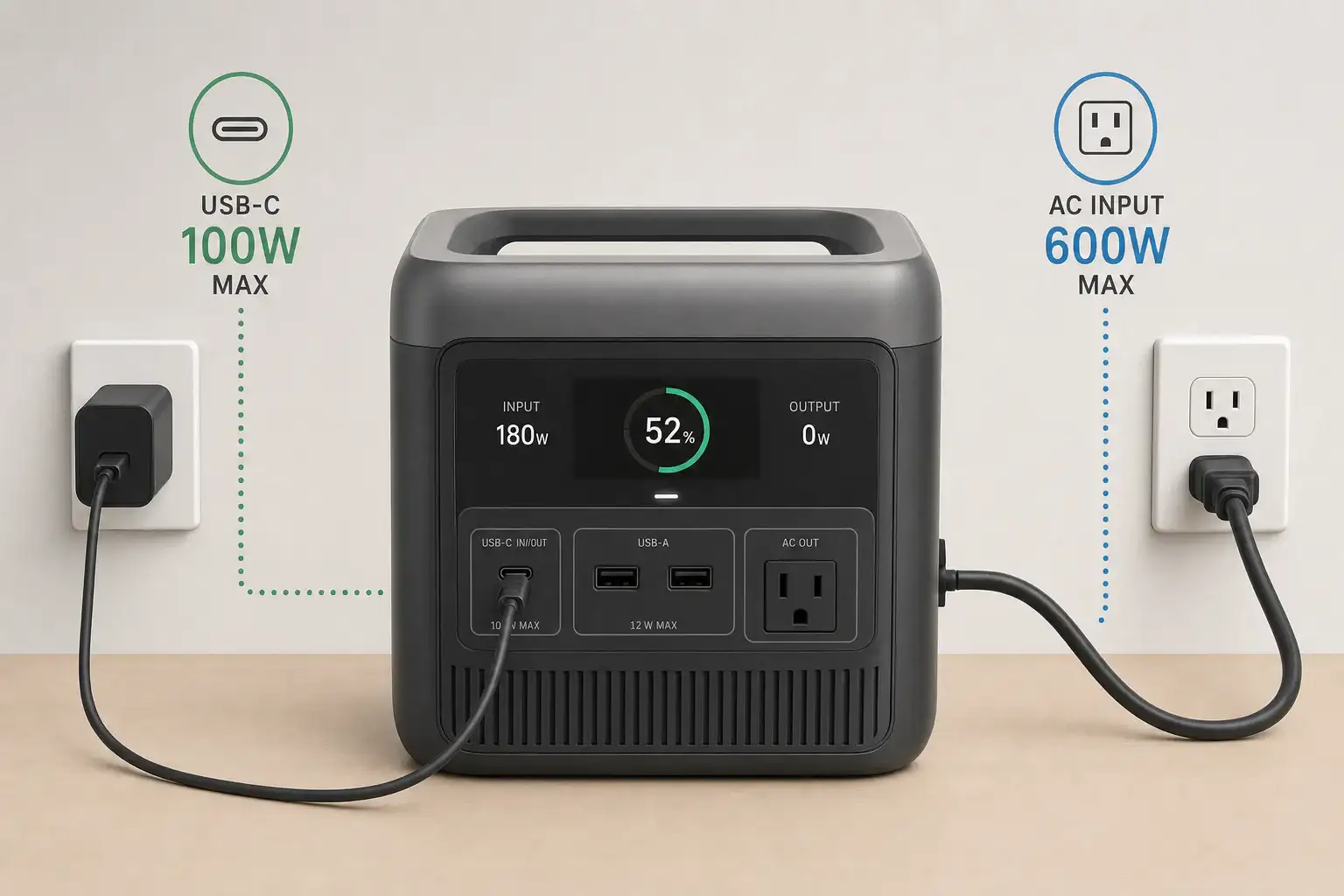
AC input usually makes the most sense when charging speed matters, while USB-C input is better for portability, convenience, and using one charger across several devices. The right choice depends on the power station’s input limit, supported USB Power Delivery profile, battery capacity, and the output rating of the charger.
For a large power station, AC charging may provide several hundred or even more than 1,000 watts, substantially reducing recharge time. USB-C charging commonly operates at lower wattage, although higher-power USB-C PD systems can be practical for compact and midsize models. Advertised charger wattage alone does not determine the result because the station, cable, and charger must agree on a compatible charging profile.
Efficiency, charging time, cable requirements, and whether a USB-C port is input-only or bidirectional also matter. Comparing these details helps determine whether USB-C can serve as the primary charging method or should remain a travel-friendly backup.
1. What USB-C Input and AC Input Mean
USB-C input allows a portable power station to receive direct current through a USB-C connector, usually under the USB Power Delivery, or USB PD, standard. The charger and power station negotiate a supported voltage and current. Charging begins at a mutually supported level rather than automatically using the largest number printed on either device.
AC input accepts power associated with a household wall outlet. Depending on the design, the station may contain an internal AC-to-DC charging circuit or use an external power adapter. In either case, AC from the outlet must be converted into the controlled DC voltage needed by the battery.
The distinction matters because it affects recharge speed, equipment requirements, and packing convenience. AC input generally supports more charging power and is often preferred before an outage or trip. USB-C may eliminate a dedicated adapter and can work with a compact charger already used for a laptop or other electronics. However, a USB-C connector does not guarantee high-wattage charging.
2. How Charging Power, PD Profiles, and Input Limits Work
Charging power is measured in watts and is broadly calculated by multiplying voltage by current. A 20-volt, 5-amp USB-C profile represents 100 watts, while newer extended-power profiles can support higher values when every component is compatible. Actual battery charging power may be lower because energy is consumed by conversion losses, thermal management, and any loads running from the station.
The lowest relevant limit controls USB-C performance. A 140-watt charger will not deliver 140 watts if the power station accepts only 100 watts, the cable is rated for less, or the required PD profile is unavailable. Some high-current cables contain an electronic marker that identifies their capabilities. An ordinary charging cable may therefore reduce power or prevent a high-power profile from being selected.
AC charging is also limited by the station’s rated AC input, not merely by the wall circuit. Many stations intentionally slow charging near a high state of charge or when battery temperature is outside the preferred range. This charging curve protects the battery, so dividing capacity in watt-hours by maximum input watts provides only a rough minimum time rather than a guaranteed result.
| Comparison point | USB-C input | AC input |
|---|---|---|
| Typical role | Portable or secondary charging | Fast primary charging |
| Illustrative input power | 45–240 watts | 300–1,800 watts |
| Equipment | Compatible PD charger and cable | AC cord or supplied adapter |
| Main limitation | Shared PD profile and cable rating | Station’s AC input rating and heat |
| Travel convenience | Often compact and multipurpose | May require dedicated hardware |
3. Real-World Charging Examples
Compact 300-watt-hour power station
Suppose a compact station has a 300-watt-hour battery, accepts 100-watt USB-C PD input, and supports 200-watt AC input. USB-C might require roughly four hours after normal losses and end-of-charge tapering. AC could reduce that to around two hours. USB-C remains attractive if the owner already carries a compatible laptop charger and does not need an immediate turnaround.
Midsize 1,000-watt-hour power station
A 1,000-watt-hour model with 100-watt USB-C input would need well over ten hours for a full charge under typical conditions. If its AC input accepts 800 watts, AC charging could complete the job in a few hours. In this case, USB-C is useful for overnight charging, topping up, or situations where only a lower-power source is available, but it is less practical before a time-sensitive outage.
Charging while powering equipment
If a station receives 100 watts through USB-C while supplying an average 70-watt load, only part of the incoming power is available to increase the battery’s state of charge. Conversion and operating overhead can narrow that margin further. The battery percentage may rise slowly, stay level, or fall. AC input with a higher wattage ceiling provides more headroom, although simultaneous charging and discharging should still remain within the manufacturer’s operating guidance.
4. Common Mistakes and Troubleshooting Cues
Assuming every USB-C port accepts input: Some ports are output-only, while others support bidirectional power. Check the port label and input specification. A display that shows no incoming watts may indicate the wrong port rather than a failed charger.
Matching wattage but not the PD profile: Two products can advertise the same maximum wattage yet lack a shared voltage profile. In that situation, they may negotiate a slower level. Compare supported input voltages and currents, not just headline watts.
Using an unsuitable cable: A cable designed mainly for data or lower-current phone charging can bottleneck the system. If charging repeatedly starts and stops, test with an intact cable explicitly rated for the intended USB-C power level.
Expecting a constant maximum rate: Charging commonly slows as the battery approaches full charge or becomes hot or cold. A lower reading near 90 percent may be normal. Persistent low input at a moderate state of charge may point to charger sharing, a cable limitation, temperature protection, or an enabled quiet-charging mode.
Overlooking shared charger output: Multiport USB-C chargers often divide their total output when more than one device is connected. Disconnecting another device may allow the power station to negotiate a higher profile.
Comparing charging time with nominal capacity alone: A 1,000-watt-hour rating describes stored energy under defined conditions, not wall energy consumed during charging. Conversion losses and battery balancing add time. If AC charging shows zero input, verify that the cord is fully seated, the outlet works, and any input setting is enabled. Stop using equipment that has damaged connectors, unusual heat, odor, or repeated fault warnings.
5. Charging Safety Basics
Use chargers, cords, and USB-C cables whose voltage, current, and power ratings are compatible with the station. Do not use damaged, loose, scorched, or unusually hot connectors. Place the power station on a stable, dry surface with ventilation openings unobstructed, and keep it away from flammable materials and direct heat.
High-power AC charging can create more heat and may place a meaningful load on a household circuit. Avoid overloading extension cords or power strips, and do not use lightweight cords that are not rated for the load. If an outlet is loose, discolored, buzzing, or repeatedly trips protection, stop using it and consult a qualified electrician.
Do not open the power station, modify its battery pack, bypass protection systems, or improvise connections to household electrical panels. Charging outdoors requires equipment and receptacles appropriate for the environment, with protection from rain and standing water. Follow the operating temperature range and pause charging if the unit reports a temperature or battery fault.
6. Maintenance and Storage for Reliable Input Performance
Keep USB-C sockets, AC inlets, and cable ends clean and dry. Dust can be removed from the surrounding surface with the unit disconnected, but metal objects and liquids should never be inserted into a port. Replace cables that have bent plugs, cracked insulation, fraying, or an unreliable connection.
For storage, follow the specified state-of-charge range and recharge interval. Many lithium battery systems are better stored partially charged than left at zero or 100 percent for long periods. Extreme heat accelerates battery aging, while very cold conditions can temporarily restrict charging.
Periodically test both inputs before emergency use. A short charging check can reveal a missing adapter, damaged cable, firmware-related setting, or charger compatibility issue. After storage, allow a unit that has been in a very hot or cold location to reach an acceptable temperature before charging.
| Battery capacity | USB-C input example | AC input example | Likely use case |
|---|---|---|---|
| 300 Wh | 100 W | 200 W | Either method can be practical |
| 600 Wh | 140 W | 500 W | USB-C overnight; AC for speed |
| 1,000 Wh | 100 W | 800 W | AC primary; USB-C backup |
| 2,000 Wh | 240 W | 1,500 W | AC usually better for full recharges |
Related guides: USB-C Power Delivery (PD) Explained for Portable Power Stations • Input Limits (Volts/Amps/Watts) Explained: How Not to Damage Your Unit • How Long Does It Take to Charge a Portable Power Station? • Dual Input Explained: Can You Combine Wall + Solar Charging Safely?
7. Which Charging Method Makes Sense and What Specs Matter?
Choose AC input when rapid recovery, a large battery, or frequent deep discharges make charging time important. Choose USB-C when compact equipment, travel convenience, and charger sharing matter more than speed. For a small station, a strong USB-C input may be sufficient as the main method. For a large station, USB-C is usually more useful as a supplementary or backup input.
The most flexible design supports both methods without relying on vague port labels. Estimate recharge time from usable capacity and realistic input power, then allow extra time for losses and charging taper. Also consider whether the station can combine solar or other inputs, since some models share internal input limits even when several connectors are present.
Specs to look for
- Maximum USB-C input: Look for roughly 100–240 watts when faster USB-C charging is important; a higher ceiling can shorten charging time on compatible stations.
- Supported PD profiles: Look for listed voltage and current combinations, such as 20 volts at 5 amps; matching profiles prevent an unexpected fallback to slower charging.
- USB-C port direction: Confirm whether the port is input-only, output-only, or bidirectional; this determines whether it can charge the battery.
- Maximum AC input: Compare values such as 300, 800, or 1,500 watts with battery capacity; higher input is especially valuable for large batteries.
- Estimated full recharge time: Look for test conditions and the stated charging mode; this is more useful than maximum watts alone because charging power tapers.
- Adjustable charging rate: A selectable low, standard, or fast mode can reduce noise and circuit demand when maximum speed is unnecessary.
- Cable requirements: Check whether high-power USB-C operation needs a 5-amp electronically marked cable; the wrong cable can limit input.
- Input behavior under load: Look for information about simultaneous charging and output; adequate input headroom helps prevent the battery from draining during use.
- Operating temperature range: A clearly stated charging range helps predict when thermal protection may slow or stop input.
AC input is the practical default for the fastest recharge, but USB-C can be the better everyday option for compact stations and lighter travel setups. The deciding factors are battery size, accepted input watts, compatible PD profiles, cable capability, and how quickly the stored energy must be restored.
Frequently asked questions
Is USB-C charging fast enough for a portable power station?
USB-C charging can be fast enough for compact power stations, particularly when the station accepts 100 watts or more and charging can occur overnight. For larger batteries, its lower input wattage usually makes AC the more practical option when a full recharge is needed quickly.
Can I use any USB-C laptop charger to charge a power station?
Not always. The charger, cable, and power station must support a compatible USB Power Delivery voltage and current profile, and the station’s USB-C port must be designed to accept input. A charger may still work at a lower power level if the highest profile is not shared.
Why is my power station charging slowly through USB-C?
A common mistake is using a cable that is not rated for the required power or assuming that a high-wattage charger guarantees high-wattage input. Charging can also slow because another device is sharing a multiport charger, the battery is warm or cold, or the station is nearing full capacity.
What specs should I compare before choosing USB-C input or AC input?
Compare the station’s maximum USB-C and AC input ratings, supported USB PD voltage and current profiles, battery capacity, and stated recharge time. Also check whether the USB-C port supports input, whether a higher-power cable is required, and whether charging speed changes while the station is powering other equipment.
Can a power station charge and run devices at the same time?
Many models can charge while supplying power, but the battery only gains energy when incoming power exceeds the station’s output load and operating overhead. Review the manufacturer’s limits for simultaneous input and output, because some units reduce charging speed or restrict certain modes.
Is it safe to charge a power station with USB-C or AC power?
Both methods can be safe when compatible, undamaged chargers and cables are used according to the power station’s instructions. Charge on a dry, stable, ventilated surface, avoid damaged or overheating connectors, and stop charging if the unit reports a fault or shows unusual heat, odor, or discoloration.
Related guides
Browse this topic →

- Beginner-friendly sizing, runtime & specs
- Solar & charging (MPPT, fast charging, cables)
- Batteries (LiFePO4, cycles, care & storage)
- Safety, cold-weather performance, real-world tips
More in Charging
See all →- Can You Daisy-Chain Portable Power Stations? Why It Usually Isn’t a Good Idea
- Car Alternator Charging vs Cigarette Lighter Charging: What Changes for Power Stations?
- Charging a Portable Power Station From an RV Outlet: 12V, 24V, and Safety Limits
- Fast AC Charging vs Battery Longevity: Should You Use Turbo Mode Every Time?
- Solid-State Batteries and Portable Power Stations: What Could Change?
Keep reading
About this site
Portable Energy Lab publishes practical, independent guides about portable power—clear sizing, safe use, and real-world expectations.
Affiliate disclosure
Some links on this site may be affiliate links. If you buy through these links, we may earn a small commission at no extra cost to you. This helps support our content. Read our affiliate disclosure.