
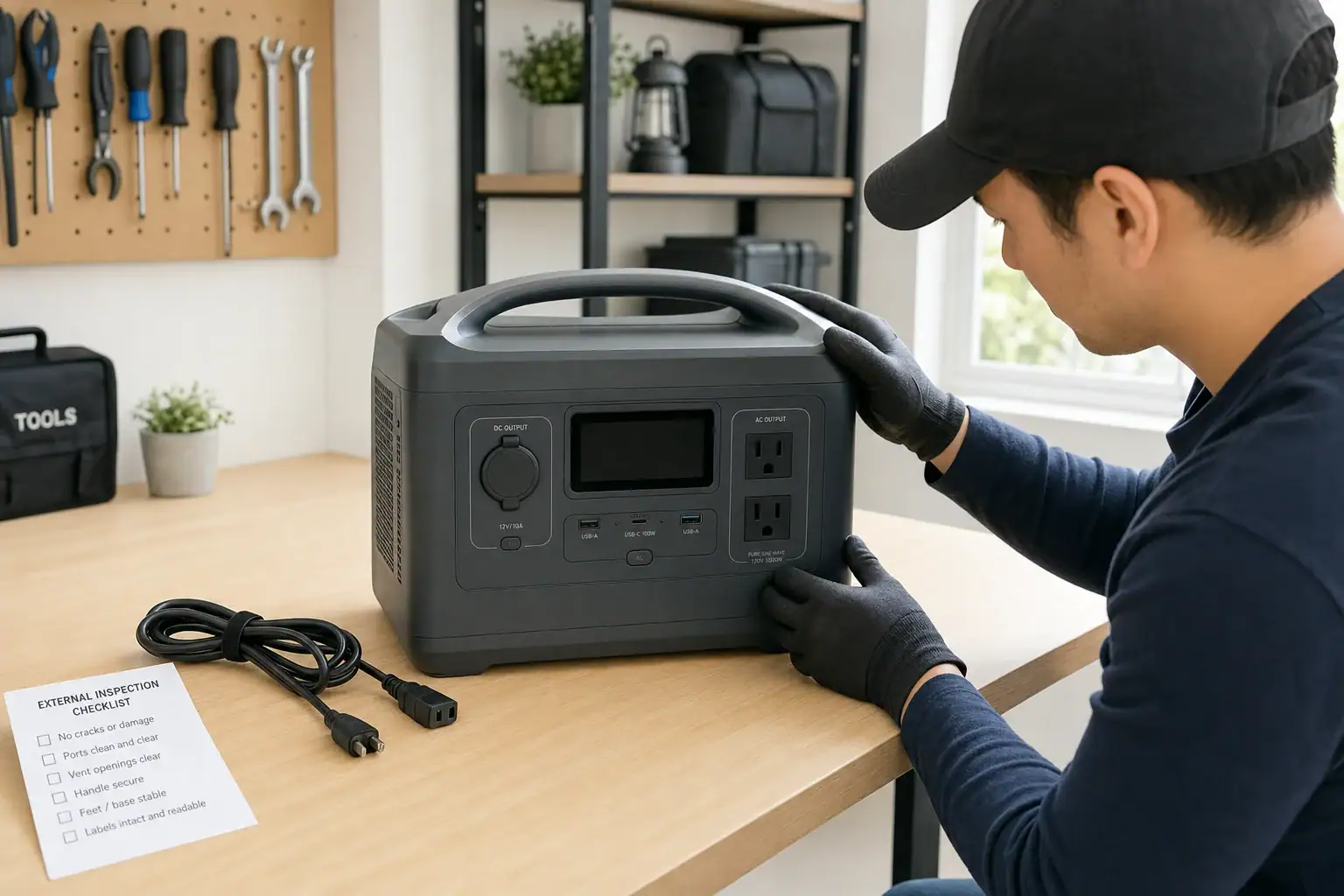
The most common reasons a portable power station will not turn on after storage are a deeply discharged battery, an activated low-voltage cutoff, sleep mode, an unsuitable temperature, or a charging problem. The battery management system may intentionally keep the unit off until it detects a valid charging input and the cells recover to a safe voltage.
Start with an external inspection, bring the unit to a moderate indoor temperature, and connect the correct charger directly to a working wall outlet. Allow time for charging before testing the main power control, display, USB ports, and AC output separately. A blank screen does not always mean the battery has failed.
Do not open the enclosure, bypass protection circuits, or repeatedly force the unit to start. If it shows swelling, leakage, impact damage, unusual heat, odor, or persistent fault codes, stop using it and seek qualified service.
1. What an After-Storage No-Power Condition Means
A portable power station that appears dead after storage may have no display, no indicator lights, no response from its power button, or no output even though the screen works. These symptoms are related but do not always have the same cause.
Rechargeable cells gradually lose energy while sitting unused. The display, wireless features, control electronics, and battery management system can also consume a small amount of standby power. If the battery reaches its low-voltage threshold, internal protection may disconnect the outputs. This prevents further discharge that could damage the cells.
Why this matters is that a protected battery and a failed battery can look similar from the outside. Safe troubleshooting focuses first on temperature, charging equipment, controls, and visible condition. It does not require opening the power station or accessing the battery pack.
2. How Storage, Charging, and Battery Protection Interact
Most portable power stations contain a battery pack, a battery management system, charging electronics, an inverter for AC power, and separate DC or USB output circuits. The battery management system monitors factors such as cell voltage, current, and temperature. It may block charging or discharging when readings fall outside the unit’s operating range.
During long storage, self-discharge and standby loads can gradually lower the state of charge. A battery stored nearly empty is more likely to reach its protective cutoff than one stored at a moderate charge. Very hot storage can accelerate aging, while very cold conditions may temporarily prevent charging.
Recovery normally begins when the charging port receives the expected voltage and current from a compatible source. Some units need several minutes before the screen responds. A severely depleted unit may require substantially longer before it can power an output. The main power control and individual AC or DC output controls may also need to be activated separately.
A charger can fit physically but still provide the wrong voltage, polarity, connector behavior, or USB-C PD profile. Solar input may also be too weak or unstable for initial recovery. A compatible wall charger is generally the clearest test because it removes sunlight and panel positioning as variables.
| Observed symptom | Possible explanation | Safe first check |
|---|---|---|
| No display or lights | Deep discharge, sleep state, or no charging input | Use the specified wall charger and wait |
| Charging icon appears, then stops | Temperature protection or charger mismatch | Move indoors and verify charger specifications |
| Display works but AC does not | AC output is off, overloaded, or protected | Disconnect loads and activate AC output |
| Unit shuts off immediately | Battery remains too low or a fault is present | Recharge without connected loads |
3. Illustrative After-Storage Scenarios
A unit stored nearly empty
Suppose a power station was put away at 8% charge and left for six months. Standby consumption and self-discharge could bring it to the low-voltage cutoff. When first connected, its screen may remain blank for 10 to 30 minutes while the charging circuit supplies a small recovery current. Leaving it connected to a verified charger is more useful than repeatedly pressing the power button.
A cold power station brought in from a garage
A unit stored below freezing may refuse to charge because charging cold lithium-based cells can be unsafe. Moving it to a dry indoor location and allowing the entire enclosure to reach room temperature may resolve the issue. External heating, heat guns, radiators, and heated blankets should not be used.
A working display with no appliance power
If the display turns on but a connected appliance does not, the battery itself may not be the problem. The AC inverter may be switched off, or the appliance may demand more startup surge watts than the inverter can supply. Testing the station with no load, then with one small compatible load, helps distinguish an output setting from a complete no-power condition.
4. Safe Troubleshooting Steps and Common Mistakes
- Inspect the exterior. Check for swelling, cracks, corrosion, liquid, burned areas, damaged ports, or a chemical odor. Do not charge a visibly damaged unit.
- Stabilize the temperature. Place the power station in a dry, ventilated indoor area at a moderate temperature. Allow several hours after exposure to significant heat or cold.
- Disconnect every load. Remove appliances, USB devices, solar panels, and vehicle charging cables. An attached load can consume the limited recovery current or trigger overload protection.
- Verify the outlet and charger. Test the wall outlet with another simple device. Use charging equipment that matches the power station’s required input voltage, current, connector, and protocol.
- Connect charging power and wait. Watch for a charging icon, input-watt reading, indicator light, fan movement, or other normal response. Follow the manual’s expected recovery and charging time rather than repeatedly reconnecting the cable.
- Try the specified power-button action. Some controls require a brief press, while others require holding the button for several seconds. Use only the documented reset procedure, if one exists.
- Test outputs separately. After the battery has gained charge, turn on the station without a load. Then activate one output group and connect one low-power device.
Common mistakes include trying to wake the unit only from a weak solar panel, using a random adapter because the plug fits, testing it while a high-surge appliance remains attached, or assuming that an inactive AC outlet means the entire battery is dead. Repeated button pressing usually does not correct an input, temperature, or battery-protection problem.
5. Battery and Electrical Safety Basics
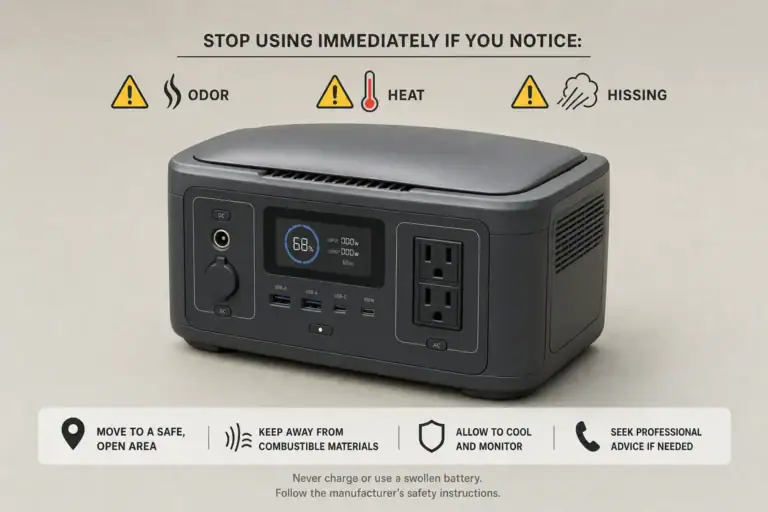
Stop troubleshooting if the enclosure is swollen, unusually hot, hissing, leaking, smoking, or producing a sharp or sweet chemical odor. Move away from the immediate area and follow local emergency guidance when there is smoke, fire, or a rapidly heating battery. Do not handle leaking material with bare hands.
Charge the power station on a stable, dry, nonflammable surface with open airflow around it. Keep vents uncovered and keep the unit away from water, fuels, direct sunlight, and heaters. Do not leave a questionable or previously damaged battery charging unattended.
Never open the enclosure, probe internal terminals, replace internal cells, bypass a fuse or battery management system, or use improvised wiring to force a charge. These actions can create shock, short-circuit, and fire hazards. Also, do not connect a portable power station directly to home wiring, an electrical panel, or a wall receptacle. Any home backup connection requires suitable listed equipment and a qualified electrician.
Professional evaluation is appropriate when a verified compatible charger produces no response after the documented charging period, the same fault code repeatedly returns, the case is damaged, or the power station becomes abnormally hot with no load.
6. Storage and Maintenance That Reduce Future Problems
Store a portable power station with a moderate charge rather than completely full or nearly empty unless its instructions specify otherwise. For many designs, roughly 40% to 70% is a practical storage target. The exact recommendation varies with battery chemistry and control software.
Power the unit on periodically and check its displayed charge. A check every three to six months is a reasonable starting point, but units with active wireless functions or greater standby consumption may need attention sooner. Recharge when the level approaches the lower end of the recommended storage range.
Turn off AC, DC, USB, wireless connectivity, and always-on display features before storage when those controls are available. Store the charger with the station so the correct input equipment is easy to identify later. Protect ports from dust without sealing the whole unit in a way that traps moisture.
Choose a cool, dry location with stable temperatures. Avoid vehicle interiors, unconditioned sheds, damp basements, and areas where the unit could freeze or overheat. Before returning it to storage, inspect cables and record the date and approximate state of charge.
| Storage situation | Illustrative check interval | Useful action |
|---|---|---|
| Indoor, moderate temperature | Every 3 to 6 months | Check charge and recharge if needed |
| Wireless or standby features active | Every 1 to 3 months | Disable features and verify charge |
| Recently exposed to cold | Before charging | Allow passive return to room temperature |
| Planned long-term storage | At the start of storage | Set a moderate charge and record the date |
Related guides: Idle Drain and “Phantom Loss”: Why Power Stations Lose Power When Not Used • Long-Term Storage Best Practices: Charge Level, Temperature, and Schedule • Temperature Limits Explained: Safe Charging/Discharging Ranges and What Happens Outside Them • Portable Power Station Error Codes: What Common Warnings Mean
7. Practical Takeaways and Specs to Look For
When a portable power station will not turn on after storage, begin with condition, temperature, charger compatibility, and adequate charging time. Test it without attached loads, follow its documented control sequence, and treat fault indicators as protective information rather than obstacles to bypass. A unit that remains unresponsive after these checks may have an aged battery, failed charger, damaged input circuit, or internal fault requiring qualified service.
Storage-friendly design features can make future diagnosis easier. Clear input readings, accessible charging options, understandable fault messages, and low standby consumption are often more useful than capacity alone.
Specs to look for
- Battery chemistry and cycle life: Look for a stated chemistry and an example rating such as 2,000 to 4,000 cycles to 80% capacity; this helps estimate long-term durability.
- Recommended storage charge: Look for a documented range, often around 40% to 70%; clear guidance reduces deep-discharge risk.
- Standby consumption: Look for automatic shutdown or a standby draw stated in watts; lower draw helps preserve charge during storage.
- AC charging input: Look for enough input power to recharge in roughly 1.5 to 6 hours; faster recovery can simplify periodic maintenance.
- USB-C PD input: Look for clearly listed profiles such as 60, 100, or 140 watts; protocol details prevent charger compatibility confusion.
- Operating and charging temperatures: Look for separate published ranges; charging limits are often narrower and explain cold-weather lockouts.
- Display diagnostics: Look for battery percentage, input watts, output watts, temperature warnings, and fault codes; these readings make no-power issues easier to identify.
- Protection features: Look for low-voltage, overtemperature, overload, and short-circuit protection; these controls reduce damage when conditions are unsafe.
- Warranty and serviceability: Look for several years of coverage, documented support procedures, and replaceable external charging cables; these matter if recovery checks fail.
If the station recovers, charge it to the level recommended for immediate use or storage and monitor its behavior during the next few cycles. Rapid self-discharge, unexpected shutdowns, or recurring fault codes can indicate declining battery health even when the unit temporarily turns on.
Frequently asked questions
Why is my portable power station not turning on after being stored?
A portable power station may be deeply discharged, in sleep mode, outside its safe temperature range, or not receiving a compatible charging input. Its battery management system may disable operation at a low battery voltage to protect the cells. Connect the specified charger to a verified wall outlet and allow the unit time to recover before testing it again.
How long should I charge a portable power station before trying to turn it on?
The required time depends on the battery level, charger output, and the unit’s recovery behavior. A deeply discharged station may show no display for several minutes and can need much longer before it has enough charge to run outputs. Follow the documented charging period for the model and avoid repeatedly disconnecting and reconnecting the charger.
Can cold weather stop a portable power station from charging or starting?
Yes, low temperatures can temporarily prevent charging and may affect startup behavior. Bring the unit into a dry, moderate-temperature indoor space and allow the entire enclosure to return to room temperature naturally. Do not use direct external heat, such as a heater, heat gun, or heating blanket, to warm it.
What is a common mistake when a portable power station will not turn on after storage?
A common mistake is using an adapter simply because its plug fits the charging port. The charger may still have an incompatible voltage, current, polarity, or USB-C power-delivery profile. Another frequent error is testing the station while a high-power appliance remains connected and triggers overload protection.
What specs and features matter most for preventing storage-related power issues?
Useful features include low standby consumption, automatic shutdown controls, clear battery and input-watt readings, fault-code diagnostics, and published charging-temperature limits. Look for documented storage-charge guidance and compatible charging-input specifications as well. These details make it easier to maintain the battery and identify whether a no-power condition is caused by storage, charging, or an output setting.
When is it unsafe to troubleshoot a portable power station?
Stop using the unit if it is swollen, leaking, smoking, hissing, unusually hot, visibly damaged, or producing a chemical odor. Do not open the enclosure, bypass protective circuits, or attempt to force a charge with improvised wiring. Seek qualified service, and follow local emergency guidance if there is smoke, fire, or rapid heating.
Related guides
Browse this topic →
- Beginner-friendly sizing, runtime & specs
- Solar & charging (MPPT, fast charging, cables)
- Batteries (LiFePO4, cycles, care & storage)
- Safety, cold-weather performance, real-world tips
More in FAQ
See all →Keep reading
About this site
Portable Energy Lab publishes practical, independent guides about portable power—clear sizing, safe use, and real-world expectations.
Affiliate disclosure
Some links on this site may be affiliate links. If you buy through these links, we may earn a small commission at no extra cost to you. This helps support our content. Read our affiliate disclosure.