
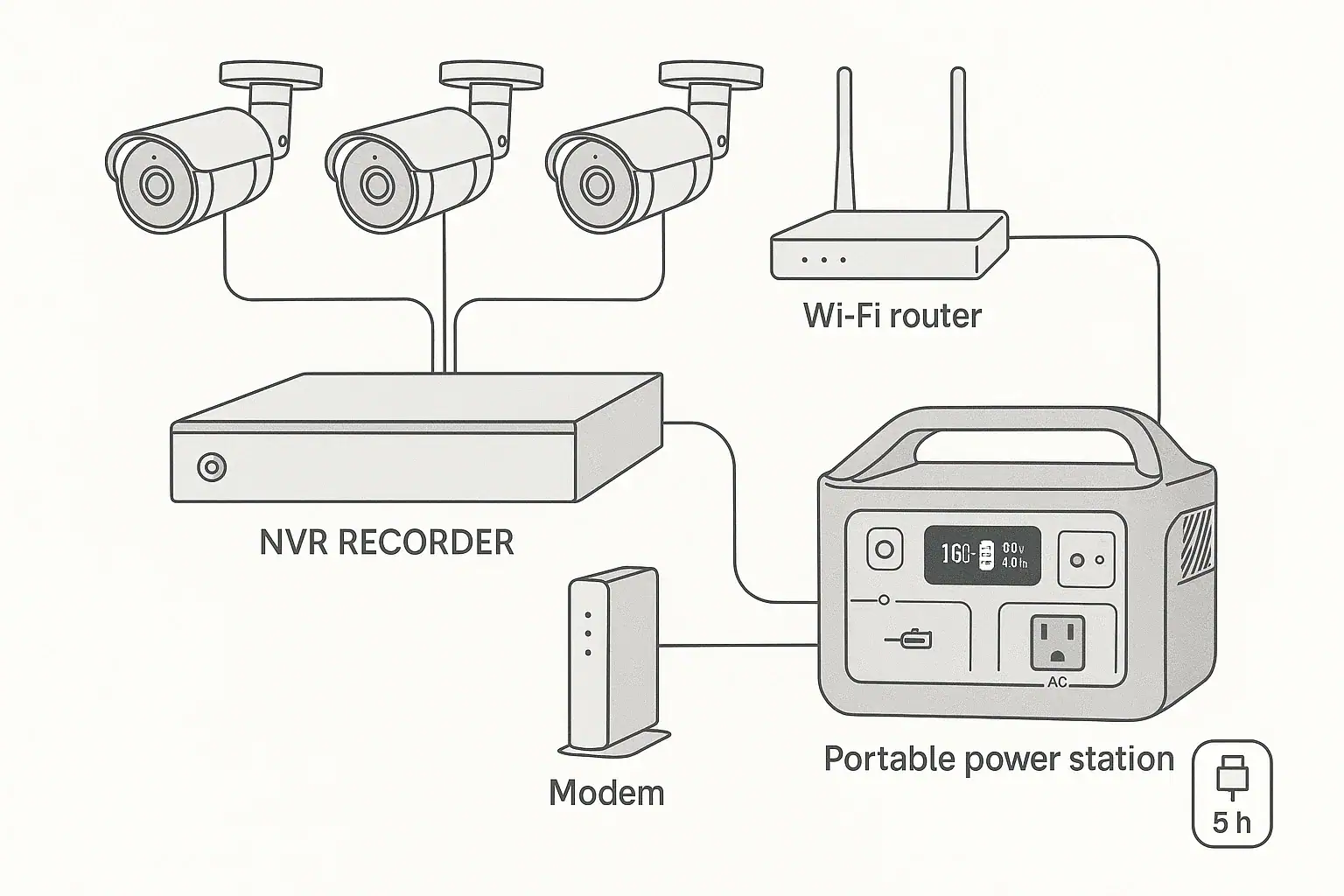
Backup power for a DVR/NVR security system is sized by adding the watts used by the recorder, cameras, PoE switch, modem, and router, then matching that load to a battery or portable power station runtime.
For most home security setups, the recorder and network gear matter as much as the cameras. A small DVR with a few analog cameras may use far less power than an NVR feeding multiple PoE cameras. Search terms like DVR battery backup, NVR runtime, PoE camera watts, router UPS, surge watts, and portable power station capacity all point to the same question: how long will the system keep recording during an outage?
The practical answer depends on total running watts, inverter efficiency, battery capacity, and whether the system must also keep internet access online for remote alerts. This guide explains how to estimate runtime, what causes unexpected shutdowns, and which specs matter when comparing backup power options.
What Backup Power Means for a DVR/NVR Security System
Backup power means the security system continues operating when wall power fails. For a DVR or NVR system, that usually includes three power groups: the recorder, the cameras, and the network equipment that lets you view video remotely.
A DVR typically records analog camera feeds and may power cameras separately through individual adapters or a central power supply. An NVR often connects to IP cameras, and many home NVR systems use PoE, or Power over Ethernet, so the same cable carries data and low-voltage power to each camera. That difference changes the backup calculation because an NVR with built-in PoE ports may be powering every camera at once.
Backup power matters because a security system is most valuable during disruptions. Power outages can coincide with severe weather, internet interruptions, nuisance alarms, or times when a building is unoccupied. If the recorder shuts down, it stops saving footage. If the router or modem shuts down, local recording may continue, but app access, push notifications, and cloud uploads may stop.
The goal is not only to keep the recorder screen on. A useful backup plan keeps the complete signal path working: cameras capture video, the recorder stores it, and the router or modem maintains connectivity if the internet service is still active. For some users, local recording is enough. For others, remote viewing and alerts are essential.
How Camera, Recorder, and Network Loads Add Up
Runtime starts with watts. A backup battery does not know whether it is powering cameras or a router; it only sees the total electrical load. To estimate that load, add the running watts of every device that must stay on.
The recorder is usually a steady load. A small DVR or NVR may draw about 10 to 25 watts, while a larger unit with multiple hard drives, built-in PoE, or higher processing demand may use more. Hard drives can briefly draw extra power when spinning up, but the running load is usually lower than the startup moment.
Cameras vary widely. Simple indoor cameras may use a few watts each. Outdoor infrared cameras may use more at night because IR LEDs turn on. Pan-tilt-zoom cameras can draw additional power when motors move. PoE cameras are often listed by maximum power class, but their typical draw may be lower than the maximum.
Network equipment is easy to overlook. A modem may use about 6 to 15 watts, and a router or mesh node may use about 8 to 25 watts. If a separate PoE switch powers cameras, it must be counted too. The switch has its own overhead plus the combined camera draw.
Battery capacity is commonly shown in watt-hours. A 500 watt-hour unit can theoretically run a 50-watt load for 10 hours, but real-world runtime is lower because inverters, power supplies, and electronics waste some energy as heat. A practical estimate often assumes 80% to 90% usable efficiency when using AC outlets, depending on the equipment and load level.
| System component | Typical running draw | Why it affects runtime |
|---|---|---|
| DVR or NVR recorder | 10 to 40 watts | Runs continuously and may include hard drive power |
| PoE camera | 4 to 12 watts each | Total increases with camera count and night vision |
| Analog camera power supply | 3 to 8 watts per camera load | May be separate from the recorder |
| PoE switch | 5 to 20 watts plus camera power | Has overhead in addition to powered ports |
| Modem and router | 15 to 40 watts combined | Needed for remote viewing and app alerts |
Runtime Examples for Common Security Setups
Runtime examples are best treated as estimates, not guarantees. The exact result depends on camera model, recording mode, hard drive activity, Wi-Fi traffic, ambient temperature, and backup power efficiency. Still, examples help show how quickly loads add up.
A small home DVR setup might include one recorder at 15 watts, four analog cameras averaging 5 watts each, and a router plus modem at 25 watts combined. The total is about 60 watts. On a 300 watt-hour backup source, assuming about 85% usable energy through AC output, the usable capacity is about 255 watt-hours. Dividing 255 by 60 gives about 4.25 hours of runtime.
A mid-size NVR system with PoE cameras may draw more. Suppose the NVR itself uses 25 watts and powers six PoE cameras averaging 7 watts each. Add a modem and router at 25 watts. The total is about 92 watts. A 500 watt-hour power station with similar efficiency may provide about 425 usable watt-hours, or roughly 4.6 hours.
A larger home system can exceed expectations. An NVR with eight cameras, night vision active, one or two hard drives, a PoE switch, modem, router, and a mesh node may reach 120 to 180 watts. At 150 watts, a 1,000 watt-hour unit with 850 usable watt-hours may provide roughly 5.5 to 6 hours. If only the recorder and cameras are backed up while internet equipment is left off, runtime may improve, but remote access may be lost.
For longer outages, the most effective strategy is reducing nonessential loads. A monitor connected to the recorder can use more power than several cameras. Extra network nodes, speakers, USB accessories, and decorative lighting should not be on the same backup circuit unless necessary. Keeping the security load lean improves runtime more than most people expect.
Common Mistakes and Troubleshooting Cues
The most common mistake is sizing backup power from camera count alone. Eight low-power cameras may draw less than four cameras with heaters, infrared lighting, PTZ motors, or high PoE demand. Always estimate watts, not just the number of devices.
Another mistake is backing up the recorder but not the power path for the cameras. If analog cameras use a separate 12-volt supply, that supply must stay powered. If IP cameras are connected through a PoE switch, the switch must stay powered. If the NVR has built-in PoE, plugging in the NVR may cover the cameras, but the combined demand will be higher.
If the system shuts off immediately when transferred to backup power, check for overload. The inverter may be rated for fewer watts than the recorder, cameras, and network gear require together. Startup demand can also matter. Hard drives, PoE negotiation, and power adapters may briefly draw more than their steady running level.
If runtime is much shorter than expected, the load may be higher at night. Outdoor cameras often activate infrared LEDs in darkness, increasing power draw for hours. Cold weather can also reduce usable battery capacity. Older batteries may have less capacity than the label suggests, especially if they have been stored fully discharged or exposed to heat.
If remote viewing fails during an outage while recording continues, the router, modem, or upstream internet service may be the issue. A local backup power source can keep your equipment on, but it cannot guarantee that the internet provider’s network remains active. For local evidence recording, the recorder and cameras are the priority. For alerts and remote monitoring, the network devices must be included too.
If video feeds drop intermittently, look at PoE power budget and cable runs. A PoE switch or NVR may have enough ports but not enough total PoE wattage for all cameras under peak conditions. Long cable runs, poor connectors, and voltage drop can make marginal power problems more noticeable during backup operation.
Safety Basics for Powering Security Equipment
Use backup power in a way that keeps equipment within its normal operating limits. DVRs, NVRs, routers, and camera power supplies are designed for specific input voltages and frequencies. If using AC outlets on a portable power station, make sure the inverter output supports the devices’ normal plug-in power requirements.
Do not open battery packs, bypass protection circuits, modify power supplies, or improvise wiring. Security equipment is often low voltage at the camera end, but it is commonly powered through AC adapters, PoE switches, or recorders connected to household outlets. Unsafe modifications can create shock, fire, or equipment damage risks.
Avoid overloading power strips or stacking multiple adapters in cramped spaces. Many recorder cabinets and network shelves already run warm. Backup batteries, adapters, PoE switches, and hard drives need ventilation. Heat shortens battery life and can make electronics unstable.
Keep backup power away from water, damp floors, and direct weather exposure unless the equipment is specifically designed for those conditions. Outdoor cameras may be weather-rated, but recorders, routers, and portable power stations usually belong indoors in dry, ventilated areas.
If you want a permanent whole-home backup arrangement, panel connection, transfer equipment, or generator integration, use a qualified electrician. This article focuses on plug-in security equipment and general sizing, not electrical panel wiring or transfer switch installation.
Maintenance and Storage for Reliable Outage Runtime
A security backup plan should be tested before an emergency. A simple test is to power the DVR or NVR, cameras, and router from the backup source and confirm that recording, live view, and remote access behave as expected. The test should be long enough to reveal overheating, overload warnings, or unexpected device restarts.
Label the plugs that must stay on during an outage. Security systems often have several similar-looking adapters. A label for recorder, PoE switch, modem, router, and camera power supply can prevent the wrong device from being unplugged when moving to backup power.
Store portable power stations and battery backups according to their general battery care requirements. In practical terms, avoid long-term storage at empty charge, avoid excessive heat, and recharge periodically. Battery capacity naturally declines over time, so a unit that once provided six hours may provide less after years of use.
Keep firmware and security settings current, but avoid starting updates during storm conditions or unstable power. A recorder or router update interrupted by power loss can cause operational problems. Schedule updates when normal power is stable and the system can be supervised.
Review runtime needs seasonally. Night hours are longer in winter, so infrared camera load may remain elevated for more of the outage. Cold garages, attics, or utility spaces can reduce battery performance. If the recorder is in a hot closet, improving ventilation may help both normal reliability and backup operation.
| Maintenance task | Suggested interval | Purpose |
|---|---|---|
| Test full security load on backup power | Every 3 to 6 months | Confirms recorder, cameras, and router stay online |
| Check estimated runtime | After adding cameras or network gear | Prevents undersizing after system expansion |
| Recharge stored battery backup | Periodically during storage | Helps prevent deep discharge and capacity loss |
| Inspect ventilation and cable clutter | Seasonally | Reduces heat buildup and accidental unplugging |
| Verify remote alerts during a test | Before storm season or travel | Confirms network gear is included in the backup plan |
Practical Takeaways and Specs to Compare
Related guides: Portable Power Station vs UPS: What Changes for Computers and Networking? • Running a Router and Modem During a Power Outage: How Many Hours Can You Get? • Backup Power for Security Cameras and Wi-Fi: Sizing a 24/7 Setup
The best backup power setup for a DVR or NVR security system starts with a load list. Identify every device that must remain on, find or estimate its running watts, and add the numbers. Then compare that load with the usable watt-hours of the backup source, not just the advertised capacity.
For many homes, the must-have items are the recorder, camera power path, modem, and router. If remote viewing is less important than local recording, the network gear may be optional, but most users expect alerts and app access. Include those devices in the calculation if they matter during an outage.
A realistic runtime estimate uses this basic idea: usable watt-hours divided by total watts equals approximate hours. If a setup draws 80 watts and the backup source provides about 680 usable watt-hours, expect around 8.5 hours. If the same system draws 140 watts at night, runtime drops to under 5 hours. That is why measuring or conservatively estimating load is more useful than guessing from camera count.
Specs to look for
- Battery capacity: Look for watt-hours that match the outage duration you want, such as 300 to 500 watt-hours for short outages or 1,000 watt-hours or more for longer runtime; capacity is the main fuel tank for the system.
- Continuous AC output: Look for an output rating comfortably above the combined load, such as a 200-watt load on a 300-watt or higher output; this helps prevent overload shutdowns.
- Surge watts: Look for surge capability above brief startup demand from hard drives, adapters, and PoE equipment; it helps the system start cleanly after transfer or reboot.
- UPS or pass-through behavior: Look for fast transfer or uninterrupted operation if the recorder must not reboot; some systems tolerate a short restart, but continuous recording may require smoother switchover.
- AC and DC outlet mix: Look for enough outlets for the recorder, PoE switch, modem, and router without unsafe adapter stacking; the right outlet layout reduces clutter and mistakes.
- Inverter efficiency at low loads: Look for good efficiency when powering 30 to 150 watts; security systems are modest loads, and poor low-load efficiency reduces real runtime.
- Recharge rate: Look for a recharge time that fits repeated outages, such as a few hours rather than most of a day; faster recharge helps if power returns briefly.
- Operating temperature range: Look for ratings suitable for the storage location, especially garages, closets, or utility rooms; temperature affects both safety and usable capacity.
- Display or load monitoring: Look for real-time watts and estimated runtime; visible load data makes troubleshooting and sizing much easier.
For an affiliate-ready comparison later, the most useful specifications are the ones that connect directly to runtime and reliability: watt-hours, continuous watts, surge allowance, transfer behavior, outlet layout, and temperature limits. A neutral comparison should also note whether the security system includes PoE cameras, a separate switch, and internet equipment, because those details often matter more than the recorder label.
The practical takeaway is simple: size backup power for the whole security chain, not just the recorder. Add the cameras, camera power supply or PoE switch, NVR or DVR, router, and modem. Leave headroom for night vision and startup demand. Then choose a backup source with enough usable capacity to cover the number of hours you actually need.
Frequently asked questions
How do I calculate backup power for a DVR/NVR security system?
Add the running watts of every device that must stay on, including the recorder, cameras, PoE switch or camera power supply, modem, and router. Then divide the backup source’s usable watt-hours by that total load to estimate runtime. Real-world runtime is usually lower than the label because of inverter and power-supply losses.
What features matter most when choosing backup power for a security system?
The most important specs are usable watt-hours, continuous output watts, surge capacity, and whether the unit can transfer power without rebooting the recorder. Outlet layout, recharge speed, and operating temperature range also matter because they affect reliability and ease of use. If remote access is important, include the modem and router in the load calculation.
What is the most common mistake people make with DVR or NVR backup power?
A common mistake is sizing the backup source by camera count instead of total watt draw. Another frequent error is powering the recorder but forgetting the camera power path, such as a PoE switch or separate 12-volt supply. Both issues can lead to much shorter runtime than expected or a system that shuts down completely.
Can I power a DVR, NVR, cameras, and router from one battery backup?
Yes, if the backup unit can handle the combined running load and has enough usable capacity for the runtime you want. Many home systems can share one backup source, but the total wattage must include every device that needs to stay online. If the load is too high, the system may need a larger unit or separate backup circuits.
Is it safe to run security equipment from a portable power station during an outage?
It is generally safe when the equipment is connected normally and the power station’s output matches the devices’ requirements. Avoid modifying wiring, overloading outlets, or placing the unit in wet or poorly ventilated areas. For permanent wiring changes or generator integration, a qualified electrician is the safer choice.
Why does my security system runtime drop at night?
Many outdoor cameras use infrared LEDs after dark, which increases power draw. That extra load can reduce runtime noticeably compared with daytime operation. Cold temperatures can also reduce battery performance, making the drop even more noticeable.
Recommended next:
- Portable Power Station for a Wi-Fi Mesh System: How Long Can It Keep Internet Online?
- Can a Portable Power Station Run a Washing Machine? Motor Surge and Runtime Limits
- Portable Power Station for a Garage Workshop: Tools, Chargers, and Safe Setup
- What Size Portable Power Station for an Electric Recliner or Lift Chair?
- Portable Power Station for Baby Monitor, Sound Machine, and Nursery Essentials
- Powering a Heated Mattress Pad or Electric Throw: Runtime and Safety Notes
- More in →
Related guides
Browse this topic →

- Beginner-friendly sizing, runtime & specs
- Solar & charging (MPPT, fast charging, cables)
- Batteries (LiFePO4, cycles, care & storage)
- Safety, cold-weather performance, real-world tips
More in Home / Appliances
See all →- Portable Power Station for an Oxygen Concentrator: Runtime Planning and Safety Questions
- Portable Power Station for Medical Refrigeration: Mini Fridge Runtime and Backup Plan
- Can a Portable Power Station Run a Space Heater? Why Heat Loads Drain Batteries Fast
- Portable Power Station for Coffee Makers and Electric Kettles: Why Small Units Struggle
- Can a Portable Power Station Run an Induction Cooktop? Wattage and Safety Limits
Keep reading
About this site
Portable Energy Lab publishes practical, independent guides about portable power—clear sizing, safe use, and real-world expectations.
Affiliate disclosure
Some links on this site may be affiliate links. If you buy through these links, we may earn a small commission at no extra cost to you. This helps support our content. Learn more.