
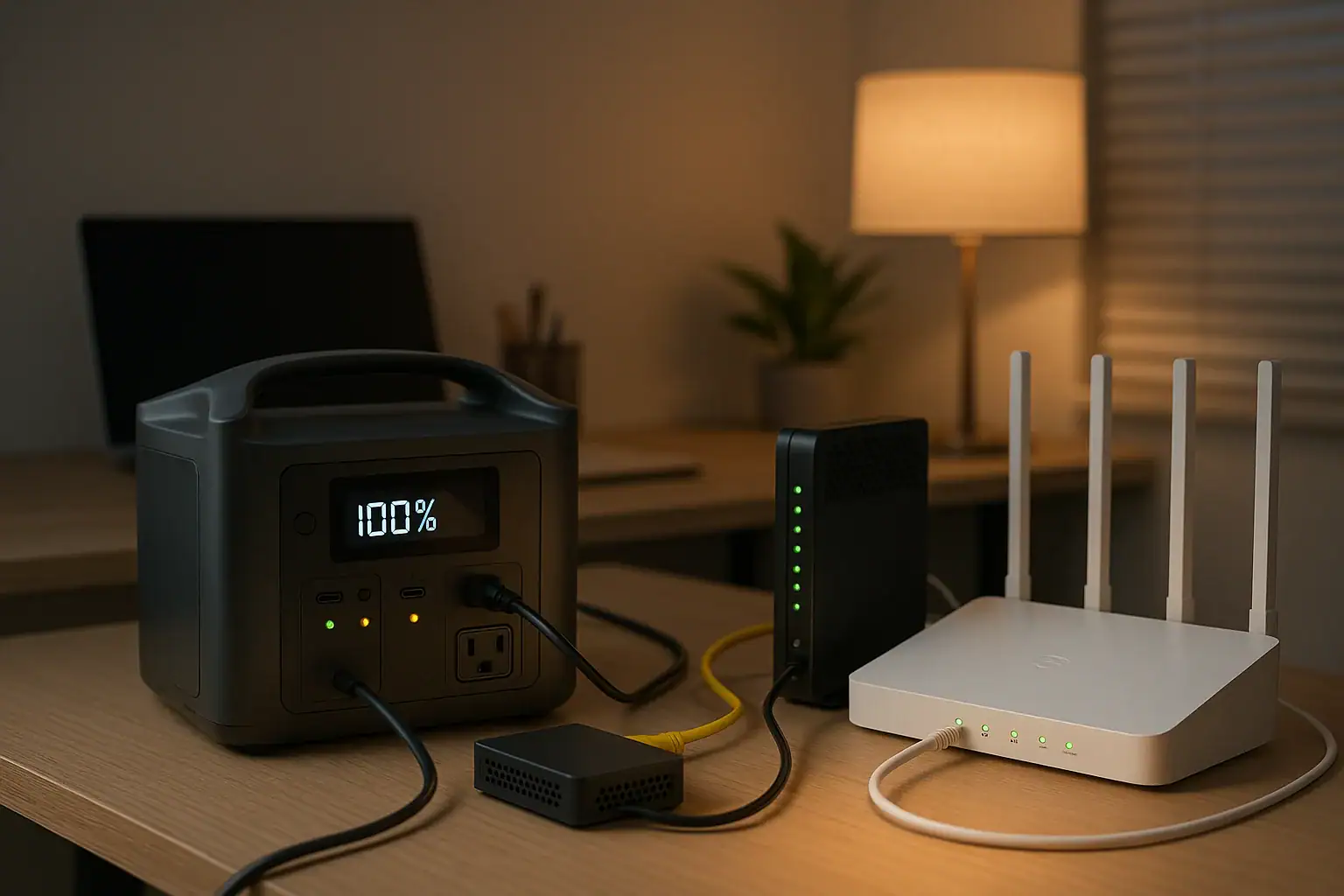
A portable power station can usually keep a fiber ONT, modem, and router online for hours, as long as its output supports the devices and its battery capacity matches the total watt load.
For most homes, the critical questions are not surge watts or heavy appliance capacity. They are runtime, AC output quality, DC voltage options, pass-through charging behavior, input limit, and whether the router or ONT needs a specific adapter or PD profile. Fiber internet equipment is typically low power, but it can still shut down instantly if the backup source has the wrong port, turns off under a light load, or cannot switch fast enough during an outage.
This guide explains how to estimate power needs, what features matter, and how to avoid common mistakes when using a portable power station as backup power for home fiber internet equipment.
What a Portable Power Station Does for Fiber Internet
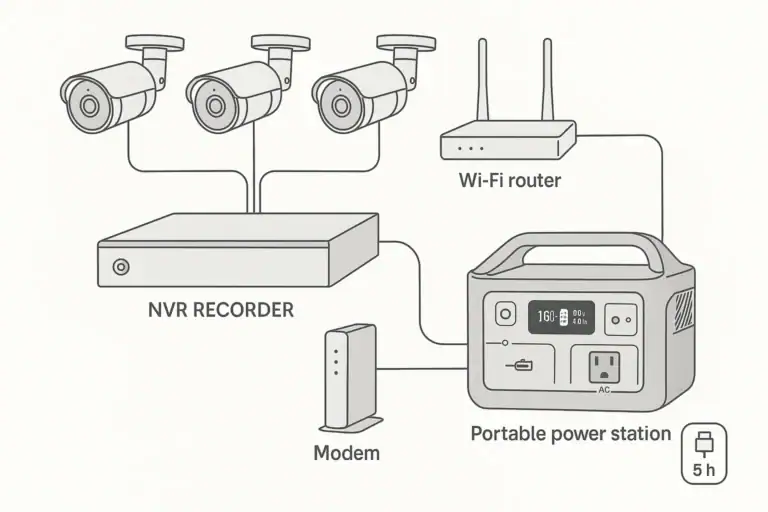
A portable power station is a rechargeable battery system with built-in outputs such as AC outlets, USB ports, and sometimes DC barrel ports. For fiber internet, it acts as a temporary power source for the equipment that normally plugs into wall outlets: the optical network terminal, commonly called the ONT, plus a Wi-Fi router and sometimes a separate modem or voice adapter.
The ONT is the device that converts the fiber signal entering the home into an Ethernet connection for the router. In many fiber installations, the ONT replaces the traditional cable or DSL modem. However, many people still use the word modem for the equipment that connects the home network to the internet service. The important point is simple: if the ONT loses power, the home internet connection usually goes down even if the router is still running.
A portable power station matters because fiber lines can remain active during a local power outage while the equipment inside the home turns off. If the internet provider network and local fiber infrastructure are still operating, keeping the ONT and router powered may allow Wi-Fi, Ethernet, messaging, work calls, security cameras, and smart home hubs to continue working.
This type of backup is different from powering a refrigerator, heater, or whole home circuit. Network gear typically uses modest continuous power, often in the range of 5 to 25 watts per device. That makes it a good match for smaller power stations, provided the unit can remain on reliably at low loads and has enough usable watt-hours for the desired outage length.
How Power Reaches the ONT, Modem, and Router
Most fiber internet setups use several small power adapters. The ONT may use a wall adapter with an output such as 12 volts DC, the router may use 12 volts DC or USB-C, and a mesh node, switch, or voice adapter may require its own supply. A portable power station can support this gear in two main ways: by using its AC outlet with the original adapters, or by using compatible DC or USB-C outputs directly.
Using the AC outlet is usually the simplest method. You plug the original power bricks into the power station, and the devices operate as they do from a wall outlet. The downside is conversion loss. The power station converts battery DC power into AC power, and each adapter converts AC back to low-voltage DC. That double conversion reduces runtime.
Using DC or USB-C can be more efficient, but it requires careful matching. The voltage, connector size, polarity, and current capacity must match the device requirements. USB-C Power Delivery can also depend on the correct PD profile, such as 9 volts, 12 volts, 15 volts, or 20 volts. If the device does not negotiate the expected profile, it may not start or may shut down under load.
Runtime is estimated from usable battery capacity divided by the total watts consumed. A simple estimate is: usable watt-hours divided by device watts equals hours of operation. Because of inverter losses, idle consumption, temperature, and battery reserve, real runtime is usually lower than the number printed on the battery label.
For example, a network setup drawing 30 watts from an AC outlet may use more than 30 watts from the battery because the inverter also consumes power. A power station with 300 watt-hours of rated capacity may provide roughly 7 to 9 hours for that load, depending on efficiency and conditions.
| Device | Typical power draw | What to check |
|---|---|---|
| Fiber ONT | 6 to 15 watts | Nameplate voltage, adapter output, backup battery port if present |
| Wi-Fi router | 8 to 20 watts | Adapter voltage, amperage, USB-C PD needs if applicable |
| Separate modem or gateway | 8 to 18 watts | Whether it is actually needed with the ONT |
| Mesh node or Ethernet switch | 4 to 15 watts | Whether it is essential during an outage |
Real-World Runtime Examples for Home Internet Gear
Runtime depends on the total load, not the number of devices alone. A small router and compact ONT may draw less than 20 watts together, while a larger Wi-Fi 6 or Wi-Fi 7 router, mesh system, voice adapter, and Ethernet switch can draw 50 watts or more.
Consider a basic fiber setup with an ONT drawing 9 watts and a router drawing 12 watts. The total load is about 21 watts before conversion losses. A smaller power station rated around 250 watt-hours might keep that setup online for roughly 8 to 10 hours through AC outlets, and possibly longer if efficient DC outputs are used correctly.
A more demanding setup might include an ONT at 12 watts, a router at 18 watts, a mesh node at 10 watts, and a small switch at 6 watts. That is about 46 watts before losses. A 500 watt-hour power station might provide roughly 8 to 10 hours through AC power, while a 1,000 watt-hour unit could potentially support the same load through a long day or overnight outage.
Another example is a work-from-home setup where only the ONT and main router are connected to backup power, while optional mesh nodes, speakers, printers, desktop monitors, and nonessential smart devices are left off. Reducing the backup load from 50 watts to 25 watts can nearly double runtime, which is often more useful than buying excess surge capacity.
Do not assume that a power station with a very high watt output automatically gives longer internet backup. Output watts describe how much power it can deliver at one time. Battery capacity, measured in watt-hours, is the main specification for runtime. A high-output battery with modest capacity may run a router for a similar time as a lower-output unit with the same usable capacity.
Common Mistakes and Troubleshooting Cues
The most common mistake is backing up the router but not the ONT. If Wi-Fi appears to be working but there is no internet connection, the ONT, gateway, or upstream provider equipment may be without power. Check which device receives the fiber line and make sure it is included in the backup plan.
Another mistake is overlooking low-load behavior. Some portable power stations automatically shut off outputs when they detect a very small draw. Networking equipment can be low enough to trigger this behavior, especially if only one device is connected. If the router turns off after a set period even though the battery is not empty, low-load auto shutoff may be the cause.
Pass-through charging is also often misunderstood. Some units allow devices to remain plugged in while the power station is charging from the wall, but not all of them function like a true uninterruptible power supply. During an outage, there may be a brief transfer delay. Some routers tolerate this, while others reboot. If uninterrupted service is required for calls, alarms, or remote access, check for an EPS or UPS-style function and the stated transfer time.
Using mismatched DC cables can cause failures that look like weak battery performance. A device requiring 12 volts should not be powered from a random barrel connector just because it fits. Wrong voltage, reversed polarity, or insufficient amperage can damage equipment or cause repeated restarts. When in doubt, use the original AC adapter with the power station outlet.
If internet remains down even though all home equipment is powered, the outage may be outside the home. Fiber distribution equipment, neighborhood cabinets, or provider systems may also need power. A portable power station can keep your side of the connection online, but it cannot guarantee that the service provider network is functioning during a widespread outage.
Safety Basics for Backing Up Networking Equipment
Use a portable power station only within its rated output and environmental limits. Fiber internet equipment is low draw, but the safest setup still depends on dry placement, stable cables, ventilation, and the correct adapters. Keep the power station on a hard, flat surface where vents are not blocked and cords are not pinched or stretched across walkways.
Do not connect a portable power station into a home electrical panel, wall outlet, transfer switch, or interlock unless the installation is specifically designed for that purpose and handled by a qualified electrician. For keeping an ONT and router online, direct plug-in backup is normally simpler and safer than any whole-home wiring approach.
Avoid opening power adapters, modifying battery packs, bypassing protections, or building improvised DC connectors. Network devices may look simple, but incorrect voltage or polarity can permanently damage them. If a direct DC setup is desired, use properly rated, purpose-made cables that match the device requirements.
Be cautious with extension cords and power strips. A short, properly rated cord may be reasonable for low-power equipment, but damaged cords, daisy-chained strips, and overloaded adapters create unnecessary risk. Keep power bricks spaced so they do not trap heat, and avoid covering them with fabric or placing them in enclosed cabinets during backup operation.
Battery temperature matters. Charging or discharging in extreme heat or cold can reduce performance and may trigger protection shutdowns. If the power station has warning messages, unusual smells, swelling, visible damage, or repeated faults, stop using it and follow the manufacturer safety guidance.
Maintenance and Storage for Reliable Internet Backup
A portable power station is most useful when it is ready before the outage starts. Check the charge level periodically, especially before storm seasons, wildfire seasons, winter weather, or planned utility work. Many households choose a routine test every few months by powering the ONT and router from the unit for a short period and verifying that internet stays connected.
Store the unit in a cool, dry indoor location. Long-term storage at very high or very low charge can shorten battery life for many lithium battery types. A mid-to-high storage level is often practical for emergency readiness, while still avoiding unnecessary heat and constant deep discharge. If the unit supports scheduled top-ups or storage guidance, follow that guidance.
Labeling cables can save time during an outage. Mark which adapter belongs to the ONT, router, gateway, switch, or mesh node. If several black power bricks look similar, labels reduce the chance of powering the wrong device or unplugging the ONT by mistake.
Keep the backup setup simple. The more devices connected, the faster the battery drains and the more points of failure appear. A good outage configuration may include only the ONT, primary router, one essential mesh node if needed, and a phone charger. Nonessential loads such as printers, decorative lighting, speakers, and large displays should stay off the backup unless capacity is abundant.
| Maintenance task | Suggested interval | Reason |
|---|---|---|
| Check battery charge | Monthly or before severe weather | Ensures enough stored energy for an unexpected outage |
| Test ONT and router runtime | Every 3 to 6 months | Confirms the setup works under real load |
| Inspect adapters and cords | Every few months | Finds heat damage, loose plugs, or worn cables |
| Review connected devices | Before outage season | Keeps runtime focused on essential internet equipment |
Practical Takeaways and Specs to Look For
The best portable power station for a modem, ONT, and router is not necessarily the largest one. It is the one that can run a low, steady network load reliably for the number of hours you need, using outputs that match your equipment safely.
Related guides: Portable Power Station vs UPS: What Changes for Computers and Networking? • Portable Power Station Watt-Hours Explained • AC vs DC Power: How to Maximize Efficiency and Runtime • USB-C Power Delivery (PD) Explained for Portable Power Stations
Start by adding the wattage of the ONT, router, and any must-have network accessories. Then estimate runtime using watt-hours, allowing for losses. If the power station will stay plugged into the wall every day, pay close attention to pass-through behavior, transfer time, heat, and battery care. If it will be stored for emergencies, prioritize simple operation, clear charge indicators, and enough capacity for realistic outage lengths.
Specs to look for
- Battery capacity: Look for roughly 250 to 500 watt-hours for basic overnight internet backup, or 500 to 1,000 watt-hours for longer outages; capacity is the main driver of runtime.
- Continuous AC output: A modest rating such as 100 to 300 watts is usually enough for network gear; it matters because the ONT and router need stable power more than high surge watts.
- Low-load operation: Look for a mode or setting that prevents automatic shutoff at light loads; this matters because routers and ONTs may draw only 15 to 40 watts combined.
- Pure sine wave AC output: Look for clean AC output for sensitive adapters; it helps reduce compatibility issues with power bricks and networking equipment.
- Pass-through or EPS behavior: Look for support for powering devices while charging, with a transfer time short enough for your needs; this matters if you want the setup to ride through sudden outages.
- DC and USB-C options: Look for 12-volt DC or USB-C PD outputs that match your devices, such as 12 volts or common PD profiles; direct DC can improve efficiency when used correctly.
- Output port count and spacing: Look for enough AC outlets or ports for the ONT, router, and essential accessories; bulky power adapters can block adjacent outlets.
- Recharge input power: Look for a recharge rate that fits your outage pattern, such as fully recharging in a few hours instead of all day; this matters during repeated utility interruptions.
- Display and watt meter: Look for real-time watts and estimated runtime; these readings help you identify which devices are draining the battery fastest.
For most households, the practical goal is to keep the fiber ONT and main router powered first, then add only the accessories that are truly necessary. A carefully sized portable power station can turn a power outage from a total connectivity loss into a manageable situation with Wi-Fi, messaging, and remote work still available.
Frequently asked questions
How long can a portable power station run a modem, ONT, and router?
Runtime depends on the combined watt draw of the devices and the usable watt-hours of the power station. A small fiber setup can often run for several hours, while a larger load may shorten that time significantly. Real-world runtime is usually lower than the label rating because of inverter losses and other overhead.
What features matter most when choosing a portable power station for internet backup?
The most important features are usable battery capacity, stable AC output, low-load compatibility, and the right DC or USB-C options for your equipment. If you want the setup to stay online during brief outages, transfer time and pass-through or EPS behavior also matter. For efficiency, direct DC output can be useful when it matches the device requirements.
What is the most common mistake people make with fiber internet backup power?
The most common mistake is powering the router but forgetting the ONT, which still leaves the internet connection down. Another frequent issue is using a power station that shuts off at low loads, causing the network gear to turn off even when the battery is not empty. Checking both the load and the device compatibility helps avoid these problems.
Is it safe to run networking equipment from a portable power station?
Yes, if the power station is used within its rated limits and the correct adapters are used. Keep the unit dry, ventilated, and on a stable surface, and avoid improvised wiring or connecting it to home electrical panels unless the system is designed for that purpose. Using the original adapters is usually the safest approach.
Should I use AC outlets or DC outputs for the ONT and router?
AC outlets are usually the easiest option because you can use the original power adapters. DC or USB-C can be more efficient, but only if the voltage, connector, polarity, and power profile match the device exactly. If you are unsure, AC is the simpler and safer choice.
How do I know what size portable power station I need for my home internet gear?
Add the wattage of the ONT, router, and any essential accessories, then choose a battery capacity that can support that load for the number of hours you want. For many homes, a few hundred watt-hours is enough for short outages, while longer outages may require more capacity. Testing the setup before an emergency is the best way to confirm the estimate.
Recommended next:
- Portable Power Station for a Wi-Fi Mesh System: How Long Can It Keep Internet Online?
- Can a Portable Power Station Run a Washing Machine? Motor Surge and Runtime Limits
- Portable Power Station for a Garage Workshop: Tools, Chargers, and Safe Setup
- What Size Portable Power Station for an Electric Recliner or Lift Chair?
- Portable Power Station for Baby Monitor, Sound Machine, and Nursery Essentials
- Powering a Heated Mattress Pad or Electric Throw: Runtime and Safety Notes
- More in →
Related guides
Browse this topic →
- Beginner-friendly sizing, runtime & specs
- Solar & charging (MPPT, fast charging, cables)
- Batteries (LiFePO4, cycles, care & storage)
- Safety, cold-weather performance, real-world tips
More in Home / Appliances
See all →- Portable Power Station for an Oxygen Concentrator: Runtime Planning and Safety Questions
- Portable Power Station for Medical Refrigeration: Mini Fridge Runtime and Backup Plan
- Can a Portable Power Station Run a Space Heater? Why Heat Loads Drain Batteries Fast
- Portable Power Station for Coffee Makers and Electric Kettles: Why Small Units Struggle
- Can a Portable Power Station Run an Induction Cooktop? Wattage and Safety Limits
Keep reading
About this site
Portable Energy Lab publishes practical, independent guides about portable power—clear sizing, safe use, and real-world expectations.
Affiliate disclosure
Some links on this site may be affiliate links. If you buy through these links, we may earn a small commission at no extra cost to you. This helps support our content. Learn more.