
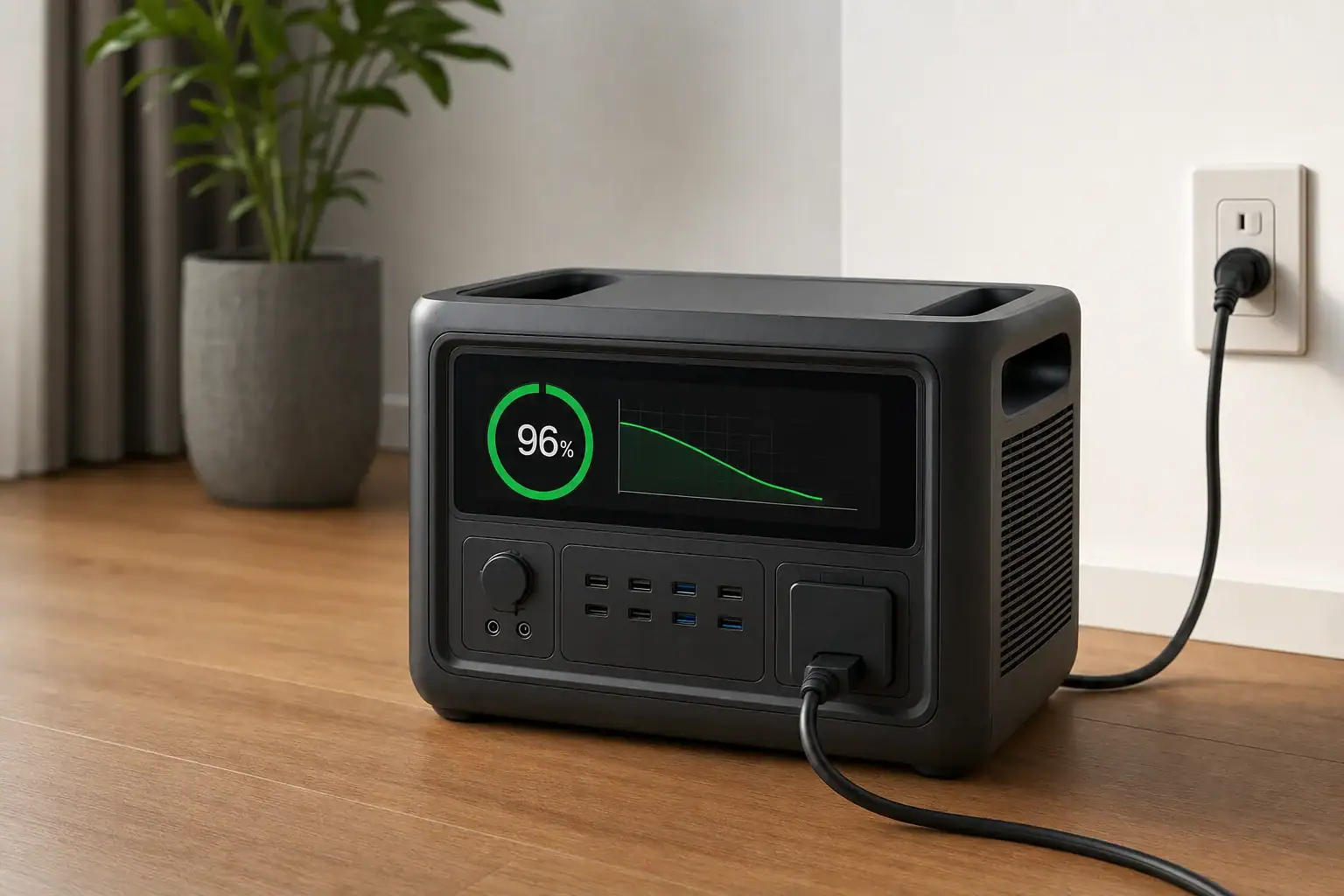
Your portable power station charges slower near 100% because its battery management system deliberately reduces charging current as the cells approach their maximum voltage. This process, called taper charging, helps prevent overcharging, limits heat, balances the battery cells, and reduces long-term wear.
The change may appear as a falling input wattage, a longer estimated charging time, or a battery percentage that seems stuck in the high 90s. It can happen with AC charging, solar input, a car outlet, or USB-C charging. Charger wattage, input limit, battery temperature, state of charge, cell balancing, and the selected USB-C PD profile can all influence how noticeable the slowdown becomes.
In most cases, tapering is normal rather than a fault. However, unusually slow charging at every battery level, repeated interruptions, error messages, or excessive heat may point to a charger, cable, temperature, or battery condition that needs attention.
What taper charging means and why it matters
Taper charging is the controlled reduction of electrical current near the end of a charging cycle. A portable power station may accept close to its rated input during the early and middle portions of the cycle, then progressively reduce power as the battery approaches full charge.
Battery percentage is an estimate based on cell voltage, current flow, temperature, and the battery management system’s calculations. It is not a perfectly linear measurement. Charging from 20% to 40% may therefore take less time than charging from 80% to 100%, even though both intervals represent 20 percentage points on the display.
Tapering matters because rechargeable cells must stay within a controlled voltage range. Forcing maximum charging current into nearly full cells would create more heat and place greater stress on the battery. The battery management system, often shortened to BMS, monitors the pack and adjusts or stops charging when necessary.
The final part of the cycle may also include cell balancing. A power station contains multiple cells arranged into groups. Small differences can develop among those groups over time. Near full charge, the BMS may allow higher-voltage groups to settle while lower-voltage groups catch up. This can make the last few percentage points appear especially slow.
How the charging curve changes as the battery fills
Many lithium-based battery systems use a charging pattern commonly described as constant current followed by constant voltage. The exact control strategy varies by battery chemistry and power station design, but the overall behavior is similar.
Higher current during the main charging stage
When the battery is at a low or moderate state of charge and within a suitable temperature range, the charging system can generally accept more current. Input wattage may stay relatively stable during this stage, although it can still be limited by the AC adapter, solar conditions, vehicle socket, USB-C charger, cable, or the station’s maximum input rating.
Reduced current near the voltage ceiling
As cell voltage approaches the target ceiling, the charger shifts toward voltage control. Current then falls gradually because the pack can no longer accept maximum power safely. The display might show 500 watts at 60%, 250 watts at 90%, and less than 100 watts near 99%. Those numbers are illustrative rather than universal.
Balancing and charge termination
At the end of the cycle, the BMS may perform balancing checks and wait for current to decline below a set threshold. It may then report 100%, stop input, or occasionally resume a small amount of charging after the battery settles. A display that alternates between 99% and 100% is not automatically evidence of a defect.
| Battery level | Possible input behavior | What is happening |
|---|---|---|
| 0% to 10% | Power may start low, then increase | The BMS checks temperature and cell condition before allowing higher current |
| 10% to 70% | Input may remain near the available charging limit | The battery can usually accept higher current efficiently |
| 70% to 90% | Input may begin declining | Cell voltage is approaching the upper operating range |
| 90% to 99% | Input often tapers substantially | Voltage control, heat management, and balancing become more important |
| 99% to 100% | Low or intermittent input may appear | The BMS completes final checks and determines when charging is finished |
Real-world examples of slower charging near full
Fast AC charging
Consider a power station with a 1,000-watt AC input rating. At a moderate battery level, it might draw 900 to 1,000 watts from the wall. Above 85%, input could fall to 500 watts, then decline below 150 watts near full. The station is not necessarily losing access to wall power; it is requesting less power to protect the battery.
Solar charging in changing conditions
With solar input, tapering can overlap with normal changes in sunlight. A station receiving 400 watts at midday may accept less as it approaches full, even while the panels could produce more. Clouds, panel temperature, shading, orientation, connector losses, and the solar input voltage range can also lower wattage. Comparing the display with the battery’s state of charge helps distinguish tapering from weak solar production.
USB-C charging
A USB-C port rated for 100 watts does not guarantee a constant 100-watt charge. The charger, cable, device port, and negotiated PD profile must all support the required voltage and current. Even with a correct setup, the power station may request less power near 100%. A cable without the necessary current capability can cause lower input throughout the entire cycle, not only at the end.
Charging while powering appliances
If the station is running a 200-watt appliance while receiving 300 watts, only the net difference is available to increase the battery’s charge. Near full, the BMS may reduce battery charging further while the connected load continues operating. The screen may show substantial input but little movement in battery percentage because some energy is passing directly to the load.
Common mistakes and troubleshooting cues
A normal taper should mainly occur at a high state of charge. If charging is slow from nearly empty through full, investigate the power source and operating conditions before assuming the battery is defective.
- Judging speed only by the time estimate: Estimated completion times can fluctuate as input power, load, and temperature change. Watch actual input wattage and battery percentage over a reasonable period.
- Expecting the rated maximum at all times: An advertised input figure is usually a peak or upper limit, not a promise of constant power throughout the cycle.
- Ignoring connected loads: Appliances, lights, DC outputs, wireless charging pads, and inverter standby consumption can reduce net charging power.
- Using an undersized USB-C charger or cable: A mismatched PD profile or lower-current cable may cap charging well below the port’s potential.
- Overlooking solar input limits: Panel voltage or current outside the accepted operating range can reduce charging or prevent it entirely. High panel wattage alone does not establish compatibility.
- Charging in extreme temperatures: The BMS may reduce or pause charging when the cells are too cold or too hot, regardless of available charger power.
- Repeatedly restarting the charger: Disconnecting power every time input falls near full can interrupt balancing and make the final stage take longer.
For a basic check, disconnect unnecessary loads, use the specified charging equipment, place the unit in a moderate-temperature location with clear ventilation, and observe whether input is stronger at a lower battery level. Consult the operating documentation if a warning icon or error code appears. Seek service if the unit never accepts meaningful input, shuts down repeatedly, smells unusual, becomes abnormally hot, or shows visible damage.
Safety basics during charging
Charge the power station on a stable, dry, nonflammable surface with the ventilation openings unobstructed. Keep it away from direct sunlight, heaters, enclosed vehicles, standing water, and materials that could trap heat. Use compatible chargers, cables, and connectors that are in good condition.
A warm enclosure or power adapter can be normal during high-rate charging, but intense heat, swelling, smoke, crackling, a burning odor, or melted connectors are not normal. Stop using the equipment if these signs occur, move away from it if doing so is safe, and follow the manufacturer’s emergency guidance. Do not open the enclosure, modify the battery pack, bypass protective circuits, or attempt internal repairs.
When charging from a vehicle, verify that the outlet can support the required current and avoid draining the starter battery. For any connection involving household circuits or permanent electrical equipment, use a qualified electrician. A portable power station should not be connected to home wiring through improvised cords or unapproved methods.
Maintenance and storage practices that support consistent charging
Battery age, temperature history, and storage habits can affect charging behavior. As cells age, internal resistance may increase, causing more heat at a given current. The BMS may respond by tapering earlier or limiting peak charging power. Some loss of capacity and charging performance is expected over many cycles.
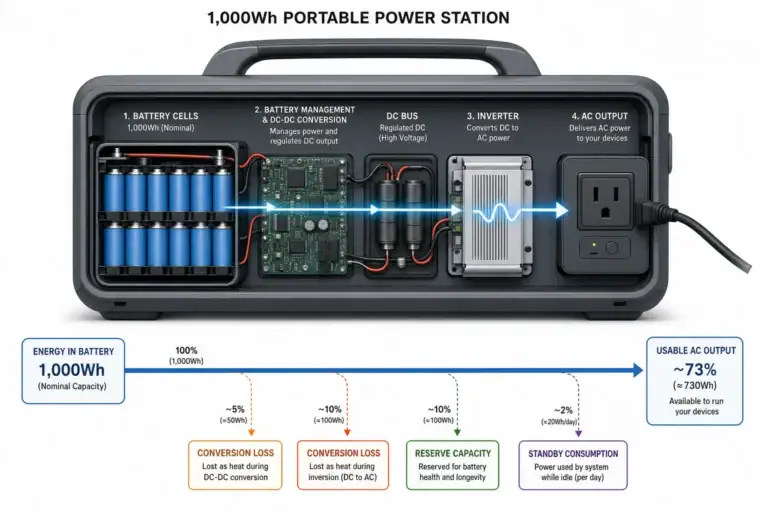
For routine use, avoid storing the station for long periods while completely empty or continuously held at 100%, unless its documentation specifically calls for a different practice. A moderate charge level is generally preferable for extended storage. Check the battery periodically because the display, BMS, and other internal electronics can consume a small amount of energy while the unit is idle.
Store the station in a dry, temperature-controlled location. Before charging a unit that has been in a very cold or hot environment, allow it to return to an appropriate operating temperature. Keep ports clean and dry, inspect cables for looseness or damage, and install official firmware updates when they address charging calculations or battery management.
An occasional uninterrupted charge may help the state-of-charge display recalibrate or allow balancing to complete, but repeatedly deep-discharging the battery solely for calibration can add unnecessary cycle wear. Follow the unit’s documentation rather than applying a universal schedule.
| Condition | Possible charging effect | Practical response |
|---|---|---|
| Moderate indoor temperature | Higher input is more likely during the main charging stage | Maintain airflow and keep vents clear |
| Very cold battery | Charging may be reduced or paused | Let the unit warm naturally before charging |
| Hot enclosure or battery | Input may taper early to control temperature | Remove loads and relocate the unit to a cooler ventilated area |
| Long storage at very low charge | The battery may enter a protective state or take time to begin charging | Check stored charge periodically |
| Aged battery with higher resistance | More heat and earlier tapering may occur | Monitor performance and seek service for major changes |
Related guides: How Long Does It Take to Charge a Portable Power Station? • Fast Charging Explained: What “AC Input” and “DC Input” Speeds Mean • Temperature Limits Explained: Safe Charging/Discharging Ranges and What Happens Outside Them • Can You Charge a Power Station While Using It?
Practical takeaways and specs to compare
Slower charging near 100% is usually a designed protection behavior. The strongest charging rate is commonly available during the middle of the charging cycle, while the final portion takes longer because current tapers as cell voltage rises. Temperature control and cell balancing can extend that final stage further.
To judge whether behavior is normal, compare input power at several states of charge, remove unnecessary loads, and account for the limits of the charger, cable, solar array, or vehicle outlet. Focus on a consistent pattern rather than a single wattage reading. A sharp performance decline across the entire charging cycle, persistent errors, or abnormal heat deserves further investigation.
Specs to look for
- Maximum AC input: Look for a clearly stated value such as 500 to 1,500 watts; it indicates the highest potential wall-charging rate before tapering and other limits.
- Full-charge time and test conditions: Look for times tied to a specific input method, such as about 1.5 to 3 hours; this makes charging claims easier to compare.
- Adjustable charging rate: Look for multiple settings, such as 200, 500, or 1,000 watts; slower modes can reduce fan noise, heat, and demand on a shared circuit.
- USB-C PD input rating: Look for both wattage and supported profiles, such as 100 or 140 watts with compatible voltage levels; negotiation determines the actual charging rate.
- Solar input range: Look for the accepted voltage, current, and wattage ranges, such as 12 to 60 volts and up to 500 watts; all three affect panel compatibility.
- Battery chemistry: Compare cycle-life estimates and operating characteristics for the stated lithium chemistry; chemistry influences longevity, weight, and charging strategy.
- Operating temperature range: Look for separate charging and discharging ranges, often narrower for charging; the BMS may limit input outside comfortable cell temperatures.
- Battery management protections: Look for monitoring of overvoltage, overcurrent, short circuit, and temperature; these controls are central to safe tapering and charge termination.
- Charge-limit controls: Look for selectable targets such as 80%, 90%, or 100%; a lower daily limit may reduce time spent at a high state of charge.
These specifications cannot eliminate taper charging, nor should they. They help show how quickly a station can charge under favorable conditions, how flexible its input options are, and how effectively it manages the battery near full capacity.
Frequently asked questions
Is it normal for a portable power station to charge slowly from 90% to 100%?
Yes. Most portable power stations reduce charging current as the battery approaches full voltage, so the final 10% commonly takes longer than earlier portions of the charge cycle. This controlled slowdown helps manage heat, prevent overcharging, and allow cell balancing.
Why does the input wattage drop when my power station is almost full?
The battery management system requests less power once the cells approach their target voltage. A falling wattage reading near full charge is usually expected, provided charging is otherwise stable and there are no warning messages or abnormal temperatures.
What specifications matter most for faster portable power station charging?
Compare the maximum AC input, supported solar voltage and current range, USB-C PD input profiles, and the stated full-charge time under defined test conditions. Adjustable charge-rate settings, battery chemistry, operating temperature limits, and charge-limit controls can also affect real-world charging behavior.
Can unplugging and reconnecting the charger make a power station charge faster?
Usually not. Repeatedly restarting charging near full can interrupt normal balancing or charge-termination checks and may make the final stage take longer. It is generally better to let the unit complete an uninterrupted cycle unless the documentation or an error message directs otherwise.
Why is my power station charging slowly even when the battery is not near full?
Slow charging at low or moderate battery levels can result from an undersized charger, cable limitations, weak solar conditions, connected loads, input limits, or battery temperatures outside the supported charging range. Check the input source, disconnect unnecessary loads, and confirm that the equipment matches the unit’s specifications.
Is it safe to leave a portable power station charging overnight?
It can be safe when the unit, charger, and outlet are compatible and in good condition, and when charging takes place on a dry, stable surface with clear ventilation. Avoid charging in hot enclosed spaces or near flammable materials, and stop using the equipment if you notice swelling, smoke, unusual odors, excessive heat, or damaged connectors.
Recommended next:
- USB-C Power Delivery (PD) Explained for Portable Power Stations
- Charging From a Car: What’s Safe, What’s Slow, and What Can Break
- Input Limits (Volts/Amps/Watts) Explained: How Not to Damage Your Unit
- MPPT vs PWM in Portable Power Stations: What It Changes in Real Life
- Can You Use a Higher-Watt Charger Than Rated? Understanding Input Headroom
- Why Charging Slows Down Near 80–100%: A Simple Explanation
- More in Charging →
Related guides
Browse this topic →
- Beginner-friendly sizing, runtime & specs
- Solar & charging (MPPT, fast charging, cables)
- Batteries (LiFePO4, cycles, care & storage)
- Safety, cold-weather performance, real-world tips
More in Charging
See all →- Car Alternator Charging vs Cigarette Lighter Charging: What Changes for Power Stations?
- Charging a Portable Power Station From an RV Outlet: 12V, 24V, and Safety Limits
- Fast AC Charging vs Battery Longevity: Should You Use Turbo Mode Every Time?
- Solid-State Batteries and Portable Power Stations: What Could Change?
- Can You Charge a Portable Power Station From an EV Charger? What Is Realistic?
Keep reading
About this site
Portable Energy Lab publishes practical, independent guides about portable power—clear sizing, safe use, and real-world expectations.
Affiliate disclosure
Some links on this site may be affiliate links. If you buy through these links, we may earn a small commission at no extra cost to you. This helps support our content. Learn more.