
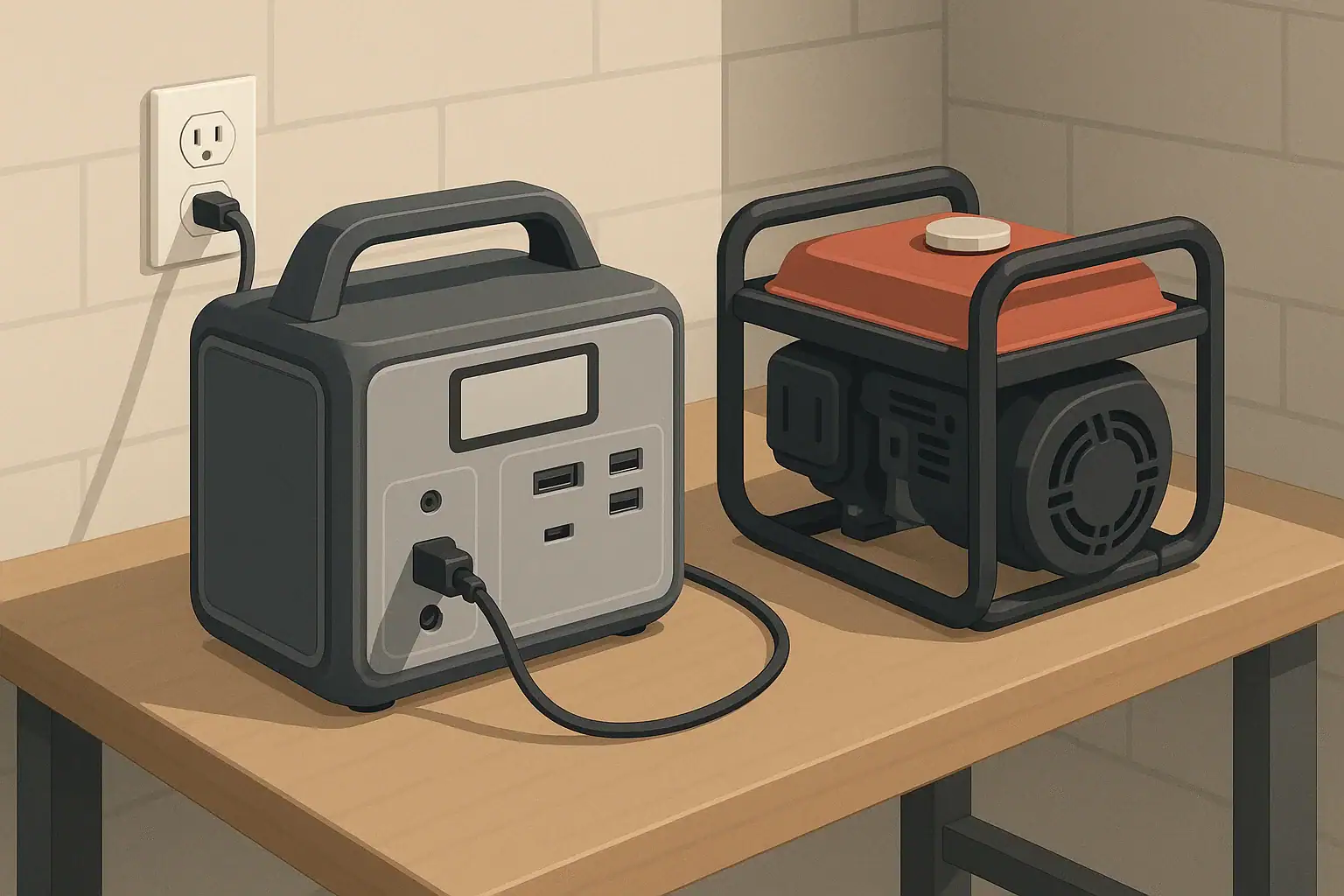
When a portable power station will not charge from a generator, it usually means the power station’s internal protections are rejecting the generator’s output. Instead of accepting power like it does from a wall outlet, the unit may show an error, rapidly start and stop charging, or simply do nothing. This can be confusing because from the outside, both the generator and the wall outlet look like the same kind of plug.
Many modern power stations closely monitor input voltage, frequency, waveform quality, and grounding. They are designed for relatively “clean” power, similar to grid electricity. Some small or older generators, especially those without inverter-style output, can have fluctuating voltage, frequency that is not close to 60 Hz, or unstable waveforms. These differences can make the power station refuse to charge to protect its electronics and battery.
Understanding why this happens matters if you plan to combine a generator and a power station for backup power, camping, RV use, or remote work. If they are not compatible, you might waste fuel, time, and money while still not having reliable charging. Knowing the role of frequency, grounding, and proper sizing helps you choose equipment that works together and avoid unsafe workarounds.
Instead of forcing compatibility, it is better to understand what your power station expects to see on its AC input and how your generator actually behaves under real loads. That knowledge will guide you toward safe troubleshooting steps and realistic expectations about charging speed and total runtime.
What the topic means (plain-English definition + why it matters)
When a portable power station will not charge from a generator, it usually means the power station’s internal protections are rejecting the generator’s output. Instead of accepting power like it does from a wall outlet, the unit may show an error, rapidly start and stop charging, or simply do nothing. This can be confusing because from the outside, both the generator and the wall outlet look like the same kind of plug.
Many modern power stations closely monitor input voltage, frequency, waveform quality, and grounding. They are designed for relatively “clean” power, similar to grid electricity. Some small or older generators, especially those without inverter-style output, can have fluctuating voltage, frequency that is not close to 60 Hz, or unstable waveforms. These differences can make the power station refuse to charge to protect its electronics and battery.
Understanding why this happens matters if you plan to combine a generator and a power station for backup power, camping, RV use, or remote work. If they are not compatible, you might waste fuel, time, and money while still not having reliable charging. Knowing the role of frequency, grounding, and proper sizing helps you choose equipment that works together and avoid unsafe workarounds.
Instead of forcing compatibility, it is better to understand what your power station expects to see on its AC input and how your generator actually behaves under real loads. That knowledge will guide you toward safe troubleshooting steps and realistic expectations about charging speed and total runtime.
Key concepts & sizing logic (watts vs Wh, surge vs running, efficiency losses)
To understand charging from a generator, you first need to separate power (watts) from energy (watt-hours). Generator and power station input ratings are usually given in watts (W), which describe the rate of energy flow. The capacity of the power station’s battery is given in watt-hours (Wh), which describes how much energy it can store. A 1,000 Wh power station drawing 500 W from a generator would take roughly two hours to charge in a perfect world.
Real charging is less efficient. Converting AC from the generator to DC for the battery wastes some energy as heat, and the power station may throttle charging at different stages to protect the battery. It is common for 10–20% of the generator’s output to be lost in conversion and overhead. If a power station advertises a maximum AC charging rate, it might only reach that rate with clean, stable power and under certain battery conditions.
Generators and power stations also have surge (or peak) and running ratings. A generator might be labeled with a higher “starting watts” number and a lower “running watts” number. Similarly, a power station inverter has a peak and continuous output rating. While charging, the power station adds a new load to the generator. If other devices are already plugged in, the combined load might exceed the generator’s stable running capability, causing voltage dips and frequency swings that the power station sees as unsafe.
Frequency and grounding complete the picture. Most power stations sold for the U.S. expect about 120 V at 60 Hz with a reasonably pure sine wave and a properly referenced ground. Some generators drift away from 60 Hz under light or changing loads, or have a floating neutral and unique grounding behavior. The power station’s protective circuits may treat these conditions as faults. Matching wattage is only the first step; reliable charging also depends on electrical quality.
| What to check | Why it matters | Example guidance (not a limit) |
|---|---|---|
| Generator running watts vs. charger draw | Prevents overload and voltage sag while charging | Aim for generator running watts at least 1.5× expected charge watts |
| Other loads on the generator | Shared loads can push generator past stable capacity | Try testing with only the power station connected first |
| AC voltage stability | Large swings can trigger input protection in the power station | Keep total load well below generator maximum to reduce dips |
| Frequency behavior | Deviation from 60 Hz may cause the power station to reject input | Use generator eco/idle modes cautiously if they affect frequency |
| Waveform type | Distorted waveforms can confuse chargers and power supplies | Inverter-based generators often produce cleaner sine waves |
| Grounding and bonding setup | Incorrect or unclear grounding may trigger safety checks | Consult generator manual and a qualified electrician if unsure |
| Extension cord quality and length | Thin or very long cords can cause extra voltage drop | Use heavy-gauge outdoor cords sized for the load |
Real-world examples (general illustrative numbers; no brand specs)
Consider a mid-sized portable power station with a battery capacity in the 800–1,200 Wh range. If it can accept around 500–700 W of AC charging, pairing it with a small generator rated for about 2,000 running watts leaves room for other modest loads while keeping the generator comfortably below its limit. Under those conditions, and assuming 15–20% losses, a mostly empty battery might go from low to full in roughly 2–3 hours of continuous charging.
Now imagine the same power station connected to a much smaller generator rated around 900 running watts, while a refrigerator and lights are also drawing power. When the fridge compressor kicks on, the total demand might briefly exceed the generator’s surge capacity. Voltage may sag and frequency can dip below 60 Hz. The power station may respond by reducing its charge rate or stopping entirely until conditions stabilize.
Another scenario involves waveform quality. A non-inverter generator under light load can produce a distorted sine wave. Some power stations are relatively tolerant, while others are very strict and will not engage charging if the waveform is too noisy. A user might see the charging indicator flash on and off every few seconds as the internal charger repeatedly tests, then rejects, the incoming AC.
Grounding can also create puzzling behavior. In certain setups, the generator’s neutral might float with respect to ground unless it is bonded through a transfer device or other approved method. Some power stations monitor the relationship between hot, neutral, and ground for safety. If the expected reference is missing or unusual, the device may display a fault or refuse to pull significant current even though a simple lamp plugged into the same generator works fine.
Common mistakes & troubleshooting cues (why things shut off, why charging slows, etc.)
One common mistake is assuming that if a generator’s total watt rating is higher than the power station’s charger rating, everything will work flawlessly. In practice, voltage and frequency stability under changing loads are just as important. If other devices cycle on and off while the power station is charging, each transition can upset the generator and briefly create out-of-spec power that the charger rejects.
Another frequent issue is running the generator in an economy or idle-down mode while attempting to charge. Some generators adjust engine speed according to load, which can temporarily change frequency or voltage. Sensitive chargers may not like this, especially when the power station ramps its input up and down as it manages its own battery. Turning off eco modes can sometimes improve stability, as long as fuel use and noise are acceptable.
Undersized or very long extension cords also cause problems. Thin cords add resistance, which leads to voltage drop under load. When the power station tries to draw near its maximum charging rate, the extra drop may pull the generator’s output below the charger’s acceptable range. The result can be slower charge rates or cycling between charging and idle, even though the generator itself is technically capable.
Watch for cues from both devices. If the generator sounds like it is straining, surging, or repeatedly changing pitch, it may be near or beyond its comfortable operating range. If the power station’s display or indicators show fluctuating input watts, periodic error messages, or repeatedly starting and stopping charging, that usually means it is actively protecting itself from inconsistent input rather than failing outright.
Safety basics (placement, ventilation, cords, heat, GFCI basics at a high level)
Any time you pair a generator with a power station, safety should come first. Generators that burn fuel must always be operated outdoors in a well-ventilated area, far away from doors, windows, and vents, to prevent carbon monoxide from entering living spaces. The power station itself should remain dry and protected from direct rain or standing water, with intake and exhaust vents clear so internal components can stay within safe temperature limits.
Use heavy-duty, outdoor-rated extension cords sized appropriately for the load. Cords that are too small for the current can overheat, especially when coiled or run under rugs and doors. Periodically check connectors and cord jackets for warmth or damage during operation. Keep cords visible and routed where they will not be pinched, abraded, or tripped over.
Ground-fault circuit interrupter (GFCI) outlets and adapters are widely used for shock protection in damp or outdoor environments. Some generators include GFCI-protected receptacles by default. When you plug a power station into a GFCI outlet, nuisance tripping can occur if there are grounding or leakage issues. If this happens repeatedly, do not bypass the GFCI; instead, investigate the setup and consult a qualified electrician if needed.
Avoid improvising grounding or neutral-bonding solutions. Do not drive random ground rods or alter plugs in an attempt to “force” compatibility. Modifying cords, using adapters in unintended ways, or defeating safety features can create shock and fire hazards. If you need a permanently integrated backup setup between a generator, power station, and home circuits, high-level planning is appropriate, but the actual wiring and equipment selection should be handled by a licensed electrician.
Maintenance & storage (SOC, self-discharge, temperature ranges, routine checks)
Regular maintenance of both the generator and power station improves the chances that they will work together when you need them. Generators require oil changes, fuel stabilizer or fuel cycling, and periodic test runs. A generator that surges, stalls, or has clogged filters is more likely to produce unstable voltage and frequency, which will frustrate sensitive chargers. Running the generator with a modest test load every few months helps keep it in known working condition.
Portable power stations need less mechanical maintenance but still benefit from routine checks. Lithium-based batteries generally prefer being stored partially charged rather than full or empty for long periods. Many manufacturers recommend keeping state of charge somewhere around the middle range for storage and topping up every few months to counter self-discharge. Extreme heat or cold during storage can accelerate aging and reduce capacity over time.
When storing for seasonal use, keep the power station in a dry, cool environment away from direct sunlight and heat sources. Avoid leaving it in a vehicle on very hot or very cold days. Check ports, vents, and cords for dust, debris, and physical damage. A brief function test with a small appliance before storm season or a planned trip can reveal issues early, when they are easier to address.
Documenting your typical runtimes, charge times, and generator behavior in a notebook or digital file can be surprisingly helpful. If you know from past measurements that your setup normally delivers a certain charge rate, any significant change later on could indicate developing problems with the generator, cords, or the power station itself. Early detection allows for safer and less stressful troubleshooting.
| Item | What to do | Example interval or condition |
|---|---|---|
| Power station state of charge | Store partly charged and avoid long-term 0% or 100% | Check and adjust every 3–6 months |
| Generator exercise run | Start and run under moderate load to verify operation | About 30–60 minutes every 1–3 months |
| Fuel condition | Use stabilizer or rotate fuel to keep it fresh | Replace stored fuel roughly yearly as an example |
| Cord and plug inspection | Look for cuts, kinks, heat damage, or corrosion | Before each extended use or at least seasonally |
| Vent and fan openings | Gently clear dust and debris from grills | Check during regular cleaning or before trips |
| Temperature exposure | Avoid storage in very hot or very cold spaces | Move equipment if forecasts are extreme |
| Performance notes | Record charge times and generator behavior | Update whenever you notice a change |
Example values for illustration.
Practical takeaways (non-salesy checklist bullets, no pitch)
A power station refusing to charge from a generator is usually the result of protective design, not a defect. The device is sensing something about the input power that falls outside its comfort zone, such as unstable voltage, drifting frequency, poor waveform quality, or an unexpected grounding situation. Treat those behaviors as clues rather than obstacles to be bypassed.
Planning and testing ahead of time reduces surprises. Size your generator with enough running capacity above the maximum expected charging load, keep cords short and appropriately thick, and avoid stacking too many cycling appliances on the same generator while charging. Regular maintenance on both generator and power station makes it more likely they will behave predictably when used together.
Use the following checklist as a concise reference when diagnosing charging issues between a generator and a power station:
- Confirm the generator’s running watt rating comfortably exceeds the power station’s maximum AC charge rate plus any other loads.
- Test charging with the power station as the only load on the generator to rule out interference from other devices.
- Turn off generator eco or idle-down modes temporarily if they cause noticeable pitch changes during charging.
- Use a short, heavy-gauge, outdoor-rated extension cord, and avoid coiling it tightly during high loads.
- Operate the generator outdoors with proper ventilation, and keep the power station dry and within its recommended temperature range.
- Do not modify plugs, cords, or grounding to “force” charging; consult the manuals and, when in doubt, a qualified electrician.
- Maintain both devices regularly and keep simple notes on typical charge times and behavior so you can spot changes early.
With a basic grasp of watts, watt-hours, surge behavior, and electrical quality, you can pair a generator and power station more effectively and safely, turning them into a coordinated backup or off-grid power solution rather than a source of frustration.
Frequently asked questions
Why does my power station refuse to charge when plugged into a generator?
Modern power stations monitor input voltage, frequency, waveform quality, and grounding, and will refuse to charge if any of those parameters fall outside safe limits. Generators with fluctuating voltage, drifting frequency, noisy waveforms, or unusual grounding can trigger built-in protections that stop or cycle charging.
How can I tell whether the generator or the power station is the problem?
Start by testing the power station as the only load on the generator using a short, heavy-gauge cord; if charging stabilizes, other loads or cords were likely the issue. You can also use a voltmeter or wattmeter to observe voltage and frequency under load—consistent large dips, frequency drift, or audible engine surging point to the generator as the likely cause.
Will switching to an inverter-style generator make charging more reliable?
Inverter generators usually produce a cleaner sine wave and tighter frequency control, which makes them more compatible with sensitive chargers, but they are not a guaranteed fix. Proper generator sizing, correct grounding, and stable load management remain important even with an inverter generator.
Is it safe to bypass GFCI or re-bond the neutral to force charging?
No. Bypassing safety devices, altering grounding, or modifying plugs and cords to force charging creates shock and fire hazards and can violate code. If grounding or GFCI tripping is suspected, consult the generator and power station manuals and a qualified electrician.
Can extension cord length or gauge stop charging, and how do I avoid that?
Yes—undersized or very long cords add resistance and cause voltage drop under load, which can pull generator output below a charger’s acceptable range and cause cycling or stoppage. Use short, heavy-gauge outdoor-rated cords sized for the expected current and avoid coiling cords tightly while operating.
Recommended next:
- USB-C Power Delivery (PD) Explained for Portable Power Stations
- Charging From a Car: What’s Safe, What’s Slow, and What Can Break
- Input Limits (Volts/Amps/Watts) Explained: How Not to Damage Your Unit
- MPPT vs PWM in Portable Power Stations: What It Changes in Real Life
- Can You Use a Higher-Watt Charger Than Rated? Understanding Input Headroom
- Why Charging Slows Down Near 80–100%: A Simple Explanation
- More in Charging →
Related guides
Browse this topic →
- Beginner-friendly sizing, runtime & specs
- Solar & charging (MPPT, fast charging, cables)
- Batteries (LiFePO4, cycles, care & storage)
- Safety, cold-weather performance, real-world tips
More in Charging
See all →- Can You Charge a Portable Power Station From USB-C PD? Limits, Adapters, and Gotchas
- USB-C PD 3.1 (240W) on Portable Power Stations: What It Changes and Who Needs It
- AC Charging Heat & Fan Noise: Why It Happens and How to Reduce It Safely
- Car Charging Explained: 12V Socket vs DC-DC Charger vs Alternator (Speed + Safety)
- Fast Charging vs Battery Life: C-Rate Explained for Portable Power Stations (No Hype)
Keep reading
About this site
Portable Energy Lab publishes practical, independent guides about portable power—clear sizing, safe use, and real-world expectations.
Affiliate disclosure
Some links on this site may be affiliate links. If you buy through these links, we may earn a small commission at no extra cost to you. This helps support our content. Learn more.