How to Calculate Watt-Hours From Amp-Hours (and Avoid Costly Mistakes)

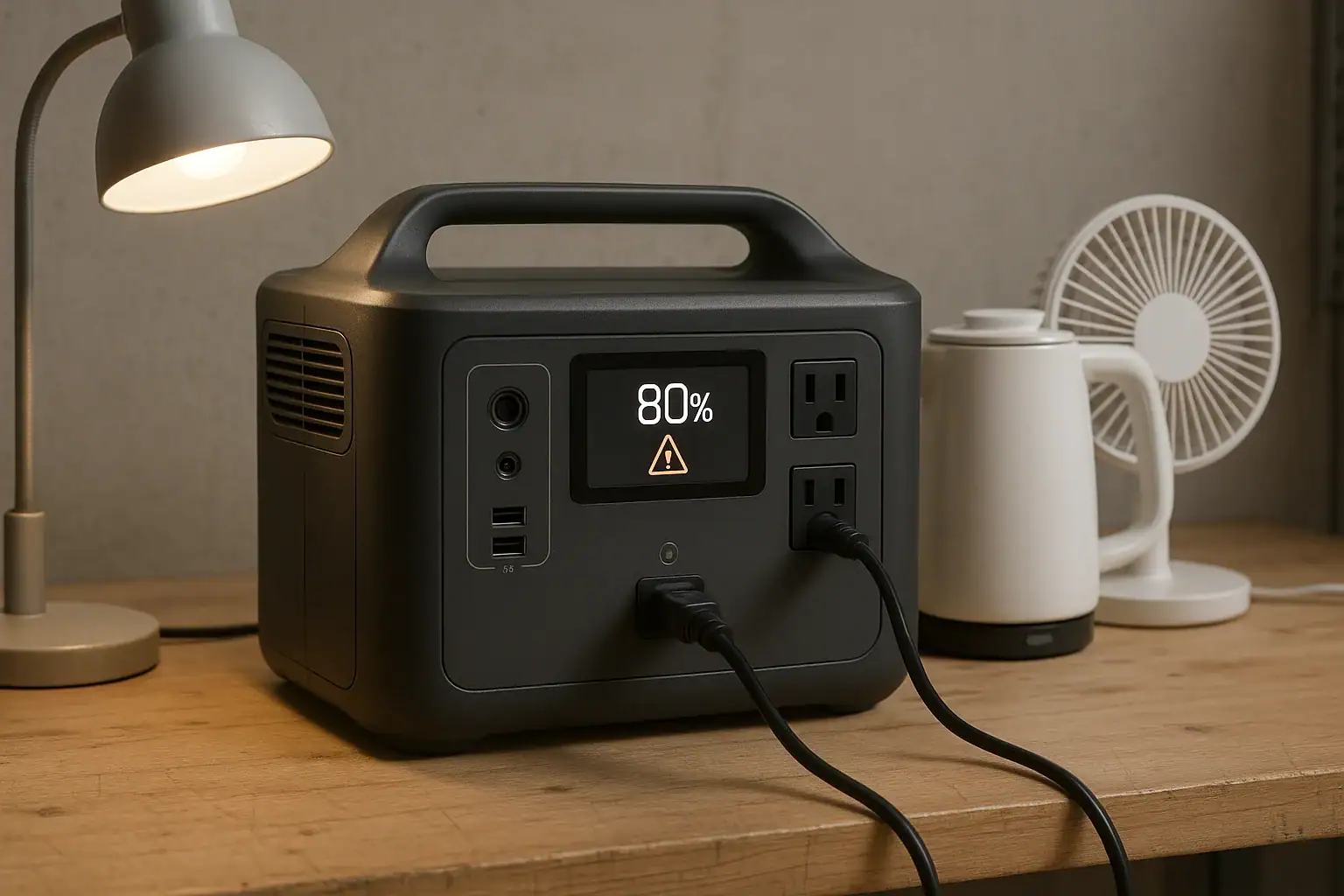
Isometric portable power station with abstract energy blocks

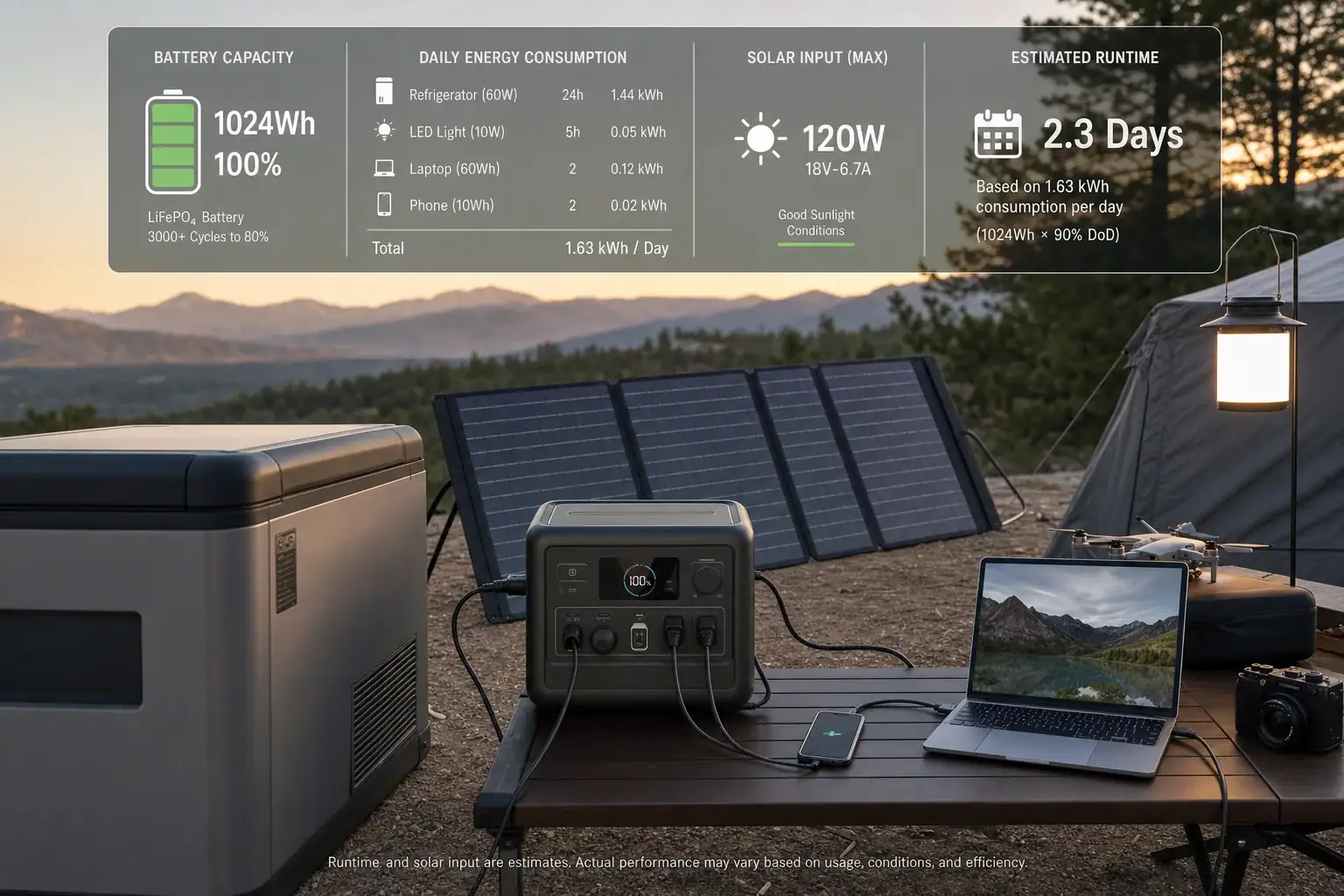
To calculate watt-hours from amp-hours, multiply the amp-hours (Ah) by the battery voltage (V): Wh = Ah × V. That single step converts battery capacity into energy, which is what actually determines how long you can run your devices.

This conversion is essential whenever you compare portable power stations, size a battery for camping or backup, or estimate how long a device will run. Amp-hours alone do not tell the full story because they ignore voltage. Watt-hours include both current and voltage, so they reflect usable energy more directly.

In this guide, you will see how to convert Ah to Wh, how to handle milliamp-hours (mAh), and how to apply these numbers to real-world runtimes. You will also learn where people commonly go wrong, how safety margins change the math, and which specs to pay attention to when you read a battery or power station label.

What watt-hours and amp-hours really mean (and why it matters)

Amp-hours and watt-hours both describe battery capacity, but they focus on different parts of the same picture.

Amp-hours (Ah) measure how much current a battery can deliver over time. One amp-hour means a battery can ideally deliver one amp for one hour, or two amps for half an hour, and so on. Amp-hours are often used on 12 V batteries and individual cells.

Watt-hours (Wh) measure total energy. One watt-hour is one watt of power used for one hour. Because watts already include voltage (W = V × A), watt-hours naturally factor in both current and voltage. That makes Wh the more useful unit for comparing different batteries or estimating runtime.

For example, a 12 V 100 Ah battery and a 24 V 50 Ah battery both store 1200 Wh of energy (12 × 100 and 24 × 50). Their amp-hour ratings are different, but their energy is the same. Without converting to watt-hours, it is easy to think the 100 Ah battery is “bigger,” even though it is not.

When you size a portable power station, plan for off-grid trips, or design a small backup system, working in watt-hours helps you match battery capacity to your devices’ power draw in watts. That is why most power station labels and spec sheets highlight Wh as the primary capacity number.

Key concepts: how to convert amp-hours to watt-hours

The core relationship between amp-hours and watt-hours is straightforward:

Watt-hours (Wh) = Amp-hours (Ah) × Voltage (V)

To use this formula correctly, you need three basic pieces of information: the capacity in Ah, the voltage in V, and consistent units.

Step 1: Get the capacity in amp-hours

Battery labels often show either Ah or mAh:

  • Amp-hours (Ah): Common on larger batteries (for example, 12 V 100 Ah).
  • Milliamp-hours (mAh): Common on small devices (for example, 3500 mAh phone battery).

If your battery is rated in mAh, convert to Ah first:

Ah = mAh ÷ 1000

Example: 3500 mAh ÷ 1000 = 3.5 Ah.

Step 2: Use the correct battery voltage

Next, identify the battery or pack voltage. Use the pack or system voltage, not the voltage of a single cell unless the Ah rating refers to that single cell. Common nominal voltages include 3.6–3.7 V for a single lithium-ion cell, about 12 V for small lead-acid batteries, and higher voltages (such as 24 V or 48 V) for multi-battery systems.

For quick estimates and comparisons, use the nominal voltage printed on the label. For more accurate calculations, especially with measurement equipment, you can use the average voltage under load over the discharge period.

Step 3: Apply the formula

Once you have Ah and V in consistent units, multiply:

Wh = Ah × V

If you need to go the other way, you can rearrange the formula:

  • Ah = Wh ÷ V
  • mAh = (Wh ÷ V) × 1000

Quick reference comparison table

The table below shows how different combinations of amp-hours and voltage translate into watt-hours.

Battery rating Voltage (V) Capacity (Ah) Energy (Wh) Typical use case
Small device cell 3.7 3.0 11.1 Phone, small gadget
Compact pack 12 10 120 Small LED lighting setup
Medium 12 V battery 12 50 600 Light loads, short backup
Larger 12 V battery 12 100 1200 General-purpose off-grid use
Higher-voltage pack 24 50 1200 Same energy as 12 V 100 Ah, different voltage
Typical battery ratings converted from amp-hours to watt-hours. Example values for illustration.

This comparison shows why watt-hours are the best way to compare packs with different voltages. Two very different Ah ratings can represent the same total energy once voltage is included.

Real-world examples: from amp-hours to watt-hours and runtime

Once you know how to calculate Wh from Ah, you can turn that into expected runtime for your devices. That is often the main reason people convert between these units.

Example 1: 12 V lead-acid battery

Suppose you have a 12 V battery rated at 100 Ah.

  • Step 1: Wh = 100 Ah × 12 V = 1200 Wh (theoretical total energy).
  • Step 2: If you only use 50% of the capacity to protect a traditional lead-acid battery, usable Wh ≈ 1200 × 0.5 = 600 Wh.

If you run a 60 W DC-compatible light directly from this battery:

  • Runtime ≈ 600 Wh ÷ 60 W = 10 hours.

If you instead power a 60 W AC lamp through an inverter that is 90% efficient:

  • AC-usable Wh ≈ 600 Wh × 0.9 = 540 Wh.
  • Runtime ≈ 540 Wh ÷ 60 W = 9 hours.

Example 2: Lithium-ion pack with mAh rating

Consider a lithium-ion pack labeled 14.8 V, 5000 mAh.

  • Convert mAh to Ah: 5000 mAh ÷ 1000 = 5 Ah.
  • Wh = 5 Ah × 14.8 V = 74 Wh.

If you use this pack to run a 15 W device:

  • Ideal runtime ≈ 74 Wh ÷ 15 W ≈ 4.9 hours.
  • Allowing 10% system losses, realistic runtime ≈ 74 × 0.9 ÷ 15 ≈ 4.4 hours.

Example 3: Phone battery in mAh

Take a phone battery rated 3500 mAh at 3.7 V.

  • Ah = 3500 ÷ 1000 = 3.5 Ah.
  • Wh = 3.5 Ah × 3.7 V = 12.95 Wh (about 13 Wh).

If your phone draws an average of 2.5 W while in use:

  • Ideal active use time ≈ 13 Wh ÷ 2.5 W ≈ 5.2 hours.
  • Background tasks, screen brightness, and temperature will reduce this in practice.

Example 4: Series vs parallel battery wiring

Imagine two 12 V 100 Ah batteries. You can connect them in series or parallel.

  • Series: Voltage adds, Ah stays the same.
    System: 24 V, 100 Ah → Wh = 24 × 100 = 2400 Wh.
  • Parallel: Ah adds, voltage stays the same.
    System: 12 V, 200 Ah → Wh = 12 × 200 = 2400 Wh.

Both configurations store the same total energy (2400 Wh), but they operate at different voltages. That affects current, cabling, and inverter choice, but not the overall Wh available.

Example-focused summary table

The next table brings these examples together so you can quickly see how Ah, V, and Wh relate and how that influences runtime.

Battery description Voltage (V) Capacity (Ah) Energy (Wh) Example device load Approx. runtime (ideal)
12 V 100 Ah (50% usable) 12 100 600 usable 60 W DC light 600 ÷ 60 ≈ 10 h
12 V 100 Ah via 90% inverter 12 100 540 AC-usable 60 W AC lamp 540 ÷ 60 ≈ 9 h
14.8 V 5 Ah pack 14.8 5 74 15 W device 74 ÷ 15 ≈ 4.9 h
3.7 V 3.5 Ah phone cell 3.7 3.5 13 2.5 W average draw 13 ÷ 2.5 ≈ 5.2 h
Two 12 V 100 Ah in series 24 100 2400 120 W DC load 2400 ÷ 120 ≈ 20 h
Example conversions from amp-hours to watt-hours and their effect on runtime. Example values for illustration.

Common mistakes when converting Ah to Wh (and how to fix them)

The math for converting amp-hours to watt-hours is simple, but several recurring mistakes can lead to unrealistic runtime expectations or undersized systems. Use the cues below to troubleshoot your calculations.

1. Forgetting to include voltage

Symptom: You compare batteries only by Ah and assume a higher Ah rating always means more energy.

Fix: Always multiply by the correct pack voltage. A 24 V 50 Ah battery has the same energy as a 12 V 100 Ah battery (both 1200 Wh). If your comparison does not include voltage, it is incomplete.

2. Mixing up mAh and Ah

Symptom: Your calculated Wh is off by a factor of 1000, or a small gadget battery appears to have more energy than a large deep-cycle battery.

Fix: Convert mAh to Ah before calculating:

  • Ah = mAh ÷ 1000.
  • Then Wh = Ah × V.

Double-check units anytime you see numbers in the thousands or tens of thousands for capacity.

3. Using the wrong voltage value

Symptom: You multiply Ah by a single-cell voltage even though the rating is for a multi-cell pack, or you use 12 V as a default for everything.

Fix: Use the pack’s nominal voltage printed on the label. If your pack is built from several cells in series, the pack voltage is higher than a single cell. For multi-battery systems, confirm whether the batteries are wired in series or parallel before deciding which voltage to use.

4. Ignoring usable capacity limits

Symptom: Your real-world runtime is much shorter than the theoretical runtime from Wh = Ah × V.

Fix: Most batteries cannot or should not be discharged to 0%. Common usable fractions include:

  • Traditional lead-acid: often 40–60% of rated Wh for good life.
  • Some lithium chemistries: often 80–95% of rated Wh.

Adjust your calculation:

  • Usable Wh = Rated Wh × Usable fraction.

5. Not accounting for conversion and wiring losses

Symptom: AC devices or devices powered through DC-DC converters run for less time than expected, even after adjusting for usable capacity.

Fix: Include efficiency in your runtime formula:

  • Runtime (hours) ≈ Battery Wh × Usable fraction × System efficiency ÷ Load watts.

System efficiency includes inverter losses, DC-DC conversion, and wiring. Typical inverter efficiencies range from about 85% to 95% under moderate loads.

6. Confusing series and parallel wiring

Symptom: You add both voltage and amp-hours when combining batteries and end up with an incorrect Wh number.

Fix: Remember:

  • Series: Voltage adds, Ah stays the same.
  • Parallel: Ah adds, voltage stays the same.

After you determine the combined system voltage and Ah, then calculate Wh using Wh = Ah × V.

7. Overlooking temperature, age, and discharge-rate

Symptom: Batteries deliver much less energy in cold weather, under heavy load, or after years of use than your Wh calculation suggests.

Fix: Treat Wh from the label as a starting point and apply reductions:

  • Cold conditions: expect reduced capacity, especially below freezing.
  • High discharge rates: some chemistries show lower effective capacity at high current.
  • Aged batteries: capacity may be significantly lower than when new.

Safety basics when working with battery capacity and energy

Knowing how to calculate watt-hours from amp-hours is only part of using batteries safely. Higher Wh capacity means more stored energy, and mishandling that energy can damage equipment or cause hazards.

Respect the limits of cables, fuses, and connectors

Even if your Wh calculations are correct, undersized wiring can overheat when delivering high power.

  • Match wire gauge to expected current, not just voltage or Wh.
  • Use appropriately sized fuses or breakers close to the battery to protect against short circuits.
  • Check connectors for signs of heat, discoloration, or looseness under load.

Avoid short circuits and improper polarity

Shorting a battery with high Wh capacity can release a large amount of energy in a very short time.

  • Keep tools and metal objects away from exposed terminals.
  • Double-check polarity before connecting devices or additional batteries.
  • Use insulated terminal covers where possible.

Operating outside recommended voltage or current ranges can reduce usable Wh and create safety risks.

  • Use chargers designed for your battery chemistry and voltage.
  • Avoid routinely discharging below the manufacturer’s recommended depth of discharge.
  • Do not exceed specified continuous or surge discharge currents when sizing loads from your Wh calculations.

Manage heat and ventilation

Energy conversion always produces some heat, especially at higher power levels.

  • Provide ventilation around inverters and converters.
  • Avoid enclosing batteries in unventilated, high-temperature spaces.
  • Monitor temperature during high-load or long-duration discharges.

Long-term performance: factors that change real-world watt-hours

The watt-hours you calculate from amp-hours and voltage describe a battery when new, at a standard temperature, and under a specified discharge rate. Over time and in different conditions, the effective Wh can change significantly.

Temperature effects on capacity

Battery chemistry is sensitive to temperature.

  • Cold: Capacity often drops, sometimes noticeably below freezing. Your calculated Wh may overestimate what you can actually draw.
  • Heat: High temperatures can accelerate aging and permanently reduce capacity over time.

For critical applications, consider applying a conservative reduction factor to your Wh estimate when operating in extreme temperatures.

Battery age and cycle count

Every charge-discharge cycle slightly reduces capacity. After many cycles, a battery that was originally rated for 1000 Wh may only deliver a fraction of that.

  • Track approximate cycle count and years in service for key batteries.
  • If you rely on a battery for backup, periodically measure its actual capacity with a controlled discharge and compare to the original Wh rating.

Discharge rate and effective capacity

Some chemistries, especially certain lead-acid types, deliver less capacity at high discharge rates. In practice, this means:

  • A small load over many hours may use most of the rated Wh.
  • A very heavy load over a short time may reach voltage cutoffs before using the full rated Wh.

When sizing batteries for high-power devices, avoid using the full rated Wh as your planning number. Build in extra capacity to account for reduced effective Wh at higher currents.

Simple maintenance habits that preserve Wh

A few basic practices help your batteries stay closer to their rated Wh over time:

  • Avoid storing batteries fully discharged for long periods.
  • Keep storage temperatures moderate and dry.
  • Follow manufacturer guidance on storage charge level, especially for lithium-based batteries.

Practical takeaways and key specs to look for

Once you understand how to calculate watt-hours from amp-hours, you can quickly translate spec sheets into realistic expectations for runtime and system sizing.

Use the points below as a checklist whenever you evaluate a battery, portable power station, or custom pack.

Core calculation takeaways

  • Always convert capacity to watt-hours for apples-to-apples comparisons.
  • Remember the basic formula: Wh = Ah × V (with Ah, not mAh).
  • Estimate runtime using: Runtime ≈ Battery Wh × Usable fraction × System efficiency ÷ Load watts.
  • Apply realistic usable fractions and efficiency values instead of assuming 100% of the label rating is available.

Specs to look for on labels and datasheets

  • Nominal voltage (V): Confirms whether you should use 12 V, 24 V, 48 V, or another value in your Wh calculation.
  • Capacity in Ah or mAh: Convert mAh to Ah when necessary before multiplying by voltage.
  • Rated energy (Wh): Many modern products list Wh directly. Verify that Wh ≈ Ah × V as a quick consistency check.
  • Recommended depth of discharge: Use this to estimate usable Wh instead of assuming full discharge.
  • Continuous and surge discharge ratings: Ensure your planned loads are within these limits so you can safely access the Wh you calculated.
  • Operating temperature range: Helps you judge how much capacity may be available in hot or cold conditions.
  • Cycle life at a given depth of discharge: Indicates how capacity and usable Wh will change over time.
  • Inverter or converter efficiency (if built in): Use this to refine runtime estimates for AC devices.

Using Wh calculations in everyday planning

When planning portable or backup power, start with your devices’ watt ratings, estimate daily energy needs in Wh, and then size your battery or power station so its usable Wh comfortably exceeds that number. The more accurately you convert from amp-hours to watt-hours and apply real-world factors, the less likely you are to be surprised by short runtimes or undersized systems.

By consistently working in watt-hours and cross-checking against amp-hours and voltage, you turn raw battery specs into clear, practical decisions about what your system can actually power and for how long.

Frequently asked questions

Which battery specs and features should I prioritize when sizing a system?

Focus first on nominal voltage and capacity (Ah or mAh converted to Ah), then check the rated energy (Wh) to verify consistency. Also consider recommended depth of discharge, cycle life, and continuous/surge current ratings; these determine usable energy and whether the battery can safely support your loads. Finally, if you’ll use AC devices, include inverter or converter efficiency in your planning.

What is a common calculation mistake that leads to overly optimistic runtime estimates?

One frequent mistake is using Ah without accounting for voltage or forgetting to convert mAh to Ah, which can be off by a factor of 1,000. People also forget usable capacity and system losses—always apply a usable fraction and efficiency factor to the rated Wh before estimating runtime.

How should I handle safety when working with batteries that have high watt-hour capacity?

Treat higher Wh as more stored energy and manage electrical and thermal risks: use correctly sized cables, fuses, and connectors; avoid short circuits and incorrect polarity; and ensure proper ventilation for heat-generating components. Follow charger and manufacturer guidelines for charge/discharge limits and monitor temperature during heavy or extended use.

How much do inverter and converter efficiencies change my runtime calculations?

Inefficiencies reduce the Wh available to your load, so multiply rated usable Wh by the system efficiency (for example, 0.9 for 90% efficiency) before dividing by load watts. Include both inverter and DC-DC converter losses as well as wiring losses for the most realistic estimate.

Can I combine batteries to increase capacity, and how does wiring orientation affect energy and voltage?

You can add batteries in series to increase voltage (Ah stays the same) or in parallel to increase Ah (voltage stays the same); either approach multiplies into the same total Wh when done correctly. After combining, calculate Wh using the system voltage and combined Ah, and ensure wiring, fusing, and charging are configured for the new system voltage and capacity.

How do temperature and battery age affect the watt-hours I can actually use?

Cold temperatures typically reduce available capacity, while high temperatures accelerate aging and can permanently decrease capacity over time. Likewise, cycle count and age gradually lower usable Wh, so treat label Wh as a starting point and apply conservative reductions for extreme temperatures or aged batteries.

AC vs DC Power: Maximize Portable Power Station Efficiency and Runtime

Isometric illustration of two portable power stations

To maximize runtime, use DC power whenever your devices allow it and reserve AC power for appliances that truly need a household-style outlet. Every time your portable power station converts DC battery energy into AC and back again, you lose usable capacity and shorten runtime.

This guide explains AC vs DC power in plain language, shows where energy is lost in a portable power station, and walks through realistic examples and calculations. You will see how different connection choices change runtime, what numbers on the spec sheet matter, and how to avoid common mistakes that quietly waste power.

Whether you use a power station for camping, vanlife, home backup, or medical and work equipment, understanding how AC and DC behave in this context lets you plan loads, choose the right outputs, and get more hours of reliable power from the same battery size.

AC vs DC Power in Portable Power Stations and Why It Matters

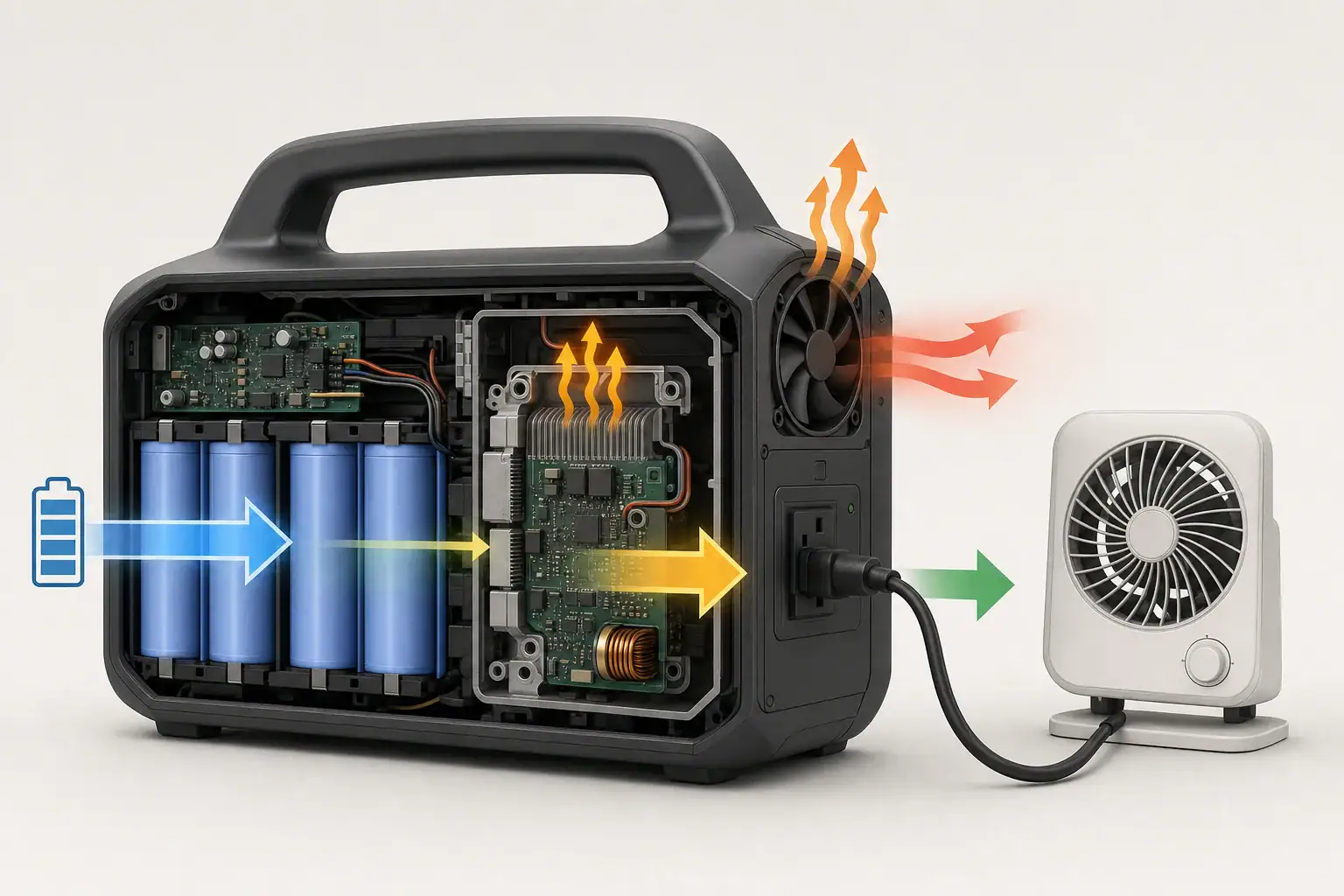
Portable power stations store energy in batteries as direct current (DC). To run typical household appliances, they use an internal inverter to convert that DC into alternating current (AC) that looks like wall power. Many smaller devices, however, can run directly from DC outputs such as USB or 12 V ports.

The key difference for runtime is simple: every conversion step wastes some energy as heat. DC devices powered from a DC port usually get more runtime from the same battery than the same devices powered through the AC inverter. When you power an AC device that internally converts AC back to DC (like most electronics), you often have two or more conversion stages.

Understanding the path from battery to device helps you decide:

  • Which port to use (AC outlet vs DC output)
  • How many devices you can run at once
  • How long your battery is likely to last under different loads

Once you see where losses occur, you can make small connection and usage changes that add up to hours of extra runtime.

Key Concepts: How AC and DC Power Flow Through a Power Station

Inside a portable power station, energy moves through several stages from the battery to your devices. Each stage has an efficiency rating that affects how much of the stored energy is actually delivered.

Direct Current (DC) Path

DC power flows in one direction and is the native form of energy in the battery. Common DC outputs include:

  • USB-A and USB-C ports for phones, tablets, and laptops
  • 12 V car-style sockets for fridges, fans, and pumps
  • Barrel or high-current DC ports for dedicated DC appliances

When you use these outputs, the power station may use DC-DC converters to adjust the voltage (for example, from a higher battery voltage down to 5 V USB). These converters are usually very efficient, especially near their rated load.

Alternating Current (AC) Path

AC power alternates direction and is what you get from household wall outlets. To provide this, the power station uses an inverter to convert DC battery power into AC at a standard voltage and frequency. This allows you to run devices such as:

  • Laptops with AC bricks and desktop computers
  • Small kitchen appliances, tools, and entertainment gear
  • Some medical or specialty devices that specify AC input only

Inverters are less efficient than DC-DC converters and have additional standby losses whenever they are turned on, even with no load connected.

Where Energy Is Lost

Energy losses primarily occur in these stages:

  • Battery round-trip losses when charging and discharging
  • DC-DC conversion losses when stepping voltage up or down
  • Inverter losses when converting DC to AC
  • Device-side losses in chargers, adapters, and internal power supplies

Typical efficiency ranges under realistic loads are:

  • Battery round-trip efficiency: about 85%–95%
  • DC-DC conversion: about 90%–98%
  • Inverter conversion: about 85%–95%, often worse at very low or very high loads
Power path Typical components Approximate overall efficiency When to use
Battery → DC-DC → Device Battery, internal DC-DC converter, phone or laptop charger 80%–90% (battery × DC-DC × device losses) Phones, tablets, DC lights, 12 V fridge, USB-C laptops
Battery → Inverter (AC) → Device Battery, inverter, AC power brick or appliance 70%–85% (battery × inverter × device losses) Appliances that require AC only, tools, some medical devices
Battery → Inverter (AC) → Device → Internal DC Battery, inverter, device’s internal AC-DC supply 65%–80% (extra AC-DC stage inside device) Electronics with built-in power supplies, monitors, routers
Comparison of common power paths in a portable power station. Example values for illustration.

Runtime Estimation Formula

You can estimate runtime with a simple equation using watt-hours (Wh) and watts (W):

Estimated runtime (hours) = (Battery Wh × usable battery fraction × system efficiency) ÷ load W

Where:

  • Battery Wh is the rated capacity of the battery pack
  • Usable battery fraction accounts for the fact that most systems do not use 100% of the rated capacity (often 0.85–0.95)
  • System efficiency includes inverter or DC-DC conversion and device-side losses
  • Load W is the actual power draw of your device or devices

Real-World Examples: How AC vs DC Changes Runtime

Seeing actual numbers makes the impact of AC vs DC power much clearer. The following examples assume a 1,000 Wh portable power station with 90% usable capacity (0.90) and typical efficiencies.

Example 1: Charging a Laptop

Assume the laptop draws 60 W while charging.

  • Via AC inverter: inverter efficiency 90%, laptop charger 90%
  • Via USB-C PD (DC): DC-DC efficiency 95%, laptop charging circuit 95%

Approximate system efficiency:

  • AC path: 0.90 (battery) × 0.90 (inverter) × 0.90 (charger) ≈ 0.73
  • DC path: 0.90 (battery) × 0.95 (DC-DC) × 0.95 (charger) ≈ 0.81

Estimated runtime:

  • AC: (1,000 Wh × 0.73) ÷ 60 W ≈ 12.2 hours
  • DC: (1,000 Wh × 0.81) ÷ 60 W ≈ 13.5 hours

Simply switching from AC to DC gains more than an hour of runtime for the same battery.

Example 2: Running a 12 V Fridge

Assume an efficient 12 V fridge averages 45 W over time (including compressor cycling).

  • 12 V DC socket: DC-DC efficiency about 95%
  • Through AC adapter: inverter 90%, fridge AC adapter 90%

Estimated runtime:

  • DC: (1,000 Wh × 0.90 × 0.95) ÷ 45 W ≈ 19.0 hours
  • AC: (1,000 Wh × 0.90 × 0.90 × 0.90) ÷ 45 W ≈ 16.2 hours

Using the native DC input for a DC appliance can add several hours of cooling on the same charge.

Example 3: Multiple Small Gadgets at Once

Consider charging three phones (10 W each) and one tablet (15 W) for a total of 45 W.

  • All via USB ports: DC-DC at about 95% efficiency
  • All via AC chargers: inverter 88% at light load, chargers 90%

Estimated runtime:

  • DC: (1,000 Wh × 0.90 × 0.95) ÷ 45 W ≈ 19.0 hours
  • AC: (1,000 Wh × 0.90 × 0.88 × 0.90) ÷ 45 W ≈ 15.8 hours

Light AC loads are often less efficient because inverter overhead becomes a larger share of total power.

Scenario Connection type Approx. load (W) Estimated runtime (1,000 Wh battery)
Laptop charging AC inverter 60 ≈ 12.2 hours
Laptop charging USB-C DC 60 ≈ 13.5 hours
12 V fridge 12 V DC socket 45 (average) ≈ 19.0 hours
12 V fridge AC adapter 45 (average) ≈ 16.2 hours
3 phones + 1 tablet USB DC 45 total ≈ 19.0 hours
3 phones + 1 tablet AC chargers 45 total ≈ 15.8 hours
Illustrative runtimes for common AC vs DC usage patterns on a 1,000 Wh power station. Example values for illustration.

Common Mistakes and Troubleshooting Short Runtime

Many users think their power station is underperforming when the real issue is how loads are connected or measured. The following mistakes frequently shorten runtime in AC vs DC power setups.

Mistake 1: Powering DC Devices Through the AC Inverter

Devices like phones, tablets, some laptops, LED strips, and 12 V fridges typically run on DC internally. Using an AC adapter adds extra conversion stages. Symptoms include:

  • Noticeably shorter runtime than expected
  • Inverter fan running even with modest loads
  • Power station display showing higher output than device rating suggests

Fix: Use USB, 12 V, or dedicated DC outputs whenever the device supports them.

Mistake 2: Ignoring Inverter Idle Consumption

Some inverters draw tens of watts simply by being turned on. With only a few small gadgets plugged in, this idle draw can equal or exceed the devices themselves.

  • Symptom: Battery drains overnight even though only a small device (like a router or LED light) is running
  • Fix: Turn off the AC inverter when not needed, or move low-power devices to DC outputs.

Mistake 3: Underestimating Startup Surge and Motor Loads

Appliances with motors, compressors, or heating elements often draw a high inrush current at startup, then settle to a lower running wattage. This can stress the inverter and reduce efficiency.

  • Symptom: Inverter shuts down when a fridge, pump, or power tool starts, even though running watts seem within the rating
  • Fix: Check both continuous and surge watt ratings and avoid stacking several motor loads on the same power station.

Mistake 4: Relying Only on Label Wattage

Nameplate ratings are often maximum values, not typical usage. Some devices draw much less in real use, while others (like gaming laptops or induction cooktops) can spike above their nominal rating.

  • Symptom: Calculated runtime does not match real-world results
  • Fix: Use the power station’s display or a plug-in meter (where safe and appropriate) to observe actual watt draw under your typical use.

Mistake 5: Running the Battery in Extreme Temperatures

Cold temperatures reduce available capacity and increase internal resistance, while high heat can cause the system to throttle or shut down to protect itself.

  • Symptom: Runtime is much shorter on cold nights or very hot days than during mild weather
  • Fix: Keep the unit within its recommended operating temperature range and avoid leaving it in closed vehicles in extreme heat or cold.
Issue Likely cause Quick check Suggested action
Runtime much shorter than expected Extra AC conversions, inverter idle loss Compare AC vs DC watt readings on display Move compatible devices to DC outputs
Inverter shuts off when appliance starts Startup surge exceeds inverter rating Listen for click or error when device starts Use smaller appliance or higher-rated inverter
Battery drains overnight on small loads Inverter idle draw dominates Check display with AC on and no loads Turn off AC, use DC or timer where possible
Poor performance in cold weather Reduced battery capacity at low temperature Compare runtime at room temperature vs cold Keep unit insulated and within spec range
Display watts higher than device label Multiple devices, power factor, or surges Measure while device is actively used Recalculate runtime using measured watts
Typical runtime and shutdown issues when using AC vs DC power, with quick troubleshooting checks. Example values for illustration.

Safety Basics When Using AC and DC Power

Maximizing runtime should never come at the expense of safety. AC power in particular can be hazardous if used incorrectly, and DC circuits can deliver high current that causes overheating.

Respect Voltage and Current Limits

  • Do not exceed the continuous watt rating of the inverter or DC outputs.
  • Avoid running the inverter at its maximum rating for long periods; this increases heat and reduces efficiency.
  • Use appropriately rated cables for high-current DC loads, especially on 12 V outputs.

Use Proper Ventilation

  • Place the power station on a hard, flat surface with vents unobstructed.
  • Do not cover the unit with blankets, clothing, or gear while in use.
  • Allow extra space around the inverter side, where heat and fan exhaust are concentrated.

Keep Moisture and Conductive Debris Away

  • Keep the power station dry; avoid placing it directly on damp ground or near open water.
  • Prevent metal objects such as tools, jewelry, or loose hardware from contacting ports.
  • Do not operate the unit if the enclosure is damaged or cracked.

Safe Use of Extension Cords and Power Strips

  • Use cords rated for the load and length you need; undersized cords can overheat.
  • Avoid daisy-chaining multiple power strips or extension cords from the same AC outlet.
  • Keep cords fully uncoiled during high-load operation to reduce heat buildup.

Follow Device-Specific Guidance

  • Some medical devices and sensitive electronics require a clean AC waveform and stable voltage.
  • Check device documentation for requirements on AC vs DC power and acceptable input ranges.
  • When powering critical equipment, build in extra capacity and redundancy rather than running at the edge of ratings.

Long-Term Efficiency: Maintenance, Storage, and Usage Habits

Maintaining good efficiency over the life of a portable power station is not just about daily usage. How you store, charge, and cycle the battery also affects available runtime for both AC and DC loads.

Battery Care for Stable Runtime

  • Avoid leaving the battery at 0% or 100% state of charge for long periods.
  • For storage longer than a few weeks, keep the battery at a moderate charge level, typically around half to three-quarters full.
  • Charge the unit every few months during storage to prevent deep discharge.

Temperature Management Over Time

  • Store the power station in a cool, dry place out of direct sunlight.
  • Avoid long-term storage in vehicles where temperatures can swing widely.
  • Allow the unit to warm up gradually before heavy use if it has been stored in a cold environment.

Monitoring Efficiency Drift

  • Periodically repeat a simple runtime test with a known load (such as a fixed 100 W AC or DC load) to see if runtime is changing over time.
  • If you notice a significant drop in runtime with the same load, consider whether aging batteries, new standby devices, or inverter behavior are contributing.
  • Keep notes on typical runtimes for your core devices; this makes it easier to spot changes early.

Good Habits for AC vs DC Use

  • Default to DC outputs for everyday electronics and lighting.
  • Turn on the AC inverter only when you actually need AC appliances.
  • Group high-demand AC tasks (like cooking or power tools) into shorter sessions instead of spreading them out, to minimize idle inverter time.

Practical Takeaways and Specs to Look For

AC vs DC power choices can easily change your usable runtime by 10–30% or more. A few planning steps and the right specs make it easier to get reliable performance from your portable power station in any situation.

Key Takeaways for Everyday Use

  • Use DC outputs whenever possible for phones, tablets, laptops, lights, and 12 V appliances.
  • Reserve AC for devices that genuinely require a standard wall outlet.
  • Account for efficiency losses when estimating runtime, not just battery size.
  • Avoid leaving the inverter on with only tiny loads connected.
  • Plan around surge and continuous ratings when running motor or heating loads.

Specs to Look For on a Portable Power Station

When comparing or configuring portable power stations, pay close attention to these specifications and features that directly affect AC vs DC efficiency and runtime:

  • Battery capacity (Wh): Larger Wh means more stored energy. Compare devices using watt-hours, not just amp-hours.
  • Usable capacity or depth-of-discharge management: Systems that manage the battery to avoid deep discharge can provide consistent runtime and longer battery life.
  • Inverter continuous and surge ratings (W): Ensure both ratings comfortably exceed the combined AC loads you plan to run, including startup surges.
  • Inverter efficiency curve: Look for high efficiency at the load levels you will actually use (for example, 100–500 W for typical camping setups).
  • Inverter idle consumption: Lower no-load or standby draw helps when you run small AC loads or leave the unit on for long periods.
  • Number and type of DC outputs: Multiple USB-A, USB-C (especially high-power USB-C), and 12 V outputs make it easier to avoid unnecessary AC conversions.
  • DC output current limits: Check the maximum current or watt rating for each DC port to ensure it can support fridges, pumps, or other higher-draw DC devices.
  • Charge efficiency and input options: Efficient AC charging and solar/DC input help you refill the battery with less wasted energy.
  • Display accuracy: A clear, reasonably accurate display of watts in, watts out, and remaining capacity makes it easier to tune AC vs DC usage in real time.
  • Thermal management and operating temperature range: Better cooling and clear temperature specs help maintain efficiency and protect the battery.

By combining the right specifications with smart choices about when to use AC vs DC power, you can stretch every watt-hour further, reduce wasted energy, and get more practical work, comfort, and safety out of your portable power station.

Frequently asked questions

Which specs and features most affect AC vs DC efficiency and overall runtime?

Battery capacity in watt-hours, usable capacity or depth-of-discharge management, inverter efficiency and idle consumption, and the number and rating of DC outputs are the most important. Thermal management and an accurate display of watts in/out also help you run the system in its most efficient range.

Why shouldn’t I power DC devices through the AC inverter?

Powering a device via the inverter adds an extra DC→AC→DC conversion, which increases losses and shortens runtime. Using native DC outputs avoids that extra conversion and usually yields noticeably longer run times.

How can I safely power sensitive or medical equipment from a portable power station?

Check the equipment’s input requirements and confirm the power station can supply a clean waveform, the required voltage, and enough continuous and surge capacity. For critical or medical devices, follow device documentation, allow a safety margin in capacity, and consider redundant power sources when possible.

What quick steps give the biggest runtime gains in the field?

Use DC ports for everyday electronics, turn off the AC inverter when you don’t need it, group high-AC tasks into shorter sessions, and monitor actual watt draw rather than relying solely on nameplate ratings. Avoid operating in extreme temperatures and use appropriately rated cables for high-current DC loads.

How do startup surges and motor loads affect performance?

Devices with motors or compressors can draw a large inrush current at startup that may exceed the inverter’s surge rating and cause shutdowns. Verify both continuous and surge ratings, avoid stacking motor loads, and choose equipment with lower startup draws if possible.

How accurate are runtime estimates and how can I measure real-world runtime?

Estimates use typical efficiency assumptions and can differ from real use due to inverter idle draw, temperature, and device-side losses. For better accuracy, measure watts out with the power station display or a meter under your normal load and repeat a timed runtime test with that known load.

Inverter Efficiency Explained: Why Your Portable Power Station Runtime Is Shorter

Isometric illustration of power station and energy blocks

Your portable power station runs shorter than the math suggests because the inverter is not 100% efficient and some battery energy is lost as heat and overhead. When you convert DC battery power into AC power for household devices, inverter efficiency, idle draw, and the type of load all reduce real runtime compared with a simple watt-hour calculation.

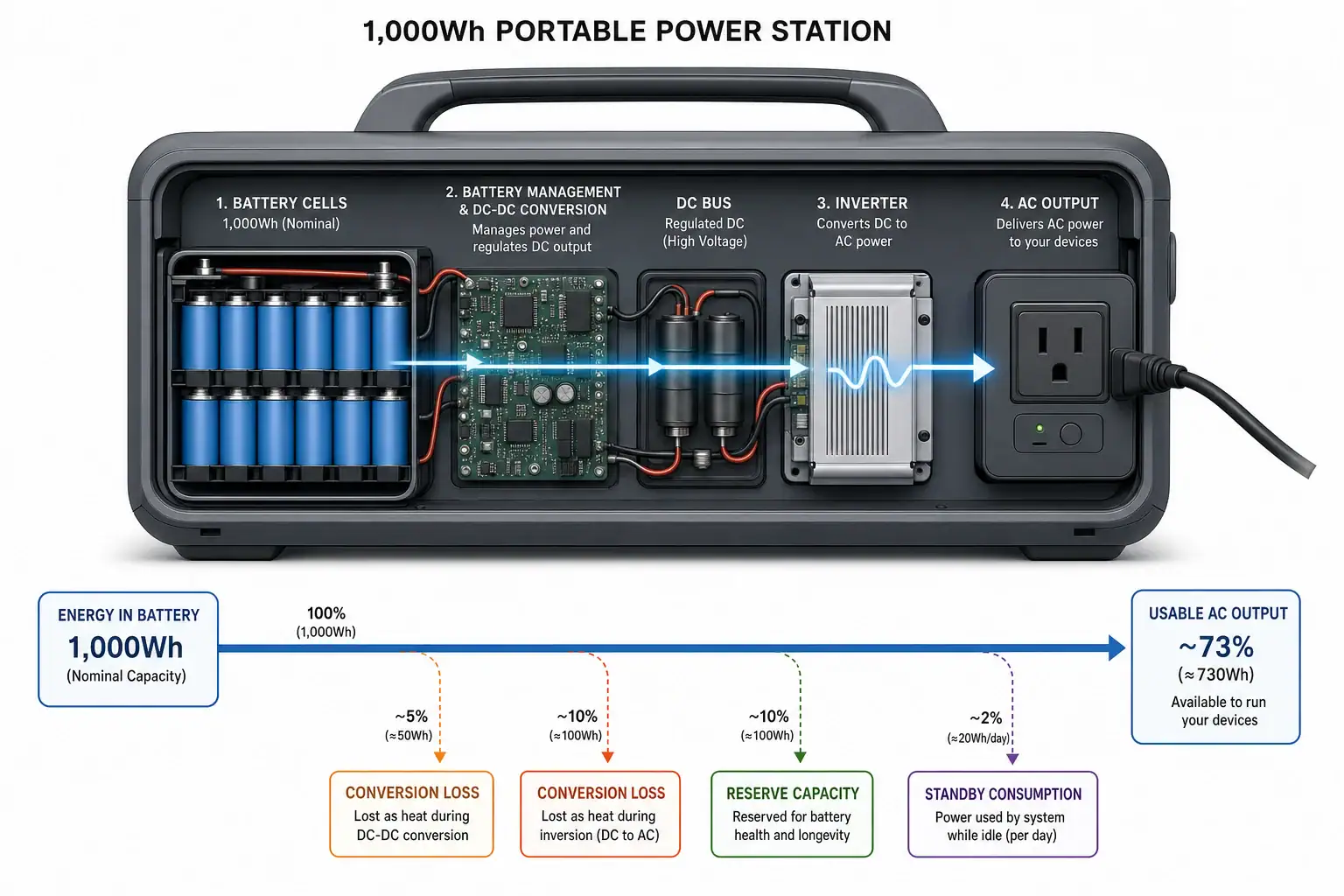
Understanding inverter efficiency, conversion losses, and how they change with load level helps you predict runtime more accurately. Instead of assuming that a 1,000 Wh battery can deliver 1,000 Wh of AC power, you can factor in realistic efficiency (often 80–95% at useful loads) and see why your devices shut off earlier than expected.

This guide explains what an inverter does inside a portable power station, how efficiency is measured, and how to estimate runtime with practical examples. You will also see common mistakes, basic safety tips, and a checklist of specs to look for when comparing power stations or standalone inverters.

What Inverter Efficiency Means and Why It Matters

An inverter is the component that turns the battery’s direct current (DC) into alternating current (AC) that most household appliances use. That conversion is never perfect. Inverter efficiency is the percentage of DC power that successfully becomes usable AC power at the outlet.

For example, if the inverter draws 100 watts from the battery and delivers 90 watts to your appliance, the efficiency is 90%. The remaining 10 watts are lost, mostly as heat and internal electronics overhead. This gap between battery watts and output watts is a major reason your runtime is shorter than a simple capacity ÷ load calculation.

In portable power stations, inverter efficiency matters because:

  • It directly reduces how many watt-hours reach your AC devices.
  • It changes with load level, temperature, and age, so runtime can vary more than expected.
  • It interacts with battery limits and surge loads, sometimes causing early shutdowns.

When you plan backup power for a refrigerator, CPAP, router, or tools, ignoring inverter efficiency can easily overestimate runtime by 10–30% or more, especially at very light or very heavy loads.

Key Concepts: How Inverter Efficiency and Losses Work

On paper, runtime is often calculated as:

Runtime (hours) = Battery watt-hours ÷ Appliance watts

Real-world runtime must include inverter efficiency and other losses:

Runtime (hours) ≈ (Usable battery Wh × Inverter efficiency) ÷ Total AC load (W)

Several concepts sit behind that single efficiency number.

Types of losses during conversion

  • Conversion losses: Energy turned into heat inside power electronics when converting DC to AC.
  • Standby or idle draw: Power used by control circuits, displays, and internal fans even when the AC load is small.
  • Waveform and load type losses: Some loads (motors, older power supplies) interact less efficiently with the inverter’s AC waveform.
  • Inrush and surge inefficiencies: Short, high current bursts when motors or compressors start up increase instantaneous losses.

How manufacturers quote inverter efficiency

Manufacturers usually specify peak efficiency under ideal lab conditions, often at 25–75% of rated power and at a comfortable temperature. That can be misleading in real use.

  • Peak efficiency: Best-case value, such as 92–95%, achieved only in a certain load range.
  • Weighted efficiency: Sometimes used to average multiple load points; still not the same as your specific setup.
  • Effective efficiency: What you actually get with your loads, temperatures, and usage patterns, which can be much lower.

Typical efficiency behavior by load

  • Very low loads (<10% of rated power): Idle and control circuitry dominate; effective efficiency can drop to 60–80%.
  • Moderate loads (25–75% of rated power): Efficiency usually peaks, often 85–95% depending on design.
  • Near-rated loads: Efficiency may drop to 80–90%; more heat and fan use increase losses.

Because portable power stations are often used at low average loads (charging phones, running routers, small fans), users frequently see lower real efficiency than the headline number suggests.

Real-World Runtime Examples and Simple Calculations

The easiest way to see inverter efficiency in action is to compare “ideal” runtime with more realistic estimates for common portable power station scenarios.

Step-by-step runtime method

  1. Start with usable battery capacity (Wh). Many batteries do not allow 100% depth of discharge. If not specified, assume 90% of the rated Wh as a rough starting point.
  2. Estimate inverter efficiency at your load. Use 85–90% for moderate loads, 70–80% for very light loads, unless you have better data.
  3. Add idle draw to your load. If idle draw is unknown, assume 5–15 W for a small portable unit.
  4. Calculate runtime: (Usable Wh × Efficiency) ÷ (Appliance watts + Idle watts).

Example 1: Medium load appliance

Assume:

  • Battery: 1,000 Wh rated, 900 Wh usable
  • Appliance: 200 W AC
  • Estimated inverter efficiency at this load: 90%
  • Idle draw: 10 W

Steps:

  • Available AC energy = 900 Wh × 0.90 = 810 Wh
  • Total effective load = 200 W + 10 W = 210 W
  • Estimated runtime ≈ 810 Wh ÷ 210 W ≈ 3.9 hours

A simple ideal calculation (1,000 Wh ÷ 200 W = 5 hours) would have overestimated runtime by almost 30%.

Example 2: Very light load device

Assume the same 1,000 Wh battery, but you only run a 20 W router overnight.

  • Battery: 1,000 Wh rated, 900 Wh usable
  • Appliance: 20 W AC
  • Estimated efficiency at low load: 75%
  • Idle draw: 10 W

Steps:

  • Available AC energy = 900 Wh × 0.75 = 675 Wh
  • Total effective load = 20 W + 10 W = 30 W
  • Estimated runtime ≈ 675 Wh ÷ 30 W = 22.5 hours

The ideal DC-only estimate (1,000 Wh ÷ 20 W = 50 hours) would be more than double the realistic runtime because low-load efficiency and idle draw dominate.

Scenario Rated battery (Wh) Usable Wh assumed AC load (W) Idle draw (W) Efficiency (%) Ideal runtime (h) Realistic runtime (h)
Medium load (laptop + monitor) 1,000 900 200 10 90 5.0 ≈3.9
Light load (router) 1,000 900 20 10 75 50.0 ≈22.5
Heavy load (small heater) 1,000 900 500 15 85 2.0 ≈1.5
Typical difference between ideal DC-only runtime and realistic runtime once inverter efficiency and idle draw are included. Example values for illustration.

Quick rules of thumb for planning

  • For moderate AC loads, multiply battery Wh by 0.8–0.9 before dividing by load.
  • For very low AC loads, multiply battery Wh by 0.6–0.8 and add 5–15 W to the load for idle draw.
  • For short, heavy loads (power tools, kettles), expect a 15–25% reduction from the ideal runtime estimate.

Common Mistakes and Troubleshooting Short Runtime

Many runtime surprises can be traced back to a few repeat patterns. Recognizing them helps you decide whether the inverter, battery, or load is the real bottleneck.

Mistake 1: Ignoring idle consumption

Symptom: Runtime is much shorter than expected when running a single small device (router, LED light, phone chargers).

Cause: The inverter’s idle draw is similar to or larger than the load. For example, a 10 W idle draw plus a 10 W load doubles the effective power use.

Quick check:

  • Turn on the power station with no AC devices plugged in.
  • Note any displayed AC output power; that is approximate idle draw.
  • Add that number to your planned load when estimating runtime.

Mistake 2: Using peak efficiency for all loads

Symptom: Your math matches manufacturer specs at mid-range loads but fails badly at low or high loads.

Cause: The quoted 90–95% efficiency only applies in a specific range. At 5% or 100% of rated power, real efficiency can be 10–20 percentage points lower.

Quick check: If your load is less than 10% or more than 80% of the inverter rating, recalculate using 70–85% efficiency instead of the peak number.

Mistake 3: Forgetting power factor and surge behavior

Symptom: Motor-driven devices (refrigerators, pumps, some fans) cause the power station to shut down early or report higher-than-expected watts.

Cause: These loads often have a power factor below 1.0 and high surge currents at startup. The inverter sees higher current and works harder than the “running watts” suggest.

Quick check:

  • Watch the display when the device starts; if watts spike well above running level, factor that into your planning.
  • Consider that frequent starts reduce effective runtime more than a steady, non-surge load of the same average watts.

Mistake 4: Ignoring temperature and battery condition

Symptom: The same setup runs longer indoors than in a hot vehicle or cold shed.

Cause: High temperatures reduce inverter efficiency and trigger cooling fans; low temperatures reduce battery output. Aging batteries also lose usable capacity over time.

Quick check:

  • Compare runtime at room temperature vs. hot or cold conditions.
  • If runtime has dropped noticeably over months or years at the same load and temperature, battery aging is likely a factor.

Mistake 5: Assuming AC and DC outputs behave the same

Symptom: Devices powered from DC ports (USB, 12 V) run much longer than similar-wattage devices on AC, or vice versa.

Cause: DC outputs avoid the DC-to-AC inverter stage and often use more efficient DC-DC converters. AC devices pay the full inverter efficiency penalty.

Quick check: When possible, compare powering the same type of device via DC vs. AC (for example, a DC laptop charger vs. an AC brick) and note the difference in reported watts and runtime.

Observed issue Likely cause What to check or change
Runtime at small loads is much shorter than expected High idle draw, low-load inverter efficiency Measure or estimate idle watts; add them to the load and recalc runtime
Unit shuts down when a fridge or pump starts Surge current exceeds inverter capability Check surge rating; avoid running other heavy loads during startup
Display shows higher watts than appliance label Low power factor or additional internal losses Use a plug-in watt meter; plan using displayed watts, not label watts
Shorter runtime in hot or enclosed spaces Thermal losses and fan power Improve ventilation; avoid direct sun and confined spaces
Runtime has declined over time at same load Battery aging and reduced usable capacity Re-test at a known load; adjust expectations or reduce depth of discharge
Typical runtime problems, their likely causes, and simple checks to narrow down whether inverter efficiency, surge, or battery condition is responsible. Example values for illustration.

Safety Basics When Using Inverters and Portable Power Stations

Inverter efficiency and runtime are important, but safety should always come first. Inefficient operation often goes hand-in-hand with unsafe operation, such as overheating or overloading.

Avoid overloading the inverter

  • Keep continuous loads below the inverter’s rated continuous wattage, not just the surge rating.
  • Be cautious when multiple devices may start at once (for example, a fridge and a pump); combined surges can trip protection or cause shutdown.
  • If the unit frequently runs near its limit, expect more heat, louder fans, and lower efficiency.

Manage heat and ventilation

  • Operate the power station on a firm, flat surface with clearance around cooling vents.
  • Avoid covering the unit with blankets or placing it in tightly closed cabinets or boxes.
  • If the case is uncomfortably hot to the touch or fans run constantly at high speed, reduce load and improve airflow.

Use appropriate cords and connections

  • Use power cords and extension cords rated for at least the maximum expected load.
  • Avoid daisy-chaining multiple power strips or adapters; each connection adds resistance and heat.
  • Do not modify plugs or bypass built-in safety features to “force” a connection.

Respect battery and charging limits

  • Follow manufacturer guidance for maximum charge rates and recommended ambient temperatures.
  • Do not attempt to bypass protections to draw more power than the unit is designed for.
  • Store and operate away from flammable materials, especially at high loads where the inverter runs warm.

Long-Term Use, Maintenance, and Storage Effects on Efficiency

Over months and years, both the inverter and the battery can change behavior. Keeping runtime predictable requires basic maintenance and storage habits.

How aging affects inverter efficiency and runtime

  • Battery wear: Each charge/discharge cycle slightly reduces capacity. After many cycles, usable Wh can drop noticeably, making efficiency losses more significant.
  • Thermal stress: Repeated hot operation can age internal components, potentially reducing peak efficiency and increasing idle draw.
  • Dust and blockage: Dusty vents and fans reduce cooling, causing higher internal temperatures and more fan use, which both hurt efficiency.

Storage tips to preserve performance

  • Store the unit in a cool, dry place, away from direct sunlight and extreme temperatures.
  • Avoid long-term storage at 0% or 100% state of charge; many chemistries prefer roughly 30–60% for storage.
  • Top up the battery every few months if the manufacturer recommends it, to prevent deep self-discharge.

Periodic checks to track real efficiency

  • Once or twice a year, run a simple runtime test at a known load (for example, a 100 W light or resistive appliance) and compare to earlier results.
  • Note any large changes in displayed watts vs. appliance label; unexpected increases can indicate internal loss changes or battery issues.
  • Keep a simple log of test dates, loads, and runtimes to see trends over time.

Practical Takeaways and Specs to Look For

Inverter efficiency is one of the main reasons your portable power station runtime is shorter than expected, but it is also one of the easiest factors to plan around. With a few conservative assumptions and quick measurements, you can get much closer to real-world performance in your calculations.

Key takeaways for planning runtime

  • Always adjust battery watt-hours by a realistic efficiency factor before dividing by load.
  • Include idle draw in your load, especially for small devices that run for long periods.
  • Expect lower effective efficiency at very low loads and near the inverter’s maximum output.
  • Motor loads and frequent surges reduce runtime more than steady resistive loads at the same average watts.
  • Temperature, ventilation, and battery age all influence how much of the battery’s energy actually reaches your devices.

Specs to look for when comparing inverters or power stations

  • Continuous AC output rating: Match this to your typical combined load, not the absolute maximum you might ever use.
  • Surge (peak) output rating and duration: Important for refrigerators, pumps, and tools with high startup currents.
  • Published inverter efficiency: Look for both peak efficiency and, if available, efficiency at different load levels.
  • Idle or no-load consumption: Lower idle draw is especially valuable if you run small loads for long periods.
  • Battery usable capacity or depth-of-discharge limits: Some manufacturers state usable Wh directly; if not, assume 80–90% of rated Wh.
  • Thermal management and fan behavior: Clear information on operating temperature range and cooling can indicate how well the unit maintains efficiency under load.
  • DC output options: Multiple DC ports (USB, 12 V, or dedicated DC outputs) let you avoid inverter losses for compatible devices.
  • Display and metering: A clear watt and watt-hour display helps you measure your own effective efficiency and refine your estimates.

By combining these specs with the calculation methods and troubleshooting cues above, you can choose and use portable power systems with realistic expectations about inverter efficiency and runtime.

Frequently asked questions

Which inverter and power station specifications should I prioritize when choosing a unit?

Prioritize continuous AC output that matches your typical combined load, a surge rating sufficient for startup currents, and the published efficiency at realistic load points. Also check idle/no-load consumption, usable battery Wh (not just rated Wh), and thermal management and metering features for real-world performance tracking.

Why does my power station run much shorter than the battery Wh suggests when powering small devices like a router?

Small devices expose the inverter’s idle draw and low-load inefficiency, so a significant portion of the battery can be used just to run control electronics and fans. Measure or estimate the unit’s no-load watts and add that to the device load when calculating runtime.

How can I improve or maximize inverter efficiency in everyday use?

Use DC outputs when possible to avoid DC-to-AC conversion, run the inverter in its moderate load range rather than very low or near-maximum loads, and keep the unit well ventilated at moderate ambient temperatures. These steps reduce conversion losses and limit fan use, improving effective efficiency.

How does the type of load affect inverter efficiency and runtime?

Resistive loads (heaters, incandescent bulbs) are straightforward and predictable, while motor-driven or reactive loads often have lower power factor and high startup currents that increase instantaneous losses. Electronic supplies and imperfect power factors can make displayed watts higher than nameplate running watts, reducing runtime.

How can I avoid overheating or overloading my portable power station?

Keep continuous loads below the inverter’s rated continuous output, avoid simultaneous startups of multiple heavy devices, and ensure adequate clearance for cooling vents. If fans run constantly or the case becomes very hot, reduce load and improve airflow to prevent thermal throttling or shutdowns.

Should I trust the manufacturer’s quoted inverter efficiency when estimating runtime?

Quoted efficiency is often a peak lab value measured at a specific load and temperature, so it can be optimistic for many real use cases. Use conservative efficiency estimates for low and high loads, include idle draw, and validate with simple runtime tests or on-unit metering when possible.

Surge Watts vs Running Watts: Size a Portable Power Station the Right Way

Isometric portable power station with energy blocks

Surge watts are the short burst of power an appliance needs to start, while running watts are the lower, steady power it needs to keep running. Understanding surge watts vs running watts is the single most important step in sizing a portable power station that will actually start your fridge, power tools, or medical equipment instead of tripping off at the worst moment. If you only match the continuous watts and ignore surge watts, high‑startup devices may never turn on.

This guide walks through what those ratings really mean, how they show up in power station specs, and how to use them to calculate the size you need. You will see concrete examples, simple formulas, and common mistakes to avoid. Whether you are planning for camping, RV use, or home backup during outages, the goal is the same: pick a portable power station that has enough continuous watts, enough surge watts, and enough battery capacity to cover your real‑world loads with a safe margin.

What surge watts and running watts mean (and why they matter)

Manufacturers use different terms for the same two ideas: running watts vs surge watts. You may also see continuous watts, rated watts, peak watts, or starting watts. They all describe either steady power or short bursts of power.

Running watts (continuous watts) are the power a device needs after it has already started and is operating normally. This is the load your portable power station has to support hour after hour. Examples include LED lights, a laptop charger, or a refrigerator once the compressor is already running.

Surge watts (starting or peak watts) are the temporary spike in power when a device first turns on or when a motor cycles. Motors, compressors, pumps, and many power tools can draw 2–6 times their running watts for a fraction of a second to a few seconds. That short spike is what trips inverters when they are undersized.

For a portable power station to work reliably, its continuous AC output rating must be higher than your total running watts, and its surge or peak rating must be higher than the highest expected startup surge. Both numbers have to be checked; focusing on only one is a common cause of overload shutdowns and failed startups.

Key concepts: how surge and running watts interact with a portable power station

A portable power station combines a battery, an inverter, and protective electronics. Each piece affects how much surge and running power you actually get.

1. Inverter continuous vs peak rating

  • Continuous watts: the maximum power the inverter can deliver indefinitely under normal conditions.
  • Surge or peak watts: the higher power it can deliver for a short time, usually a few seconds.

For example, a unit might list 1,000 W continuous and 2,000 W surge. That means it can run up to 1,000 W of steady loads and tolerate brief peaks up to 2,000 W, such as a refrigerator starting.

2. Battery capacity and runtime

Battery capacity is usually given in watt‑hours (Wh). A simple way to estimate runtime is:

Estimated runtime (hours) ≈ (usable Wh × inverter efficiency) ÷ total running watts

If a station has 1,000 Wh of usable capacity and 90% efficiency, and your loads total 200 W running:

Runtime ≈ (1,000 × 0.9) ÷ 200 ≈ 4.5 hours.

3. Load type and surge behavior

  • Resistive loads (heaters, toasters, incandescent bulbs): surge ≈ running watts.
  • Inductive loads (compressors, pumps, fans, some power tools): surge often 3–6× running watts.
  • Electronics with power supplies (TVs, computers): small to moderate surge, typically 1–2× running watts.

4. Power factor and VA vs W

Some labels show volt‑amps (VA) instead of watts. Real power in watts equals VA multiplied by power factor. For most consumer gear, the watt value on the label or in the manual is the best number to use for sizing. When you only have amps and volts, use:

Watts ≈ Volts × Amps

5. Temperature and derating

Inverters may reduce their output automatically at high temperatures. A system that works in cool weather might struggle in a hot garage. Building in 20–30% headroom between your calculated loads and the power station’s continuous rating helps account for this derating.

Putting these pieces together, you size your portable power station by matching three things: continuous watts ≥ total running watts, surge watts ≥ highest startup surge, and battery Wh ≥ desired runtime × running watts ÷ efficiency.

Real‑world examples and sizing walk‑throughs

To make surge watts vs running watts less abstract, it helps to see typical appliance values and a couple of full sizing examples.

Device type Typical running watts Typical surge watts Notes
LED light (single bulb) 10 W 10–15 W Resistive/electronic, very low surge.
Laptop charger 60 W 70–90 W Modest startup spike from capacitors.
Phone charger 10 W 15–20 W Negligible impact on sizing.
Mini refrigerator 70–100 W 400–800 W Compressor surge 4–8× running watts.
Box fan 50–70 W 150–250 W Inductive motor with moderate surge.
1/2 hp well or sump pump 700–900 W 2,000–3,000 W High surge; critical for sizing.
Microwave (countertop) 800–1,200 W 1,200–1,800 W Short‑term high load, limited surge.
Typical running and surge watt ranges for common devices. Example values for illustration.

Example 1: Small camping or van‑life setup

Assume you want to power these devices at the same time in the evening:

  • 2 × LED lights: 10 W each (no meaningful surge)
  • 1 × laptop: 60 W running, 80 W surge
  • 2 × phone chargers: 10 W each, 15 W surge each

Step 1: Total running watts

  • LED lights: 2 × 10 W = 20 W
  • Laptop: 60 W
  • Phone chargers: 2 × 10 W = 20 W

Total running watts = 20 + 60 + 20 = 100 W

Step 2: Worst‑case surge watts

  • Laptop surge: 80 W
  • Phone chargers surge: 2 × 15 W = 30 W

Lights have no meaningful surge, so worst‑case surge is 80 + 30 = 110 W. A power station with at least 150–200 W continuous and 250–300 W surge would be comfortable.

Step 3: Battery capacity for a 5‑hour evening

Target runtime: 5 hours. Assume 90% inverter efficiency.

Required Wh ≈ running watts × hours ÷ efficiency
≈ 100 W × 5 h ÷ 0.9 ≈ 556 Wh.

Choosing around 600 Wh of usable capacity gives a reasonable buffer.

Example 2: Refrigerator and essentials during an outage

You want to keep food cold and maintain basic connectivity during a 10‑hour outage:

  • Mini refrigerator: 90 W running, 600 W surge
  • Wi‑Fi router: 10 W running, 15 W surge
  • 3 × LED lights: 10 W each running

Step 1: Total running watts

  • Fridge: 90 W
  • Router: 10 W
  • Lights: 3 × 10 W = 30 W

Total running watts = 90 + 10 + 30 = 130 W

Step 2: Worst‑case surge watts

  • Fridge surge: 600 W
  • Router surge: 15 W
  • Lights surge: negligible

Worst‑case surge ≈ 600 + 15 ≈ 615 W. A practical target would be at least 150–200 W continuous and 800–1,000 W surge to maintain headroom.

Step 3: Battery capacity for 10 hours

Refrigerators do not run 100% of the time. A simple planning rule is to assume a 50% duty cycle for a modern mini fridge in moderate temperatures.

  • Average fridge draw ≈ 90 W × 0.5 = 45 W
  • Router: 10 W (continuous)
  • Lights (on for 5 of 10 hours): 30 W × 0.5 = 15 W average over 10 hours

Average load ≈ 45 + 10 + 15 = 70 W

Required Wh ≈ 70 W × 10 h ÷ 0.9 ≈ 778 Wh.

Planning for around 900–1,000 Wh usable capacity allows for warmer conditions, extra device charging, and inverter losses.

Common mistakes and troubleshooting overload issues

Many users run into problems not because the portable power station is defective, but because surge watts vs running watts were misunderstood during sizing. Recognizing these patterns helps you fix or avoid them.

Common mistake Typical symptom Likely cause What to try next
Only checking running watts Fridge or pump clicks but never starts. Startup surge exceeds inverter peak rating. Estimate or measure surge; use a unit with higher surge or reduce simultaneous loads.
Running inverter at 100% continuously Unit shuts down after several minutes or gets very hot. Thermal derating or overload protection. Reduce load to 70–80% of rating; improve ventilation and add capacity if needed.
Assuming labels are exact Runtime is much shorter than expected. Higher real‑world consumption than nameplate values. Measure actual draw with a power meter and recalculate Wh needs.
Ignoring duty cycle Battery drains faster when motors cycle frequently. Compressor or pump running more often than planned. Use conservative duty cycle estimates; consider temperature and usage patterns.
Starting too many motors at once Instant overload when multiple devices switch on. Combined surge exceeds peak rating. Stagger startups manually or with timers; avoid overlapping high‑surge events.
Overestimating usable battery capacity Battery indicator hits empty sooner than math suggested. Only a portion of nominal Wh is usable. Check usable Wh rating; assume 80–90% of nominal unless specified.
Frequent sizing and usage errors, with troubleshooting actions. Example values for illustration.

Quick troubleshooting cues

  • Device tries to start, then stops immediately: likely surge overload. Unplug other loads and try again, or use a power station with a higher surge rating.
  • Power station shuts off after several minutes at high load: may be thermal shutdown. Reduce load, move the unit to a cooler, well‑ventilated area, and keep vents clear.
  • Runtime is half of what you calculated: recheck your average wattage, inverter efficiency, and usable Wh. Many loads draw more in practice than their labels suggest.
  • Display shows high watts even with few devices plugged in: check for hidden loads such as always‑on chargers, or mis‑wired extension strips feeding multiple devices.

Safety basics when dealing with surge and running loads

Even though portable power stations feel like appliances, they are still energy systems capable of delivering high current. Safe use matters as much as correct sizing.

1. Respect the inverter limits

  • Never intentionally exceed the continuous or surge watt ratings.
  • Avoid daisy‑chaining power strips and extension cords to run many high‑draw devices from a single outlet.
  • Do not try to “test the limits” by plugging in heavy loads just to see if they work.

2. Use appropriate cords and connections

  • Use cords rated for at least the expected amperage and length of run.
  • Avoid damaged, undersized, or coiled extension cords, which can overheat under load.
  • Keep all connections dry and off the ground in outdoor or RV setups.

3. Ventilation and heat management

  • Operate the power station on a stable surface with air vents unobstructed.
  • Avoid enclosed spaces where heat cannot escape; high internal temperatures reduce surge capability and can trigger shutdowns.
  • Do not cover the unit with blankets or clothing while in use.

4. Special attention for critical and medical devices

  • Confirm both running and surge watt requirements directly from the device documentation whenever possible.
  • Consider redundancy or backup options so a single overload event does not interrupt critical equipment.
  • Test the setup under controlled conditions before relying on it during an emergency.

Following these basics not only protects the power station but also helps it deliver its rated surge and running watts safely and consistently.

Long‑term use, maintenance, and storage

Good maintenance habits keep your portable power station closer to its original performance for longer. Over time, batteries age and surge capability may decline if the system is abused or stored poorly.

1. Battery health and usable capacity

  • Avoid fully discharging the battery whenever possible; shallow to moderate cycles are easier on most chemistries.
  • Recharge promptly after heavy use instead of leaving the battery near empty for long periods.
  • Expect gradual capacity loss over hundreds of cycles; plan sizing with some margin to absorb this decline.

2. Storage practices

  • Store in a cool, dry place away from direct sunlight and extreme temperatures.
  • If storing for more than a month, follow the manufacturer’s recommended state of charge, commonly around 40–60%.
  • Top up the charge every few months during long storage to prevent deep self‑discharge.

3. Periodic testing

  • Every few months, run a short test with your key loads (such as a refrigerator or pump) to confirm they still start reliably.
  • Note any changes in startup behavior or runtime; these can be early signs of battery aging or inverter issues.
  • Update your load list if you add or replace appliances, since new devices may have different surge characteristics.

4. Keeping your load plan realistic

  • Write down which devices you intend to run together during an outage or trip.
  • Group them into “always on” loads (router, fridge) and “optional” loads (microwave, hair dryer).
  • During real use, stick to the plan to avoid unexpected overloads that stress the system.

Practical takeaways and specs to look for

At this point you know how surge watts and running watts affect sizing, runtime, and reliability. Turning that knowledge into a quick evaluation checklist makes shopping and planning much easier.

Key takeaways

  • Always size a portable power station for both total running watts and highest surge watts, not just one or the other.
  • Motors, compressors, and pumps dominate surge requirements; lights and small electronics rarely do.
  • Battery capacity in watt‑hours determines how long you can sustain your running loads; surge only affects brief startup events.
  • Build in at least 20–30% extra headroom in both inverter power and battery capacity to handle heat, aging, and real‑world variations.

Specs to look for on a portable power station

  • AC continuous output (W): should exceed your total running watts by a comfortable margin. For example, if you plan for 600 W running, look for roughly 800 W or more continuous.
  • AC surge/peak output (W): must be higher than your worst‑case combined startup surge. If your fridge and pump could briefly draw 1,800 W together, look for a surge rating above that value.
  • Battery capacity (Wh): match this to your desired runtime using the runtime formula. Consider future needs and battery aging when deciding between sizes.
  • Usable capacity vs nominal capacity: some systems advertise total Wh, but only a portion is available. When possible, base your calculations on usable Wh.
  • Number and type of AC outlets: ensure there are enough outlets to avoid unsafe daisy‑chaining and to keep high‑surge devices on separate receptacles when possible.
  • DC and USB outputs: powering low‑voltage devices directly from DC can improve efficiency and extend runtime compared with routing everything through the inverter.
  • Operating temperature range: if you expect to use the unit in hot or cold environments, confirm that its ratings apply under those conditions.
  • Display and monitoring features: real‑time wattage and state‑of‑charge readings make it easier to validate your surge and running assumptions in actual use.

By matching these specs to a realistic list of your devices, their running watts, and their surge requirements, you can choose a portable power station that starts what it needs to start, runs as long as you expect, and remains reliable over the long term.

Frequently asked questions

Which specifications and features should I prioritize when choosing a portable power station?

Prioritize AC continuous output (to cover total running watts), AC surge/peak output (to handle highest startup draws), and usable battery capacity in watt‑hours for your desired runtime. Also consider the number and type of outlets, operating temperature range, and monitoring features that show real‑time wattage and state of charge.

How can I estimate a device’s surge watts if the label doesn’t list them?

If surge isn’t listed, use typical multipliers: inductive motors and compressors often draw 3–6× running watts, while electronics are usually 1–2×. When precision matters, measure inrush with an appropriate meter or consult the device manual and add conservative headroom if uncertain.

What is a common sizing mistake that causes appliances like fridges or pumps to click but not start?

The most common mistake is sizing only for running watts and ignoring startup surge; the fridge or pump’s inrush current can exceed the inverter’s peak rating. Also avoid starting multiple high‑surge devices at the same time without staggered starts or higher surge capacity.

What high‑level safety precautions should I follow when using a portable power station?

Respect the unit’s continuous and surge ratings, use cords rated for the expected amperage, keep the unit well ventilated and dry, and avoid daisy‑chaining outlets. For critical devices, verify requirements from the device documentation and test setups under controlled conditions before relying on them.

Can I run multiple motors or compressors together, and how do I avoid overloads?

You can run multiple motors if the combined surge stays below the power station’s peak rating, but it’s safer to stagger startups or use soft‑start devices. If combined surges exceed the rating, increase surge capacity or run motors one at a time to prevent overloads.

Portable Power Station vs Power Bank: How to Choose the Right One

isometric illustration of two portable power units

A portable power station is better when you need to run laptops, appliances, or multiple devices for hours, while a power bank is usually enough for phones and small USB gadgets. Both are battery packs, but they differ a lot in capacity, output power, and how you actually use them day to day.

This guide breaks down the real differences between a portable power station and a power bank, using simple examples and numbers you can plug into your own situation. You will see how to estimate runtimes, what each option can realistically power, and where the extra cost and weight of a power station actually pay off.

Whether you are planning for travel, camping, remote work, or home emergency backup, use this comparison to decide which type of battery pack fits your needs now and what to look for if you upgrade later.

What They Are and Why the Difference Matters

At a high level, both power banks and portable power stations are rechargeable batteries with electronics that safely deliver power to your devices. The main difference is scale and capability.

Power bank: A compact battery pack designed mainly for phones, tablets, and other USB-powered devices. It focuses on portability and quick top-ups, not running appliances.

Portable power station: A larger, box-style battery system with multiple output types (for example, AC outlets, 12 V car-style ports, and USB). It is built to run higher‑power devices like laptops, lights, small refrigerators, or tools for longer periods.

This difference matters because it affects:

  • What you can plug in (USB only vs USB + AC + 12 V)
  • How long you can run things (tens of watt‑hours vs hundreds or thousands)
  • How you transport and recharge the unit (pocketable vs handled box, USB vs wall + car + solar)

If your goal is “keep my phone alive all weekend,” a power bank is usually enough. If your goal is “keep my router, laptop, and a small fridge running through an outage,” you are in portable power station territory.

Key Concepts: Capacity, Power, and Outputs

To compare a portable power station vs a power bank in a meaningful way, it helps to understand three core ideas: capacity, power, and output types.

Capacity: How much energy is stored

Capacity is the total amount of energy the battery can store. It is best expressed in watt‑hours (Wh). Many power banks are marketed in milliamp‑hours (mAh), which can be confusing.

Typical ranges:

  • Power banks: roughly 5–100 Wh (often shown as 5,000–30,000 mAh)
  • Portable power stations: roughly 200–2,000+ Wh

A simple way to estimate runtime is:

Estimated runtime (hours) ≈ Battery capacity (Wh) ÷ Device power draw (W) × 0.8

The 0.8 factor accounts for typical conversion losses and inefficiencies (around 20%).

Battery type Example capacity Example device Device power draw Approx. runtime or charges*
Small power bank 20 Wh Smartphone (10 Wh battery) 10 W while charging ≈ 1.5–2 full charges
Large power bank 60 Wh Tablet (25 Wh battery) 15 W while charging ≈ 2 full charges
Compact power station 300 Wh Laptop 60 W ≈ 4 hours of use
Mid‑size power station 500 Wh Wi‑Fi router + modem 20 W total ≈ 20 hours of runtime
Larger power station 1,000 Wh Small fridge 80 W average ≈ 10 hours of runtime
*Example runtimes use a 20% loss factor. Example values for illustration.

Power: How much can be delivered at once

Even if two units have the same capacity, they may not be able to deliver power at the same rate.

  • Continuous watts: How much power the device can deliver steadily (for example, 100 W, 500 W).
  • Surge watts: Short bursts for devices that need extra power at startup (for example, small compressors or motors).

Power banks usually top out at tens of watts through USB. Portable power stations often provide hundreds of watts (or more) through AC outlets and DC ports, which is why they can run appliances instead of just charging them.

Outputs and ports: What you can plug in

Power banks typically offer:

  • USB‑A ports for phones and accessories
  • USB‑C ports, sometimes with USB Power Delivery (PD) for faster laptop and tablet charging

Portable power stations typically offer:

  • AC outlets (inverter output) for standard household plugs
  • 12 V DC ports (car‑style sockets) for automotive and camping gear
  • Multiple USB‑A and USB‑C ports for phones, tablets, and laptops

More output types give you flexibility but also add cost and size. If you only ever charge USB devices, a power bank is usually the simpler choice.

Real‑World Examples: When Each Option Makes Sense

Below are practical scenarios that show how portable power stations and power banks perform in everyday use.

Everyday commuting and travel

If you mainly need to keep your phone and earbuds charged on the go, a pocket‑size power bank is usually the best fit. You might carry:

  • A small 20–40 Wh power bank for a day trip, providing one to three phone charges.
  • A 40–80 Wh power bank with USB‑C PD for a weekend away, topping up a phone and a tablet or small laptop.

A portable power station is usually overkill for air travel or daily commuting due to size and weight, and many airline rules limit the capacity you can take in carry‑on luggage.

Camping and van trips

For car camping or van trips, your needs often extend beyond phones. You might want to run:

  • LED string lights for several evenings
  • A laptop for work or media
  • A small fan at night
  • Camera batteries and other gear chargers

A mid‑size portable power station (for example, 300–700 Wh) can usually handle this combination for a weekend, especially if you are careful about turning devices off when not needed. A power bank can supplement for phones, but it will not comfortably run AC devices like fans or projectors.

Home internet and work‑from‑home backup

Many people want enough backup power to keep internet and basic work tools running during short outages. Typical loads include:

  • Wi‑Fi router and modem (10–25 W)
  • Laptop (40–80 W while in use)
  • Phone charging (5–10 W intermittently)

A power bank can keep a phone and maybe a laptop charged, but it cannot power a router that needs AC unless you use extra adapters. A compact power station with a 200–500 Wh battery and modest AC output can keep your network and laptop going for several hours to a full workday, depending on how heavily you use the laptop.

Medical and appliance backup

Some users want backup for devices like small refrigerators, CPAP machines, or circulation fans. These are almost always beyond a power bank’s capabilities because they require:

  • AC power with enough continuous wattage
  • Surge capability for startup loads
  • Hundreds of watt‑hours for overnight runtimes

In these cases, you would look at portable power stations in the 500–1,500 Wh range or larger, and verify that the continuous and surge ratings exceed the device’s requirements.

Job sites and field work

On job sites or in the field, you may need to run tools, test equipment, or lighting where grid power is not available. A power bank is sometimes useful for handheld electronics, but a portable power station is usually the main power source for:

  • Work lights
  • Battery chargers for cordless tools
  • Measurement or communication equipment

Here, the key is matching the station’s continuous watt rating and capacity to your typical tool usage pattern, not just its advertised peak wattage.

Common Mistakes and How to Avoid Them

People often buy the wrong type or size of portable battery because marketing terms can be vague. These are some of the most common pitfalls when choosing between a portable power station vs a power bank.

Mistake 1: Confusing mAh with real runtime

Power banks are often advertised in mAh, which makes them look huge compared to a power station measured in Wh. The number is not directly comparable unless you convert it.

  • Rough conversion: Wh ≈ (mAh ÷ 1,000) × nominal voltage (often around 3.6–3.7 V for lithium cells)

Troubleshooting cue: If your “30,000 mAh” power bank is not giving as many charges as you expected, convert to Wh and apply the runtime formula with a 20–30% loss factor. The result will usually match your real‑world experience much more closely.

Mistake 2: Ignoring continuous and surge power ratings

Some buyers focus only on capacity (Wh) and overlook how much power can be delivered at once.

  • A power station with 500 Wh but only 200 W continuous output might not run a 300 W appliance, regardless of its large battery.
  • A power bank with a 100 W USB‑C output can charge many laptops, while a similar‑capacity bank limited to 18 W cannot.

Troubleshooting cue: If a device will not start or shuts off the battery pack, check the continuous watt rating and whether the unit is going into overload protection.

Mistake 3: Overestimating solar charging

Some portable power stations support solar input, but real‑world solar charging is often slower than expected because of panel angle, shading, and weather.

  • A 100 W panel may only deliver 50–70 W for several hours on a typical day.
  • Charging a 500 Wh station from solar alone can easily take a full sunny day or more.

Troubleshooting cue: If your power station seems to “never reach 100%” on solar, calculate expected daily solar energy (panel watts × effective sun hours × efficiency) and compare it to the station’s capacity.

Mistake 4: Forgetting about weight and transport

It is easy to underestimate how heavy a large battery can be. A big portable power station may weigh as much as a small piece of luggage.

  • For backpacking, even a 20–40 Wh power bank can feel heavy if you are counting every gram.
  • For car‑based trips, a 500–1,000 Wh power station is manageable but not something you want to carry long distances.

Troubleshooting cue: If you find yourself leaving the power station behind because it is too heavy, you may be better served by a smaller station plus one or two power banks targeted to your most important devices.

Mistake 5: Using the wrong device for the job

Trying to run an appliance from a power bank or using a large power station just to top up a phone are both inefficient in different ways.

Situation Common mistake Better approach What to check
Weekend city trip Carrying a heavy power station for phone charging only Use a small or mid‑size power bank Phone battery size, daily usage hours
Short power outage Expecting a phone‑oriented power bank to run a router via adapters Use a compact power station with AC output Router power draw (W), required runtime
Camping with laptop and lights Relying on a single high‑capacity power bank Use a mid‑size power station, plus a small power bank for phones Total nightly watt‑hours for lights and laptop
Running a small fridge Choosing a station by capacity only, ignoring continuous watts Match station continuous and surge watts to fridge label Fridge running watts and startup surge
Backpacking Bringing a very large power bank that rarely gets used Downsize to the smallest bank that covers planned charges Number of days, expected device charges
Use case examples showing when each device type fits best. Example values for illustration.

Safety Basics for Portable Power Stations and Power Banks

Both device types are generally safe when used correctly, but they store significant energy and should be treated with care.

Built‑in protections to look for

  • Overcharge and over‑discharge protection: Prevents damage from charging too long or draining the battery too deeply.
  • Short‑circuit protection: Shuts the unit down if output terminals are accidentally bridged.
  • Over‑current and over‑voltage protection: Limits current and voltage to safe levels for connected devices.
  • Temperature monitoring: Reduces power or shuts down if the battery or inverter gets too hot.

Safe placement and ventilation

  • Operate the unit on a stable, dry surface away from flammable materials.
  • Leave space around vents and cooling fans so heat can escape.
  • Avoid covering the device with clothing, blankets, or gear while it is charging or discharging heavily.

Charging safely

  • Use appropriate chargers and cables that match the manufacturer’s recommendations.
  • Avoid daisy‑chaining questionable adapters or extension cords into the AC outlets of a power station.
  • Do not leave damaged cables in service; replace any with frayed insulation, bent connectors, or exposed wire.

Recognizing warning signs

Stop using the device and disconnect loads if you notice:

  • Unusual swelling or deformation of the case
  • Strong chemical or burning odors
  • Excessive heat that does not subside after loads are removed

In these cases, follow the manufacturer’s guidance for disposal or service rather than attempting to repair the device yourself.

Maintenance and Long‑Term Use

Good maintenance habits help both portable power stations and power banks last longer and perform more consistently.

Storage best practices

  • Store at a moderate state of charge, often around 40–60%, if you will not use the device for several months.
  • Keep in a cool, dry place away from direct sunlight and extreme temperatures.
  • Avoid storing completely full or completely empty for long periods, as both can accelerate battery aging.

Regular cycling and checkups

  • Every few months, charge the unit to around 80–100%, run a light load, and confirm that ports and displays work as expected.
  • Top the battery back up to your preferred storage level afterward.
  • Inspect ports for dust or debris and gently clean if needed.

Managing expectations as the battery ages

All lithium‑based batteries gradually lose capacity over time and with repeated charge cycles. You may notice:

  • Shorter runtimes for the same loads
  • More noticeable voltage sag under heavy load
  • Longer recharge times if internal resistance increases

Planning for some capacity loss over the life of the device can help you choose a size that still meets your needs after a few years of use.

Practical Takeaways and Specs to Look For

Choosing between a portable power station vs a power bank comes down to what you need to power, for how long, and how you plan to carry and recharge the unit.

  • For phones, earbuds, and light travel, a small to mid‑size power bank is usually the most practical and cost‑effective option.
  • For laptops, routers, lights, and small appliances, a portable power station with AC output and higher capacity is often required.
  • Combining a power station for heavy loads with one or two power banks for personal devices can give you flexibility without overusing the larger unit.

Specs to look for when comparing models

Use this checklist when evaluating any power bank or portable power station:

  • Battery capacity (Wh): Compare against your estimated daily energy use using the runtime formula.
  • Continuous output (W): Must exceed the total wattage of everything you plan to run at once.
  • Surge output (W): Important for devices with motors or compressors that draw extra power at startup.
  • Output types: USB‑A, USB‑C PD, AC outlets, and 12 V ports as needed for your devices.
  • USB‑C PD wattage: For laptops and tablets, look for USB‑C ports with enough wattage to match or exceed the device’s original charger.
  • Recharge methods: Wall charging, car charging, and solar input if you plan to be off‑grid.
  • Recharge time: How long it takes to go from empty to full with your typical charging method.
  • Weight and dimensions: Check whether you will realistically carry it as part of your normal gear.
  • Display and indicators: Battery percentage, input/output watts, and remaining runtime estimates improve usability.
  • Protection features: Over‑charge, over‑discharge, short‑circuit, over‑current, and temperature protections.

If you start by listing your devices, their wattage, and how many hours you need them to run, you can quickly see whether a power bank or a portable power station is the better fit and choose a size that matches your real‑world needs instead of just the biggest number on the box.

Frequently asked questions

Which specs and features should I prioritize when choosing between a portable power station vs power bank?

Prioritize battery capacity in watt‑hours (Wh), the continuous output in watts (W), and the output types you need (for example AC, 12 V, USB‑C PD). Also consider recharge methods, weight, and recharge time so the unit fits how and where you will use it. These factors together determine whether a unit can actually run your devices for the required time.

How can I avoid overestimating how many charges or runtime a power bank will provide?

Convert advertised mAh to Wh (Wh ≈ (mAh ÷ 1,000) × nominal cell voltage) and then use the runtime formula: Wh ÷ device watts × ~0.8 to account for conversion losses. This gives a realistic estimate and helps you compare different units on the same basis. Always allow an additional margin for inefficiencies and cable loss.

What common mistake should I watch for when selecting a unit?

A common mistake is choosing solely by capacity (Wh) without checking the continuous and surge watt ratings; a large battery cannot power a high‑wattage device if its output rating is too low. Verify both capacity and output ratings to ensure the unit can start and run your equipment. Also match output types to your device connectors to avoid inefficient adapters.

What safety precautions should I follow when using a portable power station or power bank?

Use the manufacturer‑recommended chargers and cables, keep the unit on a stable, ventilated surface, and avoid exposing it to extreme heat or moisture. Check for built‑in protections like over‑current and temperature monitoring, and stop use if you detect swelling, burning smells, or persistent overheating. Dispose of or service damaged batteries according to the maker’s instructions.

Can I bring a portable power station or power bank on an airplane?

Airline rules vary, but many carriers allow power banks under a certain Wh limit in carry‑on baggage, while larger stations or very high‑capacity batteries are often restricted or require airline approval. Check your carrier’s specific policy before travel and never place batteries in checked luggage if they are prohibited. Always declare larger batteries when required.

Will solar panels reliably recharge a portable power station while camping?

Solar can recharge a station but actual output depends on panel wattage, sun angle, shading, and weather; a 100 W panel often delivers 50–70 W in typical conditions. Estimate daily solar energy as panel watts × effective sun hours × efficiency and compare it to the station’s capacity to judge charging time. Plan for longer recharge times and consider supplemental charging methods if you need guaranteed availability.

Portable Power Stations for RV and Motorhomes: Sizing, Setup, and Safe Use

Isometric illustration of power station charging devices

Portable power stations for RV and motorhomes are self-contained battery systems that let you run RV appliances and electronics without a generator or shore power. They combine a large battery, inverter, and multiple outlets in one box, so you can plug in gear much like you would at home. For many campers, they are the simplest way to add quiet off-grid power for boondocking, travel days, and overnight stops.

This guide explains how these units work in an RV context, how to size one for your rig, and what to expect from real-world runtime. You will see practical examples, common mistakes to avoid, key safety basics, and a clear checklist of specs to look for before you buy. The goal is to help you choose and use a portable power station that actually matches how you camp, instead of guessing based on marketing numbers.

What a Portable Power Station Does in an RV and Why It Matters

For RV and motorhome owners, a portable power station acts as a quiet, battery-based power source that can replace or supplement a generator and built-in house batteries. It is especially useful for:

  • Boondocking or dry camping without hookups
  • Overnight parking in rest areas or driveways where generator use is restricted
  • Running critical loads like a CPAP, fridge, or furnace fan during power outages
  • Powering outdoor cooking gear, tools, or devices away from the RV

Unlike a traditional RV battery bank, a portable station is plug-and-play: you place it where you need power, plug in your devices, and recharge it from shore power, solar, or your vehicle. This flexibility matters if you rent RVs, share rigs, or do not want to modify factory wiring.

However, capacity and inverter limits mean a portable power station will not replace every part of a full RV electrical system. Understanding what it can realistically power, and for how long, is the key to choosing the right size and avoiding disappointment.

Key Concepts: How Portable Power Stations Work in RVs

Most portable power stations share the same building blocks. Knowing these parts and units of measurement will help you match a station to your RV loads.

Core components

  • Battery pack: Stores energy, usually rated in watt-hours (Wh). Common chemistries include lithium-ion and lithium iron phosphate (LiFePO4). More Wh means longer runtime.
  • Battery management system (BMS): Electronic protection that prevents overcharge, over-discharge, overheating, and short circuits.
  • Inverter: Converts DC battery power to 120V AC for household-style outlets. Rated in continuous watts and surge (peak) watts.
  • Charge controller / input electronics: Manage incoming power from AC wall charging, solar panels, or a 12V vehicle outlet.
  • Output ports: Typically include AC outlets, 12V DC ports, and USB ports for phones, tablets, and laptops.

Key electrical terms for RV use

  • Watt (W): Power. How fast energy is used. A 60W laptop charger uses more power than a 10W phone charger.
  • Watt-hour (Wh): Energy. Capacity of the battery. A 1000Wh station can theoretically power a 100W device for about 10 hours (1000 ÷ 100).
  • Continuous vs surge power: Continuous is what the inverter can supply steadily; surge is a short burst for starting motors (fridges, pumps, some fans).
  • Depth of discharge (DoD): How much of the battery’s capacity you regularly use. Shallower discharges generally extend battery life.

Waveform and why it matters in an RV

Most RV owners are better served by a pure sine wave inverter, which closely matches utility power and works well with sensitive electronics, induction motors, and many medical devices. Modified or stepped sine wave inverters can cause extra heat, noise, or malfunction in some RV appliances, especially those with motors or power bricks.

Simple sizing approach for RV loads

To estimate daily energy needs, use this basic process:

  1. List each device you want to run (fridge, CPAP, lights, laptop, fan, etc.).
  2. Find its power draw in watts (from the label or manual).
  3. Estimate how many hours per day each device will run.
  4. Multiply watts × hours for each device to get watt-hours per day.
  5. Add all device Wh, then add 10–20% to cover inverter and system losses.
Typical RV device energy use and suggested power station sizes. Example values for illustration.
Device / Load Approx. Power (W) Daily Use (hours) Daily Energy (Wh) Suggested Station Capacity Range (Wh)
LED interior lights (set of 4) 20 4 80 300–500
Laptop + phone charging 70 3 210 500–1000
12V compressor fridge (small) 45 (average) 12 (duty cycle) 540 1000–1500
CPAP (no heated hose) 40 8 320 500–1000
Microwave (short use) 1000 0.25 250 1500–2000 (inverter must handle surge)

Use your actual appliance ratings where possible; labels on RV fridges and microwaves often list both running watts and higher startup or input watts.

Real-World RV Examples and Use Scenarios

To make sizing more concrete, here are common RV and motorhome scenarios and what a portable power station typically handles in each.

Weekend boondocking (no hookups)

  • Typical loads: LED lights, water pump, vent fan, small 12V or compact AC fridge, phone and laptop charging.
  • Estimated daily energy: 600–1200Wh depending on fridge efficiency and fan use.
  • Practical station size: Around 1000–2000Wh, possibly paired with 100–300W of solar to top up during the day.
  • What this looks like in practice: You can run lights and fans in the evening, keep food cold, and charge devices, then recharge the station from solar and/or driving the next day.

Overnight stops and CPAP support

  • Typical loads: One CPAP machine, a couple of phones, maybe a small reading light.
  • Estimated daily energy: 300–500Wh per person using CPAP, plus 50–100Wh for small electronics.
  • Practical station size: 500–1000Wh for one CPAP user; more for two users or multiple nights without recharging.
  • Realistic expectation: A mid-size station can often run a CPAP for several nights if you disable heated humidification, which significantly cuts power draw.

Extended off-grid travel

  • Typical loads: Larger fridge, laptops, router or hotspot, fans, occasional microwave or induction cooktop, maybe a TV.
  • Estimated daily energy: 1500–3000Wh or more, depending on cooking style and climate.
  • Practical station size: 2000–5000Wh total capacity, usually combined with a substantial solar array or occasional generator use.
  • Reality check: Running high-draw items like air conditioning or long microwave sessions from a portable station alone is rarely practical; they drain batteries quickly and may exceed inverter limits.

Travel-day and outdoor power

  • Typical loads: Charging tablets for kids, powering a 12V cooler, running an air compressor briefly, or using small tools at a campsite.
  • Practical station size: 300–1000Wh is usually sufficient, especially if you can recharge from the vehicle alternator while driving.
  • Benefit: Keeps the RV’s house batteries from being cycled hard for small, mobile loads.

What portable stations usually cannot do well

  • Run a rooftop air conditioner for long periods (very high continuous and surge power)
  • Support electric resistance heaters for more than very short bursts
  • Replace a whole-house RV electrical system in large motorhomes without careful load management

Common Mistakes and Troubleshooting Cues

Many RV owners run into similar issues when they first start using portable power stations. Recognizing these patterns can save you time and frustration.

Frequent sizing and usage mistakes

  • Confusing watts with watt-hours: Assuming a 1000W inverter means the station has 1000Wh of energy. In reality, inverter watts and battery Wh are separate specs.
  • Ignoring startup surges: A fridge or pump may only list 100–200W running, but need 2–3 times that briefly to start.
  • Overestimating solar input: A 200W panel rarely delivers 200W all day; shading, angle, and heat reduce real output.
  • Running everything on AC: Using the inverter for small DC loads (like 12V lights or fridges) wastes energy in conversion losses.
  • Discharging to 0% regularly: Deep cycling every day can shorten battery lifespan, especially with certain chemistries.

Typical problems and what to check

Common portable power station issues in RVs and first troubleshooting steps. Example values for illustration.
Symptom Likely Cause What to Check First
Fridge will not start or clicks on and off Inverter surge rating too low or cable run too long Compare fridge startup watts to inverter surge spec; try shorter, heavier AC cord and limit other loads.
Station shuts down unexpectedly under load Overload or low battery protection Check total connected watts; reduce high-draw devices and confirm battery state of charge.
Charge time much longer than expected Input limited by adapter, cable, or settings Verify AC or solar input wattage on the display; confirm correct charging mode and adequate cable size.
CPAP stops overnight Battery too small or humidifier power draw higher than expected Check CPAP power rating with and without humidifier; consider direct DC use if available and reduce other loads.
Unit feels very hot during use Poor ventilation or continuous high load near maximum rating Improve airflow around the case, reduce load, and avoid enclosed compartments without ventilation.

Charging pitfalls specific to RVs

  • Alternator over-expectations: Vehicle 12V outlets often provide limited current; they are fine for topping off but not for fast charging a large station.
  • Mixed charging sources: Some stations limit total input if AC and solar are used together; others allow higher combined input. Always confirm the rated maximum.
  • Using undersized extension cords: Long, thin cords can drop voltage and reduce effective charging power or cause nuisance shutdowns.

Safety Basics for Portable Power Stations in RVs

Portable power stations are generally safer and cleaner than fuel-based generators, but they still store significant energy. Treat them as serious electrical equipment.

Placement and ventilation

  • Set the unit on a stable, level surface and secure it so it cannot slide or tip while driving.
  • Keep vents clear on all sides; do not stuff the station into a closed cabinet without airflow.
  • Avoid areas exposed to direct water spray, condensation, or standing water (such as near leaky windows or plumbing).
  • Keep away from direct heat sources like furnace outlets, ovens, or unshielded exhaust areas.

Temperature and environment

  • Most batteries perform poorly in extreme heat or cold. Avoid charging below freezing or leaving the unit in a closed vehicle in hot sun.
  • If camping in cold climates, keep the station inside the living space where temperatures are more moderate.

Connection and wiring practices

  • Use appropriately rated cords and plugs; avoid daisy-chaining multiple power strips or adapters.
  • Do not back-feed the RV’s shore power inlet by plugging the station into it without a proper transfer arrangement; this can create shock and fire hazards.
  • If integrating with existing RV circuits, use a qualified technician and appropriate overcurrent protection.
  • Do not modify the station’s internal wiring or bypass built-in protections.

Load management for safety

  • Stay within the inverter’s continuous and surge ratings; regularly running at the limit increases heat and wear.
  • Avoid plugging high-draw items (such as space heaters) into the station unless you have confirmed both power capability and runtime impact.
  • Supervise children around the unit and keep small metal objects away from exposed ports.

Maintenance and Long-Term Use in RV and Motorhomes

Portable power stations require less maintenance than traditional multi-component battery systems, but a few habits will keep them reliable for RV travel.

Routine checks

  • Inspect ports, cords, and plugs regularly for looseness, discoloration, or damage.
  • Wipe dust and debris from vents and surfaces to maintain airflow.
  • Monitor battery health indicators on the display if available, such as cycle count or capacity estimates.

Storage between trips

  • Store the station in a cool, dry place out of direct sunlight.
  • Avoid long-term storage at 0% or 100% charge; many manufacturers recommend storing around 40–60% state of charge.
  • Top up the battery every few months if the unit sits unused to offset self-discharge.

Using the station through the seasons

  • Summer: Pay attention to heat buildup in RV compartments and during solar charging. High temperatures accelerate battery aging.
  • Winter: Avoid charging when the battery is below its specified minimum temperature. If needed, warm the unit inside the RV before charging.
  • Shoulder seasons: These are ideal for frequent, moderate cycling, which many lithium batteries handle well.

When to consider replacement or upgrade

  • Noticeably reduced runtime for the same loads, even after full charging.
  • Frequent over-temperature or protection shutdowns at modest loads.
  • New camping patterns (for example, longer boondocking trips) that push the station beyond its original role.

Practical Takeaways and Specs to Look For

Choosing a portable power station for RV or motorhome use is easier when you match specifications to your actual camping style instead of buying by capacity alone.

Key takeaways

  • Start by listing your must-run devices (such as fridge and CPAP) and estimating daily energy use in watt-hours.
  • Choose capacity with at least 20–30% buffer above your typical daily needs, especially if you rely on solar.
  • Focus on inverter quality and surge capability if you plan to run fridges, pumps, or microwaves.
  • Plan realistic charging: know how fast you can recharge from shore power, solar, and the vehicle alternator.
  • Treat the station as a major electrical appliance: secure it, ventilate it, and follow safe wiring practices.

Specs to look for in an RV-ready portable power station

  • Battery capacity (Wh): Match to your daily Wh estimate; common RV setups fall between 500 and 3000Wh per station.
  • Inverter type: Pure sine wave is strongly preferred for sensitive electronics and motor loads.
  • Inverter ratings: Check both continuous watts and surge watts; compare to the highest-draw appliance you plan to run.
  • AC input power: Higher AC charging wattage means faster turnaround at campgrounds or when plugged into a home outlet.
  • Solar input range and maximum watts: Ensure compatibility with the panel wattage and voltage you intend to use on your RV.
  • 12V / vehicle charging options: Look for clear specs on charging via cigarette lighter or dedicated DC input, and note expected charge times.
  • Number and type of outlets: Confirm you have enough AC outlets, 12V ports, and USB ports for your typical setup.
  • Weight and form factor: Consider whether you can comfortably move the unit between storage and use locations in the RV.
  • Display and monitoring: A clear screen showing input, output, and remaining time can simplify day-to-day energy management.
  • Operating temperature range: Check that it aligns with the climates where you camp.

If you build your decision around these specs and your own load list, a portable power station can become a dependable part of your RV power system, giving you quiet, flexible energy wherever you park.

Frequently asked questions

What specs should I prioritize when choosing a portable power station for my RV?

Prioritize battery capacity in watt-hours (Wh) to meet your daily energy needs, the inverter’s continuous and surge watt ratings to handle your highest-draw appliances, and a pure sine wave inverter for sensitive electronics. Also check AC input charging watts and solar input limits so you can recharge as quickly as your camping style requires, plus weight, port selection, and operating temperature range.

What common mistakes do RV owners make when using portable power stations?

Common mistakes include confusing watts with watt-hours, ignoring equipment startup surges, and overestimating solar output or vehicle charging capability. Avoid these by calculating Wh needs from actual device ratings, comparing startup watts to inverter surge specs, and using realistic solar or alternator inputs.

Is it safe to use a portable power station inside an RV, and what precautions should I take?

Portable power stations are generally safe when used according to instructions: keep the unit ventilated, secure it against movement while driving, and avoid enclosed, unventilated compartments. Do not back-feed shore power, use properly rated cords, and avoid charging below the manufacturer’s minimum temperature to prevent damage or protection shutdowns.

Can I run my RV fridge or microwave from a portable power station?

You can run many small compressor fridges if the station’s inverter handles the fridge’s startup surge and the battery has sufficient Wh, but microwaves draw very high continuous power and deplete capacity quickly. Always compare the appliance’s running and startup watts to the station’s specs and estimate runtime from the station’s Wh capacity.

How should I charge a portable power station while on the road?

Charge from shore power when available for the fastest and most consistent input; solar is useful for daytime topping up but depends on panel size and conditions. Vehicle 12V or alternator charging can top off a station but is often limited in current—confirm the station’s DC input rating and use the recommended cable or a qualified installer for higher-power DC charging.

How can I extend the battery life of my portable power station during long trips?

Use shallower depth-of-discharge cycles (avoid frequent 0% drains), keep the unit within its recommended temperature range, and maintain regular topping charges during storage or long trips. Also minimize conversion losses by using DC outputs for DC loads when possible and follow the manufacturer’s maintenance and storage recommendations.

Portable Power Stations for Apartments: Backup Power in Small Spaces

Isometric illustration of power station powering appliances

Portable power stations can safely provide short-term backup power in most apartments when sized correctly and used with basic precautions. For renters and condo owners who cannot install permanent generators or large battery systems, these compact units offer a practical way to keep lights, Wi‑Fi, laptops, phones, and some small appliances running during blackouts.

Because apartment living comes with limited space, shared electrical circuits, and stricter fire rules, choosing the right portable battery is less about maximum size and more about matching capacity, noise level, and safety features to your actual needs. This guide explains how portable power stations work in an apartment, how to estimate runtimes, and how to avoid common mistakes like overloading circuits or blocking ventilation.

By the end, you will know how to size a unit for outages, set realistic expectations for what it can run, and create a simple plan so your backup power is ready before the lights go out.

What Portable Power Stations Do in Apartments and Why They Matter

A portable power station is a rechargeable battery with an inverter and multiple output ports (AC outlets, USB, and DC). In an apartment, it acts like a temporary, quiet power source that you can move between rooms without any wiring changes.

For apartment dwellers, portable power stations matter because they solve several common problems:

  • Short outages and rolling blackouts: Keep internet, phones, and basic lighting running without candles or noisy fuel generators.
  • Remote work continuity: Power a laptop, monitor, and router through a workday if your building loses power.
  • Essential comfort and safety: Run a small fan, charge flashlights, or keep a compact fridge or medication cooler operating for limited periods.
  • Building restrictions: Provide backup power even when fuel generators are banned on balconies, rooftops, or common areas.

Unlike permanently installed systems, portable units stay completely within your leased space, so you usually do not need landlord approval for basic use, as long as you follow house rules about battery storage and fire safety.

Key Concepts: Capacity, Power, and How Apartment Use Works

To choose a portable power station for an apartment, you mainly need to understand three ideas: capacity (watt‑hours), power output (watts), and how they interact with your devices.

Capacity (watt‑hours, Wh)

Capacity tells you how much energy the battery can store. It is usually listed in watt‑hours (Wh). A simple way to think about it:

  • Roughly 300–500 Wh: basic communications (router, phones, a laptop) for a few hours.
  • Roughly 500–1000 Wh: remote work and some small appliances for part of a day.
  • 1000+ Wh: longer runtimes and heavier loads like small refrigerators or multiple devices at once.

Real runtime is always less than the math suggests because of inverter losses and how your devices cycle on and off.

Power output (continuous watts and surge)

Power output tells you how much a station can deliver at once:

  • Continuous watts: What it can supply steadily (for example, 600 W continuous).
  • Surge watts: Short bursts for starting motors or compressors (for example, 1200 W surge).

Devices with motors (refrigerators, some fans, certain pumps) often need a surge several times higher than their running wattage when they start. In a small apartment, that means you must check both the running and startup needs of any appliance you want to support.

Inverter type and outlets

Most apartment users should look for a pure sine wave inverter, which closely mimics grid power and works well with laptops, routers, and medical electronics. A typical apartment‑friendly unit might include:

  • One to four AC outlets for small appliances and chargers.
  • USB‑A and USB‑C ports for phones, tablets, and newer laptops.
  • 12 V DC outputs for some lights and accessories.

Battery chemistry and apartment implications

Two common chemistries are used in portable stations:

  • Lithium‑ion (NMC or similar): Lighter, more compact, but typically fewer charge cycles.
  • LiFePO4 (lithium iron phosphate): Often heavier for the same capacity, but usually longer cycle life and more stable thermal behavior, which can be reassuring in small indoor spaces.

Either chemistry can be safe indoors when built and used correctly, but LiFePO4 is often favored where frequent cycling and long service life matter.

Charging options in apartments

Most apartment users charge their stations from a standard wall outlet. Key points:

  • Wall charging: Easiest and usually fastest; confirm that the charging power (for example, 300 W) is reasonable for the circuit you are using.
  • Solar charging: Possible on balconies or near sunny windows if allowed, but shading and building rules often limit output.
  • Car charging: Mostly useful for travel; less relevant if you park far from your unit.

In all cases, check estimated recharge times so you know how long it takes to refill after an outage.

Approximate runtimes for common apartment devices on different portable power station sizes. Example values for illustration.
Device Typical Power Draw (W) 300 Wh Station (hrs) 600 Wh Station (hrs) 1000 Wh Station (hrs)
Wi‑Fi router 10–20 10–20 20–40 35–70
Laptop (office work) 40–60 4–6 8–12 14–20
LED light bulb 8–12 15–25 30–50 55–90
Mini fridge (average) 40–80 (duty‑cycled) 3–6 6–12 10–18
CPAP (no heated hose) 30–60 4–8 8–16 13–24

Real‑World Apartment Scenarios and How to Size Your System

Instead of thinking in abstract watt‑hours, it helps to build a few realistic apartment scenarios and work backward to a size that fits.

Step‑by‑step sizing method

  1. List essentials: Decide what you truly need during an outage (for example, router, phone charging, laptop, one light).
  2. Note wattage: Check the label on each device or use typical values (for example, laptop 60 W, router 15 W).
  3. Estimate runtime: Decide how many hours you want to run each device (for example, 8 hours overnight).
  4. Calculate energy: Multiply watts × hours for each device, then add them.
  5. Add overhead: Add 15–20% to cover inverter losses and real‑world variation.

Example: You want 8 hours of basic connectivity and light:

  • Router: 15 W × 8 h = 120 Wh
  • Laptop: 60 W × 4 h (not all night) = 240 Wh
  • LED light: 10 W × 4 h = 40 Wh

Total = 400 Wh. Add 20% overhead → about 480 Wh. A unit in the 500 Wh range is a reasonable target for this scenario.

Typical apartment use cases

Here are common goals and what capacity ranges often make sense:

  • Basic outage kit (lights, phones, router): 300–600 Wh, especially if outages are usually a few hours.
  • Remote work day (laptop, monitor, router, phone): 500–1000 Wh, depending on whether you need a full 8‑hour day or just a few hours of coverage.
  • Short fridge backup: Often 1000+ Wh plus adequate surge rating; test with your specific fridge to confirm.
  • Medical device backup: Capacity depends on device and hours needed; confirm power draw and plan redundancy where possible.

Matching station size to apartment constraints

In a small unit, bigger is not always better. Consider:

  • Weight: Large stations can weigh 30–60 lb, which is awkward to move between rooms or up stairs.
  • Storage space: Check where it will live when not in use (closet floor, under a desk, beside a couch).
  • Noise: Larger inverters and faster charging often mean louder fans, which can be noticeable in studios and bedrooms.

Many apartment residents end up with one mid‑size unit (around 500–1000 Wh) as a primary backup and possibly a smaller one for everyday device charging or travel.

Common apartment use cases, with approximate sizing and notes. Example values for illustration.
Use Case Typical Devices Suggested Capacity Range Key Considerations
Short evening outage Router, phones, 1–2 LED lights 300–500 Wh Prioritize quiet operation and small footprint.
Work‑from‑home backup Laptop, monitor, router, phone 500–1000 Wh Check AC outlet count and USB‑C output.
Mini fridge support Mini fridge, router, light 1000–1500 Wh Verify surge rating and test fridge startup.
Overnight CPAP backup CPAP, small light, phone 400–800 Wh Use pure sine wave AC; confirm runtime in advance.
Shared household hub Multiple phones, tablets, laptops 500–1000 Wh Look for many USB ports and fast charging.

Common Apartment Mistakes and How to Troubleshoot Them

Portable power stations are simple to use, but apartment conditions create a few predictable problems. Recognizing them early helps you avoid tripped breakers, short runtimes, or overheating.

Mistake 1: Overestimating what the station can run

People often assume a station can power anything that physically plugs into it. In practice:

  • High‑draw appliances (space heaters, hair dryers, electric kettles) can drain even large batteries in under an hour.
  • Some devices will not start at all if the surge requirement exceeds the inverter’s rating.

Troubleshooting cue: If a device will not start or the station shuts down immediately, compare the device’s rated watts and startup behavior with the station’s continuous and surge limits. Try unplugging other loads and restarting with only that device.

Mistake 2: Ignoring shared apartment circuits while charging

In older buildings, multiple outlets may share a single breaker. Fast chargers can add 200–600 W of continuous load.

Troubleshooting cue: If a breaker trips when you plug in or while charging:

  • Move the charger to a different outlet on another circuit if available.
  • Avoid running other heavy loads (microwave, toaster, space heater) on the same circuit while charging.
  • Use lower‑power charging modes if the unit supports them.

Mistake 3: Blocking ventilation in tight spaces

It is tempting to hide a power station in a cabinet or behind furniture. Without airflow, heat builds up, fans run constantly, or the unit may shut down.

Troubleshooting cue: If you notice frequent fan noise, warm surfaces, or thermal warnings:

  • Move the unit to an open area with a few inches of space around vents.
  • Reduce the load or pause charging until it cools.
  • Keep dust and pet hair away from vents.

Mistake 4: Not testing critical devices before an outage

Devices like refrigerators and medical equipment may behave differently than you expect. Waiting until a real outage to test them is risky.

Troubleshooting cue: Before relying on the station:

  • Connect the device while grid power is available and observe startup and runtime.
  • Check whether alarms, error lights, or overheating occur.
  • Adjust your plan if runtime is shorter than expected.

Mistake 5: Letting the battery sit unused and fully discharged

Leaving a station drained for months can shorten battery life or prevent it from waking up.

Troubleshooting cue: If the unit will not turn on after long storage:

  • Try charging it with the supplied charger for several hours even if the display stays dark at first.
  • If it still does not respond, consult the manual for storage recovery guidance or contact support.
  • Going forward, store it partially charged and top it up every few months.

High‑Level Safety Basics for Using Batteries in Apartments

Portable power stations are designed for indoor use, but apartments add constraints like shared hallways, limited escape routes, and nearby neighbors. A few high‑level practices significantly reduce risk.

Placement and environment

  • Place the unit on a stable, non‑combustible surface such as tile, concrete, or a solid shelf.
  • Keep it away from bedding, curtains, stacks of paper, or other easily ignited materials.
  • Provide several inches of clearance around all vents so air can circulate freely.
  • Avoid operating it in closets, sealed cabinets, or directly under hanging clothing.

Building and lease considerations

  • Review building policies for limits on lithium battery size or storage locations.
  • Do not store large batteries in common hallways or stairwells unless explicitly allowed.
  • Consider notifying management if you plan to keep multiple large units in a small apartment.

Charging and cord safety

  • Use only the supplied or approved chargers and cables.
  • Do not run extension cords under rugs or across high‑traffic walkways.
  • Avoid daisy‑chaining power strips or plugging the station into an overloaded multi‑tap adapter.
  • Unplug the charger if you notice unusual smells, excessive heat, or visible damage.

Battery condition and end of life

  • Stop using the station if the case is cracked, swollen, or discolored.
  • Do not attempt to open the enclosure or replace internal cells yourself.
  • Follow local guidelines for recycling or disposal when the battery no longer holds useful charge.

Maintenance and Long‑Term Use in Small Spaces

A little routine care keeps your apartment power station reliable for years and reduces the chance of failure during a blackout.

Storage level and cycling

  • For long breaks between uses, store the battery around 40–60% charge unless the manual specifies otherwise.
  • Every few months, discharge it modestly through normal use and recharge it to keep the cells active.
  • Avoid leaving it at 0% or 100% for many weeks in a warm room.

Temperature and humidity

  • Keep the unit in a cool, dry place away from direct sunlight, radiators, or heaters.
  • Avoid storage in damp basements or unconditioned attics if you live in a multi‑level building.
  • In very hot climates, consider placing it in the coolest room to reduce thermal stress.

Periodic inspection and testing

  • Inspect the case, ports, and cables for damage, corrosion, or loose connections.
  • Clean vents gently with a dry cloth or low‑power vacuum attachment to remove dust and pet hair.
  • Test your planned outage setup (router, lights, laptop, or other essentials) once or twice a year.

Apartment‑friendly organization

  • Store the station where you can reach it in the dark, such as near the main living area or hallway.
  • Keep a small “power outage kit” next to it: extension cord rated for the load, LED lamp, and any adapters you need.
  • Label which devices you will plug in first so household members can follow the plan without guesswork.

Practical Takeaways and Specs to Look For

Choosing a portable power station for an apartment is easier when you translate technical specs into simple yes/no checks and realistic expectations for your space.

Key takeaways for apartment use

  • Decide what you truly need to power for 4–12 hours; size the station around those essentials, not every appliance you own.
  • Expect to support electronics, lights, and small appliances comfortably; treat high‑wattage heaters and cookers as off‑limits.
  • Prioritize quiet operation, safe indoor placement, and manageable weight over maximum capacity.
  • Test your setup under normal conditions so you know how long it actually lasts before a real outage.

Specs to look for checklist

  • Capacity (Wh): Matches your calculated needs; for many apartments, 500–1000 Wh strikes a good balance.
  • Continuous / surge watts: Continuous rating higher than the sum of your simultaneous loads; surge rating adequate for any motor‑driven devices.
  • Inverter type: Pure sine wave output for laptops, routers, and sensitive electronics.
  • Battery chemistry: Lithium‑ion or LiFePO4, with cycle life and warranty suitable for how often you expect to use it.
  • Ports and layout: Enough AC outlets and USB ports so you do not need multiple power strips; at least one high‑power USB‑C if you use modern laptops.
  • Noise level: Fan noise acceptable for your sleeping and working areas; consider placement in a hallway or corner to reduce disturbance.
  • Charging speed and flexibility: Wall charging time that fits your schedule; optional solar input if balcony or window use is realistic.
  • Size and weight: Compact enough to store easily and light enough to move between rooms without strain.
  • Display and controls: Clear state‑of‑charge indicator, remaining runtime estimate, and simple buttons that are easy to read in low light.
  • Safety features: Overload, short‑circuit, over‑temperature, and low‑temperature protections clearly documented.

If you match these specs to your apartment layout, outage history, and daily habits, a portable power station can become a reliable, low‑maintenance part of your home’s resilience without taking over your living space.

Frequently asked questions

Which specs and features matter most when choosing a portable power station for an apartment?

Prioritize capacity (watt‑hours) for the runtime you need and continuous/surge watt ratings to ensure the station can run and start your intended devices. Look for a pure sine wave inverter for sensitive electronics, enough AC and USB ports to avoid daisy‑chaining, and documented safety protections; also consider weight and noise for indoor use.

How can I avoid overloading shared apartment circuits while charging or using a station?

Check the circuit breaker rating and spread high‑draw devices across different outlets or circuits when possible. Avoid running heavy appliances on the same circuit while charging, use lower charging rates if available, and unplug other loads if breakers trip.

Is it safe to store and operate a portable power station inside my apartment?

Yes, if you follow basic precautions: place it on a stable, noncombustible surface with clearance around vents, keep it away from flammable materials, use the supplied charger, and follow building rules about lithium battery storage. Regular inspection and storing at a partial charge reduce long‑term risk.

Can a portable power station run high‑wattage appliances like space heaters or full‑size refrigerators?

Most compact stations are not suitable for space heaters or other very high‑wattage appliances because those loads quickly drain batteries and may exceed inverter limits. Some refrigerators may work if the station has adequate continuous and surge ratings, but you should test the specific fridge and confirm startup surge capacity before relying on it.

How long will a 500 Wh station typically power a laptop and a router?

Assuming a laptop uses about 50–60 W and a router 10–20 W, the combined draw is roughly 60–80 W; a 500 Wh battery would run them for about 6–8 hours in ideal math. After accounting for inverter losses and real‑world cycling, expect around 4.5–6 hours of practical runtime.

Portable Power Stations and Renewable Energy: How to Size, Charge, and Use Them Effectively

Isometric illustration of power station with solar panel

Portable power stations work well with renewable energy when the battery size, inverter, and charging inputs are correctly matched to your solar, wind, or vehicle setup. Used this way, they can provide reliable off‑grid power for camping, emergency backup, and remote work without depending on fuel or a wired grid.

This guide explains how portable power stations integrate with renewable sources, how to size a system for real-world use, and what to watch for so you do not damage batteries or overload components. You will see concrete examples, simple calculations, and checklists you can copy into your own planning notes.

Whether you are building a small solar generator for weekend trips or adding a portable station to a home backup system, the goal is the same: convert intermittent renewable energy into stable, usable electricity for your devices and appliances.

What a Portable Power Station Is and Why It Matters for Renewable Energy

A portable power station is a self-contained battery system with built-in electronics that stores energy and delivers it through AC outlets, DC ports, and USB outputs. When paired with renewable inputs like solar panels or small wind turbines, it becomes a compact off-grid power system.

Compared with loose batteries and separate inverters or charge controllers, portable stations offer:

  • Simpler setup: One box handles storage, conversion, and protection.
  • Predictable capacity: Battery size is clearly labeled in watt-hours (Wh).
  • Multiple charging options: Wall AC, vehicle DC, and renewable inputs on a single unit.
  • Built-in safety: A battery management system (BMS) limits overcharge, deep discharge, and overheating.

For renewable energy, this matters because solar and wind are variable. A portable power station acts as a buffer: it absorbs energy whenever the sun or wind is available and releases it later at a steady voltage and frequency your devices can use. This makes renewable power practical for everyday tasks like running a laptop, a small fridge, or communications gear.

Key Concepts: How Portable Power Stations Work with Renewable Sources

When you connect a renewable source to a portable power station, you are creating a small energy system with three main parts: generation, storage, and loads. Understanding how these pieces interact helps you size and operate the system correctly.

Core components inside a portable power station

  • Battery pack: Stores energy, usually rated in watt-hours (Wh). This determines how long you can power your devices.
  • Battery management system (BMS): Monitors cell voltage, current, and temperature to prevent damage.
  • Inverter: Converts DC battery power into AC power for household-style outlets.
  • DC-DC converters: Provide regulated DC outputs (for 12 V sockets and USB ports).
  • Charge controller: Manages solar or other DC input to safely and efficiently charge the battery.

Energy flow: from panel or turbine to your devices

A typical renewable setup follows this path:

  • Solar panel or small turbine produces variable DC power depending on sun or wind.
  • The charge controller inside (or connected to) the power station adjusts voltage and current to match the battery’s needs.
  • The battery stores energy until you plug in a device.
  • The inverter and DC outputs deliver stable AC or DC power to your loads.

Battery chemistry and renewable integration

  • Lithium-ion (NMC and similar): High energy density and relatively light. Well suited for portable use, but more sensitive to high temperatures and repeated deep discharges.
  • LiFePO4 (lithium iron phosphate): Lower energy density and slightly heavier for the same Wh, but very long cycle life and good tolerance for frequent charge/discharge cycles common with solar.
  • Lead-acid (AGM, gel): Heavier and lower usable capacity per rated Wh because deep discharges shorten life. More common in older or budget systems.

For renewable-heavy use (daily solar charging, frequent cycling), LiFePO4 is often preferred for its longevity, while lighter lithium-ion can be attractive when weight and compact size matter more than maximum cycle life.

Matching solar input to the station

Every portable power station specifies a maximum solar input in watts, voltage, and current. Staying within these limits is critical:

  • Voltage (V): Exceeding the maximum PV voltage can damage the charge controller.
  • Current (A): Exceeding the input current limit can trigger protection or reduce efficiency.
  • Power (W): The station will only use up to its rated solar wattage, even if your panel array is larger.

Basic sizing method

To size a portable power station for renewable use, you need to balance three numbers: daily energy consumption, usable battery capacity, and renewable generation potential. The table below shows a simple planning process.

Step What to calculate Example value
1. List devices Note each device’s power (W) and hours of use per day. Laptop 60 W × 4 h, fridge 80 W (duty cycle), lights 10 W × 5 h
2. Daily energy (Wh) Multiply watts × hours and add everything. Laptop 240 Wh + fridge 400 Wh + lights 50 Wh ≈ 690 Wh
3. Add losses Multiply by 1.2–1.4 for inverter and system losses. 690 Wh × 1.3 ≈ 900 Wh
4. Choose battery size Pick a station with usable capacity ≥ step 3. 1,000 Wh station gives margin above 900 Wh need
5. Size solar Daily Wh ÷ peak sun hours ÷ efficiency. 900 Wh ÷ 5 h ÷ 0.8 ≈ 225 W of panels
Basic sizing workflow for a portable power station with solar input. Example values for illustration.

Real-World Examples of Portable Power Stations with Renewable Energy

Abstract numbers are easier to understand when tied to real scenarios. Below are three common setups and how a portable power station and renewables work together in each case.

Example 1: Weekend camping with solar

Use case: A small group on a two-night camping trip wants to power phones, a tablet, LED lights, and a small 12 V cooler.

  • Loads: 4 phones (charging 10 W each for 2 h), 1 tablet (20 W for 3 h), LED strip lights (10 W for 5 h), 12 V cooler averaging 40 W for 8 h/day.
  • Daily energy: Phones 80 Wh + tablet 60 Wh + lights 50 Wh + cooler 320 Wh ≈ 510 Wh.
  • Battery size: With a 1.3 factor, 510 Wh × 1.3 ≈ 660 Wh. A station around 700–1,000 Wh gives comfortable margin.
  • Solar input: In an area with roughly 5 peak sun hours, 660 Wh ÷ 5 ÷ 0.8 ≈ 165 W. A 160–200 W folding solar panel is practical.

Result: The group can run the cooler, charge devices, and fully recharge the station each day in good sun. If a cloudy day occurs, they still have enough stored energy for one night.

Example 2: Home outage backup with rooftop solar

Use case: A household wants to keep essential loads running during short grid outages, using an existing small solar array and a portable station as a flexible battery.

  • Loads: Wi-Fi router (10 W), laptop (60 W for 4 h), LED room lights (30 W for 4 h), small fridge averaging 80 W for 8 h.
  • Daily energy: Router 240 Wh + laptop 240 Wh + lights 120 Wh + fridge 640 Wh ≈ 1,240 Wh.
  • Battery size: 1,240 Wh × 1.3 ≈ 1,612 Wh. A 1,600–2,000 Wh station is appropriate.
  • Solar input: With 4 peak sun hours and 80% efficiency, 1,612 Wh ÷ 4 ÷ 0.8 ≈ 504 W. A 500 W solar input (from rooftop or portable panels) can refill the station daily.

Result: During a daytime outage, solar keeps the station topped up. Overnight, stored energy runs essentials. For longer outages, careful load management (shorter laptop use, fewer lights) extends runtime.

Example 3: Remote work site with mixed charging

Use case: A small field crew runs measurement instruments, a laptop, and battery chargers at a site without grid power for several days.

  • Loads: Laptop 60 W for 6 h, instruments 50 W for 8 h, battery charger 40 W for 2 h, LED work light 20 W for 6 h.
  • Daily energy: Laptop 360 Wh + instruments 400 Wh + charger 80 Wh + light 120 Wh ≈ 960 Wh.
  • Battery size: 960 Wh × 1.3 ≈ 1,248 Wh. A 1,200–1,500 Wh station works.
  • Charging: 200–300 W of solar for daytime, plus vehicle DC charging while driving between sites.

Result: Even if clouds reduce solar output, vehicle charging can top up the station during transit, keeping equipment powered without a fuel generator.

Common Mistakes and Troubleshooting When Using Renewables

Many problems with portable power stations and renewable energy come from a few predictable mistakes. Recognizing them early helps you troubleshoot quickly and avoid permanent damage.

Frequent mistakes to avoid

Mistake Typical symptom What to check or change
Overestimating solar output Battery never reaches full charge; devices shut off at night. Use realistic sun hours (often 3–5), and consider panel orientation and shading. Increase panel wattage or reduce loads.
Exceeding PV voltage limit Station refuses to accept solar input or shows error codes. Re-wire panels from series to parallel or reduce panel count so open-circuit voltage stays within the station’s PV limit.
Ignoring inverter surge ratings Station shuts down when starting a fridge, pump, or power tool. Check appliance startup (surge) watts; choose a station with sufficient surge capacity or avoid that load.
Running batteries to 0% regularly Noticeably reduced runtime after a few months of heavy use. Aim to keep discharge above 10–20% when possible, especially for non-LiFePO4 chemistries.
Using thin or long DC cables Panels show good sun but charging is slow; cables feel warm. Use appropriately sized cables for current and distance to reduce voltage drop and heating.
Common issues when pairing portable power stations with solar and how to correct them. Example values for illustration.

Troubleshooting slow or no solar charging

  • Check panel orientation: Point panels directly at the sun and tilt them according to your latitude and season.
  • Inspect for shading: Even small shadows from branches or roof rails can drastically cut output.
  • Verify connections: Confirm all connectors are fully seated and polarity is correct.
  • Measure open-circuit voltage: If you have a meter, compare panel voltage in sun to its rated value; a large difference may indicate damage.
  • Confirm input settings: Some stations have multiple DC inputs or modes. Ensure the correct input is selected and enabled.

Troubleshooting fast battery drain

  • Identify hidden loads: Check for devices left plugged in (routers, chargers, small heaters) that run continuously.
  • Monitor inverter use: AC inverters are less efficient at low loads. If possible, power small devices from DC or USB instead of AC.
  • Watch for cold temperatures: Cold batteries deliver less usable capacity. Expect reduced runtime in freezing conditions.
  • Compare actual vs. planned use: Log your daily Wh usage for a day or two to see if it matches your earlier estimates.

When to reduce load vs. increase generation

If you frequently hit low battery before the end of the day, you can either reduce consumption or add more solar (or other charging). Often, a mix works best: switch some devices to DC, shorten run times on high-power loads, and increase panel wattage if your station can accept it.

Safety Basics with Batteries, Solar, and Inverters

Portable power stations are designed to be user friendly, but they still store and move substantial energy. Following basic safety practices protects both your equipment and the people around it.

Electrical and thermal safety

  • Avoid overloading outputs: Stay within the continuous and surge watt ratings of the inverter and DC outputs.
  • Provide ventilation: Do not cover vents or operate the station in tightly enclosed spaces where heat cannot escape.
  • Keep away from flammable materials: Place the station on a stable, nonflammable surface, especially under high loads or while fast charging.
  • Use appropriate extension cords: For AC loads, use cords rated for the current and length required to minimize heating.

Safe use with external generators and vehicles

  • Never run fuel generators indoors: Only use them outside and away from windows and doors to avoid carbon monoxide buildup.
  • Protect against backfeed: Do not connect a portable station directly into household wiring unless a proper transfer mechanism and qualified installation are in place.
  • Vehicle charging: Ensure cables are routed to avoid pinch points, sharp edges, and hot engine components.

Environmental and handling considerations

  • Moisture protection: Keep the station and connections dry. If you must operate in damp conditions, protect the unit under a shelter with adequate ventilation.
  • Transport: Handle the station carefully, avoid dropping it, and follow any transport restrictions for large lithium batteries, especially for air travel.
  • End-of-life: When the battery reaches the end of its useful life, use appropriate recycling or disposal channels according to local regulations.

Maintenance and Long-Term Use with Renewable Charging

Regular maintenance extends the life of both your portable power station and your renewable charging equipment. Most tasks are simple and can be done with basic tools.

Battery care over time

  • Avoid extreme states of charge: For frequent cycling, operating mostly between about 20% and 80% can reduce wear, especially on non-LiFePO4 chemistries.
  • Limit heat exposure: Do not leave the station in hot vehicles or in direct sun for long periods.
  • Exercise the battery: If stored for months, run a partial discharge and recharge cycle a few times per year to keep cells balanced.

Solar panel and wiring upkeep

  • Clean panel surfaces: Dust, pollen, and bird droppings can noticeably reduce output. Clean gently with water and a soft cloth when cool.
  • Inspect connectors: Look for corrosion, bent pins, or loose locking mechanisms.
  • Check cable strain relief: Ensure cables are not hanging by their connectors or under constant tension.

Storage best practices

  • State of charge for storage: Many lithium-based stations prefer storage around 30–60% charge rather than full or empty.
  • Temperature: Store in a cool, dry place away from direct sunlight and freezing conditions.
  • Periodic checks: Every few months, verify charge level and top up if it has dropped significantly due to self-discharge.

Simple maintenance schedule

  • Before each trip or season: Test the station with typical loads, confirm solar input works, and inspect cables.
  • Every 3–6 months: Clean panels, check for firmware updates if available, and run a controlled discharge/recharge cycle.
  • Annually: Review your energy needs; if your usage has grown, consider whether your current station and solar setup still match your requirements.

Practical Takeaways and Specs to Look For

Bringing everything together, a good portable power and renewable setup starts with realistic expectations about energy use and solar or wind availability, then matches equipment to those needs.

Key takeaways

  • Size your station by daily watt-hours, not just by peak watts or marketing labels.
  • Plan for real-world solar output using conservative sun-hour estimates and some margin.
  • Respect input voltage and current limits to protect the built-in charge controller.
  • Use DC outputs where possible to minimize conversion losses from the inverter.
  • Prioritize battery chemistries and capacities that fit how often and how deeply you will cycle the system.

Specs to look for when choosing a portable power station for renewables

  • Battery capacity (Wh): Compare to your calculated daily energy needs with at least 20–30% headroom.
  • Battery chemistry: LiFePO4 for frequent cycling and longevity; other lithium chemistries when weight and compact size are more important.
  • AC inverter rating: Continuous watts at least equal to your largest expected load, with surge capacity for motors and compressors.
  • Solar input rating: Maximum watts, voltage, and current that match the panels you plan to use.
  • Charge controller type: MPPT generally harvests more energy from solar than simpler control methods, especially in variable conditions.
  • DC output options: 12 V sockets, regulated DC outputs, and multiple USB ports for efficient low-voltage use.
  • Display and monitoring: Clear readouts for input watts, output watts, and state of charge to help manage energy use.
  • Cycle life rating: Number of cycles to a given remaining capacity (for example, 80%) to estimate long-term durability.
  • Operating temperature range: Suitability for your climate, especially if you plan to use the station in hot vehicles or cold environments.
  • Physical form factor: Weight, handle design, and overall size, particularly if you will move the station frequently.

By focusing on these specifications and applying the simple sizing and troubleshooting steps in this guide, you can build a portable renewable power system that is reliable, efficient, and well matched to how you actually use electricity off the grid.

Frequently asked questions

What specs and features matter most when selecting a portable power station for renewable charging?

Prioritize usable battery capacity (Wh), inverter continuous and surge ratings, and the station’s maximum solar input (watts, voltage, current). Also consider charge controller type (MPPT vs. PWM), battery chemistry and cycle life, available DC outputs, and monitoring features to manage real-world energy flows.

How can I avoid overestimating the solar output for daily charging?

Use conservative peak-sun-hour estimates for your location, account for panel orientation, seasonal variation, and shading, and include system losses in your calculations. Plan a margin of extra panel capacity or reduce loads to avoid shortfalls on cloudy days.

Are portable power stations safe to use indoors or in enclosed spaces?

Portable battery stations are generally safer indoors than fuel generators because they do not emit exhaust, but they still produce heat and must be ventilated. Avoid covering vents, keep units away from flammable materials, and follow manufacturer guidance on operating temperature and placement.

How do I size a portable power station for my daily energy needs with solar panels?

Estimate your total daily watt-hours for all loads, multiply by a factor for inverter and system losses (typically 1.2–1.4), and choose a station with usable capacity at or above that number. Size solar wattage by dividing required daily Wh by peak sun hours and panel-to-battery efficiency to determine needed panel power.

Can I charge a portable power station from solar panels and a vehicle at the same time?

Some stations support multiple simultaneous inputs, but you must check the combined input limits and the BMS behavior. Using both sources can speed charging if the total does not exceed the station’s rated voltage, current, or overall power input limits.

What routine maintenance helps extend the life of a power station used with renewables?

Store the battery at a moderate state of charge (often 30–60%), avoid exposing it to extreme temperatures, clean and inspect solar panels and connectors regularly, and perform occasional controlled discharge/recharge cycles. Also check for firmware updates and address any connector corrosion or cable strain issues promptly.

Are Portable Power Stations the Future of Backup Power?

isometric portable power station charging devices

Portable power stations are becoming a core part of backup power, but they will complement rather than completely replace generators and whole‑home batteries. For many households, they are now the most practical way to keep essentials running during short outages, power camping setups, and support remote work off‑grid.

These compact battery power packs combine a rechargeable battery, inverter, and multiple outlets (AC, DC, and USB) in one box. Unlike traditional fuel generators, they are quiet, produce no exhaust at the point of use, and can often be recharged from solar panels. As power grids face more extreme weather and more people work from home, interest in portable backup power, solar generators, and battery stations has grown quickly.

This guide explains how portable power stations work, where they make sense, and where they fall short. You will see concrete runtime examples, common sizing mistakes, safety basics, and a practical checklist of specs to compare when deciding if a portable power station belongs in your backup plan.

What Portable Power Stations Are and Why They Matter for Backup Power

A portable power station is a self‑contained battery system that stores electricity and delivers it through built‑in outlets. Think of it as a large, rechargeable power bank with enough capacity and inverter power to run household devices instead of just phones.

For backup power, portable stations matter because they fill a gap between small uninterruptible power supplies and permanently installed generators or home batteries. They are especially well suited for:

  • Short to medium power outages where you only need to run a few essential loads.
  • Apartment or condo living where fuel storage and hard‑wired generators are impractical.
  • Mobile use cases like camping, RVs, vanlife, and field work.
  • Supplementing existing systems, for example keeping networking and electronics up while a generator covers heavy loads.

However, portable power stations are usually not sized to run an entire home with central air conditioning, electric water heating, or electric cooking for many hours. Their strengths are flexibility, portability, and clean operation, not unlimited energy.

Key Concepts: How Portable Power Stations Work

To decide whether a portable power station fits your backup strategy, it helps to understand the main components and ratings you will see on spec sheets.

Battery capacity and chemistry

The battery is the energy tank. Capacity is usually given in watt‑hours (Wh). Roughly speaking:

  • 300–600 Wh: occasional charging, small lights, short router backup.
  • 700–1,500 Wh: basic essentials for several hours, small fridge for part of a day.
  • 2,000+ Wh: larger fridges, more devices, or longer runtimes.

Common chemistries include lithium‑ion and lithium iron phosphate. While the details differ, both are lighter and more energy‑dense than lead‑acid batteries. Cycle life (how many full charge‑discharge cycles the battery can handle before losing capacity) is an important factor for long‑term value.

Inverter power and surge

The inverter converts DC power from the battery into AC power for household devices. Two ratings matter:

  • Continuous watts: how much power the station can deliver steadily.
  • Surge watts: short bursts for startup spikes, such as compressors and motors.

If your combined running loads exceed the continuous rating, the unit may shut down. If a device’s startup surge exceeds the surge rating, it may fail to start or cause an overload error.

Charging inputs and power management

Most portable power stations support several charging methods:

  • Wall charging: fastest and most convenient before a storm.
  • Vehicle charging: useful while driving but usually slower.
  • Solar charging: essential for extending runtime during long outages or off‑grid use.

Internal charge controllers and battery management systems regulate how the battery charges and discharges, protect against over‑current and over‑temperature, and may allow you to prioritize certain outputs or limit charge rates to preserve battery health.

Use case Example devices Approx. load (W) Estimated daily energy (Wh) Suggested battery size (Wh)
Basic communications Router (24h), 2 phones, 1 laptop 40–60 300–500 500–700
Essentials during outage Router, 2 LED lights (6h), laptop (4h), fan (4h) 120–180 600–900 1,000–1,500
Fridge + essentials Energy‑efficient fridge, router, lights 150–250 avg. 1,200–1,800 1,500–2,500
RV / van weekend 12 V fridge, lights, phones, laptop, small fan 80–150 800–1,200 1,000–2,000
Typical energy needs and suggested portable power station sizes for common scenarios. Example values for illustration.

Real‑World Backup Power Examples

Abstract watt‑hours can be hard to visualize. The examples below show how portable power stations behave in practical situations. Actual results will vary with device efficiency, ambient temperature, and depth of discharge.

Keeping internet and lighting on during a short outage

Scenario: You want to stay connected and keep a couple of rooms lit during a 6‑hour evening outage.

  • Wi‑Fi router and modem: 20 W.
  • Two LED bulbs: 10 W each (20 W total), used for 6 hours.
  • Phone charging: 10 W average over 3 hours.

Energy use estimate:

  • Router: 20 W × 6 h = 120 Wh.
  • Lights: 20 W × 6 h = 120 Wh.
  • Phones: roughly 30 Wh.

Total is about 270 Wh. Allowing for inverter losses and some buffer, a station with around 400–500 Wh usable capacity can comfortably cover this scenario.

Running a refrigerator through an overnight outage

Scenario: A modern, efficient refrigerator that averages around 120 W over time (including compressor cycling) needs to stay cold for 10 hours.

  • Fridge: 120 W × 10 h = 1,200 Wh.
  • Router and a light: add another 200–300 Wh.

You are now in the range of 1,400–1,500 Wh or more. A portable power station with at least 1,500–2,000 Wh capacity is more appropriate, especially if you cannot recharge during the outage.

Supporting remote work and small appliances

Scenario: You work remotely and need to keep a laptop, monitor, and networking equipment powered for an 8‑hour workday during an outage.

  • Laptop: 60 W × 8 h = 480 Wh.
  • Monitor: 30 W × 8 h = 240 Wh.
  • Router: 15 W × 8 h = 120 Wh.
  • Occasional phone charging and a small desk fan: 100–150 Wh.

Total is roughly 950–1,000 Wh. A station around 1,200–1,500 Wh gives a comfortable margin, particularly if you want to avoid fully draining the battery.

Extending runtime with solar

If your portable power station supports solar charging, even a modest solar array can significantly extend runtime in a multi‑day outage. For example, a 200 W solar panel in good sun might produce 800–1,000 Wh per day. That is enough to offset light loads like communications and lighting indefinitely, but not enough to run high‑draw appliances continuously without careful load management.

Scenario Symptom Likely cause Practical next step
Fridge will not start Unit clicks or shows overload error Startup surge exceeds inverter surge rating Test with smaller loads; consider a higher‑power station or running fewer devices at once
Shorter than expected runtime Battery drains in a few hours Loads underestimated or capacity quoted is nominal, not usable Measure or re‑check device wattage; assume 10–20% losses when sizing
Slow solar charging Battery barely gains charge during the day Panel under‑sized, poor sun angle, or input limit reached Improve panel orientation, reduce loads while charging, or add panel wattage within input specs
Unit shuts down in cold weather Warning icon or no output Battery management system protecting against low temperature Move the station indoors or into a temperature‑moderated space before use
Fan runs constantly Noticeable noise even at low loads High ambient temperature or internal heat buildup Provide better ventilation, keep away from direct sun, and avoid enclosing the unit
Typical portable power station issues, likely causes, and quick troubleshooting steps. Example values for illustration.

Common Mistakes and Troubleshooting Cues

Many disappointing experiences with portable power stations come from planning errors rather than hardware failures. Being aware of common pitfalls helps you avoid overspending or under‑preparing.

Undersizing capacity and inverter power

A frequent mistake is buying a unit based on peak advertised watts instead of actual energy needs. Signs you may be undersized include:

  • The station shuts down when a fridge or power tool starts.
  • Runtime is only a fraction of what you expected.
  • You constantly juggle which devices can be plugged in.

Fix: Add up the running watts of devices you want to power at the same time, check their startup surges, and size both inverter power and battery capacity with a margin.

Ignoring usable capacity and efficiency losses

Not all of the quoted watt‑hours are usable. Battery management systems may reserve a portion to protect the battery, and inverters are not 100% efficient. If you rely on the printed Wh number without accounting for 10–20% losses, runtimes will fall short.

Fix: When planning, multiply the rated capacity by about 0.8–0.9 to estimate usable energy, then divide by your expected average load.

Overloading AC outlets or mixing incompatible loads

Plugging too many devices into a single AC bank or running inductive loads (like pumps and compressors) alongside sensitive electronics can trigger overload or cause voltage dips.

Fix: Spread loads across outlets where possible, avoid starting multiple heavy loads at the same time, and keep critical electronics on separate ports from large motors when feasible.

Expecting generator‑like performance without a recharge-plan

Portable power stations cannot run large resistive loads such as electric ovens, baseboard heaters, or central air conditioning for long. Treating them like fuel generators leads to rapid depletion.

Fix: Reserve the station for high‑value loads (communication, refrigeration, medical devices that are compatible, and essential lighting) and pair it with a recharge strategy such as solar or grid pre‑charging.

Basic troubleshooting checklist

  • If a device will not power on: Check that the correct output (AC, DC, or USB) is enabled and that the device’s wattage is below the port limit.
  • If runtime is unexpectedly short: Confirm actual device wattage with a plug‑in meter or manufacturer specs, and compare to your earlier estimates.
  • If charging seems slow: Verify input wattage on the display, panel orientation, and that cables are fully seated and undamaged.
  • If the unit feels hot: Move it to a shaded, ventilated area and reduce high‑draw loads until the fan cycles down.

Safety Basics When Using Portable Power Stations

Portable power stations remove many hazards associated with fuel generators, but they still store significant energy and must be treated with care.

Ventilation and placement

  • Operate the unit on a stable, dry surface away from flammable materials.
  • Allow space around air vents so internal fans can move heat away effectively.
  • Avoid placing the station in direct sunlight or enclosed cabinets during heavy use.

Temperature limits

Battery performance and safety are closely tied to temperature. Extreme cold can reduce available capacity and trigger low‑temperature protection, while extreme heat accelerates wear and can cause automatic shutdowns.

  • Do not charge or discharge outside the temperature range listed in the manual.
  • Bring the station indoors or into a moderated environment during very hot or very cold weather.

Cable and load safety

  • Use appropriately rated extension cords and avoid daisy‑chaining power strips.
  • Do not attempt to back‑feed a home electrical panel without a proper transfer mechanism installed by a professional.
  • Inspect cords and connectors for damage before use; replace damaged cables instead of taping them.

Using portable power with sensitive or critical equipment

Some devices, especially certain medical or laboratory equipment, have strict power quality and uptime requirements. Portable power stations may not be tested or certified for those uses.

  • Verify voltage and frequency requirements of critical devices.
  • Confirm that the station’s output waveform and transfer behavior are compatible.
  • Where uninterrupted power is essential, dedicated and appropriately rated backup systems may still be required.

Maintenance and Long‑Term Use

Unlike fuel generators, portable power stations need relatively little routine maintenance, but a few habits can significantly extend their useful life.

Regular cycling and state of charge

Batteries last longer when they are not left fully charged or fully empty for long periods. For most chemistries used in portable stations:

  • Store the unit partially charged when it will sit unused for months.
  • Top it up a few times per year and run a light load to exercise the battery.
  • Avoid repeatedly draining to 0% if you do not need the absolute maximum runtime.

Environmental storage conditions

Heat is a major driver of battery degradation. Long‑term storage in hot garages or vehicles can reduce capacity noticeably over time.

  • Store in a cool, dry place away from direct sunlight.
  • Avoid leaving the unit in a closed vehicle during hot weather.
  • Keep vents clear of dust; gently clean with a dry cloth if needed.

Periodic functional checks

Waiting until a storm hits to discover a problem is avoidable. A simple quarterly check can confirm everything still works as expected.

  • Charge the station to a moderate level.
  • Plug in a few representative devices and verify they power on normally.
  • Confirm the display, ports, and fans behave as usual.
  • Note any changes in noise, heat, or runtime and adjust your plans accordingly.

Battery aging expectations

All rechargeable batteries slowly lose capacity with use and time. After several hundred or thousand cycles (depending on chemistry and depth of discharge), the station may still function but run for fewer hours. Planning with some margin in your original sizing helps maintain useful performance even as capacity gradually declines.

Practical Takeaways and Specs to Look For

Portable power stations are likely to remain a major part of the future of backup power, especially for targeted, high‑value loads and mobile use. They are not a universal replacement for whole‑home systems or large generators, but they offer a flexible, low‑maintenance way to add resilience.

When deciding how a portable power station fits into your overall backup strategy, think in terms of roles: communications and lighting, refrigeration, remote work, or mobile living. Matching the station to a clear role leads to better sizing, more realistic expectations, and better value.

Use the checklist below to compare models and ensure the specs align with your needs.

Specs to look for checklist

  • Battery capacity (Wh): Does the usable capacity (after losses) cover your estimated daily energy needs with some margin?
  • Inverter continuous watts: Is it higher than the total running watts of all devices you plan to power at the same time?
  • Surge watts: Can it handle the startup surge of fridges, pumps, or other motor loads you intend to run?
  • Number and type of outlets: Are there enough AC, DC, and USB ports for your devices without relying on unsafe adapters?
  • Charging options: Does it support wall, vehicle, and solar input at rates that fit your recharge plan?
  • Solar input limits: Are the maximum input watts and voltage compatible with the solar panels you plan to use?
  • Battery chemistry and cycle life: Is the rated cycle life appropriate for how often you expect to use the station?
  • Weight and portability: Can you comfortably move the unit where you need it, especially in an emergency?
  • Display and controls: Is it easy to see remaining capacity, input/output watts, and error indicators at a glance?
  • Built‑in protections: Look for over‑current, over‑voltage, over‑temperature, and short‑circuit protection.

By focusing on these specifications and grounding your choice in realistic load estimates, you can decide where portable power stations belong in your backup power mix and how they can best support you during outages, travel, and everyday off‑grid tasks.

Frequently asked questions

What specifications and features should I prioritize when comparing portable power stations?

Prioritize usable battery capacity (Wh) after accounting for efficiency losses, inverter continuous and surge watt ratings, and the available charging inputs (wall, vehicle, and solar). Also check the number and types of outlets, solar input limits, battery chemistry and cycle life, and the unit’s weight and portability to match your intended use.

How can I avoid the common mistake of buying a unit that’s too small?

Calculate the combined running watts of devices you plan to power at the same time and note any startup surges for motors or compressors. Size both the battery capacity and inverter rating with a safety margin and account for usable capacity by subtracting roughly 10–20% for losses and reserves.

Are portable power stations safe to use indoors?

Portable power stations are generally safe indoors because they produce no exhaust, but they still store significant energy and must be used according to manufacturer guidelines. Ensure adequate ventilation for heat dissipation, avoid charging or discharging outside the recommended temperature range, and inspect cables and connections before use.

How long will a portable power station run my devices?

Runtime is roughly the station’s usable Wh capacity divided by the combined load in watts; for example, a 1,000 Wh usable capacity driving a 100 W load will last about 10 hours before losses. Remember to include inverter and conversion losses and avoid fully draining the battery to preserve cycle life.

Can solar panels reliably recharge a portable power station during a multi‑day outage?

Solar can extend runtime and sustain light loads, but daily recharge depends on panel wattage, available sun hours, and the station’s solar input limit. A modest 200 W array might produce 800–1,000 Wh on a good day, so plan for reduced output on cloudy days and confirm the station accepts the panel’s voltage and wattage.

Is it safe to power sensitive or medical equipment with a portable power station?

Possibly, but you must verify the equipment’s voltage, frequency, and power quality requirements and ensure the station’s output waveform and certifications are compatible. For critical medical devices or equipment with strict uptime needs, use dedicated, certified backup systems or consult a professional before relying on a portable station.

12 Common Portable Power Station Buying Mistakes (and How to Avoid Them)

Isometric portable power station charging phone and laptop

The most common portable power station mistakes come from misreading the specs, especially mixing up watts and watt-hours, and underestimating how much energy you actually need. If you fix those two issues and double-check ports, charging options, and safety limits, you can usually choose the right unit the first time.

This guide walks through the most frequent errors people make when buying a battery power station for camping, RVs, tailgating, or home backup. You will see what each spec really means, how it affects runtime, and how to match a unit to your devices without guesswork.

Instead of generic advice, you will get concrete examples, comparison tables, and quick troubleshooting cues. By the end, you will know how to read a spec sheet like a checklist and avoid paying for capacity or features you will never use.

What a Portable Power Station Really Does and Why It Matters

A portable power station is a rechargeable battery box with built-in electronics that lets you plug in AC and DC devices when there is no wall outlet. It sits between a small power bank and a full home backup system, making it popular for off-grid power, emergency preparedness, and mobile work setups.

Inside, the main components are:

  • A battery pack that stores energy (measured in watt-hours, Wh)
  • An inverter that turns DC battery power into AC outlet power (measured in watts, W)
  • DC and USB converters for phones, laptops, and 12 V devices
  • A charge controller to manage charging from wall, vehicle, or solar

Why this matters when buying: every part has limits. If you only look at one headline number (like “1000W”), you can end up with a station that technically turns on your gear but runs out of energy in an hour, or one that has a big battery but cannot handle the surge power of a fridge or power tool.

Understanding the difference between power, energy, and charging speed helps you match a power station to real-life use cases such as running a CPAP overnight, keeping a router and laptop online during an outage, or powering a cooler all weekend.

Key Specs and How They Actually Work

Most buying mistakes start with misinterpreting a few key specs. Here is how the main numbers work together.

Power (W) vs. Energy (Wh)

Watt-hours (Wh) describe how much energy is stored. A 500 Wh battery can theoretically deliver 500 W for 1 hour, or 100 W for 5 hours, before losses.

Watts (W) describe how fast energy is used or delivered at a moment in time. A 100 W light bulb draws 100 W while it is on. A power station inverter rated for 500 W continuous can run up to 500 W of AC load at once.

A simple approximation for runtime is:

Runtime (hours) ≈ Battery capacity (Wh) × 0.8 ÷ Load (W)

The 0.8 factor roughly accounts for inverter and system losses.

Battery capacity (Wh) Average load (W) Estimated runtime (hours)
300 Wh 60 W (laptop + phone) 300 × 0.8 ÷ 60 ≈ 4 hours
500 Wh 100 W (router + small TV) 500 × 0.8 ÷ 100 ≈ 4 hours
1000 Wh 250 W (mini-fridge + lights) 1000 × 0.8 ÷ 250 ≈ 3.2 hours
1500 Wh 80 W (CPAP + fan) 1500 × 0.8 ÷ 80 ≈ 15 hours
Approximate runtime examples based on typical efficiency. Example values for illustration.

Inverter ratings: continuous vs. surge

The inverter has two important ratings:

  • Continuous power (W): the maximum power it can deliver steadily.
  • Surge or peak power (W): a higher short-term limit (often a few seconds) to handle motor startup.

Devices with compressors or motors (refrigerators, well pumps, some fans, some power tools) can draw 2–3 times their running watts at startup. If the surge rating is too low, the power station may shut down immediately.

Also check the waveform. Pure sine wave inverters generally work best and most reliably with sensitive electronics, chargers, and induction motors.

Battery chemistry and cycle life

Most portable power stations use either lithium iron phosphate (LiFePO4) or other lithium-ion chemistries. You will often see a cycle life rating such as “2,000 cycles to 80% capacity.” That means the battery is expected to retain about 80% of its original capacity after that many full charge–discharge cycles.

Higher cycle life is especially important if you plan to use the unit daily (for full-time RV living, off-grid cabins, or frequent jobsite use). For occasional emergency use, capacity retention over calendar years and proper storage matter more than daily cycling.

Charging inputs and speed

Charging options usually include AC wall charging, DC car charging, and optional solar input. The key spec is maximum input wattage, which defines how fast the unit can realistically recharge.

Approximate full-charge time can be estimated as:

Charge time (hours) ≈ Battery capacity (Wh) ÷ Input power (W)

In practice, the last 10–20% of charge may be slower as the battery management system tapers current, so add some margin.

Ports and compatibility

Look at both the number and type of outputs:

  • AC outlets (for appliances, TVs, chargers)
  • USB-A (standard charging)
  • USB-C with Power Delivery (for laptops, tablets, fast-charging phones)
  • 12 V car-style sockets and DC barrel ports (for coolers, some routers, ham radios)

Each port type has its own maximum wattage. A USB-C port that only provides 18 W may not power a power-hungry laptop that expects 60–100 W USB-C PD.

Real-World Portable Power Examples

To avoid buying the wrong station, it helps to translate specs into everyday scenarios. Below are simplified examples you can adapt to your own devices.

Example 1: Working through a power outage

Suppose you want to keep a laptop, Wi‑Fi router, and a small LED desk lamp running during a 4-hour outage.

  • Laptop: 60 W while in use
  • Router: 10 W
  • LED lamp: 10 W

Total continuous load: 80 W.

Required energy (ideal) for 4 hours: 80 W × 4 h = 320 Wh.
Accounting for losses with a 0.8 factor: 320 Wh ÷ 0.8 ≈ 400 Wh usable battery capacity.

In this case, many buyers mistakenly choose a small 250–300 Wh unit based on price, then discover it only lasts 2–3 hours under real conditions.

Example 2: Overnight CPAP use while camping

Assume a CPAP draws 40 W on average without a heated humidifier, and you want 8 hours of sleep.

Energy need (ideal): 40 W × 8 h = 320 Wh.
Adjusted for losses: 320 Wh ÷ 0.8 ≈ 400 Wh usable capacity.

If you add a small 10 W fan and occasional phone charging (about 10 W average), the total becomes roughly 50 W, and the required usable capacity rises to about 500 Wh for a full night with margin.

Example 3: Weekend camping fridge

A typical portable compressor fridge might average 40–60 W over time, depending on size, insulation, ambient temperature, and how often it is opened. For a 24-hour period at 50 W average:

Energy need (ideal): 50 W × 24 h = 1200 Wh.
Adjusted for losses: 1200 Wh ÷ 0.8 ≈ 1500 Wh usable capacity.

Many buyers underestimate this and select a 500–700 Wh power station, which runs the fridge for less than a day unless solar panels are added and conditions are ideal.

Example 4: Tools and short high-power loads

Suppose you want to run a 600 W power tool intermittently for 1 hour total across a day. You also have 50 W of lights for 3 hours.

  • Tool: 600 W × 1 h = 600 Wh
  • Lights: 50 W × 3 h = 150 Wh

Total ideal energy: 750 Wh.
Adjusted for losses: 750 Wh ÷ 0.8 ≈ 940 Wh usable capacity.

Here, you need both a power station with at least a 600 W continuous inverter and close to 1000 Wh usable capacity. A common mistake is focusing on the inverter rating and ignoring the relatively small battery behind it.

Examples of realistic vs. unrealistic expectations

Use case Common unrealistic expectation More realistic outcome
Mini-fridge on a 300 Wh unit “It should run all day because it is a small fridge.” Often 3–5 hours depending on duty cycle and temperature.
Full-size coffee maker on a 500 W inverter “500 W is enough for anything small.” Many drip brewers draw 800–1200 W and may overload the inverter.
CPAP on a 250 Wh unit overnight “It is just a medical device, it must be efficient.” Frequently runs out after 3–5 hours, especially with humidifier on.
Weekend camping with lights and cooler “One charge will cover two nights easily.” Often requires either a larger battery or daily solar/vehicle recharging.
Typical gaps between marketing expectations and real runtimes. Example values for illustration.

Common Buying Mistakes and How to Spot Them Early

This section focuses on the most frequent portable power station mistakes, plus quick troubleshooting cues you can use while comparing models.

Mistake 1: Confusing watts and watt-hours

Symptom during shopping: choosing a station because “it is 1000 W,” without checking battery capacity in Wh.

Result: it can run high-power devices briefly but drains quickly.

How to avoid: always calculate approximate runtime using battery Wh and your expected load. Treat inverter watts and battery watt-hours as separate decisions.

Mistake 2: Underestimating capacity needs

Symptom: picking the smallest battery that fits the budget and assuming it will “probably be enough.”

Result: frequent deep discharges, short runtimes, and the need to ration power.

Quick check:

  • Add up your device wattage.
  • Multiply by hours of use.
  • Divide by 0.8 to account for losses.
  • Choose a station with at least that many watt-hours, ideally 20–30% more.

Mistake 3: Ignoring inverter type and ratings

Symptom: the product page says “pure sine wave,” but you do not check continuous and surge wattage against your devices.

Result: tripping the inverter when a fridge or tool starts, or not being able to run a device at all.

Troubleshooting cue: look up both running watts and startup/surge watts of your biggest appliance. Confirm the inverter’s surge rating is comfortably above that number.

Mistake 4: Overlooking battery chemistry and cycle life

Symptom: comparing only capacity and price, ignoring cycle life and calendar life.

Result: a unit that loses useful capacity sooner than expected if used frequently.

How to avoid: read the cycle life spec (for example, “X cycles to 80%”). If you plan daily or weekly use, higher cycle life is usually worth paying for.

Mistake 5: Neglecting charging options and times

Symptom: assuming any wall charger or solar panel will refill the station quickly.

Result: arriving at camp or facing an outage with a half-charged battery and no fast way to top it off.

Troubleshooting cue: divide battery Wh by the stated AC input watts to estimate minimum charge time, then add 20–30% for tapering and inefficiencies. Do the same for solar and car charging.

Mistake 6: Assuming rated-runtime-equals-real-world-runtime

Symptom: trusting marketing claims like “runs a fridge for 20 hours” without reading the test conditions.

Result: disappointment when your fridge runs for half that time in hot weather or with frequent door openings.

How to avoid: use your own calculations with the 0.8 loss factor and consider worst-case conditions (higher ambient temperature, higher load, or longer use).

Mistake 7: Failing to check outlet types and port power

Symptom: buying based on total wattage while assuming all ports can deliver high power.

Result: a laptop that charges slowly or not at all via USB-C, or not enough AC outlets for your gear.

Troubleshooting cue: match each critical device to a specific port and confirm the port’s maximum wattage is equal to or higher than what the device expects.

Mistake 8: Not accounting for surge currents

Symptom: the station shows enough continuous watts on paper, but still shuts down when appliances start.

Result: intermittent power, inverter overload errors, or protective shutdowns.

How to avoid: for anything with a motor or compressor, assume startup draw can be 2–3× the running watts unless the manufacturer specifies otherwise. Choose an inverter with a surge rating that comfortably exceeds this.

Mistake 9: Overlooking weight, size, and portability

Symptom: focusing on capacity alone.

Result: a unit that is too heavy to move easily between car and campsite, or awkward to store in a small apartment.

Troubleshooting cue: check the weight in pounds and imagine carrying it with one hand up stairs or across a parking lot. For frequent moves, many people find 30–40 lb to be a practical upper limit.

Mistake 10: Ignoring environmental suitability

Symptom: using the station in very hot or cold conditions without checking its temperature ratings.

Result: reduced capacity, slower charging, or protective shutdowns in cold or heat.

How to avoid: compare your typical environment (garage in winter, hot van in summer) to the stated operating and storage temperature ranges.

Mistake 11: Skipping maintenance and storage requirements

Symptom: leaving the station fully charged or fully drained in a closet for a year.

Result: noticeable capacity loss or a battery that will not wake up easily.

Troubleshooting cue: plan to check and top up the battery every few months if it is not used regularly, and store it at a moderate state of charge in a cool, dry place.

Mistake 12: Overlooking warranty details and support

Symptom: treating all warranties as equivalent.

Result: surprises about what is actually covered if something fails.

How to avoid: read what the warranty covers (battery capacity loss, electronics, or manufacturing defects) and for how long. Note any conditions that could void coverage, such as using unsupported charging methods.

Safety Basics When Using a Portable Power Station

Portable power stations are generally safer than fuel generators, but they still concentrate significant energy in a small box. A few high-level practices reduce risk and help you stay within design limits.

Respect power and temperature limits

  • Do not exceed the inverter’s continuous or surge ratings; frequent overloads stress components and may lead to shutdown or damage.
  • Avoid using the station in direct, intense sunlight or in closed, unventilated spaces where heat cannot dissipate.
  • Follow the stated operating temperature range, especially for charging; many batteries should not be charged below freezing.

Use appropriate cables and adapters

  • Use cables rated for the current they will carry; thin or damaged cords can overheat.
  • Avoid daisy-chaining multiple power strips or extension cords from a single outlet on the station.
  • Check that DC barrel connectors and adapters match the voltage and polarity of the devices you are powering.

Ventilation and placement

  • Place the station on a stable, dry, non-flammable surface.
  • Keep vents clear; do not cover the unit with blankets or clothing, especially while charging or under heavy load.
  • Keep away from standing water, rain, or heavy condensation.

Charging safety

  • Only use compatible chargers and observe maximum input ratings for AC, car, and solar.
  • If pass-through charging is allowed, monitor temperature and avoid running the station at its limits while charging continuously.
  • Unplug the charger if you notice unusual smells, sounds, or excessive heat.

Device compatibility and critical loads

  • Test critical devices (such as medical equipment) with the power station before relying on them in the field.
  • For sensitive electronics, prefer pure sine wave AC outputs and avoid modified sine wave inverters when possible.
  • Do not attempt to backfeed household wiring unless you have appropriate transfer equipment installed by a qualified professional.

Maintenance and Long-Term Storage

Proper care extends the useful life of your portable power station and helps it perform as expected when you actually need it.

Regular use and cycling

  • Use the station periodically instead of leaving it idle for years; controlled cycling keeps the battery management system active.
  • Avoid frequent full discharges to 0%; shallow to moderate cycles are generally easier on most lithium chemistries.
  • Keep firmware up to date if your unit supports updates, as manufacturers may improve charging behavior or safety limits over time.

Storage level and environment

  • Store the unit in a cool, dry place away from direct sunlight and moisture.
  • Many lithium batteries prefer storage around 30–60% state of charge rather than 0% or 100% for long periods.
  • Check the state of charge every 3–6 months and top up if it has fallen significantly.

Signs your power station needs attention

  • Noticeably shorter runtimes with the same loads and conditions.
  • Unusual noises from internal fans, or the unit becoming much hotter than usual under similar loads.
  • Inconsistent state-of-charge readings or sudden drops in the battery indicator.

Simple maintenance actions

  • Keep vents and fans free of dust and debris.
  • Inspect cables, plugs, and ports for wear or damage; replace problem cables promptly.
  • Label the unit with purchase date and any key specs so you can quickly reference age and capability during emergencies.

Practical Takeaways and Specs to Look For

Choosing the right portable power station is mainly about matching real energy needs to honest specifications and avoiding a few predictable traps.

Summarized, you will avoid most portable power station mistakes if you:

  • Calculate your watt-hour needs instead of guessing.
  • Ensure the inverter’s continuous and surge ratings exceed your heaviest loads.
  • Confirm that ports, voltages, and power levels match your specific devices.
  • Plan how you will recharge in real conditions, not just in theory.
  • Respect safety and storage guidelines to preserve battery life.

Specs to look for checklist

Use this checklist as a quick reference when comparing models or reading spec sheets:

  • Battery capacity: At least your calculated Wh need divided by 0.8, with 20–30% extra margin for inefficiencies and unplanned loads.
  • Inverter rating: Continuous watts higher than your total expected load; surge watts comfortably above the startup draw of any motor-driven appliances.
  • Waveform: Pure sine wave AC output for compatibility with sensitive electronics and motors.
  • Ports: Enough AC outlets, plus USB-A and USB-C ports with wattage that matches your laptop, tablet, and phone requirements; appropriate DC outputs if you use 12 V gear.
  • Charging inputs: Clear AC, car, and solar input wattage; realistic full-charge times that fit your use case (daily use vs. occasional backup).
  • Battery chemistry and cycle life: Cycle life rating that matches how often you will use the unit (occasional vs. daily).
  • Operating and storage temperatures: Ranges that fit your climate, vehicle storage, or garage conditions.
  • Weight and size: Manageable for how often and how far you need to carry it.
  • Warranty: Clear coverage for both the battery and electronics over a period that matches your expected ownership.

If you walk through this checklist with your own devices and scenarios in mind, you can quickly filter out units that look impressive in marketing but would disappoint in real-world use.

Frequently asked questions

What specs and features matter most when choosing a portable power station?

Focus on battery capacity (Wh) to determine runtime, inverter continuous and surge watt ratings to know what devices you can run, and port types/power for device compatibility. Also check maximum input wattage for recharge speed and battery cycle life for long-term durability.

How can mixing up watts and watt-hours lead to a bad purchase?

Watts describe how much power a device draws at a moment, while watt-hours measure stored energy; confusing them often results in picking a unit with a strong inverter but too small a battery. That produces short runtimes despite the ability to start or run the device briefly.

What are the key safety precautions when using a portable power station?

Keep the unit within its specified operating temperatures, avoid exceeding continuous and surge ratings, and ensure adequate ventilation and correct cabling. Test critical equipment beforehand and never backfeed household wiring without a proper transfer switch and professional installation.

How can I estimate how long a power station will run my devices?

Add up the wattage of your devices to get a total load, then divide the battery capacity in Wh by that load and apply an efficiency factor (commonly about 0.8) to estimate runtime. Be conservative and account for variable duty cycles and environmental factors that increase consumption.

How long does it typically take to recharge a portable power station?

Estimate charge time by dividing the battery capacity (Wh) by the maximum input power (W) of the charging method (AC, car, or solar), then add 20–30% for tapering and inefficiencies. Actual times vary with input limits, temperature, and the quality of the charger or solar array.

Is weight and portability an important factor to consider?

Yes — higher-capacity units are often heavy and can be difficult to transport frequently, so check the weight and plan how you will carry it. For regular on-the-go use, many people prefer units that they can lift comfortably by hand, typically under about 30–40 lb depending on the user.